Always increasing exposure in Post Processing

nickl360

Suspended / Banned
Messages
199
Edit My Images
Yes
Hello,

I shoot RAW and I seem to be continuously increasing the exposure in post processing to bring the photo to life otherwise it looks dull and dark.

I'd love to be able to reduce the amount of post processing work I am doing by getting it right in camera and hopefully help me improve my photography.

What can I do to help improve the brightness of my images?

Cheers,
Nick
 
Improve your metering technique and, if shooting in some sort of autoexposure mode (Tv, Av, P etc.) dial in some positive exposure compensation if you need to. If you are relying on the preview image on the camera's LCD to guide your exposure accuracy in camera then stop doing that. Look at the histogram instead (or as well).
 
Thanks for the quick reply.

Can suggest certain techniques, hints or tips that will help improve my metering technique?
 
I have also found this an issue. I use a 7D and almost always use spot metering. Using the histogram on the rear screen I tend to end up adding between 0.3 & 1.0 EV.

I think it is to do with the way I tend to meter, especially when shooting wildlife/birds. I have reverted back to shooting in manual and trying to fire off 2 or 3 shots adjusting the exposure as I go.

I know Tim has a very effective way of working, always using the ETTL technique and then pulling back a bit in PP if required. Something I'm still working on - I'll get there eventually. ;)

Steve
 
Thanks for the quick reply.

Can suggest certain techniques, hints or tips that will help improve my metering technique?

To be honest it is a big topic and the answers depend on the type of subject and scene you are shooting, the type of lighting and whether the light levels are constantly changing. It also depends on your personal preference for how you like to work with the camera. One size does not fit all.

The important thing to understand is that the camera does not have the insight that you do. It doesn't know what sort of subject/scene you have before you. It makes the assumption that your subject/scene averages out to a mid tone, commonly referred to as "middle grey". Problems emerge when you have scenes which deviate strongly (or even a bit) from mid tones. Extremes of tonal value, like a black cat in the snow will cause great problems for the camera. If you fill the frame with a white car the camera will underexpose in its efforts to make the car look grey. If you fill the frame with a black car it will overexpose, again to try to capture a "grey" car.

Which camera do you have? What metering mode(s) do you usually use? What exposure mode(s) do you usually use? Can you post some sample images showing the problems you are experiencing, without edits, but with EXIF included?
 
Last edited:
I have a 5D mk2 which I've had for a few months now.

I'm shooting in manual to learn the hard way, but last weekend I went to the local park to shoot a running event and switched to shutter priority. (I know the 5D is particularly slow at autofocusing but I'd not been out with the camera for a while so was a bit rusty!)

I'll grab some pics that I took from the weekend and post back later tonight with the EXIF intact.
 
The 5D2 isn't usually my first choice for shooting running dogs, but I did take it out for a spin recently. I used manual exposure, mostly spot metering off the green grass at +1. Strictly speaking it could be argued that that was too bright, but it gave me a result I desire and am used to shooting for. Had the dog been white I would have reduced the exposure to ensure I preserved highlight detail, metering the grass at 0 to begin with and adjusting as necessary to end up with a perfect exposure locked in.

Here's an example with the grass metered at +1 and no exposure adjustments. Compared to a "Sunny 16" exposure this is brighter by 1.7 stops, but the sun was obscured by haze at the time, thus reducing its power and requiring a little extra nudge. In truth this probably looks just a fraction bright, but as a raw capture it is just where I want it. The aesthetics can be sorted out later....

20110331_121233_000.jpg


Here's another, again without exposure adjustments, this time with the exposure set 1 stop brighter than "Sunny 16", despite the bright sunshine....

20110331_121345_000.jpg


I much prefer to take control of my exposures by spot metering, or relying on other experience, and setting exposure manually than have the camera flail around trying to guess at what it thinks is correct/optimum.

One more, with an exposure identical to the previous example, because locking the exposure manually for the steady, constant lighting made it a piece of cake to keep things on track....

20110331_121404_000.jpg
 
Last edited:
For a change of pace, here's a swan with the 7D, shot in bright sunlight and using an exact "Sunny 16" exposure. Looks pretty spot on to me, and no messing about with EC. I didn't even meter anything. I just looked at the bright sunshine, dazzling white subject and set a Sunny 16 exposure manually....

20110331_124533_000.jpg
 
Last edited:
Do they look dark when printed, or have you only seen them on your screen?
 
tdodd that sunny-16 tip is goldust, exactly what I've been looking for.

How did you get the watermark with the EXIF details, I'll sort a pic out using the same format as you then you can see the histogram etc.

Cheers :)
 
In Lightroom you press "i" to display information over the image. You can configure two sets of information and choose which data to display. You press "i" repeatedly to cycle between no data at all and the two chosen data sets.

Press CTRL-j to pull up the configuration panel to select your preferred data.

20110401_063754_000.jpg
 
nickl360 said:
I have a 5D mk2 which I've had for a few months now.

I'm shooting in manual to learn the hard way, but last weekend I went to the local park to shoot a running event and switched to shutter priority. (I know the 5D is particularly slow at autofocusing but I'd not been out with the camera for a while so was a bit rusty!)

I'll grab some pics that I took from the weekend and post back later tonight with the EXIF intact.


I would suggest that learning by sticking to manual isn't always the best option. I use manual a lot but for very specific applications. I use aperture priority and ride the exposure compensation when I am running and gunning and things are constantly changing.

I use manual whenever I am using flash, be it in camera fill, bounce flash, or off camera flash. But I use the flash in TTL for on camera and manual flash when its off camera. I also use manual when I am shooting a series of images and the light conditions are not changing, stops the camera changing exposure as I recompose and keeps the shots consistent.

But I generally use aperture priority when I shoot available light and I am moving around, I shoot weddings/events and want to control dof. I'm not a big sports shooter but maybe shutter speed would be more of a priority in some situations there.

My point is you just need to find what works for you and it might not be manual all the time just because that's what the pros use. They don't.

On another kind of related thing, I have found that if you get stuck in a creative rut and find yourself thinking about aperture and exposure too much, put the camera in P for professional for a day and let go of that control for a while and focus on composition and the decisive moment. Until your control over the camera becomes instinctive it can be difficult to focus on the things that really make a great image. Letting go of that control every now and then can remind you why you fell in love with photography in the first place.
 
Right... I'm back with an example pic, sorry it took a while I was installing windows 7 and it took me a while to get all my programs back installed!

example1m.jpg


1/200th sec
f5.6
ISO200

In this scenario using the Sunny-16 rule what would you do?
 
Um, the Sunny 16 rule requires you shoot at f/16. Also, it doesn't look that sunny so it was probably the wrong rule to use in the first place.

That said, parts of it are correctly exposed so I it depends on what you were exposing for
 
Well I only apply the Sunny 16 rule when my subject/scene is lit by direct sunshine, or a very bright sky, with the sun veiled by no more than a thin haze. For other lighting conditions I'll perform some sort of metering. For this shot your exposure is 3 stops brighter than a straight Sunny 16. It's hard to spot any shadows, which might suggest an exposure between f/5.6 (which you have) and f/8 if you reference the Sunny 16 table HERE.

Assuming no edits, I think this exposure looks pretty darned good. Your main subject/scene appears well exposed. You seem to have lost nothing in the shadows. There is clipping in the sky, but there is still some detail there, and as you shot raw you can probably recover a lot, if not quite all, but certainly enough to make a decent stab at it. But how much do you care about the sky? It seems fairly incidental to me. All in all, as a raw exposure this looks bang on to me.

The devil is in the detail, though, so switch to the Develop module and turn on clipping warnings. That will give you a better technical assessment of the image, assuming you are unhappy with it as it is and feel the need to dig deeper.
 
Um, the Sunny 16 rule requires you shoot at f/16.

Not true. The Sunny 16 GUIDELINE recommends that at f/16 your shutter speed equals 1/ISO in direct sunshine. That does not mean that you have to stick with f/16. You can create an equivalent exposure such as....

f/11, 1/200, 100 ISO;
f/8, 1/400, 100 ISO;
f/5.6, 1/800, 100 ISO;
f/5.6, 1/1600, 200 ISO.

They are all equivalent exposures. The f/16 bit is easy to remember, and forms a starting point from which you can work out other combinations of shutter speed, aperture and ISO. There is no other magic about f/16 as a value.
 
Thanks for the fast feedback.

It's an OK pic but just doesn't jump out at the screen to me. It looks like any old picture someone could take rather than a professional (which I don't claim to be but want to be able to take pictures to a professional standard!).

I see a lot of pictures that look natural but have such great exposure the subject jumps out from the image, almost 3D if you understand what I mean.

I guess that's what I'm aiming for and I want to know how to work at achieving that.
 
Light! One of the most important elements in creating magic in your camera. If you're relying on nature and she serves you up flat, dreary lighting then you'll struggle to get "Wow!".

Of course, there are things you can do with narrow DOF to make a subject leap from the background, or a dramatic perspective to achieve a similar dynamic feel, but an "average" scene, with an "average" focal length, "average" light and "average" everything else is not going to pop.

Can you post a link to a picture or two which exhibits the look you seek? Are we talking landscapes, people, what?
 
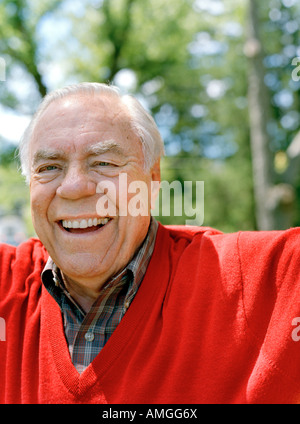
This is a good example of a person

AMGG6X.jpg


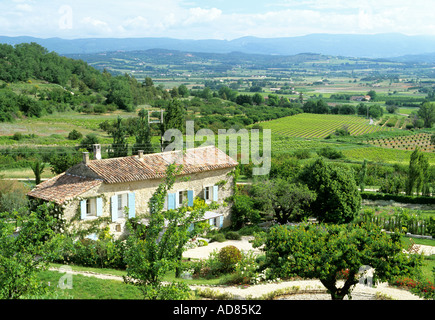
Landscapes maybe something like this
AD85K2.jpg


There was a great pic of 2 kids facing each other lying on some grass that looked naturally lit and fantastic exposure but I can't find the image at the moment.

Sticking to the pic I first posted, what would you of done differently given the average conditions?
 
Sticking to the pic I first posted, what would you of done differently given the average conditions?
You mean the picture of the house?

Well I'm no expert, but I'd pick a different time of day to shoot, with the light stronger and more contrasty, and creating form in the scene from the combination of highlight and shadow that directional light creates when striking across a scene.

I also might change the composition, reducing the amount of interference from the plant in the foreground, without losing it completely, but maybe also changing my shooting height too. Look for interesting angles. Get low. Get high. Don't just settle for a shot from standing height.

Then there's the scene content. It's just a regular house and garden, not majestic, not a show house. Nothing in the garden is in bloom. Would you see this house in this condition and this light featured in "Homes & Gardens"? I suspect not. Is it going to stir the soul? Not mine.

But the main thing is the light. The light you have here is drab. The issue is not the exposure. It's other things.

Moving to your "reference images", I don't think much of the picture of the guy. This is not the sort of light one would usually seek for a portrait. It is very high and leaving patches of hotspots and shade which do not flatter the subject. I also find the composition quite odd and I don't know what is going on with his arms, but they seem to be sticking out, or up, but why I have no idea. The appeal is probably in the colour contrast between the jumper and the background, and also the DOF which is blurring the background and creating separation between subject and background. Of course, a sunny day often helps the mood, which might be what you like in this photo, but I don't know what the appeal is for you.

As for the scenic shot, well it's an attractive scene, creating a sense of charm and a wonderful lifestyle. The light is cheerful and uplifting. Who wouldn't want to be there? Compared to a modest suburban house with a garden in the shade there seems to be a bit of a gap in the scene content, never mind anything else.

On the downside there is a lump of foliage obscuring the house/chateau which just gets in the way. Maybe there's not much to be done about that, other than chopping it down. I don't see an obvious way to gain an angle that would move it out of the way while preserving the desired perspective and framing for the rest of the scene.

I'm not sure what you are looking for, but exposure does not appear to be the problem to be solved. It's more about having creative vision and understanding light. I can't solve those things for you. I struggle to solve them for myself.

 
Last edited:
Just to illustrate the importance of light (not exposure) just take a look at these two shots. The only edits are white balance. It's the same dog, in a similar setting, with a similar composition and subject size in the frame, but a big change in the quality of the light and a modest change in the quantity, has had a massive impact on the appearance of the photograph.

20090221_161053_1037_LR.jpg
20090301_120240_4938_LR.jpg


One has highlight and shadow, with a sheen on the fur and a cheerful, summery feel. The other has flat, dreary light, rendering a lifeless image and the impression of a miserable, overcast day.
 
Back
Top