

You are using an out of date browser. It may not display this or other websites correctly.
You should upgrade or use an alternative browser.
You should upgrade or use an alternative browser.

cambsno
Suspended / Banned
- Messages
- 20,999
- Name
- Simon
- Edit My Images
- Yes
Excuse the dumb question but how does LR work on the iPad? Do you get a choice between classic (?) and the online version? Does it work in the same way as a MacBook would (would probably use a pencil) and I can export to a folder on then”desktop”?

SDK^
Suspended / Banned
- Messages
- 882
- Edit My Images
- No
It’s the online version- called Lightroom for iPad.Excuse the dumb question but how does LR work on the iPad? Do you get a choice between classic (?) and the online version? Does it work in the same way as a MacBook would (would probably use a pencil) and I can export to a folder on then”desktop”?
You can export to camera roll or files.
cambsno
Suspended / Banned
- Messages
- 20,999
- Name
- Simon
- Edit My Images
- Yes
Ok. So you can’t use it in the same time way you can on a laptop?It’s the online version- called Lightroom for iPad.
You can export to camera roll or files.

garryknight
Suspended / Banned
- Messages
- 12,452
- Name
- Garry
- Edit My Images
- No
A technical question about the iPhone's camera, specifically the 13 Pro Max, though really about any iPhone with Portrait mode.
I can take a photo with any of the three lenses on my camera, in Photo mode or in Portrait mode, and the result is a 20MP file at 3024 x 4032. Unless I take it using Portrait mode using the 3x lens and choosing any filter (other than Original), in which case it's a 3MP file at 1512 x 2016, i.e. a quarter of the size. And in this particular case the result is saved as JPG rather than the HEIC that I selected in the Settings. Also, if I take the photo into the iPhone's editor, there's no button to remove Portrait mode from the photo, as the manual suggests that there should be.
It's only that particular combination of Portrait mode, 3x lens, and an applied filter that seems to produce this result. I would expect all photos to be saved as HEIC at full resolution. Does anyone have any idea what's going on, or a suggested fix?
Someone on Reddit suggested that I take the photo in colour then apply the filter in the built-in editor. This works as a stopgap, but isn't ideal, as I haven't yet learnt to 'see in black and white'. Also, I like to have the mono result right there in front of me and make an instant decision on whether to retake the photo. I can resize the photo to 3024 x 4032 in On1 Photo Raw but a) the result won't be as good, and b) I can't take Photo Raw out with me when I want to shoot, process, and upload while on the move. (OK, I can, but not without paying a monthly sub.)
Any ideas, anyone?
I can take a photo with any of the three lenses on my camera, in Photo mode or in Portrait mode, and the result is a 20MP file at 3024 x 4032. Unless I take it using Portrait mode using the 3x lens and choosing any filter (other than Original), in which case it's a 3MP file at 1512 x 2016, i.e. a quarter of the size. And in this particular case the result is saved as JPG rather than the HEIC that I selected in the Settings. Also, if I take the photo into the iPhone's editor, there's no button to remove Portrait mode from the photo, as the manual suggests that there should be.
It's only that particular combination of Portrait mode, 3x lens, and an applied filter that seems to produce this result. I would expect all photos to be saved as HEIC at full resolution. Does anyone have any idea what's going on, or a suggested fix?
Someone on Reddit suggested that I take the photo in colour then apply the filter in the built-in editor. This works as a stopgap, but isn't ideal, as I haven't yet learnt to 'see in black and white'. Also, I like to have the mono result right there in front of me and make an instant decision on whether to retake the photo. I can resize the photo to 3024 x 4032 in On1 Photo Raw but a) the result won't be as good, and b) I can't take Photo Raw out with me when I want to shoot, process, and upload while on the move. (OK, I can, but not without paying a monthly sub.)
Any ideas, anyone?

G.K.Jnr.
Suspended / Banned
- Messages
- 34,213
- Name
- George.
- Edit My Images
- No
A technical question about the iPhone's camera, specifically the 13 Pro Max, though really about any iPhone with Portrait mode.
I can take a photo with any of the three lenses on my camera, in Photo mode or in Portrait mode, and the result is a 20MP file at 3024 x 4032. Unless I take it using Portrait mode using the 3x lens and choosing any filter (other than Original), in which case it's a 3MP file at 1512 x 2016, i.e. a quarter of the size. And in this particular case the result is saved as JPG rather than the HEIC that I selected in the Settings. Also, if I take the photo into the iPhone's editor, there's no button to remove Portrait mode from the photo, as the manual suggests that there should be.
It's only that particular combination of Portrait mode, 3x lens, and an applied filter that seems to produce this result. I would expect all photos to be saved as HEIC at full resolution. Does anyone have any idea what's going on, or a suggested fix?
Someone on Reddit suggested that I take the photo in colour then apply the filter in the built-in editor. This works as a stopgap, but isn't ideal, as I haven't yet learnt to 'see in black and white'. Also, I like to have the mono result right there in front of me and make an instant decision on whether to retake the photo. I can resize the photo to 3024 x 4032 in On1 Photo Raw but a) the result won't be as good, and b) I can't take Photo Raw out with me when I want to shoot, process, and upload while on the move. (OK, I can, but not without paying a monthly sub.)
Any ideas, anyone?
My iPhone "12 Pro Max" is exactly the same.
With regards to the file size I would almost certainly think its something to do with adding a filter etc as RAW files are exactly that RAW with no added effects etc. The same happens with a camera ie if you snap in a certain style let's say vivid, or mono for instance then that file will be in the JPEG format (at least it is on all of my cameras) and the accompanying file will be in RAW without any effects. I'm pretty sure the portrait modes etc are an internally processed effect file so it naturally changes to JPEG.
I think that’s what you mean and apologies if I've got it wrong.
garryknight
Suspended / Banned
- Messages
- 12,452
- Name
- Garry
- Edit My Images
- No
With regards to the file size I would almost certainly think its something to do with adding a filter etc as RAW files are exactly that RAW with no added effects etc.
I tend not to use raw, George. I shoot HEIC to save a lot of space, given that the photos from this phone are excellent quality and don't need much processing at all. And you've already seen the quality of the mono shots, even though they're downsized. I'd just prefer them to be full resolution to give me more leeway.
I don’t have it but assumed you would have to use ProRaw + jpg or heic to do that in the standard Camera app.
With the standard Camera app, you either shoot HEIC, or JPG, or ProPhoto raw files. You can't mix and match.
It looks like, since Portrait mode leans heavily on the lighting effects (Natural Light, Studio Light, and so on), and these don't apply if you use a filter, the camera might create a different kind of portrait+filter mode and switches to the main 1x lens. So if you try to use the 3x lens, and even though the phone *shows* 3x on the display, it might use the 1x lens and crop the result. I can't think of anything else that explains the discrepancy between choosing the 1x lens and choosing the 3x lens. The former gives a full-res HEIC, the latter a 1/4 sized JPG. And there's no mention of this size change in the manual.
G.K.Jnr.
Suspended / Banned
- Messages
- 34,213
- Name
- George.
- Edit My Images
- No
I tend not to use raw, George. I shoot HEIC to save a lot of space, given that the photos from this phone are excellent quality and don't need much processing at all. And you've already seen the quality of the mono shots, even though they're downsized. I'd just prefer them to be full resolution to give me more leeway.
I didn't realise you only snapped in JPEG/HEIC, I assumed that as you have the currently top of the range iPhone you'd want to get the very best quality from the camera which obviously means shooting in RAW/Pro Raw. The tests I did for you then are of of little use to you as I did them in Pro Raw both with the standard app and the ProCamera app (which gives much more control).
I did however wonder why your full res files were only about 20mp as mine are sometimes over 40mp, but more often than not around 30-35mp. These files obviously give me a lot more scope when I get them to the PP stage.

LCPete
Suspended / Banned
- Messages
- 9,785
- Edit My Images
- Yes
is it possible to easily switch between normal jpeg and raw on the iPhone 13 mini ?
Would be nice to be able to switch to raw for the occasional time when I haven’t got my camera and want to maximise quality
Until I got the iPhone 13 I didn’t use my phone for much for taking photos but was pleasantly surprised how good it can be in decent light
Would be nice to be able to switch to raw for the occasional time when I haven’t got my camera and want to maximise quality
Until I got the iPhone 13 I didn’t use my phone for much for taking photos but was pleasantly surprised how good it can be in decent light
garryknight
Suspended / Banned
- Messages
- 12,452
- Name
- Garry
- Edit My Images
- No
I didn't realise you only snapped in JPEG/HEIC, I assumed that as you have the currently top of the range iPhone you'd want to get the very best quality from the camera which obviously means shooting in RAW/Pro Raw.
I'm getting great quality from HEIC. And I don't think the iPhone 13's sensor is any bigger than the sensor in any other phone, so shooting in ProRaw won't give anything like the scope for processing/relighting as even an APS-C camera will. Even a raw photo from the RX100 will be better in this regard than a phone sensor. Again, I'm happy with the JPGs from the RX100. And when I start seriously doing video again, I'm probably not going to get a day's worth of 4K and ProRaw in my 256 GB.
is it possible to easily switch between normal jpeg and raw on the iPhone 13 mini ?
I'm afraid that Apple ProRaw is only available on the Pro series phones.
G.K.Jnr.
Suspended / Banned
- Messages
- 34,213
- Name
- George.
- Edit My Images
- No
is it possible to easily switch between normal jpeg and raw on the iPhone 13 mini ?
Would be nice to be able to switch to raw for the occasional time when I haven’t got my camera and want to maximise quality
Until I got the iPhone 13 I didn’t use my phone for much for taking photos but was pleasantly surprised how good it can be in decent light
I don't know if you can snap in RAW (not Pro RAW) with the standard app, but I'd be surprised if you couldn't snap in RAW (not Pro RAW) using something like the ProCamera app. I could when I used an old "iPhone 7+" so would certainly think you could using one of the current latest series. As previously mentioned Pro RAW is only available at the moment on the Pro units.

- Messages
- 14,819
- Name
- Richard
- Edit My Images
- No
Or Halide but definitely not in standard app up to 11 anyway.I don't know if you can snap in RAW (not Pro RAW) with the standard app, but I'd be surprised if you couldn't snap in RAW (not Pro RAW) using something like the ProCamera app. I could when I used an old "iPhone 7+" so would certainly think you could using one of the current latest series. As previously mentioned Pro RAW is only available at the moment on the Pro units.
LCPete
Suspended / Banned
- Messages
- 9,785
- Edit My Images
- Yes
I'm getting great quality from HEIC. And I don't think the iPhone 13's sensor is any bigger than the sensor in any other phone, so shooting in ProRaw won't give anything like the scope for processing/relighting as even an APS-C camera will. Even a raw photo from the RX100 will be better in this regard than a phone sensor. Again, I'm happy with the JPGs from the RX100. And when I start seriously doing video again, I'm probably not going to get a day's worth of 4K and ProRaw in my 256 GB.
I'm afraid that Apple ProRaw is only available on the Pro series phones.
I don't know if you can snap in RAW (not Pro RAW) with the standard app, but I'd be surprised if you couldn't snap in RAW (not Pro RAW) using something like the ProCamera app. I could when I used an old "iPhone 7+" so would certainly think you could using one of the current latest series. As previously mentioned Pro RAW is only available at the moment on the Pro units.
Thanks Garry and George
G.K.Jnr.
Suspended / Banned
- Messages
- 34,213
- Name
- George.
- Edit My Images
- No
"Heads Up"
If anyone is using the "ProCamera" app there's a very good update out today. I personally consider this app to be the best all round photography app available at the moment for an iPhone and it is my go to app both for stills & video.
If anyone is using the "ProCamera" app there's a very good update out today. I personally consider this app to be the best all round photography app available at the moment for an iPhone and it is my go to app both for stills & video.

srichards
Suspended / Banned
- Messages
- 10,968
- Name
- Suz
- Edit My Images
- Yes
Is there an action to turn the personal hotspot feature on or off with the shortcuts or iPhone automation feature? I've looked and can't find it. Seems bonkers as you can turn wifi or Bluetooth on or off but hotspot feature seems to be missing.
OP
Deleted member 49549
Guest
I haven’t tried it, but take a look here.Is there an action to turn the personal hotspot feature on or off with the shortcuts or iPhone automation feature? I've looked and can't find it. Seems bonkers as you can turn wifi or Bluetooth on or off but hotspot feature seems to be missing.
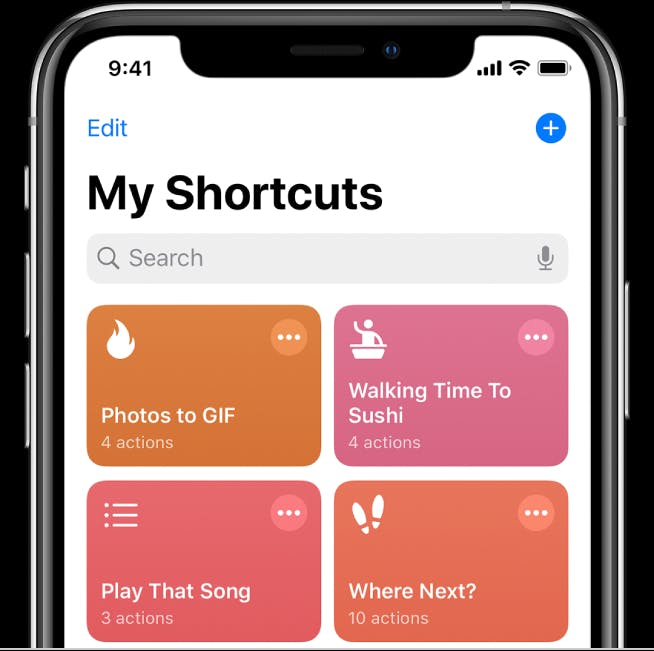
How to Setup Shortcuts on iPhone iOS | HackerNoon
The OSX 13 users have now a new opportunity to use Shortcuts. It is an interesting tool that helps automate frequently used features. Further, it may expand Siri’s features on iPhone. At the same time many iOS users don't actually know how to use this tool. If you belong to this group of people...
hackernoon.com

gramps
Suspended / Banned
- Messages
- 44,805
- Name
- 'Gramps'
- Edit My Images
- No
Up to 25 million Britons who owned an older iPhone model in 2017 could be able to claim damages from Apple if the lawsuit is successful.
It is an opt-out claim - meaning people who owned an iPhone 6, 6 Plus, 6S, 6S Plus, SE, 7, 7 Plus, 8, 8 Plus and iPhone X model do not need to actively join the case to seek damages.
Apple iPhone lawsuit: Have you owned an older device? If this £768m lawsuit is successful, you could get damages
Up to 25 million Britons who owned an older iPhone model in 2017 could be able to claim damages from Apple if the lawsuit is successful.
garryknight
Suspended / Banned
- Messages
- 12,452
- Name
- Garry
- Edit My Images
- No
I've got an XS lying around. Looking forward to spending my $0.02.
gramps
Suspended / Banned
- Messages
- 44,805
- Name
- 'Gramps'
- Edit My Images
- No
Average $26 in the US lawsuit apparently.I've got an XS lying around. Looking forward to spending my $0.02.
gramps
Suspended / Banned
- Messages
- 44,805
- Name
- 'Gramps'
- Edit My Images
- No
You'll have to opt-out thenI think I possibly have a claim with a 7 Plus but wouldn’t claim as I don’t think Apple were in the wrong.
srichards
Suspended / Banned
- Messages
- 10,968
- Name
- Suz
- Edit My Images
- Yes
One thing I find really strange with current iPhone is the way it behaves with bluetooth devices. It doesn't seem possible to have one default when connected to in car device and another one when you aren't.
Auto call routing is useless. It just defaults to not using the speakerphone which I never want when at home. If I set it to speaker always instead then when you make a call in the car then of course it decides to use the speaker on the phone and not in the car so you basically can't use it in the car as it means physically picking up the phone to turn the stupid thing onto the BT device which it is already connected to.
It's another setting option I can't find in automation either. I have no idea when it became so monumentally crap as I'm sure in the old days it'd pick car for calls when you were in the car and it would automatically transfer back to speakerphone when you got out of the car.
I want an if then list: if connected to car audio use car BT for incoming and outgoing calls. If not connected to car audio use speakerphone for incoming and outgoing calls. It seems it's not possible just to do something this simple easily.
You have the driving focus as well which again you'd think you could set something different.
Also call routing is in assistive touch. What a dumb place to keep it. It should be under Phone and you should be able to set default answer behaviour when you're connected to particular BT devices.
Auto call routing is useless. It just defaults to not using the speakerphone which I never want when at home. If I set it to speaker always instead then when you make a call in the car then of course it decides to use the speaker on the phone and not in the car so you basically can't use it in the car as it means physically picking up the phone to turn the stupid thing onto the BT device which it is already connected to.
It's another setting option I can't find in automation either. I have no idea when it became so monumentally crap as I'm sure in the old days it'd pick car for calls when you were in the car and it would automatically transfer back to speakerphone when you got out of the car.
I want an if then list: if connected to car audio use car BT for incoming and outgoing calls. If not connected to car audio use speakerphone for incoming and outgoing calls. It seems it's not possible just to do something this simple easily.
You have the driving focus as well which again you'd think you could set something different.
Also call routing is in assistive touch. What a dumb place to keep it. It should be under Phone and you should be able to set default answer behaviour when you're connected to particular BT devices.
- Messages
- 14,819
- Name
- Richard
- Edit My Images
- No
I’m sure the upcoming Apple self-drive car will sort all that, there’ll be no buttons, wheels (inside), levers or switches to confuse things, just SiriOne thing I find really strange with current iPhone is the way it behaves with bluetooth devices. It doesn't seem possible to have one default when connected to in car device and another one when you aren't.
Auto call routing is useless. It just defaults to not using the speakerphone which I never want when at home. If I set it to speaker always instead then when you make a call in the car then of course it decides to use the speaker on the phone and not in the car so you basically can't use it in the car as it means physically picking up the phone to turn the stupid thing onto the BT device which it is already connected to.
It's another setting option I can't find in automation either. I have no idea when it became so monumentally crap as I'm sure in the old days it'd pick car for calls when you were in the car and it would automatically transfer back to speakerphone when you got out of the car.
I want an if then list: if connected to car audio use car BT for incoming and outgoing calls. If not connected to car audio use speakerphone for incoming and outgoing calls. It seems it's not possible just to do something this simple easily.
You have the driving focus as well which again you'd think you could set something different.
Also call routing is in assistive touch. What a dumb place to keep it. It should be under Phone and you should be able to set default answer behaviour when you're connected to particular BT devices.

OP
Deleted member 49549
Guest
Not sure if this will help, but with some Bluetooth devices you can set the device type in iOS, eg handsfree or speaker.One thing I find really strange with current iPhone is the way it behaves with bluetooth devices. It doesn't seem possible to have one default when connected to in car device and another one when you aren't.
Auto call routing is useless. It just defaults to not using the speakerphone which I never want when at home. If I set it to speaker always instead then when you make a call in the car then of course it decides to use the speaker on the phone and not in the car so you basically can't use it in the car as it means physically picking up the phone to turn the stupid thing onto the BT device which it is already connected to.
It's another setting option I can't find in automation either. I have no idea when it became so monumentally crap as I'm sure in the old days it'd pick car for calls when you were in the car and it would automatically transfer back to speakerphone when you got out of the car.
I want an if then list: if connected to car audio use car BT for incoming and outgoing calls. If not connected to car audio use speakerphone for incoming and outgoing calls. It seems it's not possible just to do something this simple easily.
You have the driving focus as well which again you'd think you could set something different.
Also call routing is in assistive touch. What a dumb place to keep it. It should be under Phone and you should be able to set default answer behaviour when you're connected to particular BT devices.
srichards
Suspended / Banned
- Messages
- 10,968
- Name
- Suz
- Edit My Images
- Yes
Not sure if this will help, but with some Bluetooth devices you can set the device type in iOS, eg handsfree or speaker.
It's got car stereo as an option. That doesn't make a difference. I've set it to none for the device type and it's the same. There is no handsfree. There's only headphone, speaker and a few others to choose from.
- Messages
- 14,819
- Name
- Richard
- Edit My Images
- No
iPadOS has this side by side view of two windows of different apps which is useful , especially in landscape mode) when referring/copying etc between apps.
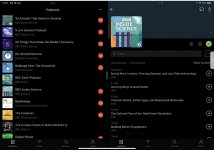
One can also have split views with 2 iterations of the same app which is sometimes useful. However I discovered at least one app where the 2 windows communicate as though one. In a podcast app Pocket Casts with two windows in split view ans a list of podcasts (‘folders’) in one, selecting the ‘folder’ opens the contents, the “list’ on the other. Thusly:
So far I’ve not found another app that functions like this. I thought it would be useful for the Photos app but that doesn’t support multiple windows ! .
I only found it because my previous podcast app has the functionality built in and it was frustrating using the new one without though I didn’t expect to function like it does!
One can also have split views with 2 iterations of the same app which is sometimes useful. However I discovered at least one app where the 2 windows communicate as though one. In a podcast app Pocket Casts with two windows in split view ans a list of podcasts (‘folders’) in one, selecting the ‘folder’ opens the contents, the “list’ on the other. Thusly:
So far I’ve not found another app that functions like this. I thought it would be useful for the Photos app but that doesn’t support multiple windows !
.I only found it because my previous podcast app has the functionality built in and it was frustrating using the new one without though I didn’t expect to function like it does!
- Messages
- 14,819
- Name
- Richard
- Edit My Images
- No
Thanks,George! Maybe it’ll fix my iPad Safari problem — often whee I open a linking in yhe background it vanishes immediately after loading. Seems not only to be me but searching for variations on “tabs closing” bring up to many non helpful solutions"Heads Up"
There's a software update out for "iPad OS" & "IOS" version 15.6. Mine are all done & dusted and everything seems to be just fine.


- Messages
- 34,670
- Edit My Images
- Yes
Thanks, George. iPhone & iPad done."Heads Up"
There's a software update out for "iPad OS" & "IOS" version 15.6. Mine are all done & dusted and everything seems to be just fine.

wyx087
Suspended / Banned
- Messages
- 3,209
- Edit My Images
- Yes
I think I have similar problem. Though I keep Safari clean, and when clicking on a link, it just sits at new tab page and nothing happens. I have to click on a bookmark and then go back to click on the link from the other app again. Usually happens when Safari hasn't been opened for a while. It's really annoying.Thanks,George! Maybe it’ll fix my iPad Safari problem — often whee I open a linking in yhe background it vanishes immediately after loading. Seems not only to be me but searching for variations on “tabs closing” bring up to many non helpful solutions
I'm really looking forward to the AI image cropping feature in iOS 16.....
- Messages
- 14,819
- Name
- Richard
- Edit My Images
- No
My Safari is not “clean”. I have dozen tab groups each with maybe 10 tabs (varying which ones) and a long Reading List that I prune from time to time but use more like bookmarks.I think I have similar problem. Though I keep Safari clean, and when clicking on a link, it just sits at new tab page and nothing happens. I have to click on a bookmark and then go back to click on the link from the other app again. Usually happens when Safari hasn't been opened for a while. It's really annoying.
I'm really looking forward to the AI image cropping feature in iOS 16.....
I don’t think the problem occurs in Chrome/Firefox/Brave which all use the same WebKit software as Safari. Howeve I find Safari more convenient and better for synchronising and linking with 1Password and so on so am reluctant to change. The problem never used to happen and tried changing various settings but nothing cures it so far.
I think a hard reset may stop for a time before it reappears.

G.K.Jnr.
Suspended / Banned
- Messages
- 34,213
- Name
- George.
- Edit My Images
- No
I've been shooting quite a bit of video recently using my "iPhone 12 Pro Max" and the "ProCamera" app up to today, and always shot in 1080p and have always been very pleased with the results. Today I thought I'd try a bit of 4K HDR video having never used even the standard 4K format before on anything, let me tell you now I was blown away with the quality of the clips together with the extra clarity in sound. The only downside is obviously the increase in file size so definitely not something to be used for everything but something I will use when I want the extra quality that 4K HDR can give.
Last edited:
- Messages
- 14,819
- Name
- Richard
- Edit My Images
- No
I never use Safari. Exclusively Firefox.

- Messages
- 14,819
- Name
- Richard
- Edit My Images
- No
My Safari is not “clean”. I have dozen tab groups each with maybe 10 tabs (varying which ones) and a long Reading List that I prune from time to time but use more like bookmarks.
I don’t think the problem occurs in Chrome/Firefox/Brave which all use the same WebKit software as Safari. Howeve I find Safari more convenient and better for synchronising and linking with 1Password and so on so am reluctant to change. The problem never used to happen and tried changing various settings but nothing cures it so far.
I think a hard reset may stop for a time before it reappears.
I’ve had 3 calls with Apple support and they’ve received screen recordings if the issue. Originally the recommended to put in Recovery Mode and Restore on a Mac which I did but it made no difference.
Las support guy has escalated it but was going on holiday for a week so has booked a call with me when he gets back on Monday -x I could have been transferred to someone else but decided to stick with him.
This problem only occurs on Safari on my newish M1 iPad Air and not on my oldish iPad Pro 10.5 with same OS and Safari synched with same tabs & groups & apps etc. Seems to be a ‘feature’ of the Air
.
OP
Deleted member 49549
Guest
Try creating a new MacOS user and see if they still have the same issue. That may help narrow down the possible source of the issue to some settings within your profile.I’ve had 3 calls with Apple support and they’ve received screen recordings if the issue. Originally the recommended to put in Recovery Mode and Restore on a Mac which I did but it made no difference.
Las support guy has escalated it but was going on holiday for a week so has booked a call with me when he gets back on Monday -x I could have been transferred to someone else but decided to stick with him.
This problem only occurs on Safari on my newish M1 iPad Air and not on my oldish iPad Pro 10.5 with same OS and Safari synched with same tabs & groups & apps etc. Seems to be a ‘feature’ of the Air
- Messages
- 14,819
- Name
- Richard
- Edit My Images
- No
That’s an interesting idea, I assume you are speaking of the recovery process on the Mac.Try creating a new MacOS user and see if they still have the same issue. That may help narrow down the possible source of the issue to some settings within your profile.
I’m not sure why that would affect one iPad and not the other though.
There is something wrong with my profile or whatever since on the Mac I can’t sign in to iCloud using 1Password despite the fact that it has the correct password stored but then it’s OK when I manually type in the password. Unfortunately Apple never allows you to see the password except letter by letter as you type so impossible to check what is there before hitting return. This has been going on for years but used to be OK.