

You are using an out of date browser. It may not display this or other websites correctly.
You should upgrade or use an alternative browser.
You should upgrade or use an alternative browser.
Aiming for a quieter PC....
- Thread starter arad85
- Start date
OP

arad85
Suspended / Banned
- Messages
- 9,438
- Name
- Andy
- Edit My Images
- Yes
Purleeease.... Beige with brown highlights - very retro!Brown fans are for cool kids
OP
arad85
Suspended / Banned
- Messages
- 9,438
- Name
- Andy
- Edit My Images
- Yes
Yup aquasuite 2013.... Takes a little getting used to, but once you have your head around it, it's really good.
The key is to model your fans first. How they start up, what the minimum voltage/power you can apply, whether you want to hold the voltage (keep them on), whether they are voltage or PWM controlled and if they need a startup boost (last two are under advanced options). Once you have that, you link inputs to outputs via the control section.
The key is to model your fans first. How they start up, what the minimum voltage/power you can apply, whether you want to hold the voltage (keep them on), whether they are voltage or PWM controlled and if they need a startup boost (last two are under advanced options). Once you have that, you link inputs to outputs via the control section.

OP
arad85
Suspended / Banned
- Messages
- 9,438
- Name
- Andy
- Edit My Images
- Yes
Nein!i take it you dont need a driver downloaded
OP
arad85
Suspended / Banned
- Messages
- 9,438
- Name
- Andy
- Edit My Images
- Yes
OK. New mobo and cooler going in this weekend. My strategy will be to run all fans in the system off the Aquaero - even the CPU fan. The board temperatures can be transferred to the Aquaero by the Aquaero service. If this fails for any reason, you can set an alarm setting of the temperature which then makes the fans go full on - so the system will fail safe.
The Noctua starts at 130rpm and is silent up to about 500rpm, so I will try passive first but will probably run it somewhere below 500rpm and ramp the fans up from 50+ degrees.
The experiments I did with idle temps in my current system and case fans using the thermal sensors stuck down properly this time are:
are:
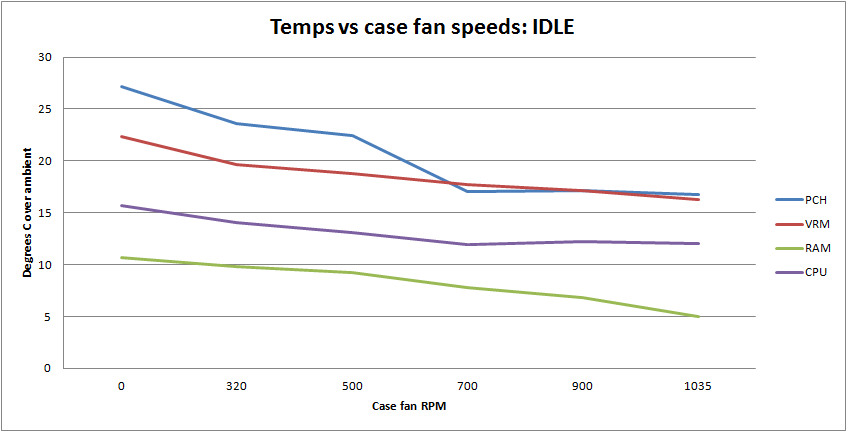
so there is benefit from running the fans with the system at idle. The new board has ten (yes, 10) thermal sensors embedded. I'm hoping they will be visible to Open Hardware Monitor so I can track them in the Aquaero. I will experiment and see what brings no noise 99% of the time and minimal noise when I stress the CPU. I will also do some further work on overclocking (I've justs et 4.4GHz at the moment and not tried to optimise up further...).
The Noctua starts at 130rpm and is silent up to about 500rpm, so I will try passive first but will probably run it somewhere below 500rpm and ramp the fans up from 50+ degrees.
The experiments I did with idle temps in my current system and case fans using the thermal sensors stuck down properly this time
are:
so there is benefit from running the fans with the system at idle. The new board has ten (yes, 10) thermal sensors embedded. I'm hoping they will be visible to Open Hardware Monitor so I can track them in the Aquaero. I will experiment and see what brings no noise 99% of the time and minimal noise when I stress the CPU. I will also do some further work on overclocking (I've justs et 4.4GHz at the moment and not tried to optimise up further...).

neil_g
Suspended / Banned
- Messages
- 30,364
- Name
- Neil
- Edit My Images
- No
the thermal sensors stuck down properly this time
using?

wyx087
Suspended / Banned
- Messages
- 3,209
- Edit My Images
- Yes
sellotape! 
I had the P182 case, it's a well designed case, but not very quiet for the amount of airflow it offers.
You should look into Silverstone FT02, this is considered the best air cooling case at the moment.
I have the limited edition R-W version. It's fantastic. 3 180mm fans pushing air in, even at 300rpm they push a lot of air, then hot air naturally raises to the top and out of the case. My CPU fans for D14 don't spin most of the times, neither does my Ax850 power supply. Only a slight hum comes from my gtx580's, the GPU BIOS is hard coded to run at 40% minimal fan speed.
I had the P182 case, it's a well designed case, but not very quiet for the amount of airflow it offers.
You should look into Silverstone FT02, this is considered the best air cooling case at the moment.
I have the limited edition R-W version. It's fantastic. 3 180mm fans pushing air in, even at 300rpm they push a lot of air, then hot air naturally raises to the top and out of the case. My CPU fans for D14 don't spin most of the times, neither does my Ax850 power supply. Only a slight hum comes from my gtx580's, the GPU BIOS is hard coded to run at 40% minimal fan speed.
Last edited:
OP
arad85
Suspended / Banned
- Messages
- 9,438
- Name
- Andy
- Edit My Images
- Yes
Gaffa tape! Just bigger and pushed down properlyusing?
OP
arad85
Suspended / Banned
- Messages
- 9,438
- Name
- Andy
- Edit My Images
- Yes
sellotape!
I had the P182 case, it's a well designed case, but not very quiet for the amount of airflow it offers.
You should look into Silverstone FT02, this is considered the best air cooling case at the moment.
I have a Fractal XL R2 now which is fine. I don't like the vertical placement of the mobo. in the FT02 plus it is a bit long to fit where I want it to go. I was thinking of trying completely passive but figured that I would need some forced airflow for that and whilst it might work overclocked, it might not... I'm only ever hammering the CPU a couple of hours a week, so I will live with the slight noise then.
Even with the Ninja, it is only just audible above the ambient now. With the Noctua, I am expecting complete silence (I run passive graphics cards, so nothing from there) 99% of the time.
Only 1 PC in the room to get even more silent now (I can't do anything about the loudest - the works laptop
)
OP
arad85
Suspended / Banned
- Messages
- 9,438
- Name
- Andy
- Edit My Images
- Yes
Aha... You were right... The gaffa tape holding the sensor on had come off :shrug:
what have you stuck the sensors down with?
Gaffa tape. But it is only a temporary job
and..
using?
Gaffa tape! Just bigger and pushed down properly
cool
(see what i did there?)
Yup.
neil_g
Suspended / Banned
- Messages
- 30,364
- Name
- Neil
- Edit My Images
- No
and..
Yup.
yeah yeah.. :razz:
(didnt know if youd changed tack when you said properly
)
OP
arad85
Suspended / Banned
- Messages
- 9,438
- Name
- Andy
- Edit My Images
- Yes
OK.
So new mobo in place.
I'm now running 4.5GHz as a standard overclock. Bizarrely, the overclock is doing more than I would expect. I've gone from 4.4GHz -> 4.5GHz max.
Cinebench has gone from 7.79->8.34 repeatedly
and an x264 encode has gone from:
Pass 1 took 0:17:28 (2.53x)
Pass 2 took 0:27:40 (1.60x)
In total took 0:45:08 (0.98x)
to:
Pass 1 took 0:16:47 (2.64x)
Pass 2 took 0:26:46 (1.65x)
In total took 0:43:33 (1.01x)
I can seem to bench nicely at 4.8GHz, just won't boot into Windows at that speed.... More tweaking tomorrow methinks...
Oh. And it is effectively silent until I thrash the CPU (no case fans, heatsink on at 150rpm).
So new mobo in place.
I'm now running 4.5GHz as a standard overclock. Bizarrely, the overclock is doing more than I would expect. I've gone from 4.4GHz -> 4.5GHz max.
Cinebench has gone from 7.79->8.34 repeatedly
and an x264 encode has gone from:
Pass 1 took 0:17:28 (2.53x)
Pass 2 took 0:27:40 (1.60x)
In total took 0:45:08 (0.98x)
to:
Pass 1 took 0:16:47 (2.64x)
Pass 2 took 0:26:46 (1.65x)
In total took 0:43:33 (1.01x)
I can seem to bench nicely at 4.8GHz, just won't boot into Windows at that speed.... More tweaking tomorrow methinks...
Oh. And it is effectively silent until I thrash the CPU (no case fans, heatsink on at 150rpm).
Last edited:
neil_g
Suspended / Banned
- Messages
- 30,364
- Name
- Neil
- Edit My Images
- No
OP
arad85
Suspended / Banned
- Messages
- 9,438
- Name
- Andy
- Edit My Images
- Yes
Thanks. Will have a read through of that as it applies to the 2600K I have here - 4.5 seems rock stable (what I am on now) but I can't boot at 4.6 (but I haven't played with voltage yet). Not sure how stable 4.7-> is with the overclocks....
I'm liking this board though - now back to 2x Nvidia graphics cards - running x8 in both slots - and have got taken the 7750 out of the system. Too many bugs (monitors would randomly blank, occasional glitches on the HDMI port and I couldn't get any printscreen program to run).
I'm liking this board though - now back to 2x Nvidia graphics cards - running x8 in both slots - and have got taken the 7750 out of the system. Too many bugs (monitors would randomly blank, occasional glitches on the HDMI port and I couldn't get any printscreen program to run).
OP
arad85
Suspended / Banned
- Messages
- 9,438
- Name
- Andy
- Edit My Images
- Yes
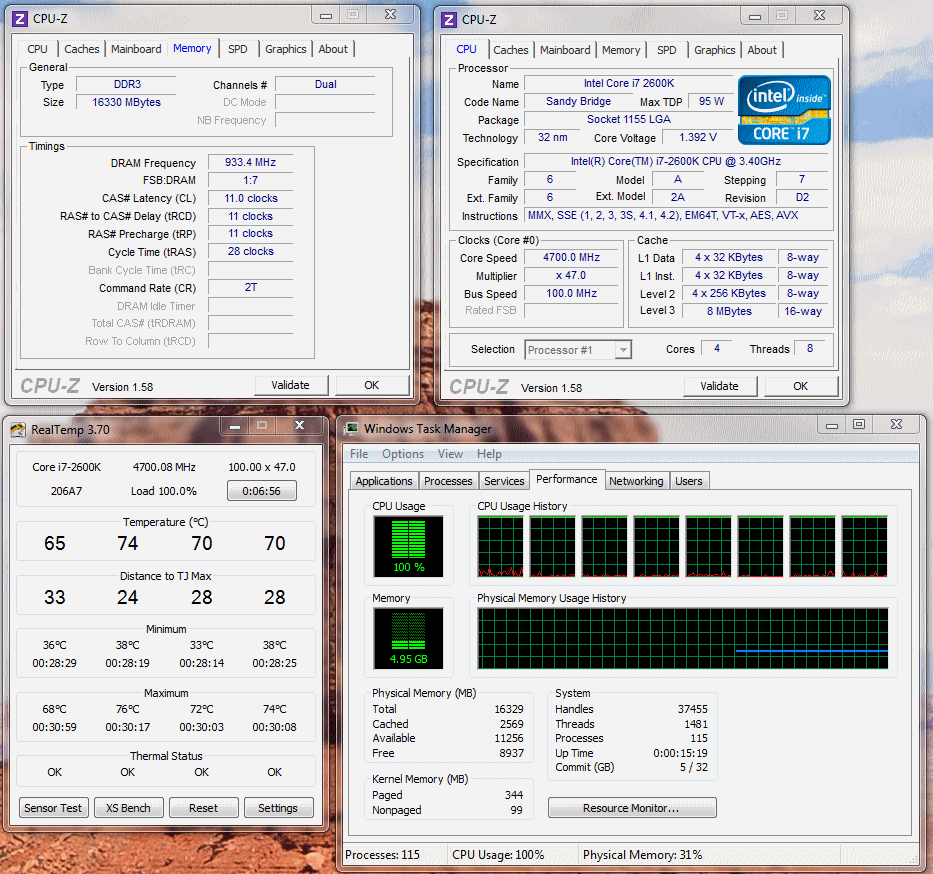
Right. Before I bought the new mobo, I was running at 4.4GHz (memory @ 1600MHz) on a P8P67. Managed to get to 4.7GHz and memory at 1866MHz (from an already overclocked 1600MHz) last night. Will see how stable it is today before proclaiming success, but bench scores have gone up (as you'd expect).
Before:
after:
My geekbench scores have gone from (although this was at 4.5GHz at 1600MHz):
To:
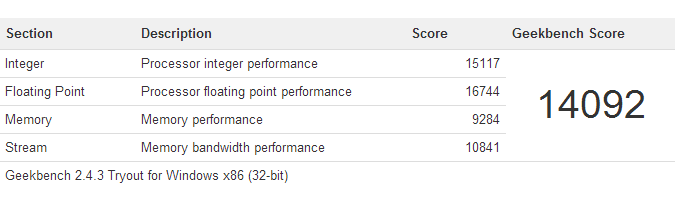
and proof (as if I'd lie to you):
More tweaking and my findings of graphics cards a little later....
Before:
Code:
4.4GHz - P8P67
==============
2-pass ffmpeg recode of 0:44:20 of an HD Dr Who capture off air.

Pass 1 took   0:17:28 (2.53x) (63.5 fps)
Pass 2 took   0:27:40 (1.60x) (40.1 fps)
In total took 0:45:08 (0.98x) (24.6 fps)

Cinebench
=========
CPU:    7.78
Single: 1.71
Ratio:  4.55x
after:
Code:
4.7GHz Z77 OC Formula (1866MHz mem)
===================================
2-pass ffmpeg recode of 0:44:20 of an HD Dr Who capture off air.

Pass 1 took   0:16:12 (2.73x) (68.4 fps)
Pass 2 took   0:25:14 (1.75x) (43.9 fps)
In total took 0:41:26 (1.06x) (26.5 fps)

CPU:    8.80
Single: 1.89
Ratio:  4.67x
My geekbench scores have gone from (although this was at 4.5GHz at 1600MHz):
Code:
Score: 13239
Int: 14403
Float: 15878
Mem perf: 8367
Mem b/w: 9674
To:
and proof (as if I'd lie to you
):
More tweaking and my findings of graphics cards a little later....
OP
arad85
Suspended / Banned
- Messages
- 9,438
- Name
- Andy
- Edit My Images
- Yes
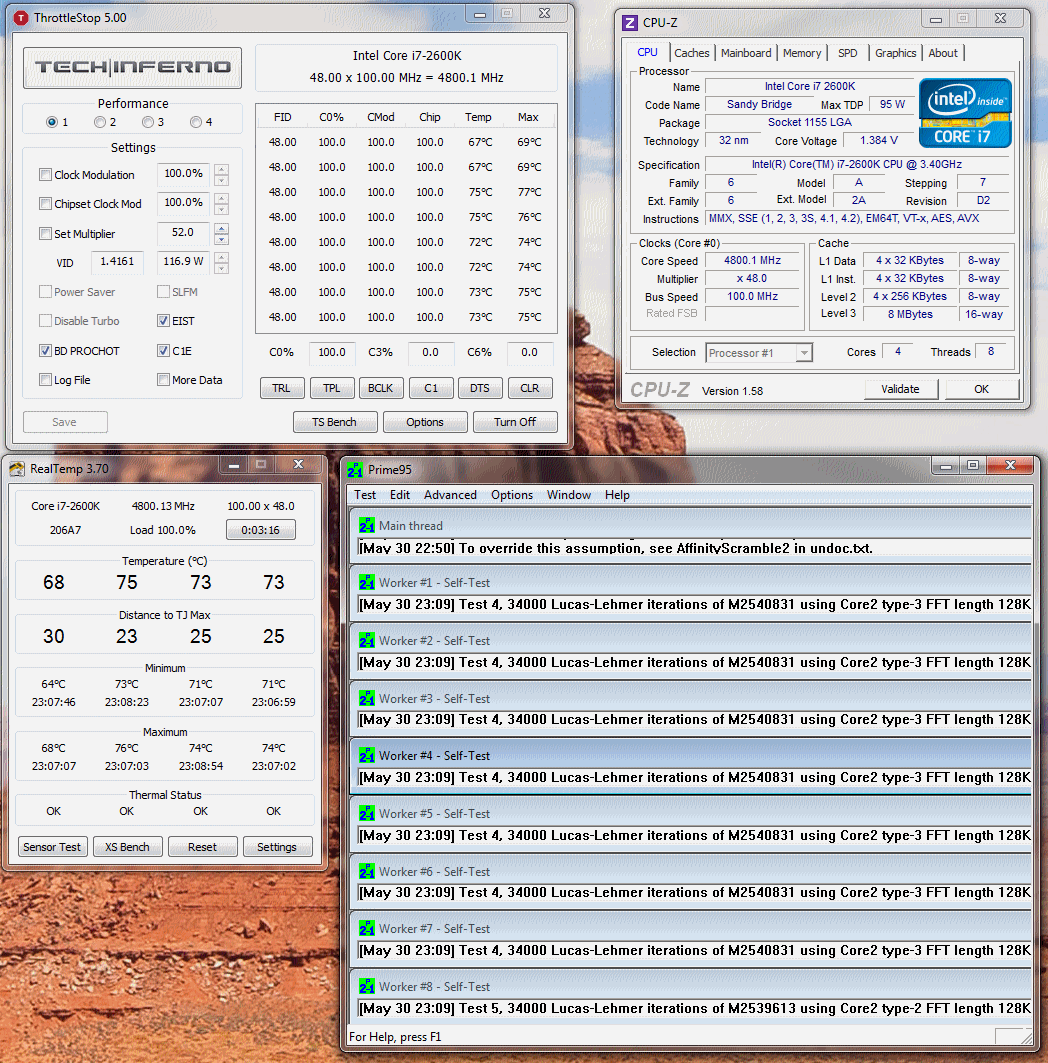
I'm back to 4.7G - I got 4.8 stable but had to up it from that run - one of the cores would drop out after 40 or so minutes. In the end I got +10deg in temps (over 80 deg) and had to add voltage. It just felt one step too far. Currently recoding a couple of videos from last night and CPUs are flat out and temps are 66-68 degrees.
4.5 was achievable on auto settings. The only things I changed to get to 4.7 were:
Everything else on auto. Basically, all I had to do was get my voltages configured correctly for the board (CPU being given what it asked for and a stiff power supply setting) and turn off C3 and C6 states. Then just turned it up to 4.7G.
4.5 was achievable on auto settings. The only things I changed to get to 4.7 were:
- Set Load Line Calibration to "level 2" which is almost no Vdroop
- Set to Offset mode and added +0.035 V to the offset voltage (I hadn't done this in the pics above - you can see Throttlestop monitors what the CPU is asking for with VID of 1.4161, whilst CPU-Z tells you what the board is feeding it 1.384. The difference is added to the offset voltage
- Disabled C3 and C6 states and ENABLED C1E state (otherwise you don't get a downclock). Leaving C3 and C6 states enabled causes weird BSODs....
Everything else on auto. Basically, all I had to do was get my voltages configured correctly for the board (CPU being given what it asked for and a stiff power supply setting) and turn off C3 and C6 states. Then just turned it up to 4.7G.