2024 M4 Mac Mini vs iMac

I appreciate your interest in this thread and value your opinion - but didn't expect this to get to a willy waving contest! I'm not in to video and that I understands eats space and system resources but pretty certain that whatever replacement Mac I end up with will be just fine for many years.

My mistake with my 2019 iMac was that I was keen to avoid the upcoming M1 chip (Photo Mechanic needs to be upgraded) and I got a Fusion Drive (a small SSD with larger hard drive that are supposed to work together). That said, any computer that works pretty flawlessly 5 years without the endless updates and driver incompatibility cannot be all bad. I was trying to find the receipt to see how much I paid for it - I think around £1400 - and know that Apple trade in will give me £210 against a new one - probably works out to a fiver a week.
 
I'm so relieved to see someone else in a similar quandary to myself. I'm currently on a late 2014 Core i7 iMac with 27" display. The new M4 iMacs tick many boxes and reports of rip-roaring performance are encouraging. Here's a few random thoughts that perhaps help Chris to know he is not alone.

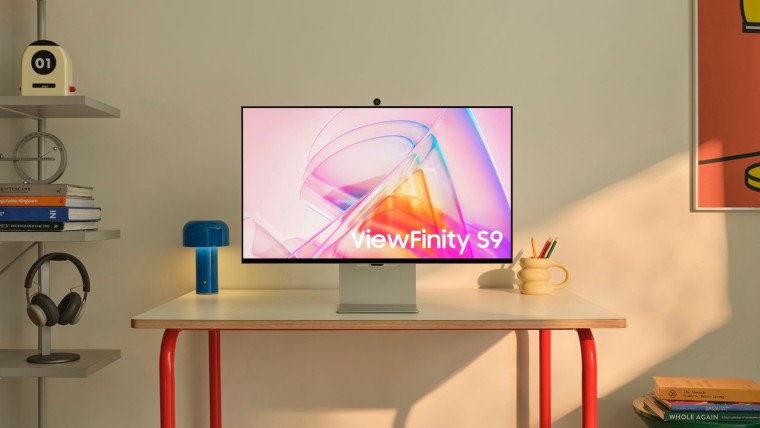
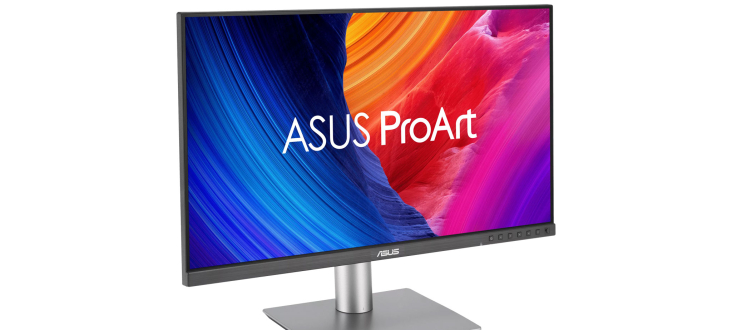
It appears that Mac Mini with third party display costs soon mount up and I wouldn't be getting the total integration of the iMac from any of the alternatives BenQ, Asus or Viewsonic.

I totally understand some of the antipathy towards Apple but all I can say is that it has worked for me. I work from home and have hammered the system all day, every day for the last 10 years so in terms of value, it's earned it's keep but we are now at the end of the road. A lot of the software I use is no longer supported and the raw horsepower of the Intel CPU is lacking.

I'm a bit worried about losing the extra three inches (what man isn't) but as others have pointed out, the bezel on older iMacs is huge making the whole affair a real monster on the desk

As well as my interest in photography, I'm a bass guitar player and general dabbler so use the Garageband and Logic Pro applications frequently.

Fundamentally, I'm working for another four years (good lord willing) so I still need to straddle the divide of good document rendering (Retina display) plus the video conferencing capabilities and iPhone integration. When I bought the Intel based iMac, I loaded it with memory so I was running the VMware Fusion application to execute windows virtual machines for work as well but since the latest upgrade to OSX 11.7, this has suffered a multitude of performance issues. For nearly it's whole life, the box has done everything I needed but as with many areas of life, the "new thing" simply does't work as well as the "old thing".

My reasons, for looking at Mac Mini plus 3rd party display were around the possibility of running a second Windows PC hooked up for a look at MS Flight Simulator or possibly X-Plane. However, I really need to stop being such a dilettante and focus (pun intended) on taking more pictures, editing them properly and finally printing some of the buggers out. I guess this means I need to stop worrying about what Apple doesn't offer, buy the bloody iMac and get on with things. There, decision made :)

. . . . . . . . . . . . . . . . . . . . Almost, I'll report back after a visit to John Lewis to have a look see.
 
. . . . . . . . . . . . . . . . . . . . Almost, I'll report back after a visit to John Lewis to have a look see.
Ha! I went to John Lewis today as had a day off and hooked up a new MacBook via HDMI to an ASUS 4K monitor. Even with screen mirroring the difference is very noticable - even to my wife who understands that I may need to spend £1400 on an Apple Display if there was a difference. The colours were wrong, but worse the difference between 4K and Apple 5K made the image so less sharp. I’m still dithering but now know it’ll either be a new iMac or Mac Mini with an Apple Studio display.
 
the difference is very noticable - even to my wife who understands that I may need to spend £1400 on an Apple Display

This is so familiar. When we looked at the iMac all those years ago, we examined the Retina and non-Retina displays side by side and luckily for me my wife just said "get the better one".

Please don't make me have to go cap in hand saying "but the expert on TP is getting the Studio display" followed by some industrial strength Christmas present purchasing :)
 
Please don't make me have to go cap in hand saying "but the expert on TP is getting the Studio display" followed by some industrial strength Christmas present purchasing :)
The biggest problem for me is that the iMac is really good value and entirely adequate for my needs but the smaller screen worries me. I’d also like a M4 pro because….I’m important and do important things that need to be done quicker than someone less important.
 
I have a 2012 iMac so before retina. I also have a 2018 MBP (touch bar era). I have come to the conclusion that a base M4 Mac Mini will serve my needs with just a ram bump. The main benefit with the pro in real world use would be when exporting it will take 5mins instead of 8mins. I am not exporting twice a day everyday to save 6 mins and even if I am, it's not worth £800 difference.

Having used a 16G ram M1 at work for 4 years, a 24G M4 will be perfectly fine.

I also have a Huawei Mateview 4k+ sitting around so will just use that. It was fine with the MBP so I’ll just stick with it.

Also have a 2TB nvme in a 40gb/s enclosure ready too.

mcOhAUv.jpg
 
Last edited:
Thank you for your wise words Raymond, that is very useful indeed. My only guilty pleasure though is that I can't face giving up 5k but if an Apple Studio display lasts me as long as my iMac, I'll be in the great recycling bin in the sky before the hardware is.

May I ask what that neat looking nvme enclosure is?
 
Thank you for your wise words Raymond, that is very useful indeed. My only guilty pleasure though is that I can't face giving up 5k but if an Apple Studio display lasts me as long as my iMac, I'll be in the great recycling bin in the sky before the hardware is.

May I ask what that neat looking nvme enclosure is?

It’s the OWC 1M2 express. It’s probably the most expensive 40gb/s out there but I bought it with good reasons.

There are other enclosures that does this speed, but almost all of them except one other I’ve found has a built in fan. My criteria’s are

1 - no fan. Small fans inside enclosures like these generally have a high pitch noise. Especially over time when dust built up. I plan to have this SSD plugged in and left on so I wanted no moving parts

2 - I wanted 40gb/s enclosure rather than 10gb/s so to “exceed” the speed of the internal for the base spec and future proof.

3 - with no fan, planning to keep it a long time and knowing heat is the enemy to SSD, cooling is important so this design gives me confidence

4 - bonus point is that this does about 10% faster than the Acasis which is the other one on the market which also fanless except no heatsink like this on the case.
 
Last edited:
Ha! I went to John Lewis today as had a day off and hooked up a new MacBook via HDMI to an ASUS 4K monitor. Even with screen mirroring the difference is very noticable - even to my wife who understands that I may need to spend £1400 on an Apple Display if there was a difference. The colours were wrong, but worse the difference between 4K and Apple 5K made the image so less sharp. I’m still dithering but now know it’ll either be a new iMac or Mac Mini with an Apple Studio display.

Worth saying that calibration will eliminate a lot of difference between screen colours and brightness. It's not unusual for monitors to have everything set to 11 to impress the punters rather than to be set up for work.
 
It’s the OWC 1M2 express. It’s probably the most expensive 40gb/s out there but I bought it with good reasons.

There are other enclosures that does this speed, but almost all of them except one other I’ve found has a built in fan. My criteria’s are

1 - no fan. Small fans inside enclosures like these generally have a high pitch noise. Especially over time when dust built up. I plan to have this SSD plugged in and left on so I wanted no moving parts

2 - I wanted 40gb/s enclosure rather than 10gb/s so to “exceed” the speed of the internal for the base spec and future proof.

3 - with no fan, planning to keep it a long time and knowing heat is the enemy to SSD, cooling is important so this design gives me confidence

4 - bonus point is that this does about 10% faster than the Acasis which is the other one on the market which also fanless except no heatsink like this on the case.

Can I ask what speeds you actually get? I am using Acacias enclosures but get nowhere near 40gbs on my mini Mac, they are however much faster than my other enclosures and are more reliable.
 
Can I ask what speeds you actually get? I am using Acacias enclosures but get nowhere near 40gbs on my mini Mac, they are however much faster than my other enclosures and are more reliable.

The OWC gets about 3100gb/s. None of them will do 4000gb/s. I think the Acasis (from someone I know) gets 2800gb/s.
 
Last edited:
Hi All,

Should it be of interest to those here, I pressed the button on the Apple Studio Display and M4 Mac Mini (24GB / 512GB) today. The screen at least needs to see me out.

My pre New Year's resolution now is avoid even looking at lenses etc for the whole of 2025 (not that I cold afford anything) and focus on improving my picture taking. The beauty of the new Mac is that I no longer have to futz about switching partitions to use current version of both work and pleasure software.

I remain appreciative for all the advice and opinions in this thread.
 
Should it be of interest to those here, I pressed the button on the Apple Studio Display and M4 Mac Mini (24GB / 512GB) today. The screen at least needs to see me out.
I'll be interested in hearing how you get along with both, I decided in the end to go for the BenQ monitor (arrives tomorrow) and a Mac Mini (currently on a flight from Hong Kong).
 
I'll be interested in hearing how you get along with both, I decided in the end to go for the BenQ monitor (arrives tomorrow) and a Mac Mini (currently on a flight from Hong Kong).
Which BenQ monitor? I’m sure you’ll be pleased with your purchases.
 
PD2725U. Hoping that it'll be okay. I have a feeling that it is going to look 'odd' with scaling but sure I’ll settle to it.
I have a 4K BenQ on my Mac Studio and it looks perfectly fine scaled to 2k resolution. ( can’t remember the px, 2560x1440 perhaps)

I also have 2 x 2k BenQ screens on my mini for work which also look perfectly good.
 
I have a 4K BenQ on my Mac Studio and it looks perfectly fine scaled to 2k resolution. ( can’t remember the px, 2560x1440 perhaps)

I also have 2 x 2k BenQ screens on my mini for work which also look perfectly good.

So out of the box it seems fine - got a bit of a pink cast but sure with some tweaking it'll be just fine.
 
And another piece of great news (for me anyway) - PhotoMechanic 6 still works on an M4! Okay, it needed to download Rosetta but it works! I read somewhere that it wouldn't and this was one of the reasons I put off upgrading for so long. Maybe it'll get chopped in the next OS - but it works now.
 
Apple Studio display arrived, actual Mac Mini is still 4-8 days out for delivery. As ridiculous as it sounds, won't be opening until Christmas day along with the family and their gifts :)
 
Apple Studio display arrived, actual Mac Mini is still 4-8 days out for delivery. As ridiculous as it sounds, won't be opening until Christmas day along with the family and their gifts :)
Enjoy - I love my Studio display
 
Apple Studio display arrived, actual Mac Mini is still 4-8 days out for delivery. As ridiculous as it sounds, won't be opening until Christmas day along with the family and their gifts :)
Awesome, that is the way i shall be heading in 2025 I think.
 
And another piece of great news (for me anyway) - PhotoMechanic 6 still works on an M4! Okay, it needed to download Rosetta but it works! I read somewhere that it wouldn't and this was one of the reasons I put off upgrading for so long. Maybe it'll get chopped in the next OS - but it works now.
That is good to hear. It was my reason for resisting upgrading too. I ended up going for a 14" M4 Pro 1TB 24GB MBP in the end. It seems small after my old 15" MBP, but I will probably get an external monitor. It seems so whizzy!

Are there any downsides to installing Rosetta that you know of?
 
Last edited:
Apart from it being snappier to use? I have not given it a full run out but no bad news noted. When I ran it it just called to down load it, installed and opened.
 
Last edited:
Apart from it being snappier to use? I have not given it a full run out but no bad news noted. When I ran it it just called to down load it, installed and opened.
Perfect thanks. I haven't braved it yet :)

I note that Camera Bits were selling a new non-subscription version which won't get further updates, but it is VERY expensive. I don't think I can justify splashing out again.
 
@PeteSpringfield @Tulipone - My current 27" iMac is starting to creak so I'm looking at upgrading in the near future. My uses are photo editing (Luminar) and Office applications. I don't do any video editing. Sounds like there is consensus to go for a T4 enabled external drive for storage so not to go overboard on the internal SSD. Any additional feedback on the mac mini spec and display options you chose that may help inform my decision? I've not had to buy new computer hardware for a while so feedback gratefully received. Thanks in advance
 
I think I said I got the Mac Mini Pro with 1Tb and 24gb memory. For my modest use it is a significant overkill and I have seen absolutely no slow downs or issues with Affinity 2 / DXO 8 or PhotoMechanic.

With knowledge, I wouldn’t change a thing cos it does what I want easily. I probably would have been fine with 16gb and 500gb.

I was worried re screen but very happy with my BenQ 27325 ?
 
I have no idea why John Lewis / Curry’s et al don’t have proper displays with different options of monitors and keyboards.
 
I got mine last week and set it up now and migrated from my iMac (fresh installed though, rather through migration assistant).

0qKUAM9.jpg


BzIfxBU.jpg


Some of the things I am still working out, like I had to purchase an official Apple USB adaptor in order to get the SuperDrive to work.

iFP8702h.jpg


I have a 2nd monitor, 16" OLED on the way which I will mount vertically next to the other screen.
 
Some of the things I am still working out, like I had to purchase an official Apple USB adaptor in order to get the SuperDrive to work.

When I still used my MacBook I found it very fussy about USB connections, and hardware that was fine in everything else wouldn't work. I think they deliberately made a non-standard USB port, knowing users would sometimes have to buy Apple hardware.
 
I decided to use the USB hub built into my monitor for non USB C kit. I understand that a/b is not as fast as c but it is fast enough, even through the monitor, for my scanner, printer and Wacom tablet. Fast enough for a SuperDrive? CD transfer not that swift.
 
I've seen some reports that the USB ports are a little temperamental. Seems that the issues affect the rear ports most commonly. I'm going to weight up the pros / cons of the M4 vs M4 Pro and decide on the monitor. Good to hear that the BenQ works well. Studio display would be nice but might overstretch the budget.
 
Studio display would be nice but might overstretch the budget.
Within seconds I no longer noticed the difference between 27" iMac and this one.

I have several different branded USB C external SSD, monitor is connected via USB C, iPhones and iPads and other USB C peripherals and not had any issues with any of them. The USB a/b go into the monitor just to keep cables to a minimum - and not had any issues at all (yet!).
 
Last edited:
Update from me on my rig @Sniffer , I went for the OWC 1M2 external drive caddy as recommended above. To my absolute amazement, a 4TB NVME turned up in my Christmas stocking (which was nice!). Installation took about 5 minutes and the only complaint I have is the permanently on white LED which is blooming bright at night.

Mac Mini wise, I settled for the 512GB storage / 24GB memory model. I don't do video editing either so LR and Lr Classic are about the heftiest apps I run routinely and the Mini remains stone cold and the 1M2 probably a little warmer than my hand. I hope I'm not teaching anyone to suck eggs here when I mention that you can conserve internal drive space for apps by offloading even core Apple stuff such as your Music and picture library to external disk.

I've also loaded up the ARM version of Windows 11 under VMware Fusion for the rare occasion that I need Windows stuff for work but I haven't stressed that yet, it was just a test to see if works and it does.

The final nail in the coffin of my old 27" iMac was it routinely spinning up it's fan to full tilt whilst using video conferencing software such as Zoom or Teams which I do frequently every day for work. It could be argued that I've paid an Apple 'hardware tax' but it has been worth it as all my apps now run happily on the current hardware / MacOS combination.

I can't defend my purchase of the Apple Studio Display financially but I'm glad I did, the speakers are frankly good enough for me to consider retiring the pair of Sonos One's that sit on the desk and the integrated camera (although criticised elsewhere) is a significant improvement on the old iMac.

My one possible (but not absolute) criticism is that despite what we read, I don't think the standard M4 Mini is up to gaming. As an experiment, I. downloaded the xPlane 12 flight simulator demo and boy, oh, boy, does that get the Mini hot. So much so that I abandoned the test.

All in all, I couldn't be happier. The iMac is packed away in the loft in case of emergency and a possible conversion to a 5K screen if I ever work up the courage to separate the screen from the chassis and install the various gubbins from eBay to do the conversion.

All the best,
 
Back
Top