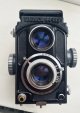
Yashica 44 - Project Beater

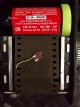
I tested the donor winding rod earlier and the bond wasn't really strong enough. I had visions of it snapping with a film loaded so not ideal! I broke it apart from the camera and drilled through the middle of it and screwed a small bolt through it, long enough to go right inside the 127 spool holder on the camera. I've now re-glued the two pieces together so should have more bite for the Araldite to hold. I'll leave it for at least 24 hours then try rewinding again.
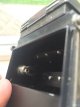
 
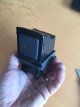
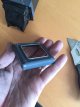
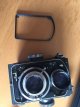
While I'm waiting for the winding rod to go off, I've bonded part of the original screen surround to the rear door. Once this is stuck, I can screw the circuit to it as per the original counter which will hold the LCD in place to match the opening.
 
Last edited:
Looking good, LCD looks as if its meant to be there.
 
Thanks, I'm pretty impressed with the fit. I've had to order another digital counter though because I cut the LCD connector to make the screen fit more closely to the circuit and it works but is a bit intermittent. I don't think the cut was completely parallel because I have to put a little more pressure on one end to make it work properly which isn't ideal. It's becoming a money pit camera now, that's another 99p...
 
Thanks, I'm pretty impressed with the fit. I've had to order another digital counter though because I cut the LCD connector to make the screen fit more closely to the circuit and it works but is a bit intermittent. I don't think the cut was completely parallel because I have to put a little more pressure on one end to make it work properly which isn't ideal. It's becoming a money pit camera now, that's another 99p...
Well creativity has its problems:)
 
Time for a respray;

IMG_1469630588.834607.jpg

IMG_1469630595.901917.jpg

IMG_1469630608.659212.jpg

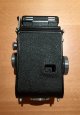
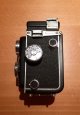
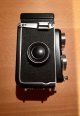
I like my cameras to be black with a hint of black and the original paintwork was a bit tatty in places so it seemed like a good idea to strip down/paint.

IMG_1469630645.660909.jpg

It's actually Matt black paint rather than gloss to be a bit different and I've got a VH Black leather skin coming for it which should match nicely. I still need to strip/sand back the rear door before spraying it and doing some of the main body with a brush instead of trying to mask it all.
 
Aww, kinda liked the Gray,
 
Yeah, I did think about keeping the original colour but it's more of a blue-grey and the paintwork wasn't in great condition. I also wanted a mini TLR to match my 635 :0)

 
Time for a respray;


I like my cameras to be black with a hint of black and the original paintwork was a bit tatty in places so it seemed like a good idea to strip down/paint.


It's actually Matt black paint rather than gloss to be a bit different and I've got a VH Black leather skin coming for it which should match nicely. I still need to strip/sand back the rear door before spraying it and doing some of the main body with a brush instead of trying to mask it all.

So................you like black then?
 
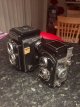
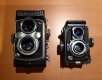
It's like Dr Evil and Mini Me :0)

IMG_1469654832.481438.jpg

IMG_1469654839.118463.jpg

I just need the new black skin and to re-attach the 'Y' badge on the wlf to be sorted. I've also drawn up a new face plate that I'm going to 3D print so it will be good to go.
 
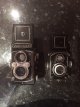
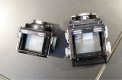
Slightly better side by side shot;

IMG_1469708565.900806.jpg

IMG_1469708572.318375.jpg

Jobs to do:

- Strengthen the rewind spool because it's not holding properly at the moment

- Print a spacer for the other end of the 35mm cartridge to hold it centrally in the film gate.

- Finalise the design and then print the new face plate. I can't really fit the logo I drew because the plate is only 8mm high so I'm trying a few other ideas to incorporate the 35mm functionality.

IMG_1469708762.958010.jpg

- Complete the sprocket hole counting button and install it in the camera. The current version works but is a bit fiddly so I need to come back to that.

- Make a battery holder to fit the digital counter battery onto the rear door.

- Cover the inside of the rear door to hide the circuit/battery.

- Fit the new black leather skin when it arrives from CameraLeathers.com. They don't pre-cut the film counter window or round logo on the wlf so I'll need to do that when it comes.

- Finish making two spacer rings. One to hold out the take up spool when rewinding and the other to fit the film cartridge centrally.

Other than that, it's pretty much done ;0)
 
Last edited:
Whose idea was it to mount a %#{%{%{% LCD screen and counter into this! Trying to slim the screen/circuit down as much as possible without causing issues with the display is proving to be a pain in the proverbial. I've used my second donor counter and still not got it spot on which is really annoying [emoji35]
 
Whose idea was it to mount a %#{%{%{% LCD screen and counter into this! Trying to slim the screen/circuit down as much as possible without causing issues with the display is proving to be a pain in the proverbial. I've used my second donor counter and still not got it spot on which is really annoying [emoji35]

He'll fire Steve! That's ANOTHER 99p!
 
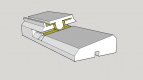
While I'm waiting for the new skin to arrive, I've drawn up a replacement bracket incorporating the sprocket hole counter. The sprung button I've got now is a bit too weak and will have to be secured to the camera body somehow so this will be the replacement;

IMG_1470294978.641386.jpg

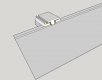
The yellow parts are metal contacts I'll bend to shape and touch together. The bracket will be bonded to the camera body between the two rollers after the film gate and the film is then fed through it;

IMG_1470295064.031172.jpg

The tolerances are pretty tight so I've sent the model over to the 3D printer that's working on my InsTLR parts to see if they could print them. Fingers crossed they'll be fine. The channels on the top and bottom are for running the wires to connect the contacts to the digital counter circuit.
 
Last edited:
I'd use more spring with less plastic behind it. Old doorbells have pretty good springy contacts which should work with a slight redesign.
 
Thanks for the tip Nod. I'll see if I've got any old doorbells knocking about.
 
To add, the film is only 0.14mm thick so the contact only needs to separate by that much to break the circuit so in hoping it won't need much movement in the contacts.
 
If you've still got some battery contacts for button cells, they might make suitable donors for springy contacts too.
 
That's what I used for the first button contact so was thinking about using more for the final one. Cheers
 
I've been playing with ideas in my head for replacing the original top winding knob with one from an SLR so I can rewind the 35mm film in camera rather than faffing around with a changing bag. The main issue is that the camera winding knob and 35mm spool don't line up perfectly, so any physically attached part is always going to be running off-centre so will be a weak spot.

I was drawing a few ideas when I realised the perfect universal joint was in my hand :0)

IMG_1470439093.921682.jpg

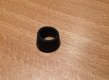
I removed the rubber grip from the pen and the narrow end fits tightly over the original winding knob in the camera so I cut it down to a short rubber connector.

IMG_1470439153.101498.jpg

I slide the wider end over the 35mm spool before fitting it into the camera;

IMG_1470439201.370314.jpg

After that, I drop the film into the camera and stretch the other end over the camera winder;

IMG_1470439246.898340.jpg

I'm using a piece of plastic as a spacer at the other end for now but will machine a proper part that will drop in place to hold the film central in the camera.

IMG_1470439300.726191.jpg

I've tested it and there's enough friction to rewind the film once I've loosened the take up spool by pulling the bottom knob out and turning it anti-clockwise a few times to release the exposed film.
 
Yay, my new skin has arrived from Morgan Sparks today so I can get on with fitting that later :0)
 
And it's fitted and looking very smart :0)

IMG_1470520378.374499.jpg

IMG_1470520387.925975.jpg

IMG_1470520397.163824.jpg

IMG_1470520404.101019.jpg

IMG_1470520410.987305.jpg

I had to cut a few of the pieces by hand because of the variances with the 44 models but overall I'm happy with the finish. I can't recommend CameraLeathers enough, the pieces were cut perfectly and all stuck well. Now I just need to get the sprocket hole counter circuit sorted and I'm ready to shoot.
 
Looking good Steve, although maybe a nice neon blue crocodile skin would have been better. :D
 
First print of my new faceplate looks like a good fit. I might make it taller so it goes up to the top of the wlf but will need to notch a few mm out of the back to allow the wlf to fold open.

IMG_1470849354.040133.jpg

If I do make it larger, I should be able to use my original logo idea so I'll have a play around with the design tonight.

I've also printed the counter button but it's a little too small to comfortably fit the metal contacts in so I'll stretch that out a bit too.
 
Last edited:
Ok, next step, getting the counter circuit working. After spending some time shaping two metal plates into shape to fit the button holder I printed, I realised that the rubber universal joint wouldn't have enough friction to rewind the film back though the contacts meaning I wouldn't be able to rewind the film inside the camera. As a result, I started looking at other Spring bearings and IR beam splitters to 'count' the sprocket holes. After looking at a few options, I remembered that there's a very small, low-pressure, micro switch in the gearbox of the Instax Mini camera I took apart for my first InsTLR. The switch is used to tell the circuit when to eject the film and it's pressed by a low impact arm inside the camera so it should be fine for the film to press.

I've stripped the gearbox down and got the switch out and it should fit ok in the 44.

IMG_1470870292.510485.jpg

All I need to do is round off the button piece on both sides, so the film presses it with minimal force whichever way it's winding and print a bracket to hold it in place. I'll draw something up tomorrow along with modifying the faceplate.
 
Really enjoying following this project. Great stuff.
 
Thanks Trevor. I'm quite looking forward to using the little 44 once I get the counter sorted. I've got my third digital counter on the way so hopefully it will be third time lucky!
 
IMG_1471028536.913618.jpg

I've extended the faceplate I printed to increase its height by 10mm so it meets the top of the wlf when closed. I didn't like the layout of the logo I put together so have instead gone with a custom text instead.

I'll see how It looks when printed anyway :0)
 
Thanks Trevor. I'm quite looking forward to using the little 44 once I get the counter sorted. I've got my third digital counter on the way so hopefully it will be third time lucky!

SO.....................................another 99p?
 
Oh man, this embedded LCD is killing me! Who'd have thought that a 99p counting unit would be pretty basically made with little room for adjustment eh...I've got the screen and surround glueing into the camera back now but am not convinced it's going to be particularly stable so am having serious doubts about keeping it there :0(.

However, I have come up with a much simpler alternative using a basic LED setup and an Arduino micro which is basically a tiny (20mmx10mm) computer that I can embed code on. A basic program can count how many times the microswitch is pressed (by the film between sprocket holes) and when it gets to 10 it can flash the LED for a set period of time. I think this might be a better option in the long run for simplicity and durability. I won't have an ongoing shot counter but that's not really the end of the world. I've just borrowed a full size Arduino Uno to test the code/circuit before I buy a micro board and charge circuit to run it off a small lipo battery.
 
Oh man, this embedded LCD is killing me! Who'd have thought that a 99p counting unit would be pretty basically made with little room for adjustment eh...I've got the screen and surround glueing into the camera back now but am not convinced it's going to be particularly stable so am having serious doubts about keeping it there :0(.

However, I have come up with a much simpler alternative using a basic LED setup and an Arduino micro which is basically a tiny (20mmx10mm) computer that I can embed code on. A basic program can count how many times the microswitch is pressed (by the film between sprocket holes) and when it gets to 10 it can flash the LED for a set period of time. I think this might be a better option in the long run for simplicity and durability. I won't have an ongoing shot counter but that's not really the end of the world. I've just borrowed a full size Arduino Uno to test the code/circuit before I buy a micro board and charge circuit to run it off a small lipo battery.

Bloody 'ell
 
Oh man, this embedded LCD is killing me! Who'd have thought that a 99p counting unit would be pretty basically made with little room for adjustment eh...I've got the screen and surround glueing into the camera back now but am not convinced it's going to be particularly stable so am having serious doubts about keeping it there :0(.

Get a proper counter! :D

Abacus.jpg
 
Back
Top