Yahoo and passwords

jerry12953

Suspended / Banned
Messages
12,421
Name
Jeremy Moore
Edit My Images
No
I've had a warning about passwords from Yahoo this morning (like about a million others, no doubt.....) But I can't remember ever having anything to do with Yahoo.

Could i have signed in to something else which uses Yahoo as its proxy (if that's the right word......)?

And in a more general sense, passwords are getting ridiculous; I just can't remember them. What do others do about them?
 
And in a more general sense, passwords are getting ridiculous; I just can't remember them. What do others do about them?

In my filofax I have a section entitled 'Passwords', and an exel file on my pc with same :D
 
Breach was allegedly in 2014 so horse/gate/bolted comes to mind for changing passwords, hopefully everyone will have changed theirs since 2014... :tumbleweed:
 
Breach was allegedly in 2014 so horse/gate/bolted comes to mind for changing passwords, hopefully everyone will have changed theirs since 2014... :tumbleweed:

Although if you have a file a file with a billion passwords in it you could probably pick as few at leisure every so often! I think I probably have changed my passwords since then but the whole password thing just seems to get more and more out of hand.
 
Last edited:
the whole password thing just seems to get more and out of hand.

I entirely agree with you ... "can't use that it's not long enough/doesn't have a capital letter/doesn't have a numeral/used it before/too many letters".
Just drives me nuts and what makes it so much more annoying is that those who make these requirements are incapable of keeping their own information secure! :bat:
 
Separate email address for each on-line account.
Unique passwords for each account, maintained in KeePass.
 
Separate email address for each on-line account.
Unique passwords for each account, maintained in KeePass.

So you're suggesting that every time you register to buy something online you use a new email address? That does seem a bit over the top! :eek:

But I'm interested in KeePass. does it keep your passwords under control/accessible in some way?
 
What these hackers are after is a username/ password combination.
This enables them to have a good guess at what your password might be on any given website.
It always irks me that it's easy to change a password but not a username.
I read recently that in a banking scam the would-be thieves used an attack with 61 most popular passwords, presumably giving them best chance of a hit!
 
Are there any alternatives out there?

I use Roboform. If it's managing my passwords, I feel more comfortable paying for the security. One master key, multiple passwords for different things, and all passwords accessible online (if you're not on your home PC).

Yes, all my passwords are in one place. Yes, if someone gets my PC I'm in trouble. But importantly - Yes I do have different passwords for every site.
 
time to deploy the old favourite..

password_strength.png
 
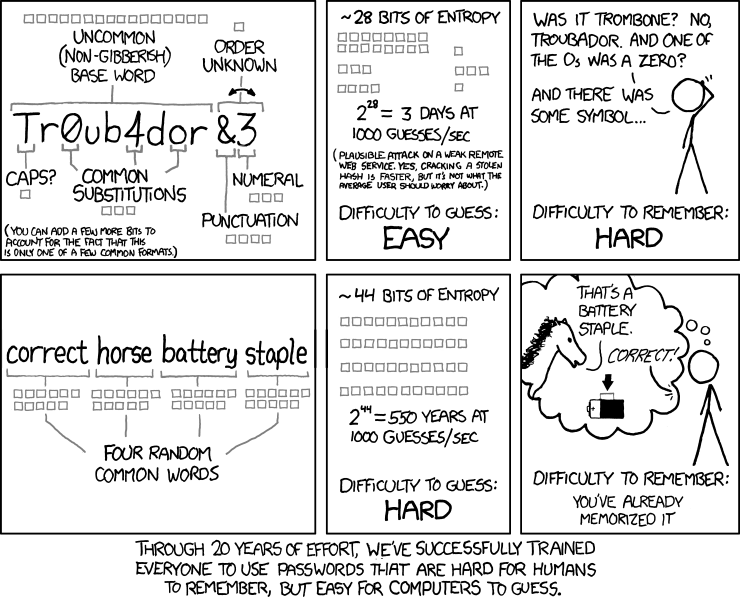
If only many sites would accept something like "correct horse battery staple" but 95% wouldn't :banghead:
 
no that is true.

what is this sudden fascination with capital letters..

Cos it looks like IT CaMel text --- looks secure :)
 
time to deploy the old favourite..

password_strength.png

This is now a fairly common technique for choosing passwords. Thus it's not a particularly good idea, especially if all four words are common usage dictionary words.
A non-dictionary phrase is the best way to go.
Or a completely random phrase that includes a full range of non-alphanumeric characters, as generated by a tool.
 
Just change your login to 2 stage verification.
You get a text that you click on to your mobile.
Much safer.
 
So how does one set that up?

Click on 'The Cog' (Yahoo site - top right hand corner) Go to account info - Go to account security & set it up from there.
 
Just change your login to 2 stage verification.
You get a text that you click on to your mobile.
Much safer.

Don't be fooled into thinking it's safer. The latest NIST guidelines recommend against using SMS for two factor authentication.

I'm not saying don't use it, just still be vigilant.
 
Don't be fooled into thinking it's safer. The latest NIST guidelines recommend against using SMS for two factor authentication.

I'm not saying don't use it, just still be vigilant.
Always am!
 
How easy is Key Pass to use, though? The documentation looks a bit scarey......

Download. Install. Run. Create new database file. Create key file and pass phrase.

Memorise pass phrase.

Ensure database is backed up. Ensure key file is backed up. If you are paranoid, store the key file and database separately. E.g. keep the database on a NAS and keep the key file in Google drive or on >2 USB sticks.

Adding a new password is as simple as adding a new entry. You can organise into different folders etc.

There are apps for MacOS and Android that can open KeePass databases. I'm too paranoid to have it on my phone, personally but I have tested it and it works.
 
Last edited:
Back
Top