

Andrew Moore
Suspended / Banned
- Messages
- 1,054
- Name
- Andrew
- Edit My Images
- Yes
I was looking over the last few threads on CC, Lightroom, Affinity etc and I noticed no real trend in the way people actually work. This naturally made me curious as to how the majority of us actually go about editing.
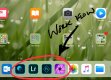
As you can see from the above, my work flow tends to lean towards a whole bunch of programs starting with an unseen entity, MS OneDrive.
I transfer images from SD card to a dongle on my iPad into my one drive and from there I sync a one drive folder with LR, PS, Affinity and occasionaly PS Mix. Ive had problems reading RAW files, problems syncing saved files, problems working with layers and problems with grading on an iPad screen (especially since it changes the backlight in IOS11 as it seems fit which was a pain to fix!) but now it seems to all be up and running as I would hope.
No one program is as good as Lightroom or photoshop for desktop but combined I would say that with Affinity we are 99% there.
It’s now time to ditch the laptop when on the move, on holiday etc and save only the most intensive images and video for the main PC when I am home.
I am not a professional tog, Ive never been paid and I would never look to so the compromises I have made in my opinion are easily justified. I’m just curious as to whether or not any pros on here have been able to move to a truly mobile and easy to travel with solution as I have and if this solution resembles their own.
So...
How do you work on the move, what programs work for you and if you don’t work/cant work on the move, what processes do you find hold you back and how would you like to see advancements take over.
As you can see from the above, my work flow tends to lean towards a whole bunch of programs starting with an unseen entity, MS OneDrive.
I transfer images from SD card to a dongle on my iPad into my one drive and from there I sync a one drive folder with LR, PS, Affinity and occasionaly PS Mix. Ive had problems reading RAW files, problems syncing saved files, problems working with layers and problems with grading on an iPad screen (especially since it changes the backlight in IOS11 as it seems fit which was a pain to fix!) but now it seems to all be up and running as I would hope.
No one program is as good as Lightroom or photoshop for desktop but combined I would say that with Affinity we are 99% there.
It’s now time to ditch the laptop when on the move, on holiday etc and save only the most intensive images and video for the main PC when I am home.
I am not a professional tog, Ive never been paid and I would never look to so the compromises I have made in my opinion are easily justified. I’m just curious as to whether or not any pros on here have been able to move to a truly mobile and easy to travel with solution as I have and if this solution resembles their own.
So...
How do you work on the move, what programs work for you and if you don’t work/cant work on the move, what processes do you find hold you back and how would you like to see advancements take over.
