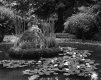
With or without

Which looks better in your opinion?

  • Image No 1

  • Image No 2


Results are only viewable after voting.

Asha

Blithering Idiot
Suspended / Banned
Messages
11,274
Name
Asha
Edit My Images
Yes
Come on guys, help me out with a vote.

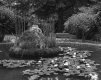
Two identical photos , one taken with a filter, the other without.

I can't make my mind up which to work on (sometimes it's easier to have just have one neg!!)

Which, in your opinion looks better?


Image No 1
TP 1 sans titre.jpg


Image No 2


TP 2 lilly fountain.jpg
 
2 looks better but I would work with first as there seems to be more shadow detail.
 
Well I always thought the best way to tell a good B\W shots is that it should have all the tones from black to white i.e. shades of grey...of course it's only a guide as some people prefer soot and whitewash etc
The 2nd looks clearer but the 1st could be changed in Photoshop and any shadow detail wanted in either could be enhanced...so difficult to judge when you consider what photoshop can do.
AAMOI in "cheating" Andreas Gursky's shot the Rhiene, that sold for $4 million ( erm in my opinion ????) not only broke the rule of thirds but even removed walkers and a factory in the shot so anything goes.
 
Well I always thought the best way to tell a good B\W shots is that it should have all the tones from black to white i.e. shades of grey...of course it's only a guide as some people prefer soot and whitewash etc
The 2nd looks clearer but the 1st could be changed in Photoshop and any shadow detail wanted in either could be enhanced...so difficult to judge when you consider what photoshop can do.
AAMOI in "cheating" Andreas Gursky's shot the Rhiene, that sold for $4 million ( erm in my opinion ????) not only broke the rule of thirds but even removed walkers and a factory in the shot so anything goes.


Yes I know what can be manipulated in PS and tbh I try to avoid too much.

There is a distinct difference between the two brought about by the use of a coloured filter.

As Craig says there is more shadow detail in the first which in some ways would be a more beneficial start rather than pulling shadows in PS ( which, in a large print may be clearly evident of manipulation.)

I agree that the second looks clearer which of course also has its advantages.

This is precisely why I've opened up to voting as I'm really struggling to decide.
 
If you’re happy with the amount of shadow detail in the 2nd then go with that one. I think it looks a lot better as my preference is for black and white to have plenty of contrast and some blacks as well.

If you’re just going to darken the shadows anyway then use the clearer one.
 
Number 1 for me. Even after spending extra time looking. Your vision will be different from mine, but the first offers me the better starting point for the print I would make.
 
What filter did you use Asha, as I've been a bit underwhelmed with a yellow-green filter recently? I think both are good results, but the inky blackness in the trees behind the bench in #2 is pushing me towards #1.
 
Scènes of vegetation do throw me when it comes to the use of filters. If there is a colour involved with flowers then that can help dictate what to use but if almost all green then like you I have been underwhelmed with what some advice offered suggests.

Like with a previous mixed green tones of tree shot that I captured not long ago, I used a green filter with a view that it would selerate the different greens and was unimpressed by the result
In this instance the filter effects appear to have ( as expected) lightened some greens but not really separated the tones.
Of course the green filter has darkened its opposite in the tree trunk and thus removed shadow detail.

Filters and vegetation seem to me, difficult to assess.
Perhaps best not to use any at all unless there is reason to subtly highlight a sky in the scene with a yellow.
 
Last edited:
Well I played with 1st in Photoshop and all the shadow detail are shown e.g. tree trunk, but you might have a problem as if you show everything (and just my opinion) the scene become "cluttered" ....but then you might want to show everything? Nice shot and please remember it's only my opinion and you and thousands of other photographers could disagree with me ;)
 
Do you have a colour version? :LOL:

I'd go with the first one if you're planning on further post-processing. You can always more contrast in, but not so easily remove it if it's there in the source. I prefer the gentler highlights on the first too. I like the darker shadows in the second though but, as I say, you can easily add those to the first shot.
 
Last edited:
I've always preferred contrasty B&W prints with deep shadows so my vote goes to #2. Having said that, if you're going to be digging the scanner out to do one or the other, scan both, work on whichever you decide might work best and save the other scan to play with on a rainy day (when you're not stuck on a wet hillside trying to keep your powder dry!!!)
 
What you're describing Asha is exactly why I have been shying away from shooting black and white and doing more colour.

I live in a rural location so most of my photos are of or contain vegetation and they end up just looking a mess of mid grey. Too chaotic for me and end up being too cluttered and the viewer doesn't know where to look.

I haven't tried filters as I don't think that they do enough to pull the tones apart, and it is just an inherent issue of shooting vegetation, especially on overcast days.

If you figure it out then do let us know!
 
The first is technically better as it has a fuller range of tone especially the darker ones. however both images have lost highlight detail in the floating lilies
If I were making a wet print I would start with no1 and burn an dodge to get the print that I like..
Out of the many many thousands of silver prints that I have made, I have hardly ever made a straight print,
there is always something that can be improved or enhanced.
The same is true of all digital images. which is why I always shoot raw.
 
Snip:

Neither! :p ;) :exit:

Joking aside, how about this rendering of the second one?

View attachment 286756

That's bordering on an Infra Red result.

It's quite appealing tbh but on this occasion it's not what I was after with this particular scene.

I'm presently on with the first version so will see how I go on with it.

Thanks everyone for your input (y)
 
Back
Top