Wireless trigger trouble!

Teya

Suspended / Banned
Messages
12
Edit My Images
No
Hi Guys

Not sure if anyone out there is a bit of a wizz with wireless....but I have a very frustrating problem!

I purchased a wireless trigger (sender and receiver) about 6 months ago, in favour of the infra red trigger that I used to use, which seemed to eat batteries and also not work if I was too far in front of the lights...

I have been over the moon with my wireless. I use it with my Canon 350D and 2 x 500 Bowens flash heads.

Last week, i set up for a shoot.... wireless trigger not working.

Changed batteries etc, but still not working. It cant be anything to do with my camera, as it should fire with the sender just in my hand and me pushiing the button...it doesnt. The lights will still fire via cable and infra red...so it doesnt seem to be the lights...

I bit the bullet and ordered a new wireless set. New one arrived today - this one not working either!

Any ideas??! Am I missing something really silly??! I really am at a loss - I cant see how it can all work fine and now just doesnt! And even the new one wont work!! Arrrgghhh!!!!

:bang::thinking::help:
 
I have the simple wireless trigger set, Transmitter is always on, in that there is no on/off switch, I have changed the battery once; the receiver batteries are the original (they do have an on/off switch). So check the transmitter battery, (from memory mine is a 12volt one), the set I have is 4 channel, so the transmitter and receivers will need to be set to the same channel, usually a little set of two slide switches. Other than that there is little to go wrong.
 
Check the channels?
 
Have tried all channels....as I said I have been using this set up since middle of last year, so I understand the set up. Never had any problems.

The sender unit has a small watch type battery in it, but the red light on top of the sender unit comes on when I press the button so Im guessing battery is fine. Also I have the brand new wireless kit which has new sender unit and battery.....

Im really at a loss what can be wrong :(
 
What make are the units?
 
Does the transmitter (bit on the camera) have a test button? Does that fire?

If it does, does the flash on the hotshoe of the camera work?
 
Does the transmitter (bit on the camera) have a test button? Does that fire?

If it does, does the flash on the hotshoe of the camera work?


When I press the test button on the transmitter, the red light on top of it flashes, but no, it is NOT setting my flash units off. (THis is when its in my hand, not even on the camera)

My existing wireless AND my brand new one are both just the simple cheapo ones, Jap I think..

2 channel one is model No. RD604 (receiver) and RF 604 (trans)
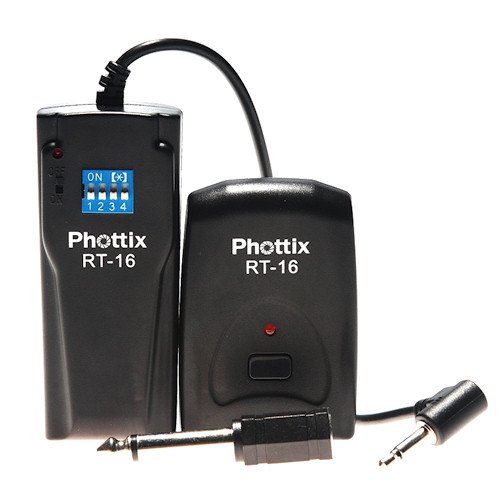
4 channel BRAND NEW one only has a model on the receiver - RT-16
 
Is this the new one?

PX-RT16.jpg
 
Generally if you've tried two sets of triggers and neither is working then the fault lies elsewhere, either with the camera, the lights themselves or some other component that is being used with both sets of triggers.
 
Yes thats the new one..Though mine does not have Photix written on it at all, and my transmitter does not have RT16 written on it....but has the matching blue 4 channel sliders on back...
 
Generally if you've tried two sets of triggers and neither is working then the fault lies elsewhere, either with the camera, the lights themselves or some other component that is being used with both sets of triggers.

It cant be the camera...
a) because the transmitter button should set the lights off even when NOT on camera
b) camera still works with sync cable and infra red

It cant be the lights - they work with cable and also with infra red trigger (havent managed to try them with SOMEONE ELSES wireless yet....)

What other component is there?!

ALso bear in mind I have been using this set up for some time, its not like I cant get wireless to work - it worked last time I used my studio, then next time I went in there it had stopped!!
 
It cant be the camera...
a) because the transmitter button should set the lights off even when NOT on camera
b) camera still works with sync cable and infra red

It cant be the lights - they work with cable and also with infra red trigger (havent managed to try them with SOMEONE ELSES wireless yet....)

What other component is there?!

ALso bear in mind I have been using this set up for some time, its not like I cant get wireless to work - it worked last time I used my studio, then next time I went in there it had stopped!!


It could well be then that something else nearby is on the same 433hz channel and is causing interference - have you tried switching channels to see if that makes any difference?
 
It could well be then that something else nearby is on the same 433hz channel and is causing interference - have you tried switching channels to see if that makes any difference?

That would be my next guess. Try a new channel, or take them elsewhere to try them there.

It cant be the lights - they work with cable and also with infra red trigger (havent managed to try them with SOMEONE ELSES wireless yet....)

It can be the lights - maybe the trigger in the foot is buggered? So it will still work with a sync cable and infra red but won't work from a hotshoe?
 
That would be my next guess. Try a new channel, or take them elsewhere to try them there.

I have tried several different combinations with the channels, on both the new and old triggers

I cant see anything suddenly interfering with them - my studio is in my house...no one else here except me, and no new equipment of any sort.....

It can be the lights - maybe the trigger in the foot is buggered? So it will still work with a sync cable and infra red but won't work from a hotshoe?

What do you mean by the trigger in the 'foot'? Its nothing to do with the hot shoe....the trigger section does not have to be on the camera to fire the lights via the wireless....you can simply hold it on your hand and push the test button. As long as the reveiver is plugged into the lights then that should fire...and it always did...till now....

I guess I am going to have to go back to alternative methods :(
 
I have tried lots of different combinations with the channel selectors too :(
 
I'm not familiar with either type of trigger you have, however assuming they are like most others and have a light on the trigger and one on the receiver which illuminates when the trigger button is pressed, is this happening?
 
What do you mean by the trigger in the 'foot'? Its nothing to do with the hot shoe....the trigger section does not have to be on the camera to fire the lights via the wireless....you can simply hold it on your hand and push the test button. As long as the reveiver is plugged into the lights then that should fire...and it always did...till now....

I guess I am going to have to go back to alternative methods :(

Sorry, I'd assumed you were using hotshoe based flashes :bonk:
 
Yes, lights on both units which flash when trigger pressed...

LOL Outlore :)
 
Someone else has suggested to me that someone in a house nearby may be using something thats interferring??? Is that a possibility? Dont know that much about how frequencies work to know if thats likely...
 
Yes, lights on both units which flash when trigger pressed...

Then the signal is getting as far as the triggers, which means the problem is either with the connection to the lights, the lights or.....

Someone else has suggested to me that someone in a house nearby may be using something thats interferring??? Is that a possibility? Dont know that much about how frequencies work to know if thats likely...

interference from an outside source on the same frequency
 
My wireless router didn't work out of the box and it was the wireless signal from the cordless phone to blame. Changed the channel and hey presto!
 
You know what... I think Im just going to have to sit and try every possible frequency. The 4 channel one obviously has a few combinations to try and I have only tried a few random ones...maybe if I go through each possible frequency setting one at a time....
 
if the reciever lights up then its a connection issue with whatever its plugged into, check the cables into the lights, check the connection on the lights by triggering with a pc cord
 
Thanks David...we have checked this already. Lights are fiting with sync cable.
 
Back
Top