

You are using an out of date browser. It may not display this or other websites correctly.
You should upgrade or use an alternative browser.
You should upgrade or use an alternative browser.
Wireless router & eye-fi card
- Thread starter Craig2008
- Start date


hunnymonster
Suspended / Banned
- Messages
- 2,263
- Name
- Jason
- Edit My Images
- Yes
What seems to work well for me is a 3 MiFi (like this other similar devices are available via other carriers) - being connected to the internet is a bonus (and you don't have to connect if you don't want to - or 3G signal is poor) but to all intents it's a wireless router in your pocket and if t'internet isn't available you can still at least connect between your devices.
Jason....How do you have this configured ?
I have recently sacked 3 as the signal at my home is unuseable but in all othe locations, it was fantastic...I looked at the MIFI for use when I'm out and about.
Like Craig above, if this can be used as you say, it will definitely be for me too...
I have recently sacked 3 as the signal at my home is unuseable but in all othe locations, it was fantastic...I looked at the MIFI for use when I'm out and about.
Like Craig above, if this can be used as you say, it will definitely be for me too...


DemiLion
Suspended / Banned
- Messages
- 13,016
- Name
- Mark
- Edit My Images
- No
Tugster said:Jason....How do you have this configured ?
+1
The Three MiFi is great for direct Internet connection, but doesn't work as a LAN router; unless there's a hack for it?
As for the original question; you should be able to set up a wireless LAN on any decent make of WiFi router, but you are best off either manually assigning IP addresses to each client, or at least reserving them in the DHCP server rather than allowing to assign random ones.
hunnymonster
Suspended / Banned
- Messages
- 2,263
- Name
- Jason
- Edit My Images
- Yes
Jason....How do you have this configured ?
I have recently sacked 3 as the signal at my home is unuseable but in all othe locations, it was fantastic...I looked at the MIFI for use when I'm out and about.
Like Craig above, if this can be used as you say, it will definitely be for me too...
The e585 for sure you can set to have LAN isolation or not (ie. that the devices on the local WLAN can see each other or not...) it's entirely possible that's a feature that's been added or removed by firmware update (whether it be one I've done or missed doing) though... Now you've got me panicking that it might not still be working as it was...
Edit: No, it's working as it was....
It's running this version of firmware:
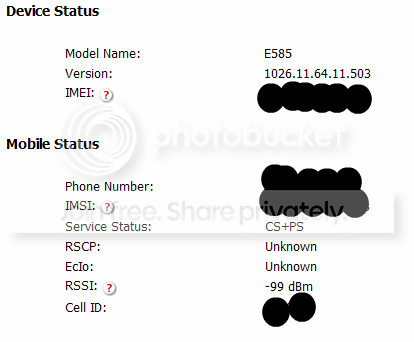
And in Advanced Settings... Wifi...
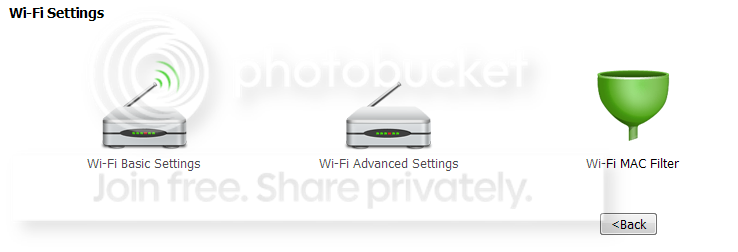
Wifi Basic (in the blurb at the top)

And there's the setting:
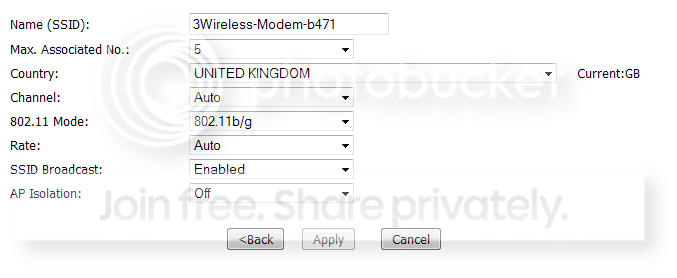
Happily able to ping between devices and also mount drives etc - so it looks to be a transparent LAN with AP isolation set to off... when it's on, none of it works.
Last edited:
hunnymonster
Suspended / Banned
- Messages
- 2,263
- Name
- Jason
- Edit My Images
- Yes
Well... not having an iPad no. But the EyeFi to PC app works (just tried it - isolated from t'internet) - the EyeFi only arrived yesterday so you're lucky I had that bit 

Charles Burley
Suspended / Banned
- Messages
- 214
- Name
- Charles
- Edit My Images
- No
The eye-fi pro x2 syncs directly to laptops, iPads and pcs. Whether mac or windows.
Maybe worth upgrading to cancel the need for any other gear.
My pro x2 cost around £100.
Maybe worth upgrading to cancel the need for any other gear.
My pro x2 cost around £100.
DemiLion
Suspended / Banned
- Messages
- 13,016
- Name
- Mark
- Edit My Images
- No
Charles Burley said:The eye-fi pro x2 syncs directly to laptops, iPads and pcs. Whether mac or windows.
Maybe worth upgrading to cancel the need for any other gear.
My pro x2 cost around £100.
Yup, and it's incredibly inefficient in terms of transport speed & battery usage. It's cleaner running via a LAN.


tictoc
Suspended / Banned
- Messages
- 750
- Name
- Vishal
- Edit My Images
- Yes
Thank you, thank you, thank you. I had it all up and running on the 585 and then I went and 'upgraded' to a 586 for the N benefit and I couldnt get the damn thing to work (obviously now I think that the AP was set to off with the 585 and on with the 586 out of the box). I had posted on Shuttersnitch forums and googled eye fi places and no answer from anyone. I even checked the card logs and all I could tell was that it was connecting to the mifi but then not much else was happening. Im glad the 'talk to the other devices button' was clearly labelled as AP, or rather someone else who understands what these machines do when they talk to each other pointed it out to meThe e585 for sure you can set to have LAN isolation or not (ie. that the devices on the local WLAN can see each other or not...) it's entirely possible that's a feature that's been added or removed by firmware update (whether it be one I've done or missed doing) though... Now you've got me panicking that it might not still be working as it was...
Edit: No, it's working as it was....
It's running this version of firmware:
And in Advanced Settings... Wifi...
Wifi Basic (in the blurb at the top)
And there's the setting:
Happily able to ping between devices and also mount drives etc - so it looks to be a transparent LAN with AP isolation set to off... when it's on, none of it works.
. Thank you again very much. I hadnt used my eyefi cards (yes 2 cards and 2 cameras) for months and had to manually load them to my ipad. Finally, the functionality I hoped I would get with the silly amount of money I was spending on new fangled tech.
tictoc
Suspended / Banned
- Messages
- 750
- Name
- Vishal
- Edit My Images
- Yes
But have you managed to run Shuttersnitch or the Eye-Fi App across it yet? Mine fails every time.
Thanks to Hunnymonster, yes. Shuttersnitch with a D7000 with 4gb x2 connect card (set to jpeg basic) and a D5100 with sandisk eyefi x2 8gb set to raw and basic. Both cards work simultaneously in conjunction with a mifi. speed wise, maybe 5 secs per pic, bit more, bit less depending on size (once the connection is established).
Until the camera companies build this tech into the cameras, I'll keep persevering with alternatives. I dont want my photography to be a science, I take pics because I need to share them quickly and get them in front of other people. Not because I want to go home and cook the raw pics with hours of transfers and adjustments and backups. I save that pleasure for my holidays. hahaha.
hunnymonster
Suspended / Banned
- Messages
- 2,263
- Name
- Jason
- Edit My Images
- Yes
You're welcome gents...
Last edited: