Windows updates failing

Ozei

Suspended / Banned
Messages
3,143
Edit My Images
No
I'm on Win 7 SP1 and it refuses to install these:
  1. KB2952664 (compatibility update for upgrading Win 7 to Win 10)
  2. KB3035583 (installs the 'get Win 10' nag)
  3. KB3138612 (contains some improvements to Windows Update Client in Windows 7 SP1)
  4. KB3118401 (update for Universal C Runtime)
  5. KB3121255 ("0x00000024" Stop error - refers to Server 2008 and 2012)

Anyone else getting one or more of these failing?

I'm not bothered with 1, 2 and 5 - but 3 and 4 are relevant to Win 7.
 
KB3121255 applies to 7 too (7 uses the same sort of architecture as 2008).

do you get any error codes? anything in the event log?

have you tried manually downloading and installing?
 
try installing them one by one. If you look in the Windows folder on your boot drive you should see a windowsupdate log file, open it in notepad & scroll to the bottom, it should show you why they are failing. Find the error code & search with google or similar for answers.
 
KB3121255 applies to 7 too (7 uses the same sort of architecture as 2008).

do you get any error codes? anything in the event log?

have you tried manually downloading and installing?

Yes, event log shows about 20 errors 0x80070643 (source WindowsUpdateClient)

Yes, I've tried manual download & installs - no change.
 
try installing them one by one. If you look in the Windows folder on your boot drive you should see a windowsupdate log file, open it in notepad & scroll to the bottom, it should show you why they are failing. Find the error code & search with google or similar for answers.

I've tried installing one by one - no change.

Here's one from the windowsupdate log file

91E6-031A3BE52E41} 501 0 wusa Success Content Install Installation Started: Windows successfully started the following update: Update for Windows (KB3121255)
2016-03-03 11:54:03:625 316 ac0 Report REPORT EVENT: {CD359EC9-AE7D-48EC-BD6F-8BEE62263AA4} 2016-03-03 11:51:54:876-0000 1 182 101 {C3157C17-6577-49D7-91E6-031A3BE52E41} 501 80071a91 wusa Failure Content Install Installation Failure: Windows failed to install the following update with error 0x80071a91: Update for Windows (KB3121255).
 
I've tried installing one by one - no change.

Here's one from the windowsupdate log file

91E6-031A3BE52E41} 501 0 wusa Success Content Install Installation Started: Windows successfully started the following update: Update for Windows (KB3121255)
2016-03-03 11:54:03:625 316 ac0 Report REPORT EVENT: {CD359EC9-AE7D-48EC-BD6F-8BEE62263AA4} 2016-03-03 11:51:54:876-0000 1 182 101 {C3157C17-6577-49D7-91E6-031A3BE52E41} 501 80071a91 wusa Failure Content Install Installation Failure: Windows failed to install the following update with error 0x80071a91: Update for Windows (KB3121255).

1) Run SFC /SCANNOW from a cmd prompt to check for problems within Windows

2) Check for HDD errors, run CHKDSK on the drive where windows resides, note that you will have to schedule this and restart Windows as you cannot run CHKDSK while the drive is in use.

If these run clean, try this http://windows.microsoft.com/en-US/windows7/Open-the-Windows-Update-troubleshooter

Update this thread with any outcomes & I will see if I can help further?
 
Last edited:
Thanks Brian.

I'm trying SFC /SCANNOW as we speak. Will let you know what it says when it's finished (if anything).

I tried CHKDSK earlier and there was no option to schedule it to run on restart - it just ran while the machine was in Windows.
 
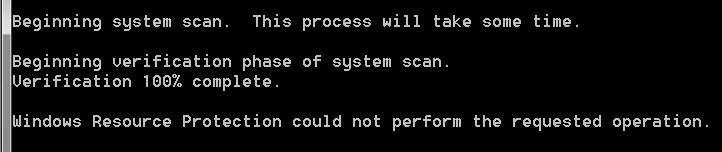
This is what SFC /SCANNOW says:

14763-1457044369-a30d9f2c1bd61f736f79b6231018e661.jpg
 
I just downloaded & ran Windows Update Troubleshooter (your above link) and it said this:

14764-1457044778-877fd93b6928ec7e4a12f1c4be3f57fc.jpg


Then I tried Win Update again and it said this:

14765-1457045002-fbb4e3bbdeb7f4b61a68833ef2c8d5bb.jpg


These are the three updates that failed:
  1. KB2952664 (compatibility update for upgrading Win 7 to Win 10)
  2. KB3035583 (installs the 'get Win 10' nag)
  3. KB3138612 (contains some improvements to Windows Update Client in Windows 7 SP1)
 
I've run the troubleshooter again and it now says this:

14766-1457045378-6ccda4327330e20b31a8768c6abbd61c.jpg
 
..............I tried CHKDSK earlier and there was no option to schedule it to run on restart - it just ran while the machine was in Windows.

CHKDSK is still not giving an option to schedule it to run on restart.
 
This is what SFC /SCANNOW says:

14763-1457044369-a30d9f2c1bd61f736f79b6231018e661.jpg
Oh dear I have never seen that message ,however a quick Google search reveals this amongst other hits:

https://www.infopackets.com/news/9620/how-fix-sfc-scannow-fails-wont-complete

The link above has a user post right at the end suggesting he was able to resolve Windows Update problems by running the Microsoft DISM or System Update Readiness tool. This can be downloaded here (make sure you download the right version 32 bit or 64 bit)

https://support.microsoft.com/en-us/kb/947821
 
I just downloaded & ran Windows Update Troubleshooter (your above link) and it said this:

14764-1457044778-877fd93b6928ec7e4a12f1c4be3f57fc.jpg


Then I tried Win Update again and it said this:

14765-1457045002-fbb4e3bbdeb7f4b61a68833ef2c8d5bb.jpg


These are the three updates that failed:
  1. KB2952664 (compatibility update for upgrading Win 7 to Win 10)
  2. KB3035583 (installs the 'get Win 10' nag)
  3. KB3138612 (contains some improvements to Windows Update Client in Windows 7 SP1)
Will you try to download KB3138612 and install it manually please?
https://support.microsoft.com/en-us/kb/3138612
 
I had a similar problem with windows update a couple of weeks ago
Can't remember which update it was but it locked up the computer when it was doing the update and I had to unplug the computer as it was completely frozen which I really wasn't happy doing
It was ok after rebooting though and had been ok since
 
This seems to suggest a possible cause is Microsoft .Net problems
If you have .Net installed, you could also try running the .Net Framework repair tool downloadable from here
https://www.microsoft.com/en-gb/download/details.aspx?id=30135

I just tried the .Net Framework repair tool and it didn't work. A window popped up saying: "The tool was unable to resolve the installation issue......"

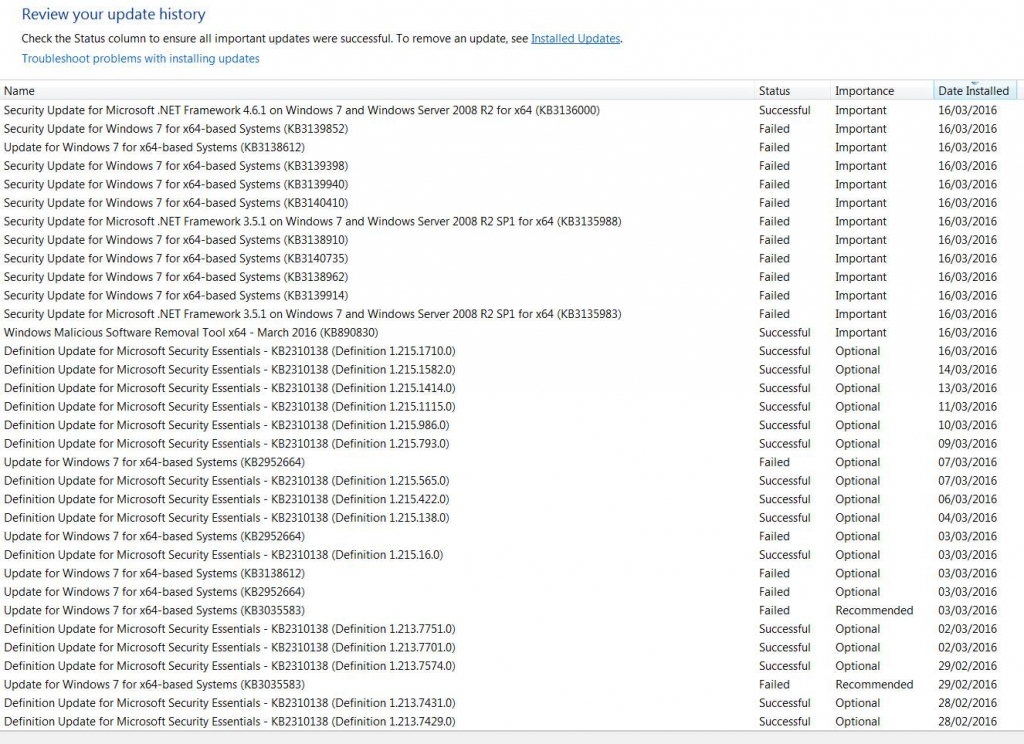
Windows Update is now completely out of control - just about everything fails except MSE definitions.

Have a look at this:

14845-1458128785-a485f732c5922ed91ea4e77ae1e2a623.jpg
 
Brian was right - it was a .NET Framework issue.

I went into this folder and C:\Windows\Microsoft.NET and destroyed everything I could. :punch::punch::punch::punch::punch::punch::punch::punch::punch:

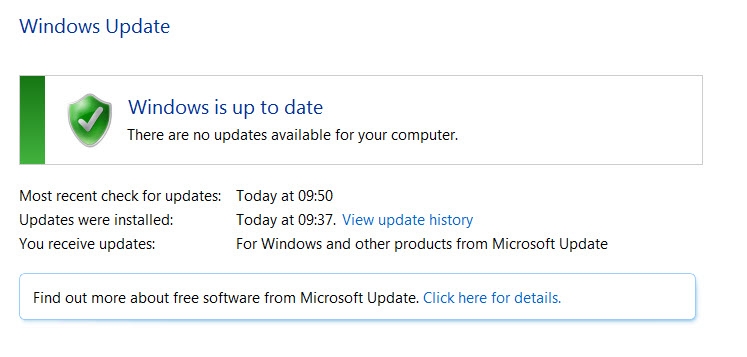
Windows Update now says this:

14851-1458209093-0045d0f860e9512766cc5131b0305017.jpg

:banana::banana::banana::banana::banana::banana::banana:
 
Last edited:
Brian was right - it was a.NET Framework issue.

I went into this folder and C:\Windows\Microsoft.NET and destroyed everything I could. :punch::punch::punch::punch::punch::punch::punch::punch::punch:

Windows Update now says this:

14851-1458209093-0045d0f860e9512766cc5131b0305017.jpg

:banana::banana::banana::banana::banana::banana::banana:
Well done, I was running out of ideas, beyond the last resort of cutting your losses & reinstalling. I agree about the 'happy' banana !
 
Cheers Brian - thanks for the help.

I was about to give up and reinstall Windows - wiping everything I could in C:\Windows\Microsoft.NET was a last ditch effort.
 
Unplug the computer from the internet? Or unplug from the mains?
Sorry I missed your reply I had to unplug it from the mains
It's ok now in fact I have upgraded to windows 10 just getting used to it :)
 
Back
Top