


StewartR
Suspended / Banned
- Messages
- 11,513
- Name
- Stewart
- Edit My Images
- Yes
Just checking on the software licensing situation in the office, and I've come across an anomaly which I don't understand. Can anyone explain?
The background is that I'm getting a PC out of mothballs to use in the office. It used to run XP, but I don't want to use XP on an internet-capable PC now that the OS is no longer supported, so I decided to try upgrading it to Windows 7 which is what our other PCs run. I wasn't sure whether or not it would run 7 very well, so before committing to it I did a test install using a reinstallation CD from one of the other PCs. It works fine, so now I want to regularise it and license it.
I thought I ought to double check that all the other PCs in the office were legal too. (I was pretty sure they were, but we have another PC which had previously been mothballed and I couldn't remember what OS that had had before it had been mothballed. Maybe that was another one which I'd upgraded from XP to 7 and had forgotten lo license.) So I went round all the PCs in the office, and checked the Windows Product ID via Start > Control Panel > System.
And the weird thing was, they were all exactly the same.
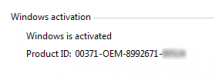
So then I checked the original purchase records, and all of them came from Dell with Win 7 pre-installed. So surely they must all have different Windows Product IDs? How come they are all reporting that they have the same Product ID? And how could they have all been activated online with the same Product ID?
It doesn't make any sense to me. Can anyone point out what I'm missing?
The background is that I'm getting a PC out of mothballs to use in the office. It used to run XP, but I don't want to use XP on an internet-capable PC now that the OS is no longer supported, so I decided to try upgrading it to Windows 7 which is what our other PCs run. I wasn't sure whether or not it would run 7 very well, so before committing to it I did a test install using a reinstallation CD from one of the other PCs. It works fine, so now I want to regularise it and license it.
I thought I ought to double check that all the other PCs in the office were legal too. (I was pretty sure they were, but we have another PC which had previously been mothballed and I couldn't remember what OS that had had before it had been mothballed. Maybe that was another one which I'd upgraded from XP to 7 and had forgotten lo license.) So I went round all the PCs in the office, and checked the Windows Product ID via Start > Control Panel > System.
And the weird thing was, they were all exactly the same.
So then I checked the original purchase records, and all of them came from Dell with Win 7 pre-installed. So surely they must all have different Windows Product IDs? How come they are all reporting that they have the same Product ID? And how could they have all been activated online with the same Product ID?
It doesn't make any sense to me. Can anyone point out what I'm missing?


