Windows Logon

cowasaki

TPer Emeritus
Suspended / Banned
Messages
19,708
Name
Darren
Edit My Images
Yes
Anyone know how to get to the full list of user logins? I am trying to get into a laptop which has one user, guest and admin. There is no guest or admin password but the user's password has been forgotten. Starting normally or safe mode just brings up the users picture with space for password and the red button just brings up restart or shutdown.
 
Try pressing control+alt+delete twice at login and this should take you to the admin login, if there is no password set you should just be able to press enter to login.
 
Try pressing control+alt+delete twice at login and this should take you to the admin login, if there is no password set you should just be able to press enter to login.

Nope nothing happens when I do that at all!
 
F8 on my lappy goes to the menu, safe mode from there............

or the delete button.

these are from boot.
 
F8 on my lappy goes to the menu, safe mode from there............

or the delete button.

these are from boot.

No I can select SAFE mode or normal mode using f8.

Whatever mode I boot the computer in it just goes straight to the user's logon asking for the password. What I cannot do is login AS ADMINISTRATOR. I know that both the guest and administrator login passwords are set to nothing.
 
Log in as ADMIN (no password), and have a look for USER accounts in the control panel. I don't remember the EXACT steps as it has changed from XP to VISTA and now Windows 7. I seem to remember though being able to CHANGE a password / remove a password on other accounts, as long as you are logged in as a computer administrator.

Good luck,

Gary.
 
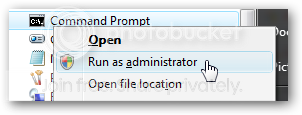
First you’ll need to open a command prompt in administrator mode by right-clicking and choosing “Run as administrator”

image6.png


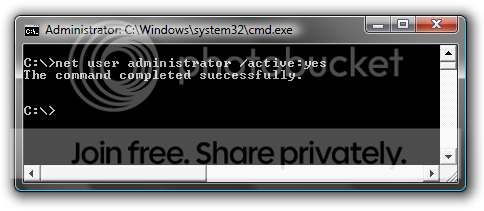
Now type the following command:

net user administrator /active:yes

image7.png

You should see a message that the command completed successfully. Log out, and you’ll now see the Administrator account as a choice. (Note that the screenshots are from Vista, but this works on Windows 7)

image8.png


To reverse it just put active:no in the command line


Hope this helps

Dave
 
Thanks everyone but the problem was that the only active account was a user account with a forgotten password. No access whatsoever to anything else either booting normally or via safe mode. I downloaded a couple of bootable Linux installations which I hoped would help but to no avail. In the end I was pmd re another Linux rescue disc. This allowed me to re-enable the disabled admin account and once done I had admin access to the computer allowing the erant password to be deleted.
 
Back
Top