Windows 10 Anniversary Update

FiestaRed

Suspended / Banned
Messages
1,452
Name
Mike
Edit My Images
Yes
Turned my PC on this morning and, as normal, I hit the Check For Updates button. WOW!

MS has just rolled out the Windows 10 Anniversary Update, I think it's called version 1607. Although I have a reasonably fast PC the download seemed to take forever, a little over 40 minutes for me. Had a quick check through and everything seems to be working as before if not a little faster. Not sure what's new in the update so I'll spend a few minutes on Google to see what has changed.
 
What other hidden items have they bundled in there to spy on us.:):p
 
What other hidden items have they bundled in there to spy on us.
Probably the same or similar to the ones that are installed to your mobile phone.
 
Nothing for me, and when I force it using the updater tool it gets to 23% and rolls-back. So much for using Microsoft Reference Hardware and Signature Build. God and I thought I'd be safe from all the usual fun and games by going down that route :god:
 
I, too, have downloaded the update and it all went smoothly (took about 30 minutes).

However, I did hope to be greeted by this . . .

e73e45a04e3c4ea7f556d3e0aa08fe78-d5eykfe.png


. . . but felt a bit underwhelmed when I hadn't noticed any difference. :D :rolleyes: ;)
 
new start bar, wallpaper on the logon screen, colours look different.

hi

are you on a Pro/Business Edition or something..?

my PC
''...Your device is up to date. Last checked: Today, ‏‎01:06 PM...''
winver = v.1511

screen etc not changed
 
Doing update by going to All Settings. - Check for updates -Learn more then download Anniversary update.
 
Browsing thought Edge browser favourites is so much easier after the update. The few available extensions are a start.
 
It downloaded on my Insider PC yesterday but I'll have to shift wifey from in front of the telly to see what happens on the PC attached to it....
 
I'm getting really annoyed by it. Created an USB stick with the media creation tool and tried it that way. Nope still failing to install the update.

0x80070002 - 0x20007
The installation failed in the SAFE_OS phase with an error during INSTALL_DRIVERS operation.

And helpfully Microsoft has nothing on that error when you click the link. I would have thought that for a reference machine like the Surface Pro 3 this process really doesn't have to be that hard. Really makes me wonder why I bother paying the premium for the privilege of a signature edition machine. Then tried it again as standalone; i.e. no Microsoft dock attached, no external screen, no usb devices, not even my second hard drive. But nope again the same error.

Going through a bitlocker decryption stage now to try it without bitlocker. Failing that a fresh install? I mean really in 2016.

I'm glad to hear others have had a smooth transition but unfortunately on a Microsoft Surface Pro 3, design and build by Microsoft it is turning in a big time wasting exercise. Only saving grace is that the roll back mechanism works really well ;)
 
i feel your pain

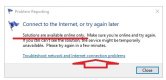
how's this for a Microsoft solution to my internet connection probs this morning..... you couldn't make this up.....:)

connect irony.jpg
 
i guess it depends what sort of internet issue it is. if its a DNS related fault then i know MS bypass DNS lookups for their own services sometimes.

oh, and people still use bitlocker?
 
i guess it depends what sort of internet issue it is. if its a DNS related fault then i know MS bypass DNS lookups for their own services sometimes.

oh, and people still use bitlocker?
Why not? It is foundation grade level approved for secure encryption. That is a pretty darn good standard.
https://www.cesg.gov.uk/guidance/end-user-devices-security-guidance-windows-10

Finally found something that did the trick;
https://blogs.technet.microsoft.com...hen-upgrading-from-windows-10-10074-to-10122/

I'm upgraded now.
 
Last edited:
This update disables use of some local goup policy objects in the Pro version.
They still appear but have no effect.
The policies effected seem to be those that report to Microsoft, control MS Updates and third party updates via MS Update etc.
 
I have got rid of this new update as it was causing me problems.
 
I very much like the new Tab pinning feature in Edge.
 
I now realise why my update took so long yesterday, it did not complete. When I turned my PC on this morning, I got the same update messages as I did yesterday, the PC needs to be restarted to install updates ETC. I tried everything again and this time I got a message telling me the update did not complete.

I now get the error message 0x8007001f which refers to Windows Media Encoder and a Video Capture Card, neither of which I don't think I have on my system.
 
Last edited:
It downloads and installed yesterday. Now I'm a a huge win 10 fan but this turned my ultra fast pc (4790k@4.8ghz, 16gb ram, all ssd, 1080gpu) into a PC that took sometimes over a minute to flick between explorer menu items! Rolled back and the speed returned!
 
It downloads and installed yesterday. Now I'm a a huge win 10 fan but this turned my ultra fast pc (4790k@4.8ghz, 16gb ram, all ssd, 1080gpu) into a PC that took sometimes over a minute to flick between explorer menu items! Rolled back and the speed returned!
That is what i found as well.:eek:
 
Haven't seen it crop up on my machine yet but don't want it slowing down ... how to stop it updating?
 
Haven't seen it crop up on my machine yet but don't want it slowing down ... how to stop it updating?

To be fair, it doesn't do this on all machines. I updated my Dell laptop and my old desktop yesterday/Friday and if anything they are (very marginally) snappier if anything. YMMV

Anthony.
 
To be fair, it doesn't do this on all machines. I updated my Dell laptop and my old desktop yesterday/Friday and if anything they are (very marginally) snappier if anything. YMMV

Anthony.
I'm sure that's the case it's just very strange! Tbh not 'having' to have Cortana is a fantastic reason not to upgrade;)
 
It downloads and installed yesterday. Now I'm a a huge win 10 fan but this turned my ultra fast pc (4790k@4.8ghz, 16gb ram, all ssd, 1080gpu) into a PC that took sometimes over a minute to flick between explorer menu items! Rolled back and the speed returned!
Sounds like it is trying to find some integrated explorer components, possibly on the network it if is in explorer. I would have suggested to investigate the log files and check what it waiting for. Installing a new OS may require re-entry of various credentials.
 
I haven't hear a word from her yet. She's less introduce than my wife and children ;)
 
By the way, for those with a broken Logitech webcam because of the recent Windows 10 anniversary download (such as in my case as I have the C920), the latest update now fixes it. Apparently it restores a H264 video codec needed for taking photos and videos using the Logitech webcam driver.

Just thought I'd let you know. :banana:
 
I've had to roll it back. Damm thing won't find my printer now and nothing on the Epson site is of any help. Granted the printer is a POS at the best of times, but it's not the point!
 
Not after the update...

That kinda depends on which version of W10 you have. If you're running a Pro version then she can be silenced in the Group Policies area but on Home versions it's a bit more difficult.

There are a few threads on Tenforums about it post-anniversary update.
 
Back
Top