

You are using an out of date browser. It may not display this or other websites correctly.
You should upgrade or use an alternative browser.
You should upgrade or use an alternative browser.
Widows update failed
- Thread starter Cobra
- Start date


Craigus
Suspended / Banned
- Messages
- 1,562
- Name
- Craig
- Edit My Images
- Yes
I don't know anything specifically about this update code, but I was having all kinds of trouble with my Windows 7 updates not installing. Some googling seemed to indicate it was a very common issue. I did overcome it but can't remember how now I'm afraid.
No desire to upgrade to Win 10? It is pretty stable now and can be done for free still if you are clever about it.
No desire to upgrade to Win 10? It is pretty stable now and can be done for free still if you are clever about it.
OP

- Messages
- 114,434
- Name
- The real Chris
- Edit My Images
- No
Its the only one that doesn't up date, I get a few every week that go through OK.Some googling seemed to indicate it was a very common issue.
I even tried the NVIDIA site, to search for my product and install the current drivers.
That told me I needed to install JAVA to complete the action.
Java is installed and up to date, so that's obviously another issue.
I'm happy with 7 but realise that when I do finally get around to buying a new desk top that I'll have no chioce.No desire to upgrade to Win 10?

OP
- Messages
- 114,434
- Name
- The real Chris
- Edit My Images
- No
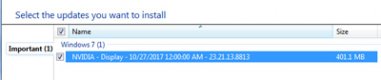
Thanks for that, I got no where when I tried to search.A quick search says the code is because the update is for a hardware driver that is already installed, or a lesser version of the one installed ...
All I know is what is shown above, NVIDIA display I wouldn't know how to disable updates, I'm a total dinosaur where computers are concerned.can you find out what driver it is for and disable updates for it?

Snapsh0t
Suspended / Banned
- Messages
- 2,709
- Name
- Jonathan
- Edit My Images
- No
Okay, lets see if this helps.
Click on Start then click on Control Panel.
Click on Windows Update then click on 'Change settings'.
Use the drop-down box under 'Important updates' to select 'Check for updates but let me cock it up myself'. (ish )
)
Click on 'OK'.
The next time updates arrive, they won't install automatically so you'll get a chance to look at them. If there's one with NVIDIA in the name, right-click on it and select 'Hide'.
That should get it out of the way until a later version is released. There's another step that might be needed but it means stopping services so a folder inside the Windows folder can be deleted so we won't think about that until it's really necessary.
MS screwed something fairly thoroughly in W7 updates last year that stopped PCs installing any updates and meant deleting the Windows\Software Distribution folder to fix it. I had to do it on both my remaining W7 PCs and my brother-out-law had to operate on his and my sister's to get them updating again.
Click on Start then click on Control Panel.
Click on Windows Update then click on 'Change settings'.
Use the drop-down box under 'Important updates' to select 'Check for updates but let me cock it up myself'. (ish
)Click on 'OK'.
The next time updates arrive, they won't install automatically so you'll get a chance to look at them. If there's one with NVIDIA in the name, right-click on it and select 'Hide'.
That should get it out of the way until a later version is released. There's another step that might be needed but it means stopping services so a folder inside the Windows folder can be deleted so we won't think about that until it's really necessary.
MS screwed something fairly thoroughly in W7 updates last year that stopped PCs installing any updates and meant deleting the Windows\Software Distribution folder to fix it. I had to do it on both my remaining W7 PCs and my brother-out-law had to operate on his and my sister's to get them updating again.
Last edited:
OP
- Messages
- 114,434
- Name
- The real Chris
- Edit My Images
- No
Well that's bloody curious.
I couldn't get NV to to a smart scan without JAVA, It now transpires that Neither Opera or the Latest Firefox support JAVA.
So from the depths ne' bowls of the PC I found IE, that actually had been sneakily up dating itself. And in fact is up to date!
Try again,
Open IE
down load JAVA check
Run Smart scan Check
Driver found and installed check...
Lets see what up date makes of that now...
I couldn't get NV to to a smart scan without JAVA, It now transpires that Neither Opera or the Latest Firefox support JAVA.
So from the depths ne' bowls of the PC I found IE, that actually had been sneakily up dating itself. And in fact is up to date!
Try again,
Open IE
down load JAVA check
Run Smart scan Check
Driver found and installed check...
Lets see what up date makes of that now...
OP
- Messages
- 114,434
- Name
- The real Chris
- Edit My Images
- No
Thanks for that I'm giving it a shot now.Okay, lets see if this helps.

OP
- Messages
- 114,434
- Name
- The real Chris
- Edit My Images
- No
Just tried to download the update and it failed, so did the "hide" thing.That should get it out of the way until a later version is released.
Actually NV comes with its own updater so hopefully all sorted

RIR
Suspended / Banned
- Messages
- 1,311
- Name
- Robert
- Edit My Images
- Yes
OP
- Messages
- 114,434
- Name
- The real Chris
- Edit My Images
- No
Excellent thanks it did find 4 problems and tells me they are now fixed ..
OP
- Messages
- 114,434
- Name
- The real Chris
- Edit My Images
- No
Thanks, that's a great tipMS updates are always a bit glitchy for certain hardware, it is best to hide them and only update from the maker of the hardware in question.

Box Brownie
Suspended / Banned
- Messages
- 17,645
- Edit My Images
- No
I don't know anything specifically about this update code, but I was having all kinds of trouble with my Windows 7 updates not installing. Some googling seemed to indicate it was a very common issue. I did overcome it but can't remember how now I'm afraid.
No desire to upgrade to Win 10? It is pretty stable now and can be done for free still if you are clever about it.
+1 ^ to this
There is an old thread of mine sometime back where W7 was misbehaving with its updates

Finally bit the bullet and went the (belated) free W10 upgrade route.......so far been aok.
FWIW my OS was W7 Pro 64 bit and the W10 is the Pro 64 bit version.

Box Brownie
Suspended / Banned
- Messages
- 17,645
- Edit My Images
- No

the black fox
Suspended / Banned
- Messages
- 17,082
- Name
- Jeff
- Edit My Images
- No
as per the title muppet ,try scottish widows there might be a Mac alternative 
OP
- Messages
- 114,434
- Name
- The real Chris
- Edit My Images
- No
Not until I absolutely have toupdate to windows 10 you dino

I'm still in mourning over XP
b****r!@Cobra just noticed the typo in the subject title.........

I do, they have my pension interests at heart, I doubt they'd be much use with the PC problems though, but I guess I could phone them and ask?try scottish widows

Giblets
Suspended / Banned
- Messages
- 611
- Name
- Peter
- Edit My Images
- Yes
Based on this thread I have just tried to update my Nvidia drivers using Windows Update which duly failed. Then downloaded GeForce Experience https://www.geforce.co.uk/geforce-experience/download and the new driver was automatically found and updated.
@Snapsh0t thanks for the tip about hiding the updates. I have just hidden 32 language updates that have been sitting in the non-important section for a long time.
@Snapsh0t thanks for the tip about hiding the updates. I have just hidden 32 language updates that have been sitting in the non-important section for a long time.
OP
- Messages
- 114,434
- Name
- The real Chris
- Edit My Images
- No
Glad its not just me thenI have just tried to update my Nvidia drivers using Windows Update which duly failed.

- Messages
- 6,283
- Name
- Chaz
- Edit My Images
- Yes
I cant understand why anyone would not go from Win 7 to 10 Win 10 was the best out it took the best from win 7 mixed it with win 8 dropping much that was bad in 8 and came out with what I have been using and not had any problems at all. Its work like 7 on the surface but much faster and smother.
I dont understand why there are some who put about such bad comments about 10, I think it's guys who love things like Lynex or are just against Windows
I dont understand why there are some who put about such bad comments about 10, I think it's guys who love things like Lynex or are just against Windows
OP
- Messages
- 114,434
- Name
- The real Chris
- Edit My Images
- No
There was a hell of a lot of posts about issues of W10 when it was released as a freebie, ( from windows users) of course there were some positive posts too, but on balanceI dont understand why there are some who put about such bad comments about 10,
I preferred to stay with what I know works
And as my little issue has been sorted thanks to various inputs in the thread.
I shall continue to use 7 until either I or my PC dies ( which ever comes soonest)

OP
- Messages
- 114,434
- Name
- The real Chris
- Edit My Images
- No
Totally agree with that, its almost a daily occurrence ....Theres so many windows updates these days its ridiculous.