Which HDR software?

redmonkee

Suspended / Banned
Messages
2,653
Name
PHILIP
Edit My Images
No
Hi guys just wondered what software you recommend for processing HDR shots?

I'm thinking of upgrading Adobe CS3 to CS5 for the new HDR pro feature as i've read good things about the new remove ghosts feature and just the general all round improvement over the previous HDR capabilities of CS4.

However I've also read great things about Photomatrix.

The advantage of Photomatrix would be it is cheaper to buy than the CS5 upgrade, but the CS5 would give me the benefits of all the other cool features of photoshop alongside HDR capabilities.

Any thoughts and advice greatly appreciated :)
 
Personally I much prefere Photomatix, Photoshop has improved it's HDR but IMHO it' could be a lot better.
It might be worth checking out Oleano (haven't used it myself but I'm hearing good things) and Nik HDR Effx pro (although I failed to get it to work properly on 3 different computers) but it seems to work for some.
At the moment I'm experimenting with a hdr script for image blending, it gives a very natural look, and doesn't use a lot of resources, so far the results look promising.
 
In my limited experience of HDR I find that CS5 does a better job of combining the images but Photomatix is better at the tone mapping.
 
I have found the PS CS5 doesn't seem to produce very sharp HDR images - I going to try the Photomatix trial to seem if it is better in that respect.

Anybody else have comments re "sharpness"?

Mel
 
HDR Effex is very controllable and integrates well with Photoshop
 
I have found the PS CS5 doesn't seem to produce very sharp HDR images - I going to try the Photomatix trial to seem if it is better in that respect.

Anybody else have comments re "sharpness"?

Mel

From what I've read once you've done the hdr processing you then need to do more regular photoshop work to get the images looking their best.
 
Wow cheers for all the replies guys.
I've downloaded CS5 and Photomatix trial versions to see which one I prefer the trouble is I dont have any bracketed landscape shots to put through them.

I know this is a big ask but has anyone got 3 bracketed shots I could use for the demo versions just to see which software does the better job.
 
You can just change the exposure or levels in one frame to get an idea.
- save as three images.
 
You can just change the exposure or levels in one frame to get an idea.
- save as three images.

yeah i tried this but the files I have dont lend themselves to HDR treatment as I try to avoid high contrast scenes for the very reason I end up blowing out the highlights etc.

Anyway Neil has just pm'd me a link full of bracketed raw images so i'll have a play and see how I get on :)
 
Like everyone else has said photomatix

After reading many many blogs on the subject everyone seems to agree that photomatix is the standard
 
Ive only just become interested in HDR. I always thought LR did a good job of getting close but i happened to find that PSCS5 had the option to do this so gave it a go. I then tried Photomatix pro yesterday and the two things that sold it to me was the LR plug-in, as im in LR99% of the time and dont really use PS, the the tone mapping from one image.

Although its not cheap there was a copy going for £20 on ebay yesterday. All i got was the serial, and im not 100% its legit but it works so im happy..

There seems a lot to learn but im going to put the time in, ive seen so many fantastic images and i'd love to be able to get mine looking that good.

As there are some experts here i have a basic question. I know you should do some PP on the final image once its been produced, but what should you not do before this?
I know to put the sharpness set to 0, but am i right in thinking i shouldn't really do any exposure type of PP on the images (raw files).

Thanks, sorry if im hijacking the thread.
 
As there are some experts here i have a basic question. I know you should do some PP on the final image once its been produced, but what should you not do before this?
I know to put the sharpness set to 0, but am i right in thinking i shouldn't really do any exposure type of PP on the images (raw files).

Some people argue that the best time for noise reduction is on the original images before running them through photomatix but unless it's a really noisy photo which you then wanted to print onto huge canvas or something I wouldn't bother.

I personally don't do anything to my files before running through photomatix apart from ocassionally using photoshop to align them if I don't trust photomatix to get it right.

Hope this helps a bit :)
 
Thanks Rich, very helpful.

I dont have much noise in my images but the HDR process seems to bring it out more, depending on the effect im after or settings used of course. Once the final image is back in LR its a lot harder to remove.
I dont use PS unless i have to, and everything goes through LR first and last so ill have to get used to not tweaking too much before i export to Photomatix.

Its early days though and i have a lot to learn.
 
My only advice is to go a bit mental with the processing to begin with, in my opinion its the only way you properly get to understand that actually less is more when it comes to HDR.

I really enjoy looking back on some of my older HDR shots and working out what I'd do differently if I processed it again. If I can find the original brackets sometimes I even do.

Photomatix is also the first step of HDR, I'm usually in and out of photomatix within 15mins, but can spend anything upto 3 hours editing it in photoshop if it's complicated.
 
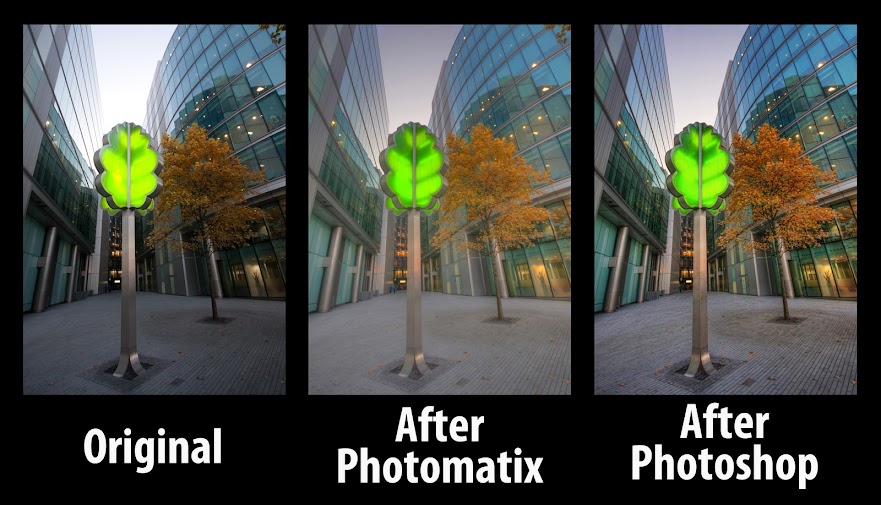
This is a shot of mine showing the original image, after photomatix image and then after photoshop image. Thought you might be interested to see what a big difference post processing makes after tonemapping in photomatix.

TreeAll.jpg
 
Thanks again Rich, nice bit of editing.
I would always do a bit of PP in LR after Photomatix and i like exporting to flickr from LR rather than directly (saves having redundant files on the PC).

This was one of my first efforts with Photomatix. Like i say, ive still got a lot to learn.


OXO Tower HDR by dave_bass5, on Flickr
 
This is a shot of mine showing the original image, after photomatix image and then after photoshop image. Thought you might be interested to see what a big difference post processing makes after tonemapping in photomatix.

TreeAll.jpg

To me Photoshop looks the better HDR of this shot. More contrast in the buildings than the Photomatix version and slightly better sky.
 
You misunderstand (I think!) - it's a three stage example.
 
I have both and for me it's photomatix hands down!!!
 
Back
Top