DaelpixPhotography
Suspended / Banned
- Messages
- 1,801
- Name
- David
- Edit My Images
- No
That's expensive if you don't mind me saying so. Can be got at times for £79.00 on Amazon and £49.00 at other times. To answer your question.. you go onto your account to page that you set up for the trial version and enter it in there.My trial version of,
Creative Cloud Photography Plan 1TB: Photoshop + Lightroom
will end in 3 days. If I buy THIS from Amazon, where do I insert the code?
Thanks

That’s expensive as it’s the 1TB storage version rather than the standard 20GB Lightroom/photoshop versionThat's expensive if you don't mind me saying so. Can be got at times for £79.00 on Amazon and £49.00 at other times. To answer your question.. you go onto your account to page that you set up for the trial version and enter it in there.
The cheaper prices are for the 20Gb version - which is currently £119.99.That's expensive if you don't mind me saying so. Can be got at times for £79.00 on Amazon and £49.00 at other times. To answer your question.. you go onto your account to page that you set up for the trial version and enter it in there.
That’s expensive as it’s the 1TB storage version rather than the standard 20GB Lightroom/photoshop version
@Dael_Pix the usual price for the 20GB version is £119.99 but it goes on offer a few times a year. During the recent prime day it was £72.99. There was a £40ish sale last year but it was short lived. Most of the time the sale price is £70-80. Next sale will likely be Black Friday. I’ve never seen the 1TB version at sale price.
I thought I’d check you definitely know which version you want as there is a Lightroom only with1TB version that doesn’t include photoshop and two version of Lightroom with photoshop which have 20GB and 1TB storage.
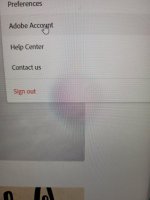
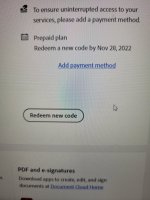
To enter a new code:
1. Login to your Adobe account
2. click on the blue circle top right
3. click view account
4. Scroll down and click on redeem new code.
The code should give you 12 months subscription so you need to buy another in a years time.
That’s expensive as it’s the 1TB storage version rather than the standard 20GB Lightroom/photoshop version
@Dael_Pix the usual price for the 20GB version is £119.99 but it goes on offer a few times a year. During the recent prime day it was £72.99. There was a £40ish sale last year but it was short lived. Most of the time the sale price is £70-80. Next sale will likely be Black Friday. I’ve never seen the 1TB version at sale price.
I thought I’d check you definitely know which version you want as there is a Lightroom only with1TB version that doesn’t include photoshop and two version of Lightroom with photoshop which have 20GB and 1TB storage.
To enter a new code:
1. Login to your Adobe account
2. click on the blue circle top right
3. click view account
4. Scroll down and click on redeem new code.
The code should give you 12 months subscription so you need to buy another in a years time.

The cheaper prices are for the 20Gb version - which is currently £119.99.
I would suggest at the moment you actually sign up with Adobe - it will be the same annual cost as the Amazon 1yr bundle, but spread over 12 months.
During those 12 months, keep a watch on the Amazon price - as John said they do drop it in price from time to time (Black Friday week is the next likely time for a discount version).
You can then buy the 1yr discounted bundle, and apply the code - at which point, Adobe will simply give you 12 months credit, and stop taking monthly payments until the credit expires.
So (for example), sign up now, you'd pay 4 monthly payments (taking you to November), then get a 1 yr discounted bundle (I'd guess ~£140), and pay nothing more until December 2023...
No, don't buy the Amazon bundle at this point - go direct with Adobe for a monthly subscription;So you're saying I should pay for the full price, and then when a Sale comes, I should buy that, and insert the code to credit me back?
I need the Lr and Ps version.
I still don't see the 'redeem new code' option
Edit: Do you insert code via this link? (I searched for it on Google)
So you're saying I should pay for the full price, and then when a Sale comes, I should buy that, and insert the code to credit me back?
I need the Lr and Ps version.
I still don't see the 'redeem new code' option
Edit: Do you insert code via this link? (I searched for it on Google)
So you're saying I should pay for the full price, and then when a Sale comes, I should buy that, and insert the code to credit me back?
And enter your code here.I need the Lr and Ps version.
I still don't see the 'redeem new code' option
Edit: Do you insert code via this link? (I searched for it on Google)
So you're saying I should pay for the full price, and then when a Sale comes, I should buy that, and insert the code to credit me back?
I've changed to the Photography Plan 20GB. I only chose the 1TB
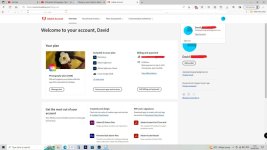
This is only what I see. There is no option for 'redeem new code'
I've tweeted AdobeNot too sure tbh
They didn't help much.I've tweeted Adobe
Click on ‘view account’ under your name top right (step 3) . Then on the next page scroll down to ‘redeem new code (step 4).I've changed to the Photography Plan 20GB. I only chose the 1TB because I'm having difficulty with storage on my computer. I've used 681GB up of a 1TB SSD (This comprises of .CR2 and .MP4 files. (Always backed up on an external drive). But having said this I can't delete the .CR2 files off my SSD.
Anyway, I'll wait for another sale to come along, and buy it.
This is only what I see. There is no option for 'redeem new code'
View attachment 362672
The page I'm on is what I see when I click on 'View Account'.Click on ‘view account’ under your name top right (step 3) . Then on the next page scroll down to ‘redeem new code (step 4).
I’m doing it on a phone so the mobile version of the website may be slightly different.
My redemption codes have been 24 letters/numbersThey didn't help much.
So the link I posted in #6 was correct?
And it's a 6 letter/number code?