

Hi all , just wondered if anyone has a sensible or realistic solution . I been doing semi serious wildlife Photography for the last ten plus years at least . I have amounted thousands of images which I have kind of catalogued so not a total loss to start with . The thing is even out of all those thousands of images that I didn`t delete already , there is only realistically going to be be a limited amount that are worth messing with further . Is there any real solution to weeding out the best relatively quickly ? I find I often have to be in the mood , so it`s keeping note of where I am up to can be a problem . Do I work from the beginning , or start from now and work backwards and try and keep up to date with it....doubtful . I really don`t like the idea of some of my images just being forgotten , which is what will happen eventually if I don`t do something . Like most , I would rather be taking pictures than sorting and editing I guess .
You are using an out of date browser. It may not display this or other websites correctly.
You should upgrade or use an alternative browser.
You should upgrade or use an alternative browser.
Where do I start ...again .
- Thread starter Lepus
- Start date

Bristolian
Suspended / Banned
- Messages
- 4,428
- Name
- Steve
- Edit My Images
- Yes
Hi Lepus,
I think I know how you feel - I'll go out shooting images at the drop of a hat but I often don't get around to doing anything with them for a week (or more). I have to be in the mood, so to speak. Until I get around to editing a shoot I keep the original images (SooC, NEF files) in date stamped folders in one particular place on my PC (with a separate backup copy elsewhere). When dealing with the backlog I normally start at the oldest folder and work forwards but sometimes I will pick a folder that I think has images worth working on and do that one first.
I'm pretty sure that once I have gone all of my images will be lost/deleted/whatever as no-one else in my family has any interest in them
I think I know how you feel - I'll go out shooting images at the drop of a hat but I often don't get around to doing anything with them for a week (or more). I have to be in the mood, so to speak. Until I get around to editing a shoot I keep the original images (SooC, NEF files) in date stamped folders in one particular place on my PC (with a separate backup copy elsewhere). When dealing with the backlog I normally start at the oldest folder and work forwards but sometimes I will pick a folder that I think has images worth working on and do that one first.
I'm pretty sure that once I have gone all of my images will be lost/deleted/whatever as no-one else in my family has any interest in them

TimHughes
Suspended / Banned
- Messages
- 3,655
- Name
- Tim
- Edit My Images
- Yes
To clarify - have you kept every image from all the cards, or already culled and looking to cull further?
If you’ve kept every image then is one option to delete the originals and keep only the final pictures? Or final pictures and the original copy from the card?
If you want to cull from the final pictures, consolidate those and re-rate them?
If you’ve kept every image then is one option to delete the originals and keep only the final pictures? Or final pictures and the original copy from the card?
If you want to cull from the final pictures, consolidate those and re-rate them?
Thanks for the replies , these are all double backed up on around 20 hard rives , I have culled as you call it most of the soft focus , or bad beyond saving composed pics ect . It still runs into thousands of images . Realistically there is no option I guess but to look through them all and cull them down to the best of`s , but it feels an impossible task .

Harlequin565
Suspended / Banned
- Messages
- 8,684
- Name
- Ian
- Edit My Images
- No
Do you use Lightroom? (If not, no point reading further - although you could download the trial and do it in the trial period!)
If you do, bung everything in a big catalogue (if it isn't in one already) then use smart collections to make that huge job more piecemeal.
1. Create a smart collection with a filter that is "doesn't have" and then whatever your keeper flag will be. It could be a green label, or a star, or a keyword of "keeper". This is your list of images that haven't been looked at yet. Your "to do" list.
2. Set a filter to "hide rejected images"
Start to go through your images.
If you want to keep the photo, give it the keeper rating (star, green label, keyword etc). It will be removed from the smart collection.
If you want to reject the photo, press "x" to reject it. The filter you created in the second step should remove it from the grid. It's still in Lightroom (and the collection), it's just hidden by the filter.
When you get bored and want to finish for the night, come out of the smart collection and pull up all the rejected images. (I have a filter for "show rejected" to make this easy)
Either...
a) delete them from LR & disk. They're gone.
b) delete them from LR only. They'll remain on disk and you can re-add them in the future if you're worried about deleting something now you might want later. If you do this, it's worth giving all the images a "rejected" keyword and saving it back to the raw file/jpeg (CTRL+S) before deleting from the catalogue. That way, if you re-import them again, you can quickly find them with a filter against the "rejected" keyword.
Once this is done, you're left with a smart collection containing all the photos you haven't looked at yet. Your "keepers" will all have a way to identify them, and the ones you rejected will either be flagged as rejected (with the "x" key) or won't be in the catalogue.
This method allows you to do a hundred or so a night, or half a dozen here & there and the smart collection will just track your progress. It makes the job much less daunting.
I used this process for keywording all my images when I decided to do it properly (and was also outfaced by the enormity of it). It allowed me to tackle the job in bite sized chunks and continues today to remind me what I still have to keyword.
e.g.
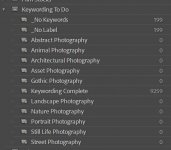
Damn... it got up to 200...
If you do, bung everything in a big catalogue (if it isn't in one already) then use smart collections to make that huge job more piecemeal.
1. Create a smart collection with a filter that is "doesn't have" and then whatever your keeper flag will be. It could be a green label, or a star, or a keyword of "keeper". This is your list of images that haven't been looked at yet. Your "to do" list.
2. Set a filter to "hide rejected images"
Start to go through your images.
If you want to keep the photo, give it the keeper rating (star, green label, keyword etc). It will be removed from the smart collection.
If you want to reject the photo, press "x" to reject it. The filter you created in the second step should remove it from the grid. It's still in Lightroom (and the collection), it's just hidden by the filter.
When you get bored and want to finish for the night, come out of the smart collection and pull up all the rejected images. (I have a filter for "show rejected" to make this easy)
Either...
a) delete them from LR & disk. They're gone.
b) delete them from LR only. They'll remain on disk and you can re-add them in the future if you're worried about deleting something now you might want later. If you do this, it's worth giving all the images a "rejected" keyword and saving it back to the raw file/jpeg (CTRL+S) before deleting from the catalogue. That way, if you re-import them again, you can quickly find them with a filter against the "rejected" keyword.
Once this is done, you're left with a smart collection containing all the photos you haven't looked at yet. Your "keepers" will all have a way to identify them, and the ones you rejected will either be flagged as rejected (with the "x" key) or won't be in the catalogue.
This method allows you to do a hundred or so a night, or half a dozen here & there and the smart collection will just track your progress. It makes the job much less daunting.
I used this process for keywording all my images when I decided to do it properly (and was also outfaced by the enormity of it). It allowed me to tackle the job in bite sized chunks and continues today to remind me what I still have to keyword.
e.g.
Damn... it got up to 200...

Craikeybaby
Suspended / Banned
- Messages
- 7,590
- Name
- Lewis
- Edit My Images
- Yes
As above, I use smart collections, and stars/colour labels to organise my images in Lightroom. I start the very best images **** or ***** and add a colour tag to any image that I export.
Then I have a smart collection to find look out for any images that are over 1 year old, without a star rating or colour tag, then either process them or delete them, on the basis that if I haven't used them in a year I'm not going to bother...
Then I have a smart collection to find look out for any images that are over 1 year old, without a star rating or colour tag, then either process them or delete them, on the basis that if I haven't used them in a year I'm not going to bother...


wornish
Suspended / Banned
- Messages
- 2,088
- Name
- David
- Edit My Images
- Yes
+1 for what @Harlequin565 posted.
First, make sure you are in the right mood.
Then be brutally honest in your judging.
Have a nights sleep before hitting the final delete forever key.
I don't see any point in keeping images that no one else will be interested in.
Even worse keeping them as large RAW files that just consume gigabytes of storage. IMVHO.
First, make sure you are in the right mood.
Then be brutally honest in your judging.
Have a nights sleep before hitting the final delete forever key.
I don't see any point in keeping images that no one else will be interested in.
Even worse keeping them as large RAW files that just consume gigabytes of storage. IMVHO.
Last edited:

Dave Canon
Suspended / Banned
- Messages
- 1,980
- Name
- David
- Edit My Images
- No
Managing your photographs required self discipline. You do not have to do what I do but I use Lightroom and on return from a shoot within a few few days I will make time to upload the images from my camera or card to LR. The LR imports is set to automatically make a copy of the images to my NAS. I then use the features of LR Library to decide which images I do not wish to keep and will then rate the images using the 1to 5* . For me 5* means a potential competition success (I do not get too many of these); 4* I give to all images I wish to process so may have some potential; 3* I give to all other images that I do not delete. So consider all those deleted would have have had 1 or 2* on my system. I use the Survey mode and comparison mode to assist the selection. When deleting I mark for delete so I can just quickly check though these images to be sure but almost never reprieve an image so they are then removed from the LR catalogue and deleted form the disk. If I have made a mistake, no matter, as I keep the NAS back up for 3 month or so. I then colour code all the kept images (Blue). This is helpful because I know Blue images have not been processed at all. Once the Raw images are edited I change the colour coding to Red. Any finally edited images (normally TIFF) are colour coded Green. All of the Blue images are initially given keywords from my list. This can be done as selections, so can be very quick. I may edit the images some time later but I will always know which have been processed. I do sometimes change the rating usually down when the image did not have the potential I had hoped for but occasionally I do increase the rating.
This system allows me to easily determine which images still need editing and find images for say a competition by a search. For instance in April, I will enter 2 images in our monthly club on-line club competition and we have a different genre each month. For April it is Street photography and "Street" is one of my Keywords. So in LR search I can select the entire catalogue of 30,000 images and set Keyword=Street, selecting only 4*, Green images. In this case the images have to have been taken in 2020, 2021 or 2022 this can also be set. The search takes a fraction of a second with LR and, if I am lucky, I may have selection of more than 2 images to choose from.
Dave
This system allows me to easily determine which images still need editing and find images for say a competition by a search. For instance in April, I will enter 2 images in our monthly club on-line club competition and we have a different genre each month. For April it is Street photography and "Street" is one of my Keywords. So in LR search I can select the entire catalogue of 30,000 images and set Keyword=Street, selecting only 4*, Green images. In this case the images have to have been taken in 2020, 2021 or 2022 this can also be set. The search takes a fraction of a second with LR and, if I am lucky, I may have selection of more than 2 images to choose from.
Dave

tikkathreebarrel
Suspended / Banned
- Messages
- 2,150
- Edit My Images
- Yes
Thanks for the replies , these are all double backed up on around 20 hard rives , I have culled as you call it most of the soft focus , or bad beyond saving composed pics ect . It still runs into thousands of images . Realistically there is no option I guess but to look through them all and cull them down to the best of`s , but it feels an impossible task .
The option you're not mentioning is to start again. Leave the rest where they are or delete the lot. Be ruthless.
wornish
Suspended / Banned
- Messages
- 2,088
- Name
- David
- Edit My Images
- Yes
You could have your images judged by AI. Just don't blame me if you don't score as high as you thought you would.
Take a look here.
https://www.everypixel.com/aesthetics
Take a look here.
https://www.everypixel.com/aesthetics
I’ve not seen that before so I thought, “why not?” selected one of my shots, the screen rotated, as it does, and after a while came back the message,”your image has 0% chance of being awesome!” Well, that’s me put in my place good and proper!You could have your images judged by AI. Just don't blame me if you don't score as high as you thought you would.
Take a look here.
https://www.everypixel.com/aesthetics

Markk
Suspended / Banned
- Messages
- 728
- Name
- Mark
- Edit My Images
- Yes
Omg, what a bummer. I also put in a few. A heron, a motorcycle, RC car...best was 6.8%.I’ve not seen that before so I thought, “why not?” selected one of my shots, the screen rotated, as it does, and after a while came back the message,”your image has 0% chance of being awesome!” Well, that’s me put in my place good and proper!
But a portrait of 'caucasian ethnicity' brought it up to 21.5% lol
...but a bearded white male with glasses in black in white is 89.4%!!!

Ed Sutton
Suspended / Banned
- Messages
- 8,556
- Name
- Dave
- Edit My Images
- No
I managed to get an awsomensess score of 0% for one photo.Omg, what a bummer. I also put in a few. A heron, a motorcycle, RC car...best was 6.8%.
But a portrait of 'caucasian ethnicity' brought it up to 21.5% lol
...but a bearded white male with glasses in black in white is 89.4%!!!

Markk
Suspended / Banned
- Messages
- 728
- Name
- Mark
- Edit My Images
- Yes
Lol. Had a few of those...like a photo from my newborn session.I managed to get an awsomensess score of 0% for one photo.
TimHughes
Suspended / Banned
- Messages
- 3,655
- Name
- Tim
- Edit My Images
- Yes
haha that is fun, last week's selections have 20-30% chance of being awesome apparentlyYou could have your images judged by AI. Just don't blame me if you don't score as high as you thought you would.
Take a look here.
https://www.everypixel.com/aesthetics

- Messages
- 4,870
- Edit My Images
- Yes
Ha! 3.9% chance, on a photo that is quite graphic in style, and very much liked.You could have your images judged by AI. Just don't blame me if you don't score as high as you thought you would.
Take a look here.
https://www.everypixel.com/aesthetics
then 93.6% for a night shot.
wornish
Suspended / Banned
- Messages
- 2,088
- Name
- David
- Edit My Images
- Yes
Wow! That's a very high score. My best so far is 65%.The algorithm seems to like black and white portraits, I'm getting 90% for the latest

Kell
Suspended / Banned
- Messages
- 5,130
- Name
- Kell
- Edit My Images
- Yes
Can you 'chunk' them up before you start?
For example, make your first task putting them in folders by date.
The way I store mine are:
Year.month.subject (or month name)
so anything I take this month will go in a folder named
2022.02.Feb
If I make a special trip (or take photos for the TP52) it might be something like
2022.02.TP52_Bottle
It makes it easy to see when looking through folders which are which.
But in your case it might just make the process more manageable. you can then tackle one folder at a time. Doesn't have to be by month, you could put the first 200 in a folder for example and do it that way.
Just breaking it down will make it not seem so daunting.
For example, make your first task putting them in folders by date.
The way I store mine are:
Year.month.subject (or month name)
so anything I take this month will go in a folder named
2022.02.Feb
If I make a special trip (or take photos for the TP52) it might be something like
2022.02.TP52_Bottle
It makes it easy to see when looking through folders which are which.
But in your case it might just make the process more manageable. you can then tackle one folder at a time. Doesn't have to be by month, you could put the first 200 in a folder for example and do it that way.
Just breaking it down will make it not seem so daunting.
Dave Canon
Suspended / Banned
- Messages
- 1,980
- Name
- David
- Edit My Images
- No
I decided to try this AI App. My son used to give me useful critiques but he left home years ago. I do not think that this App will be useful. I fed it several of my successful award winning shots and the scores ranged from 0.0% to 96.3%. I then chose a few less successful images and the scores were a similar range. A recent shot of a M/Cycle racing crash won me an award in Toronto recently but the App only gave it 0.9%. It was a bit of fun playing with it but no practical use for me.
Dave
Dave
wornish
Suspended / Banned
- Messages
- 2,088
- Name
- David
- Edit My Images
- Yes
I think it was meant to be experimental, a bit tongue in cheek and not taken too seriously.I decided to try this AI App. My son used to give me useful critiques but he left home years ago. I do not think that this App will be useful. I fed it several of my successful award winning shots and the scores ranged from 0.0% to 96.3%. I then chose a few less successful images and the scores were a similar range. A recent shot of a M/Cycle racing crash won me an award in Toronto recently but the App only gave it 0.9%. It was a bit of fun playing with it but no practical use for me.
Dave
How an AI system is trained is key to its usefulness. Recognising something like a face is one thing but trying to assess aesthetics is always going to be subjective. A single picture posted on this site has people who think it's fantastic and people who think the opposite.
TimHughes
Suspended / Banned
- Messages
- 3,655
- Name
- Tim
- Edit My Images
- Yes
I just tried my all-time favorite landscape picture.....0.4%I think it was meant to be experimental, a bit tongue in cheek and not taken too seriously.
How an AI system is trained is key to its usefulness. Recognising something like a face is one thing but trying to assess aesthetics is always going to be subjective. A single picture posted on this site has people who think it's fantastic and people who think the opposite.

It's not quite there for running through an old catalog to make a selection, but maybe the tech will get there soon.
Thanks again for further comments , and the amusing but useless link . I think I am relatively organised and to explain further , all my photos are stored in folders , that have dates , location and subjects in sub folders . some folders might contain ten different subjects . So it might go for example Yorkshire 19-07-20 Bempton - Gannets - Kittiwakes - Guillemots - Razorbills . I then delete all the non runners from these folders , but it still leaves me with thousands of images to pick the best of`s from . Being brutal definitely plays a part in selection .
wornish
Suspended / Banned
- Messages
- 2,088
- Name
- David
- Edit My Images
- Yes
Sorry if I have offended you by posting the "useless link".Thanks again for further comments , and the amusing but useless link . .......
It was simply meant to be a light-hearted comment and maybe a foretaste of what is still to come in future tech.
Last edited:

Bebop
Suspended / Banned
- Messages
- 7,318
- Edit My Images
- No
I ended up buying Photo Mechanic (after ditching Lightroom). It is not cheap, but it is brilliant for speedily browsing through photos and keywording or culling them. You can compare two photos side by side and zoom in and lock the scrolling so you can have a good look around and compare them if you wish. I went through folder by folder. I am still going through sporadically and deleting more. I often shoot sports and wildlife.
A year or so later, I have upgraded to Photo Mechanic Plus which includes cataloguing. This is very handy for example to search across all of my catalogs (I do one per year) for kittiwakes. This would enable me to compare kittiwakes from different folders and years - a functionality which I don't think exists in Photo Mechanic unless they are in the same folder.
(By the way I don't really have many kittiwake photos ha ha!)
A year or so later, I have upgraded to Photo Mechanic Plus which includes cataloguing. This is very handy for example to search across all of my catalogs (I do one per year) for kittiwakes. This would enable me to compare kittiwakes from different folders and years - a functionality which I don't think exists in Photo Mechanic unless they are in the same folder.
(By the way I don't really have many kittiwake photos ha ha!)
Sorry if I sounded grumpy , no not offended at all , it sounds fun . What a time saver it would be if it could be trusted to do a Propper job .Sorry if I have offended you by posting the "useless link".
It was simply meant to be a light-hearted comment and maybe a foretaste of what is still to come in future tech.
Dave Canon
Suspended / Banned
- Messages
- 1,980
- Name
- David
- Edit My Images
- No
It was fun and given that AI is working well in Topaz Plug-ins, it is clear that in time AI software will take your original Raw file and process to produce an excellent output. As for recognising awesome images, we would first have to agree on what an awesome image looks like.Sorry if I have offended you by posting the "useless link".
It was simply meant to be a light-hearted comment and maybe a foretaste of what is still to come in future tech.
Dave
- Messages
- 4,870
- Edit My Images
- Yes
Indeed!
My Awesome Image is your Freedom Fighter, or something like that.
My Awesome Image is your Freedom Fighter, or something like that.
Which is why AI selection of good from bad can never truly work , we would never all agree with it .It was fun and given that AI is working well in Topaz Plug-ins, it is clear that in time AI software will take your original Raw file and process to produce an excellent output. As for recognising awesome images, we would first have to agree on what an awesome image looks like.
Dave

Phil V
Suspended / Banned
- Messages
- 26,303
- Name
- Phil
- Edit My Images
- No
“AI” is a buzzword, and as such it’s typically misattributed still.
I remember a discussion on here a couple of years ago about a fantastic sky swapping app. Apparently it’s success was down to AI.
I asked if it recognised the light falling on the landscape before adding an appropriate sky and was told ‘it doesn’t do that’.
And when I suggested that it wasn’t ‘intelligent’ at all then but just really good at edge detection, the poster threw his teddy out of the pram.
I remember a discussion on here a couple of years ago about a fantastic sky swapping app. Apparently it’s success was down to AI.
I asked if it recognised the light falling on the landscape before adding an appropriate sky and was told ‘it doesn’t do that’.
And when I suggested that it wasn’t ‘intelligent’ at all then but just really good at edge detection, the poster threw his teddy out of the pram.

LCPete
Suspended / Banned
- Messages
- 9,785
- Edit My Images
- Yes
Rather going through and deciding which ones to delete I would make new folders on another drive and start again
You would need to decide on categories for each type of image
Then go through them all in date order and pick the best ones and save to new folders
I wouldn’t delete anything though in case you have a change of mind as storage is relatively cheap nowadays
You would need to decide on categories for each type of image
Then go through them all in date order and pick the best ones and save to new folders
I wouldn’t delete anything though in case you have a change of mind as storage is relatively cheap nowadays

shapeshifter
Suspended / Banned
- Messages
- 1,444
- Edit My Images
- Yes
Just download FastStone it's free. I can cull 600-800 Football pics in 5- 10 mins. Just.. Tag- tap to next pic tag- Tag move to next pic. Then click delete none tagged.Hi all , just wondered if anyone has a sensible or realistic solution . I been doing semi serious wildlife Photography for the last ten plus years at least . I have amounted thousands of images which I have kind of catalogued so not a total loss to start with . The thing is even out of all those thousands of images that I didn`t delete already , there is only realistically going to be be a limited amount that are worth messing with further . Is there any real solution to weeding out the best relatively quickly ? I find I often have to be in the mood , so it`s keeping note of where I am up to can be a problem . Do I work from the beginning , or start from now and work backwards and try and keep up to date with it....doubtful . I really don`t like the idea of some of my images just being forgotten , which is what will happen eventually if I don`t do something . Like most , I would rather be taking pictures than sorting and editing I guess .
Then key word after that if required.
It is lightening fast. You don't use things like Lightroom for culling.
FasStone. https://www.faststone.org/FSViewerDetail.htm All the Top boys use it.
