What's causing this.....

Phil-D

Suspended / Banned
Messages
7,553
Edit My Images
Yes
Wasn't sure where to post this but seeing its talk photography........

Any ideas what's causing this black line to appear on certain jpegs?

It doesn't appear on the raw, just the cameras jpeg and only ever along the top, never along the underside, a type of chromatic aberration ( is there a type?) I've only ever seen it appear as blue in harsh, contrasting light.

Someone recently commented on an image I posted saying it looked over-sharpened but it was just my usual work flow.

Settings, if it helps, 1/2000th, f5.6, ISO 2000, Nikon D500, 500pf, poor light conditions

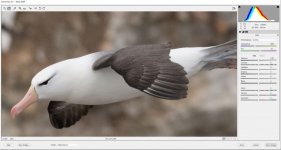
Apart from a crop and resize, these are sooc and a screen shot of raw file

@pooley, Mike, any thoughts?

All input appreciated, ta

jpeg, cropped resized, sooc
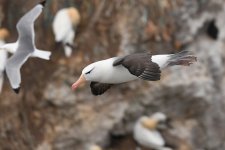
cropped 1024.jpg

Cropped showing black line, its clearly not visible below the bird
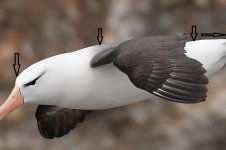
over cropped 1024.jpg

Not showing on the raw file

Albo raw crop.JPG
 
Last edited:
I can only think it is a sharpening artefact especially as its on a strongly contrasting area.

Perhaps export a jpeg and leave it unsharpened then at least you can rule it out one way or another.
 
Ay up Phil, best thing is to fire me the RAW and let me take a look - I'll PM you - but my thoughts would initially be something in the sharpening workflow. I believe if you've hit the clarity it can do this as can creative sharpening later in the process

Mike
 
I can only think it is a sharpening artefact especially as its on a strongly contrasting area.

Perhaps export a jpeg and leave it unsharpened then at least you can rule it out one way or another.

Ay up Phil, best thing is to fire me the RAW and let me take a look - I'll PM you - but my thoughts would initially be something in the sharpening workflow. I believe if you've hit the clarity it can do this as can creative sharpening later in the process

Mike

Thanks chaps, these are just straight out of camera, no other workflow apart from crop and resize for posting here.

I can actually see the black line on the cameras rear LCD screen when zoomed in?
 
Would it be the camera trying to control light difference between the BG and subject?
 
Would it be the camera trying to control light difference between the BG and subject?

Not sure Gav, it does seem to only be a recent problem though, unless I've not noticed it before :rolleyes:

It got me thinking when @Kirk said a photo I posted recently looked over-sharpened, I hadn't spotted the above then.
 
Doesn't the move from RAW to camera jpeg automatically involve some processing, inc sharpening?
If you look at your 2nd photo the line is there underneath the bird but it's just 'clear' not black, typical of over-sharpening (for the scene/image).
 
Not sure Gav, it does seem to only be a recent problem though, unless I've not noticed it before :rolleyes:

It got me thinking when @Kirk said a photo I posted recently looked over-sharpened, I hadn't spotted the above then.
Hope you find an answer (y)
 
Doesn't the move from RAW to camera jpeg automatically involve some processing, inc sharpening?
If you look at your 2nd photo the line is there underneath the bird but it's just 'clear' not black, typical of over-sharpening (for the scene/image).

So over sharpening in camera Roger?

I shoot both jpeg and raw but if I can 'get away with it' ;) I'll just use the jpeg
 
@gramps

Roger, I've checked the cameras jpeg setting, I had sharpening set to 7 with 9 being the limit and clarity set to plus 1, I've dropped both to see if it makes any visible change.

I must've been shooting those settings though since I got the body, 2 years ago maybe without looking back, its something I've only just recently started noticing?
 
You won't very often have such a white subject against a darkish OOF background either.
 
I get a similar artifact when I drop highlights and raise the shadows too much, especially with landscapes, where mountians meet the sky. As you say though Phil, it's SOOC jpegs you're seeing this with. The JPEG will be processed in camera to an extent and when an image is viewed in camera, it's a jpeg that is displayed. The settings you mention, especially sharpening could be the cause.

It could also be the variation in contrast beween the edges that meet but I would expect to see that on the RAW as well.

You've recently got the PF, if I remember right? Is it just that lens or others too?

Be interesting to see what Mike says, he's the wizard with these things. (y)
 
just bin it Phil its obviously a fake shot as those albatrosses only live south of the equator ROFPMSL ..
 
just bin it Phil its obviously a fake shot as those albatrosses only live south of the equator ROFPMSL ..

Great Black-backed gull on steroids practising for Red Nose Day?..........actually Jeff, just back from a couple of days in the Falklands ;)
 
Can't think you would ever need that with your kit Phil, it is overkill even if you don't get that halo.

Roger, I presume I altered the settings when I was using the D500 with the Sigma 150-600c and never altered them back.

@dale, Dale, I've had the 500pf over 12 months now, took loads of Terns, Gulls ect so nothing new for some time.

As mentioned by @4wd, it's quite a contrasty bg and a bright white bird even in the poor light, can't understand why I haven't noticed it before now though.

Anyway, thanks for all the thoughts and input. I'll see how I get on with re-setting sharpness and clarity, on reflection, I can't think of own else that would only affect the jpeg and not the raw, cheers.
 
Roger, I presume I altered the settings when I was using the D500 with the Sigma 150-600c and never altered them back.

@dale, Dale, I've had the 500pf over 12 months now, took loads of Terns, Gulls ect so nothing new for some time.

As mentioned by @4wd, it's quite a contrasty bg and a bright white bird even in the poor light, can't understand why I haven't noticed it before now though.

Anyway, thanks for all the thoughts and input. I'll see how I get on with re-setting sharpness and clarity, on reflection, I can't think of own else that would only affect the jpeg and not the raw, cheers.

Every shot that you take starts as a raw.
The in camera jpeg is camera processed to a jpeg using your settings.
The raw is discarded and the jpeg saved.

When you shoot raw the camera still processes it to jpeg and saves it at a smaller size with in the raw file. It uses this for display and as a thumbnail. You never actually see a raw file. But you can see a version with neutral settings.
 
I've just been out this evening and realised I had VR turned on.

I'm a bit of a believer in only turning it on with shutter speeds lower than 1/500th.

A few weeks ago I had an owl perched late one evening and remember dropping ss to 1/200th and turning VR on......its been on since and I've only just noticed this evening :rolleyes:

What's folks thoughts on having VR on when its not needed,? Could that cause the atifact in the jpeg and not raw?
 
Great Black-backed gull on steroids practising for Red Nose Day?..........actually Jeff, just back from a couple of days in the Falklands ;)
You go in the camper van ?
 
What's folks thoughts on having VR on when its not needed,? Could that cause the atifact in the jpeg and not raw?
Wouldn't have thought so.
Forgot you switched sharpening on, forgot you switched VR on ... what age are you now Phil? :LOL:
 
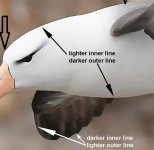
The artifact is from sharpening... the image also shows some white outline along dark edges (e.g. bottom of front wing). "Sharpening" is really only an increase in contrast and this is the typical "halo" from oversharpening. Note that not only does it increase the contrast outside the edge, it also increases the contrast of the edge itself.

I just shifted the gamma/midtones to make it a little more obvious

.Untitled-1.jpg
 
Wouldn't have thought so.
Forgot you switched sharpening on, forgot you switched VR on ... what age are you now Phil? :LOL:

You don't know the half of it Roger..........old before me time :facepalm::LOL:

The artifact is from sharpening... the image also shows some white outline along dark edges (e.g. bottom of front wing). "Sharpening" is really only an increase in contrast and this is the typical "halo" from oversharpening. Note that not only does it increase the contrast outside the edge, it also increases the contrast of the edge itself.

I just shifted the gamma/midtones to make it a little more obvious

.View attachment 353730

Thanks Steven, it does look like over-sharpening, caused by having sharpening and contrast set too high in camera.

I have no idea why I hadn't picked up on it before but hopefully sorted now, ta
 
Back
Top