What to do with 365 photos

ShawWellPete

Suspended / Banned
Messages
3,699
Name
Pete
Edit My Images
Yes
I am now 10 months through my 365 of Jessica and I am wondering what to do with the photos once I have finished.

Obviously I could put them in a book but was wondering if there was something more imaginative I could do?

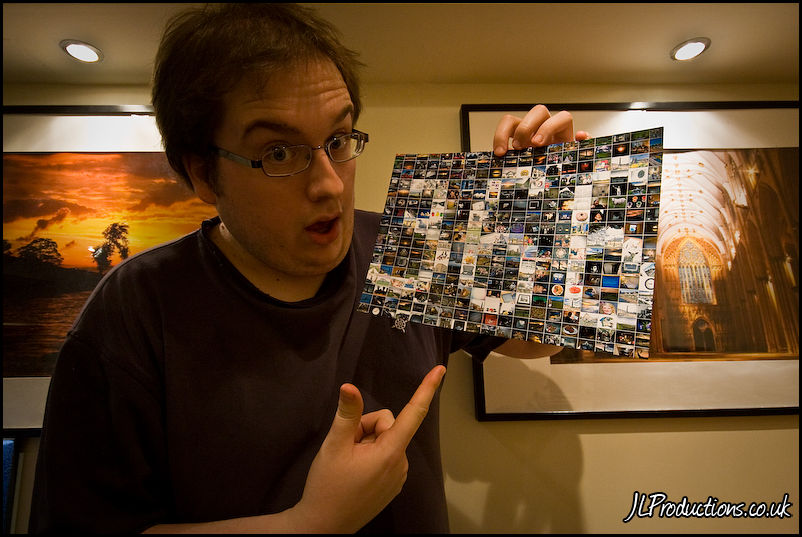
Maybe a montage? any ideas on software that will make one?

Any other ideas?
 
Might be worth a look at something like:- http://www.arcsoft.com/estore/software_title.asp?ProductCode=PMVE#submenu

Not sure how well it will work with 365 photos..
Basically you pick 1 image that the end result will look like,then give it a source directory for images to be used to create the montage.
Results are dependant on your source images,but its fun to have,and people are endlessly peering at the tiny details to spot more photos in there..
 
Save them as a slide show or Powerpoint presentation?
 
Might be worth a look at something like:- http://www.arcsoft.com/estore/software_title.asp?ProductCode=PMVE#submenu

Look good but PC only and I'm on a mac

Not sure how well it will work with 365 photos..
Basically you pick 1 image that the end result will look like,then give it a source directory for images to be used to create the montage.
Results are dependant on your source images,but its fun to have,and people are endlessly peering at the tiny details to spot more photos in there..

I did a little montage of mine as a final photo

WOHOOOOO! (366-366) by Tom Holmes, on Flickr

honestly cant remember what software I used now though :(

Looks good Jimmy, if you remember what the software was, can you give me a shout.

Save them as a slide show or Powerpoint presentation?

Good ideas Cedric, but I'd quite like something to put on the wall...
 
Well you don't need any fancy software Pete. just open a new file -make it big -you can always reduce if need be later.Choose a bg colour or a larger image perhaps. just open each pic you want in the montage, resize, then cut and paste into your larger image as a new layer.

When you've pasted in all the required pics you can arrange them just as you wish - overlap them, rotate them etc. When it's as you'd like it, flatten the image and Bob's your Auntie
 
Well you don't need any fancy software Pete. just open a new file -make it big -you can always reduce if need be later.Choose a bg colour or a larger image perhaps. just open each pic you want in the montage, resize, then cut and paste into your larger image as a new layer.

When you've pasted in all the required pics you can arrange them just as you wish - overlap them, rotate them etc. When it's as you'd like it, flatten the image and Bob's your Auntie

Yes, that is certainly an option...
 
Good idea with the montage Pete, or you could treat them like a bottle of Sanatogen and eat one a day every day :thinking:
 
I read here last night about someone making a slideshow in a PDF file.

Not something I thought you could do, so I'm putting it on the list as something to try at some point. And the ability to read PDF's is more widespread that PowerPoint support. ;)
 
Since you are thinking more on the lines of displaying the photos, how about printing them (as a montage / collage / mosaic) on to any object, such as the glass top of your center table, or wrapping it around a column or any such thing. I guess you could take a flex print (something like poly vinyl, I am not sure of the technicals) - the kind used in mini billboard ads
 
I read here last night about someone making a slideshow in a PDF file.

Not something I thought you could do, so I'm putting it on the list as something to try at some point. And the ability to read PDF's is more widespread that PowerPoint support. ;)

Since you are thinking more on the lines of displaying the photos, how about printing them (as a montage / collage / mosaic) on to any object, such as the glass top of your center table, or wrapping it around a column or any such thing. I guess you could take a flex print (something like poly vinyl, I am not sure of the technicals) - the kind used in mini billboard ads

good ideas, thanks!
 
Hi Pete - meant to respond to this thread t'other day, so just throwing in another suggestion.

Memory book. With the photos and her keepsakes in (e.g. hospital bracelet), dates of first tooth, first stand up, family occasions etc. There are some beautiful ones out there which come with the sleeves - photos are protected, keepsakes are kept safe.

Last year, my best friend got breast cancer (she's survived) and I made her a memory book before she went in for surgery... <can post you pics if that would explain it a little better, just let me know as she's coming down from Essex for this Bank Holiday and I can ask her to bring it down to photograph>

So, I don't know if you've ever used Picasa - I used it for years before going into PS5 and tbh, for a quick upload, I still prefer Picasa.

It has the collage facility and, IMO, it's brilliant - you can change the shots around to whichever you want - some larger, uniform, ones mosaic'd around the outside of a larger shot etc. I know most here prolly wouldn't use Picasa, but for a free download and ease of use, it's great.

The Memory Book is something I know Charlie will treasure for the rest of her life - pics of when we were wee kids, special times, family, pets and of course, our kids growing up together.

If you did something along those lines, it's special for you, Claudia and your family... and a keepsake for when she's older which can be given to her later in life. It's also tangible... very different to looking at a screen... you'd be surprised how many times your hands would brush across those photos as you and family look through it.

Anyhoo - just a thought... not everyone's cuppa tea - but sure works for me and mine.

 
Last edited:
Hi Naomi,

I'll have a look at Picasa, I didn't even realise they did a Mac version. So you used it to create a book that you then got printed? I do a blurb book every year with my favourite shots and so this year there will be a big overlap with the 365. I do agree that I would like something physical, which is why I thought a poster size mosaic where one picture, maybe Jessica on her 1st birthday is made up of a mosaic of all the other shots. I have tried out Andrea mosaic software but can't get it to work, I have a feeling it is not OSX Lion compatible.

Maybe a small fat book with one photo per page would be nice?
 
Hi Pete

Yep, there is a MAC version - tho a friend Stateside wasn't able to get it working on her MAC but she's admittedly a little technologically challenged ;) <knows the feeling>

http://picasa.google.com/mac/

I actually printed my own photo collages as I was adding all the bits and pieces to them as I went along. It also enabled me to move the photos around when adding the different embellishments (metal tags, words, bits and pieces) so that the ones I wanted to make bigger or fit around the embellishing could be done immediately. However, if you printed off just a draft of the page, and were happy where things were, you could always then have the photo page printed by an external company.

There are 6 settings for the collage on Picasa (Win7) (soooooooo easy) and you can scramble the shots to suit your style/preference for each page. I must have used around 500-600 - (mebbe more actually) photos with Charlies plus all the other bits as well - but I'm a little uber creative when I want to be and it was such a personal thing that I didn't want to finish it. Have left some blank sleeves at the back of the album for future photos as our lives go on (you just need to add additional spaces on the binder to increase the volume of pages).

It does take time, to get it just right... but it's so worth it. Each time she looks at it, she notices something else - so that's kinda cool knowing she's smiling and roaring with laughter as she gets to the last shot.

There are hundreds of albums to choose out of depending on taste on a million different sites. Just an example for a baby album...

http://www.craftsuperstore.co.uk/Cr...Accessories/12-x-12-Albums/sc1204/p17247.aspx

I've done a few of these now - used a pressed flower homemade paper album for Charlie and S-boy did a TRAVEL BOY one of his time spent in the USA. Hugely gratifying... if you like that sort of thing :D
 
Back
Top