What is this on my laptop screen?

gramps

Suspended / Banned
Messages
44,805
Name
'Gramps'
Edit My Images
No
Had the laptop on all day with no problems, as usual, but tonight whilst looking at a listing on eBay I noticed a strange symbol on my screen ....


capture1.jpg

It stays in exactly the same position on the screen and if I hover the cursor over it I get the revolving blue circle as though it's trying to complete something, if I close down the browser window it's there on the desktop.
I guess it will be gone tomorrow after I have shut the machine down but would be interested if anyone can suggest what this is. :)
 
Have you tried looking at Task manager (ctrl-alt-del & select task manager) to see what's running that should not be? Do you have anti-virus (I'd be concerned about malware) and were you running a browser or email when you first saw it? Personally I would have restarted ASAP to get rid of it.
 
Have you tried looking at Task manager (ctrl-alt-del & select task manager) to see what's running that should not be? Do you have anti-virus (I'd be concerned about malware) and were you running a browser or email when you first saw it? Personally I would have restarted ASAP to get rid of it.

I have anti-virus and malware protection and nothing shows.
I was in Firefox when it appeared and it went after a restart, it hasn't returned as yet. :)
 
Are you using a touch pad?
If it happens again try double clicking on the scroll area of the pad (along the bottom or side usually)
 
Has your mouse wheel got side to side (left/right) when I use mine I get a similar icon. Moving the pointer to either side scrolls left right.
 
Has your mouse wheel got side to side (left/right) when I use mine I get a similar icon. Moving the pointer to either side scrolls left right.
Its a laptop touch pad so I don't think that applies ... could be wrong though. :)
 
Ah, good point about the scrolling - some touch pads had an edge that could be used for scrolling, and I wonder if your machine was trying to load a bit of a touchpad driver that it didn't have the right hardware for.
 
I've just checked the properties of the 'Synaptics Pointing Device' and this shows, which is I guess what is being referred to ... I don't have a 'wheel' so the above suggestion of the software trying to use something it can't may well be the issue ...

capture1.jpg
 
So......even though I was wrong........I was right? Maybe? :D
 
I've just checked the properties of the 'Synaptics Pointing Device' and this shows, which is I guess what is being referred to ... I don't have a 'wheel' so the above suggestion of the software trying to use something it can't may well be the issue ...

View attachment 120820

On the device settings tab, make sure your touchpad is highlighted, click settings and on the left you might see 'virtual scrolling'... click on the words and not the plus sign.. two options should show, uncheck the boxes and save the changes.
 
On the device settings tab, make sure your touchpad is highlighted, click settings and on the left you might see 'virtual scrolling'... click on the words and not the plus sign.. two options should show, uncheck the boxes and save the changes.

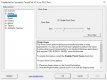
Thanks, I don't have 'virtual scrolling' but I do have this...

capture2.jpg

My guess is that switching off 'Enable Pinch Zoom' would disable any 'wheel' options and probably sort the issue?
 
Back
Top