

You are using an out of date browser. It may not display this or other websites correctly.
You should upgrade or use an alternative browser.
You should upgrade or use an alternative browser.
what format to shoot in ??
- Thread starter devilnev
- Start date
OP

devilnev
Suspended / Banned
- Messages
- 245
- Name
- Neville
- Edit My Images
- Yes


Lunaticsamurai
Suspended / Banned
- Messages
- 1,228
- Name
- Keith
- Edit My Images
- No
sRGB
OP
devilnev
Suspended / Banned
- Messages
- 245
- Name
- Neville
- Edit My Images
- Yes
sorry to be a pain ...but why ..what is ther difference ...i mean adobe is rather wekll known in photography ....photsoshop and adobe file formats just being two to mention...
so what are the diferences in the two formats and advantages
so what are the diferences in the two formats and advantages
Lunaticsamurai
Suspended / Banned
- Messages
- 1,228
- Name
- Keith
- Edit My Images
- No
The reason that you use sRGB as apposed to Adobe RGB is because most technology today is pre programed to show this format, ipods, monitors... So what you see when you save your image is what everyone else is going to see when you display it.
If you are going to be doing proffesional printing, then aRGB would be better as it has a wider colour range than sRGB. The problem with aRGB is that it will display incorrectly and pretty much show everything desaturated and washed out, sRGB won't.
CYMK is also for printing, not display.
If you are going to be doing proffesional printing, then aRGB would be better as it has a wider colour range than sRGB. The problem with aRGB is that it will display incorrectly and pretty much show everything desaturated and washed out, sRGB won't.
CYMK is also for printing, not display.
Last edited:
Lunaticsamurai
Suspended / Banned
- Messages
- 1,228
- Name
- Keith
- Edit My Images
- No
ok thanks for that ..sorry to be a pest ,just i like to know why.......well i even spent time today finding out the difference from EF and EF S mounts lol
Not being a pest at all, glad to help, its a massive learning curve.


flossie
Suspended / Banned
- Messages
- 560
- Name
- Richard
- Edit My Images
- Yes
Ok i have now switched over to raw...now what next should it be S RGB or ADOBE RGB i know i see these setting some where
if that "somewhere" was in your camera, it doesn't matter anyway, the colour space only comes when you process the file (in camera to JPG or on your computer...). RAW has more information than either colour spaces anyway.
If it was in the Export/Save As dialogue in Photoshop/Lightroom/Aperture I'd stick to sRGB unless you are sending pictures off to be published in a glossy magazine! aRGB has more colours than sRGB, but very few people will be able to see them, so for 99% of the time don't worry about it.
aRGB is technically better and covers all the colours than sRGB does :
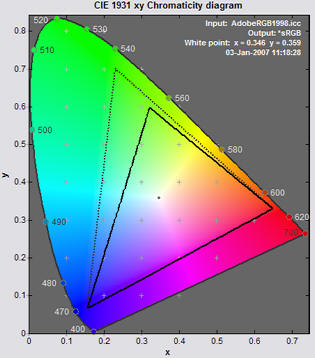
but its no good having more colours if 0.1% of your viewers can see them, and the other 99.9% think your images look a bit bland :thumbsdown:
OP
devilnev
Suspended / Banned
- Messages
- 245
- Name
- Neville
- Edit My Images
- Yes
if that "somewhere" was in your camera, it doesn't matter anyway, the colour space only comes when you process the file
It is in the menu on the 7D. the second one along it is called colour space and the choices there are sRGB or Adobe RGB... at the moment i am set at sRGB....will leave it that way then as for me it seems there is no useful purpose to change it

ohjin22
Suspended / Banned
- Messages
- 276
- Name
- Owen
- Edit My Images
- No
I thought that those options and the 'standrd, vivid', etc only affectd the jpg preview that appears on the display.
RAW is a completely unprocessed / unadjusted "original" file created inside the camera.
So if you are doing PP with RAW, you dont need to bother with any of those settings.
RAW is a completely unprocessed / unadjusted "original" file created inside the camera.
So if you are doing PP with RAW, you dont need to bother with any of those settings.
OP
devilnev
Suspended / Banned
- Messages
- 245
- Name
- Neville
- Edit My Images
- Yes
this is why i asked the question as in some things i am working in the dark. i know that some settings are not used in raw did not realise the sRGB and Adobe RGB was not used either ..
I have never looked at using raw till now ......
at moment the camera is set up to do both raw and jpeg till i get comforatble with raw shooting..
I have never looked at using raw till now ......
at moment the camera is set up to do both raw and jpeg till i get comforatble with raw shooting..

pampers
Suspended / Banned
- Messages
- 773
- Name
- Clifford
- Edit My Images
- Yes
Ok so you are shooting in RAW. But I asume that you are going to want to print you photos. Thats where sRGB comes in. After you have done you pp, you are then going to need to convert to jpeg. And you will need to us sRGB as you colour space.
As mentioned if you shoot raw it doesn't matter, you set colour space when you export as jpeg or whatever.
Personally, my workflow goes like this. Shoot raw, import into lightroom for sorting and global adjustments like white balance etc. Export as 16 bit tiff prophoto color space, open tiff in PhotoShop for final tweaks, skin touching etc. and export as jpeg (8 bit) adobe rgb for printing at the lab, another copy is resized for web and exported as srgb.
I made an action that does the resizing, output sharpening and exporting from ps with one click. Reason I do this is the printer I use prefers adobe rgb. But if you view an adobe rgb file in a web browser the colours shift dramatically. If you convert the colour space in a program like ps, you will barely notice the difference. I like to work in the biggest space possible while I'm pushing pixels, hence 16 bit tiff and prophoto, I don't jpeg to 8 bit or reduce colour space until all that is finished.
You could go straight to srgb to keep things simple and still get good results, even with my printer. I'm just always looking for an edge any place in the process, it all adds up in the final product.
BUT having said all that remember this, ultimately it's not pixel quality but picture quality that counts. (I think Jay Maisel said something like that once).
Personally, my workflow goes like this. Shoot raw, import into lightroom for sorting and global adjustments like white balance etc. Export as 16 bit tiff prophoto color space, open tiff in PhotoShop for final tweaks, skin touching etc. and export as jpeg (8 bit) adobe rgb for printing at the lab, another copy is resized for web and exported as srgb.
I made an action that does the resizing, output sharpening and exporting from ps with one click. Reason I do this is the printer I use prefers adobe rgb. But if you view an adobe rgb file in a web browser the colours shift dramatically. If you convert the colour space in a program like ps, you will barely notice the difference. I like to work in the biggest space possible while I'm pushing pixels, hence 16 bit tiff and prophoto, I don't jpeg to 8 bit or reduce colour space until all that is finished.
You could go straight to srgb to keep things simple and still get good results, even with my printer. I'm just always looking for an edge any place in the process, it all adds up in the final product.
BUT having said all that remember this, ultimately it's not pixel quality but picture quality that counts. (I think Jay Maisel said something like that once).
OP
devilnev
Suspended / Banned
- Messages
- 245
- Name
- Neville
- Edit My Images
- Yes
un fortunately i dont have light room just a dodgy copy of photoshop that does not handle raw ..
will upgrade programs later ,so at the moment i am playing with the program that canon supplied with the camera, it seems simple enough to use have played with raw and saved back as jpeg with no problem .
will upgrade programs later ,so at the moment i am playing with the program that canon supplied with the camera, it seems simple enough to use have played with raw and saved back as jpeg with no problem .

MacPingu
Suspended / Banned
- Messages
- 156
- Edit My Images
- Yes
Thanks too for these explanations guys, as I'm another one that was getting bogged down about colour space, and the which what where how. Now I know just to get on with using sRGB for now at the very least. My workflow takes long enough as it is !
ohjin22
Suspended / Banned
- Messages
- 276
- Name
- Owen
- Edit My Images
- No
As mentioned if you shoot raw it doesn't matter, you set colour space when you export as jpeg or whatever.
Personally, my workflow goes like this. Shoot raw, import into lightroom for sorting and global adjustments like white balance etc. Export as 16 bit tiff prophoto color space, open tiff in PhotoShop for final tweaks, skin touching etc. and export as jpeg (8 bit) adobe rgb for printing at the lab, another copy is resized for web and exported as srgb.
Just incase you wern't aware, you can quickly transfer the image from lightroom to photoshop, by right clicking the image and going to the edit in area. once done, save or close image, and it will automatically re import back into lightroom