

What Connection is This Please?

russellsnr

Suspended / Banned
Messages
3,121
Name
Russell
Edit My Images
Yes
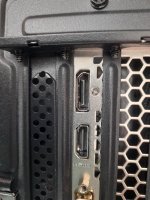
Hi, Soon to receive a new monitor with the USB-C option for connection, I have a Windows computer without the USB-C but two options I think as shown and one I am hoping is a display port connection next to an HDMI connection as they look different. Thankyou for any help. Identifying Russ.
20210810_141328.jpg
 
  • Like
Reactions: EJB
Last edited:
The uppermost one looks like the DP (Display Port)

On picture to 'name them all'!
Hi, was hoping that was the case as I have splashed out on a Benq SW270C monitor and have no USB-C connections on my PC but understand next best is a display port. Thanks, Russ.
 
I have the SW270C and connect with DP.

PS be ready to receive a huge & heavy box ;) and unless things have changed there will be screen hood in the box as well!
 
For some reason 'HDMI' is stamped under the lower connection but no indication on the top one!?
Thank goodness Russell asked. ;)
 
I have the SW270C and connect with DP.

PS be ready to receive a huge & heavy box ;) and unless things have changed there will be screen hood in the box as well!
Hi, sorry to ask again but what connection do you use on the monitor? The USB-C or other DP? Thanks, Russ.
 
The display port connector has a springy clip locks it in place but it's not easy to see if your tower is in an awkward place :rolleyes:
 
For some reason 'HDMI' is stamped under the lower connection but no indication on the top one!?
Thank goodness Russell asked. ;)
Its part of the spec - all HDMI should have that labelled and in that font/style (and pay your royalties to the HDMI association)

DisplayPort was conceived as a royalty-free equivalent for HDMI
 
  • Like
Reactions: EJB
Hi, sorry to ask again but what connection do you use on the monitor? The USB-C or other DP? Thanks, Russ.
No problem, as mentioned in my post I connect using the DP. Though I now have added a USB-C to my PC I have not changed it.
 
Hi, Well the monitor arrived today but hay ho the cable supplied is DP to mini DP and I do not have mini DP on computer just DP so before I go out and get a DP tp DP cable will that work please or is there another outside HDMI? Many Thanks, Russ.
 
Hi, Well the monitor arrived today but hay ho the cable supplied is DP to mini DP and I do not have mini DP on computer just DP so before I go out and get a DP tp DP cable will that work please or is there another outside HDMI? Many Thanks, Russ.

Ah! I had forgotten about which DP cable they included....................I recall 'talking' to BenQ about the choice of cable and though the customer support agent could not endorse he did say this one would be AOK and it has been since I got it.


HTH :)
 
Ah! I had forgotten about which DP cable they included....................I recall 'talking' to BenQ about the choice of cable and though the customer support agent could not endorse he did say this one would be AOK and it has been since I got it.


HTH :)
Thankyou, just ordered one but you would think at the price they charge for a monitor they could include one of these.
 
Well it's up and running but what a job to get there, got the no cable connected message, switched it over to an HDMI cable that works on my other computer, again no cable connected, took me some time to get right but now working with DP to DP cable (thankyou BB), now calibrating with fingers crossed.
Thankyou for ALL the help. Russ.
 
Back
Top