

Guy Fawkes
Suspended / Banned
- Messages
- 201
- Name
- Lee Thurston
- Edit My Images
- Yes
Hi all,
I'm getting married in about a years time and I REALLY REALLY want to design the invties myself (under strict supervision from Mrs Fawks of course!) a) to save money but also b) to put something personal into it. I don't mind investing time in it, hence the long notice.
After doin some research and getting some ideas we'd love them to look SIMILAR to this:
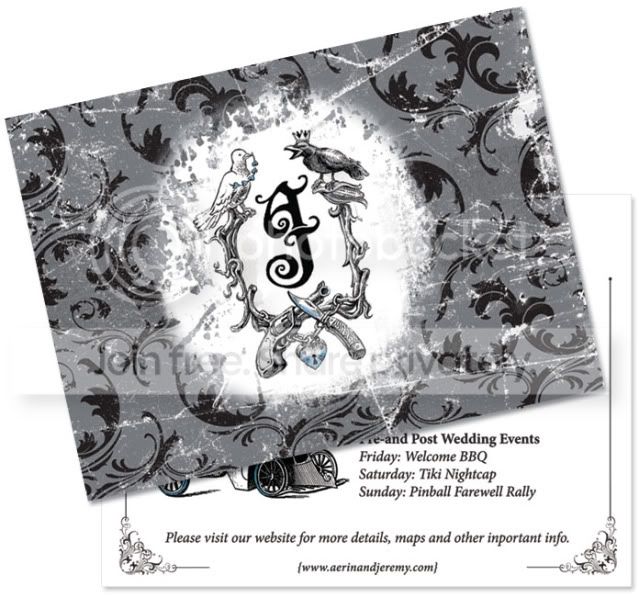
But maybe with our initials in the middle, and butterflys, lovey/dovey insignia rather than then guns/knives!!!
As a relative PSer I can do the basics but am eager to learn the skills to make something like the above.
How difficult would it be to create the 'distressed/worn' look? I Imagine the paisley effect wpould be easy and the illustrations could be pieced together via line-art etc?
Any help greatfully recieved!
Many thanks.
I'm getting married in about a years time and I REALLY REALLY want to design the invties myself (under strict supervision from Mrs Fawks of course!) a) to save money but also b) to put something personal into it. I don't mind investing time in it, hence the long notice.
After doin some research and getting some ideas we'd love them to look SIMILAR to this:
But maybe with our initials in the middle, and butterflys, lovey/dovey insignia rather than then guns/knives!!!
As a relative PSer I can do the basics but am eager to learn the skills to make something like the above.
How difficult would it be to create the 'distressed/worn' look? I Imagine the paisley effect wpould be easy and the illustrations could be pieced together via line-art etc?
Any help greatfully recieved!
Many thanks.


 k
k


 Too late for that mate, the sentence has been passed!