Websites. If you manage your own, how do you handle publishing updates?

Naboo32

Suspended / Banned
Messages
3,278
Name
Andy
Edit My Images
Yes
OK, a bit of a vague title, but allow me to elaborate :naughty: ....

I have recently started using Joomla! (version 2.5.1) to build a new website with. The Joomla application is not a local one, but has been installed for me on a remote server by my web hosting company. The web hosting company use the 'Plesk' control panel system, from where I can view, but not edit (due to lack of permissions) my website files.

Right now, I have this problem: Because the Joomla! application is pointed toward my live website, the website gets updated every single time that I hit the 'Save' button (which is necessary to move between screens, to access other functions etc.). Also, there is no function in either Joomla! or in the host's control panel to 'preview' (i.e. WITHOUT actually publishing the changes made) :(.

So, if I screw up one small change (as I did recently when I deleted a category instead of an article in Joomla! :bang:), I will basically bring the whole website down with no way of restoring it :shrug:. This is unworkable.

I would be interested to know if anyone else has similar problems with their web building/hosting, as I am currently going through the options with my web hosting service, but they haven't yet come up with a good solution for me. How do you folks manage? Which web building tools are you using and are you able to preview before publishing?

Thanks in advance for the input :thumbs:.

Andy
 
Build the website on your computer then upload.... IF and thats a big IF joomla hasnt got a preview then the answers simple.. stop using it.. find a solution that lets you build and preview on your computer (off line) before uploading
 
Wordpress will let you preview articles before you publish them. I also find it very straightforward to use.

I tried joomla once or twice and didn't like it.

With deleting categories by mistake then you can do that in any content management system. Most warn 'are you sure you want to delete x' before letting you do so. Not seen any with an 'undo' button unfortunately.

What do you want your website to do?

If it is mainly a gallery and maybe a blog then I'd probably cheat and use 500px. You can build a portfolio on there and display it with contact details and a blog which you can have pointed to by a domain name of your choice (if you choose a paid for option).
 
Build the website on your computer then upload.... IF and thats a big IF joomla hasnt got a preview then the answers simple.. stop using it.. find a solution that lets you build and preview on your computer (off line) before uploading

I did actually download Joomla! onto my PC and tried it out, but there were issues with 'Strict Standards' warnings appearing all over the resulting web pages and dealing with those meant re-writing some PHP.ini files, all of which went above my head :(. Besides which, I favoured a solution which would allow me to edited my website from work as well (where I can't install any software on my workstation).

As for the second part of your post, that's kind of what I'm reaearching now ;).

Wordpress will let you preview articles before you publish them. I also find it very straightforward to use.

I tried joomla once or twice and didn't like it.

With deleting categories by mistake then you can do that in any content management system. Most warn 'are you sure you want to delete x' before letting you do so. Not seen any with an 'undo' button unfortunately.

What do you want your website to do?

If it is mainly a gallery and maybe a blog then I'd probably cheat and use 500px. You can build a portfolio on there and display it with contact details and a blog which you can have pointed to by a domain name of your choice (if you choose a paid for option).

I think you're right about the lack of 'Undo' function - I've never seen any web building software with that either. I just need the security of being able to backup and restore my own website though, which this solution doesn't appear to offer :shrug:.

The website is a series of pages for different genres of photography, each with about 20 or more 900 pixel size images loaded directly onto the page (which is the way I want it to be - no thumb nail galleries for me, thank you very much ;)). It also has a Guestbook function, a search function and I would like to add a moving slifeshow to the front page as well. Joomla! can do all of these things (given the right template as a starting point), but I can't get by with only its 'live preview' function (whereby all changes are saved immediately in the live domain :thumbsdown:).

Anyway, thanks for the info about the preview function in Wordpress. I will keep that in mind ;).
 
Backup and restore isn't so bad. Most cms have backup functions so you'd take a backup before you made any drastic changes so you could restore it afterwards... If they aren't in the main software then there are usually plugins available that will do it. There's also backup in plesk but that is more for total disaster.
 
Backup and restore isn't so bad. Most cms have backup functions so you'd take a backup before you made any drastic changes so you could restore it afterwards... If they aren't in the main software then there are usually plugins available that will do it. There's also backup in plesk but that is more for total disaster.

Good point, the online Plesk Help shows a 'Backup Manager' in the control panel, but the version of Plesk that my host is using doesn't have that :shrug:!?
 
I've always stuck with WHM/cPanel on my server and my server provider does regular (several times daily) backup using R1Soft so I can always recover if I make a major mistake - cPanel is very user friendly though and so I rarely have to bother the provider.
 
+1 for Cpanel
 
Not used Joomla but definitely like wordpress even though I don't use the self hosted version. I'm not sure what the pros & cons of wordpress vs joomla are but no doubt each has it's merits.
 
take a look into akeeba backup extension for joomla. you can automate, or take manual backups (full and incremental) at various points. not quite a live preview (which is what I think you really want), but a little bit of security for when you are making large edits. I tend to do full backups on most of our joomla sites every few weeks, and incrementals whenever I know there have been a few changes.

Stu
 
+1 for Cpanel

Yes, I liked the straight forward functionality of cPanel too :) (which my last host used), but ...

But not if your web hosting provider doesn't support it ;)

... as Andy said, the hosting company I'm with now don't provide it :shrug:.

Oh, before anyone suggests changing hosting companies (again :bonk:), I'm happy with the price and service of my new host, I just need to find a way around the software issues and I'm sorted :thumbs:.

For your Joomla stuff, have a read here: http://docs.joomla.org/Backup and here: http://extensions.joomla.org/extensions/access-a-security/site-security/backup for plugins.

UWH plesk has a phpMyAdmin for the database - goto Database -> select the database you want to manage -> WebAdmin icon above the list of users for the database.

Hi Andy!

I'll check out the links shortly, thanks.

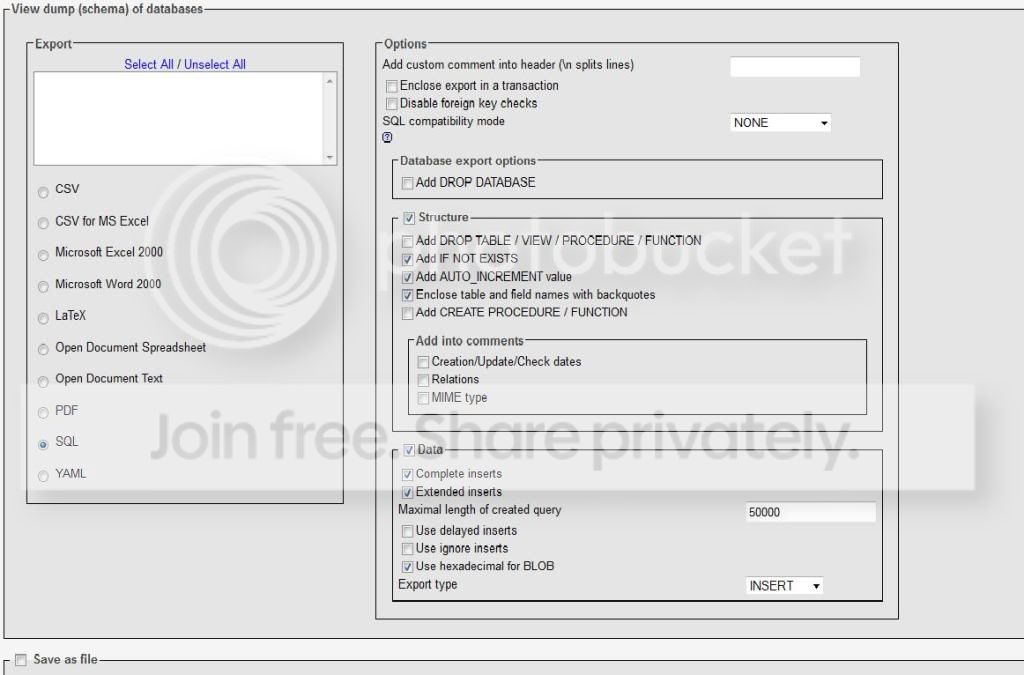
I did find the database admin stuff in Plesk and go to the Export page, but none of it means a thing to me, I'm afraid :shrug:. It's a page fulll of highly technical data and 25 tick boxes, which refer to things that I know nothing about ...

PHPadmin.jpg


... and the default 'save' is to a server!? How do I copy the files to my computer :thinking:? I suppose that if I don't have to change any of these parameters, then it's not such a problem, but as I don't know what any of the parameters mean, it's hard to say.

I dunno, I didn't sign up for this - I just want a simple 'Backup Project' button :'(!

I'm having a little telephone conference with Dave, from UWH, tomorrow evening and I really hope that he has some good suggestions for me. From what others have said here, maybe I need to have a look at Wordpress as an alternative :shrug:!?

If the worst comes to the worst, I could always go and find another hosting company (who have a better user interface), but everything else about UWH has been so good so far that I really don't want to.

Thanks for all of the input, folks :thumbs:.
 
Back
Top