Website critique

learningtofly

Suspended / Banned
Messages
514
Name
Tony
Edit My Images
No
Hi all - I wonder if I could ask for some feedback on a website that I set up a while ago as a means of selling prints and to which I'll shortly be aiming to add a page covering headshot and - potentially at least - portrait photography? I'm comfortable with the business side, and it will all be above board in terms of tax declaration, insurance, etc if I decide to proceed. I'm therefore just asking whether the site looks and works well as it is, as my intention would just be to add another page once I've built up a portfolio of "stock" headshot images.

One issue I've struggled with to date is that the shop page only shows thumbnail images and, even when you click on one to buy, those images are quite small. The only solution I've found is to have a landing page for my gallery/portfolio and then organise the shop on a separate page, with the option of viewing by portfolio categories. Please assume that this constraint will remain as I really like the template I use and don't want to change it. Any additional page(s) will be structured much like that for watch photography, with any necessary information (plus example images) on the one page.*

Be kind please, but thanks in advance for any feedback. The site can be found here, and naturally I'll update the "about" page as and when the headshot/portrait element gets added.

*Now resolved (although it took a good few hours!)
 
Last edited:
I like it.

Print collections is a good landing page. However when I click through (for example) to London and I see an image I like, I can't get to the shop. I need to go to the "shop" menu tab at which point I then need to scroll down to find the London image. It's a bit unintuitive. I know you have sub-headers to filter the content (similar to your print collections page) but they're small and I didn't see them initially. A link from the Print Collections page straight to the shop would be useful so I can "click to buy" instead of "click back to shop, then search for image, then buy". Personally, I'd be looking to get rid of the duplication and just have discreet "buy" buttons next to one copy of the image on your site. You say "Please assume that this constraint will remain as I really like the template I use and don't want to change it. " and if that refers to what I've just mentioned, well, you might like it, but it's clunky to navigate and contrasts against the rest of the site, and most marketing folks I know would tell you it's bad. [/opinion]

Small size of images... It's a tricky one. Too big and they get pinched. Too small and people can't see what they're buying. It's also very subjective because it's a "would I spend over £100 on an image I can only see at a small size?" question which is going to be different for everyone.

You don't mention (unless I missed it) whether you supply the image rolled in a tube, or on a mat. I'm assuming it's rolled but it might be worth mentioning as a) you've been quite detailed about everything else and b) some people might assume it comes mounted.

The shop page took a while to load in (Firefox, Win 10, Desktop PC) but is fine now it's cached. Would be interesting to see how long it takes to load on a phone on wifi. I guess it's because there are a lot of images.

Couldn't spot any grammar or typo errors. Well done!
 
Last edited:
I like it.

Print collections is a good landing page. However when I click through (for example) to London and I see an image I like, I can't get to the shop. I need to go to the "shop" menu tab at which point I then need to scroll down to find the London image. It's a bit unintuitive. I know you have sub-headers to filter the content (similar to your print collections page) but they're small and I didn't see them initially. A link from the Print Collections page straight to the shop would be useful so I can "click to buy" instead of "click back to shop, then search for image, then buy". Personally, I'd be looking to get rid of the duplication and just have discreet "buy" buttons next to one copy of the image on your site. You say "Please assume that this constraint will remain as I really like the template I use and don't want to change it. " and if that refers to what I've just mentioned, well, you might like it, but it's clunky to navigate and contrasts against the rest of the site, and most marketing folks I know would tell you it's bad. [/opinion]

Small size of images... It's a tricky one. Too big and they get pinched. Too small and people can't see what they're buying. It's also very subjective because it's a "would I spend over £100 on an image I can only see at a small size?" question which is going to be different for everyone.

You don't mention (unless I missed it) whether you supply the image rolled in a tube, or on a mat. I'm assuming it's rolled but it might be worth mentioning as a) you've been quite detailed about everything else and b) some people might assume it comes mounted.

The shop page took a while to load in (Firefox, Win 10, Desktop PC) but is fine now it's cached. Would be interesting to see how long it takes to load on a phone on wifi. I guess it's because there are a lot of images.

Couldn't spot any grammar or typo errors. Well done!
Thank you very much for that.

In terms of the landing page/shop conundrum I think I'll contact Squarespace and see if they can offer some guidance. I'd love a "buy now" or similar button under each gallery image, so maybe there's a way I can include a link in button form that would go straight to the shop. Otherwise I think the thumbnail restriction of the shop page will mean I have to put up with it.

Your comments regarding page loading are interesting, as I've limited all images to PNG files of circa 500-750kb. I guess I could make them smaller although I've found that it loads fairly quickly on both phone and iPad. I'll do some tests again, though, given your comments.

Finally, I'm not actually sure right now how images would be sent, as I've decided to forgo my local printer and use an online printing service (such as Loxley) instead; my costs were too high, and I think I could get orders fulfilled by the lab as well (which would be helpful). I'll make some enquiries, though, as it's a good point.

Thanks again. I'm obsessive when it comes to spelling, grammar and typos so it's good to know I haven't missed anything :)
 
Last edited:
Quick update - as well as clarifying the way that prints are delivered I've also now found the best solution I can achieve* to the main issue of separate landing and shop pages. I've managed to add a click-through link from each of the collections on the landing page, which will take customers straight to the appropriate part of the shop for that collection.

I think it works quite well, but any feedback is welcome (@Harlequin565?).

*I've now found a way to put a "Buy Now" link under each individual image within in each collection (using the description field that I've found within the template). The link will go straight to the purchase options for the image concerned. It'll be a few hours of work but I'm working my way through at the moment. Once completed I may even be able to make the actual shop page invisible... I'll just need to make sure that the links will still work properly.
 
Last edited:
I get a security warning from your website. It could be a false positive but my systems are fairly reliable.
Your other links are OK.
 
I get a security warning from your website. It could be a false positive but my systems are fairly reliable.
Your other links are OK.
That's strange. Given that Squarespace are bound to be meticulous and my image files are all clean I think it may well be a false positive but I'll take it up with Squarespace anyway. Can I ask what anti-virus software you're using, and whether you get the warning on https://tonyangelimages.com, https://tonyangelimages.squarespace.com or both?
 
Much better IMO. Now it's a simple 1 click process to buy.

I'm guessing this bit
"Once you’ve made your selection please visit the “Coastal Britain” area of the shop here to complete your purchase."
is no longer relevant and can be removed?
 
Much better IMO. Now it's a simple 1 click process to buy.

I'm guessing this bit is no longer relevant and can be removed?
Yes, I'm just updating each of the images first and then amending it (and have actually now done so on the Coastal Britain page, which is finished).

Once all the gallery pages are updated I'm going to see of I can make the shop page itself invisible without affecting the functionality of all the links I've added. I don't think I'll need it as a standalone page, or do you disagree?
 
Last edited:
Once all the gallery pages are updated I'm going to see of I can make the shop page itself invisible without affecting the functionality of all the links I've added. I don't think I'll need it as a standalone page, or do you disagree?

No disagreement here. The fewer pages visible to customers the better. It's not needed any more as far as I can see.
 
Well, I've now finished the updates to the gallery pages, with each image now having a one-click buy option. Frustratingly, I haven't found a way to make the standalone shop page invisible whilst still allowing the links to function. Not given up yet, though...

Update: Done it :banana:
 
Last edited:
That's strange. Given that Squarespace are bound to be meticulous and my image files are all clean I think it may well be a false positive but I'll take it up with Squarespace anyway. Can I ask what anti-virus software you're using, and whether you get the warning on https://tonyangelimages.com, https://tonyangelimages.squarespace.com or both?

I'm getting a warning/block for "Dangerous Website" on tonyangelsimages.com but not on .squarespace.com, I'm using Norton AV.

Like the layout (y)

Hope this helps,

GC
 
I'm getting a warning/block for "Dangerous Website" on tonyangelsimages.com but not on .squarespace.com, I'm using Norton AV.

Like the layout (y)

Hope this helps,

GC
Thank you. That's very helpful and also suggests that it is indeed a false positive. However, I'll speak to Squarespace about it now I have that info.
 
That's strange. Given that Squarespace are bound to be meticulous and my image files are all clean I think it may well be a false positive but I'll take it up with Squarespace anyway. Can I ask what anti-virus software you're using, and whether you get the warning on https://tonyangelimages.com, https://tonyangelimages.squarespace.com or both?
Your Squarespace link is OK........https://tonyangelimages.com,.......is the link that gives me the warning.
My prime security programme is F Secure.
Have scanned with Malwarebytes and a couple of others.....they all show no residue.F Secure 1.JPG
 
Last edited:
Kaspersky seems happy with the tonyangelimages link...
 
Kaspersky seems happy with the tonyangelimages link...
Thanks, and I’m actually in correspondence with Squarespace about it. Their view is that everything is fine at the Squarespace end and it’s a case of false positives. I’ve not quite accepted that yet but I’d be very surprised if they were wrong.
 
I'd remove the 'Powered by Squarespace' in the footer and add a copyright as you have in your Copyright page.

Also, think of a favicon (The icon that shows up in your bookmarks). Design > Browser Icon.
 
I'd remove the 'Powered by Squarespace' in the footer and add a copyright as you have in your Copyright page.

Also, think of a favicon (The icon that shows up in your bookmarks). Design > Browser Icon.
Thanks - I’ll give both of those ideas some thought and may well go for them.
 
Just tried now and its fine.

Glad you got it sorted.

GC
 
Just tried now and its fine.

Glad you got it sorted.

GC
Thanks. I've actually had confirmed false positives - with subsequent clean evaluations of the site - from Norton, Kaspersky, McAfee and Sophos. F-Secure is still to respond but I'm expecting the same result. Squarespace have no idea what caused the problem but they were right in contending that it related to erroneous categorisation by the antivirus vendors rather than being a Squarespace or website issue.
 
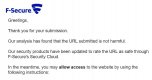
Result from my submission to F-Secure:-
F Secure 2.JPG
 
Thought I at least owed you that much :)
 
Well, as I start to gear up to incorporate headshot/portrait photography on the site in the future, I thought it might be prudent to simplify the structure even further. I've therefore combined what were two seperate pages - "Print Collections" and "Options & Prices" - into one and thereby lost another heading from the navigation menu and reduced the need for visitors to view additional pages. I've then highlighted some key elements of the descriptive text, and all in all I think it looks okay; the advantage, though, is that I'll eventually have just one page each for headshots, watch photography and print collections (and the landing page will become headshots).

I've been looking at how I might style the headshot page when it's ready to go up, and the only decision I'll have to make is whether I have a grid of images underneath the text or show them as a slideshow (with both auto advance and "prev/next" options) with just a single image visible at any one time. Is there a view as to what works best?
 
Back
Top