Right.
The only filters you need to buy (in my opinion) are neutral density and polarising filters. Everything else you can do in photoshop. ND and polarisers you can try and simulate, but you will never get it right. If you're on about seriously long daylight exposures then there's no way you can replicate that without the real thing.
So - starting with polarising filters.
These remove 'polarised light' - they make skies bluer and cut out reflections in water and car bodywork etc.
That's about it really (oh, and you could say they cut out 2 stops of light too...), but there's nothing else that can do the same job.
Example photo with a polarising filter
 Chesterton Side 1
 by
Nick Tsiatinis, on Flickr
Neutral Density Filters
These come in two main types - the solid ND and the grad (for graduated or gradient). With ND grads you have two other types, hard and soft. I'll come to that in a bit.
So - solid ND filters - what are they? Well, it's basically something that you put in front of your lens which lengthens the exposure. A 0.3ND/ND2/1 stop will halve the amount of light getting to your sensor so you need to double the length of the exposure, a 0.6ND/ND4/2 stop will halve that again and a 0.9/ND8/3 stop will halve that again.
Why would you want this? Well, if you want to introduce a bit of motion into your photographs this is what you're after. Want the 'misty water' look? Solid NDs. Bit of motion in clouds? Solid NDs.
See the below image. The bit on the left was with no filter. Note the static look of the water. Then a 3 stop filter was added - the exposure was lengthened and we get the result on the right - motion in the water

 filterdemo
 by
Nick Tsiatinis, on Flickr
You then have the extreme of the 10 stop filter. This lengthens your exposure by 10 stops, so an exposure which is usually metered at 1/100th would require a length of 10 seconds with a 10 stop filter. This flattens moving water, gives you really long exposure time in bright daylight and is by far my favourite filter.
Example!
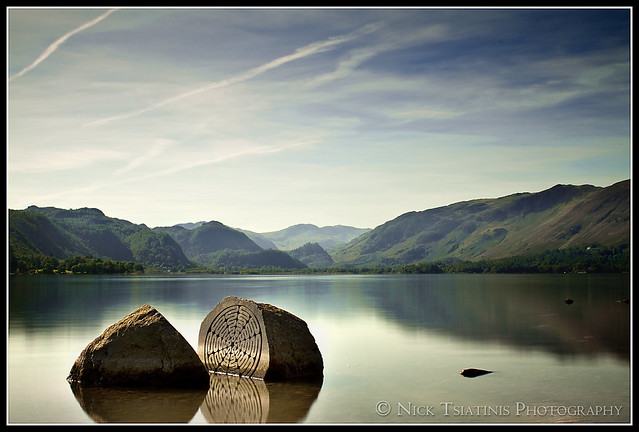 Serenity
 by
Nick Tsiatinis, on Flickr
Now, ND grads...
These are the same as a solid ND, except that half the filter is coated with the neutral density bit, then the other half is clear. If the grad is hard then there's a really quick transition between the ND bit and the clear bit, but if it's soft then there's a really gradual transition. I personally believe soft ND grads are not worth it, because only the top part of the filter is actually the strength you bought. Again you can get these in varying strengths, the common ones being 1, 2 and 3 stops.
Why would you use these? Look outside on a normal day. You'll note the sky is usually much brighter than the ground. Your eyes can cope with these variances in brightness - your camera sensor cannot. Using a ND grad darkens a certain part of your photograph (the sky) bringing it within the cameras 'dynamic range' and allowing the whole scene to be recorded correctly without the sky 'blowing out'.
What strength do you use? Trial and error
Example: (10 stop filter stacked with 3 stop hard grad)
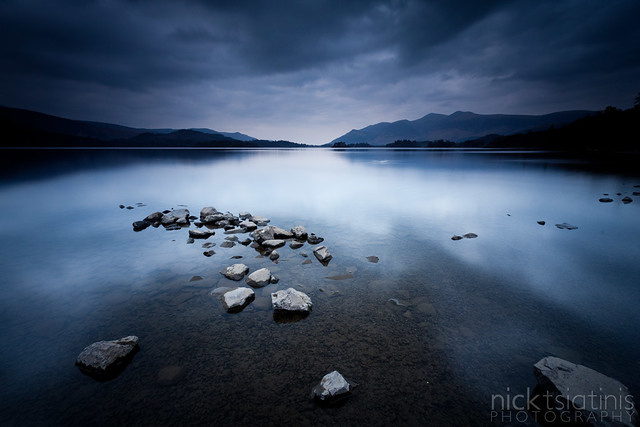 Still
Still by
Nick Tsiatinis, on Flickr
Purchasing ND filters
I'll not go into the intricacies of why you should choose slot in filters rather than screw in filters (just trust me on this, or someone else can tell you), but buy yourself the slot in variety.
You can get either (for example)
Cokin 'P' or compatible (such as Kood or anything marked 'P' type) - these are cheap and cheerful, but may not be 'neutral' density and may add certain unwanted colours to your photos (Cokin are legendary for turning your photos purple)
or
Lee Filters - expensive but quality.
Either way, you'll be needing a filter holder (to hold your filters), a lens adapter (mounts the holder to your lens - you need one of these for each size filter thread you have on your lens - most Canon kit lenses are 58mm, and the pro lenses are usually 77mm, although they can all be different, so please check!) and the filter itself.
A Cokin P compatible set of a holder, 58mm adapter and some ND filters can be purchased for less than £50 from
Premier Ink
Conversely, a Lee set will cost you around £60 for the holder, another £30 or so for the filter adapter and then you're looking at £60 per filter. Not cheap!
If you have any other questions then just ask, but I'm bored of typing now and I hope I've given you enough info to get going with





