Wanted JPG and RAW comparison photograph.

Dave in Wales

Suspended / Banned
Messages
3,373
Edit My Images
Yes
Can anyone please post an identical photograph in both JPG and RAW format, or perhaps suggest a link.

I'm looking to see is there is a great improvement using RAW.

D in W
 
You're not going to see a RAW look better than a jpg. That's the whole point of them. They're unprocessed by the camera, so will, in general, look worse than the jpg until you've processed it yourself. I'm thinking what you need to be asking for is a jpg from the camera v a jpg processed from the RAW.

You can see a RAW v jpg from your own camera.
 
The point about shooting raw is that you have that full data as shot available without any processing. If you shoot jpeg, then the camera will apply a picture style and some processing.

The thing with Raw is you've much more info available so you can process the image. Exposure adjustment, colour balance etc.

Can you set your camera to shoot raw+jpeg so you can compare yourself?
 
The point about shooting raw is that you have that full data as shot available without any processing. If you shoot jpeg, then the camera will apply a picture style and some processing.

The thing with Raw is you've much more info available so you can process the image. Exposure adjustment, colour balance etc.

Can you set your camera to shoot raw+jpeg so you can compare yourself?

OK,OK I know all that, so perhaps I asked the wrong question.

Can anyone post identical shots....one in JPG and one in processed RAW.

I wan't to see what RAW is capable of over JPG.

Or can anyone suggest a link.

D in W
 
Dave cant you just do a test yourself, shoot in jpg and raw together and compare the results as different peoples camera may have custom functions like colour enhanced sharpness, so you may not get a true reading looking at someone elses
 
Last edited:
Raw leaves you with more processing options. As such there is no improvement directly attributed to the fact it's raw that wouldn't be over-written by the skill of the post-processing.

As I generally only shoot raw images I don't have a comparison. But if you wanted to try something for yourself to see the benefit and you have Lightroom.. drop a graduated filter adjustment (exposure mode) onto a raw image in lightroom and see how much additional detail is there to be recovered from the sky and/or foreground in comparison to a jpg image. Or digitally push/pull a raw image by 2 stops and do the same to a jpg image and compare how quickly the jpg looses the details.

If you don't like post-processing then raw probably isn't the way to go, although the software that came with you camera will usually allow you to apply a number of jpg-styles to a raw image very quickly and easily. So you get to taken the shot and decide the jpg style settings afterwards.
 
I wan't to see what RAW is capable of over JPG.

Or can anyone suggest a link.

I think there's some valid reasons when to shoot jpeg, such as sport, multishot stuff, because of file size/write speed for writing to flash, ftping off to agencies etc.

Raw just gives you an insurance policy as well.
 
The biggest benefit of raw over jpg is the dynamic range of the data. Raw will often store 12 or 14 bits per channel, jpg only 8. As such you can correct exposure either way with a raw, with a jpg what you get is (broadly speaking) what you have.

I see processing RAW as a vital part of what I do. It is an extension of the creative process that starts in the camera with the shutter speed and aperture.
 
Put it this way, Is your photography a hobby or do you want a full time job? Mind you , If you get a pic that has stuff going for it, You can get more out of the raw file, So, Shoot raw plus jpeg.
 
I'll oblige the OP, unprocessed jsut resized.

JPEG

IMG_0198 by cw318is, on Flickr

RAW conversion

IMG_0198 raw conv by cw318is, on Flickr

Absolutely identical with the same flaws, except I can correct the RAW file a lot easier. Unless I'm doing a burst then its RAW all the way for me, that particular shot, or series of shots, was an exception using the RAW + HQ JPEG as the customer wanted a couple of shots immediately to email someone.
 
Well, I'll save Dave the hassle of doing the experiment, since I've already got the images.

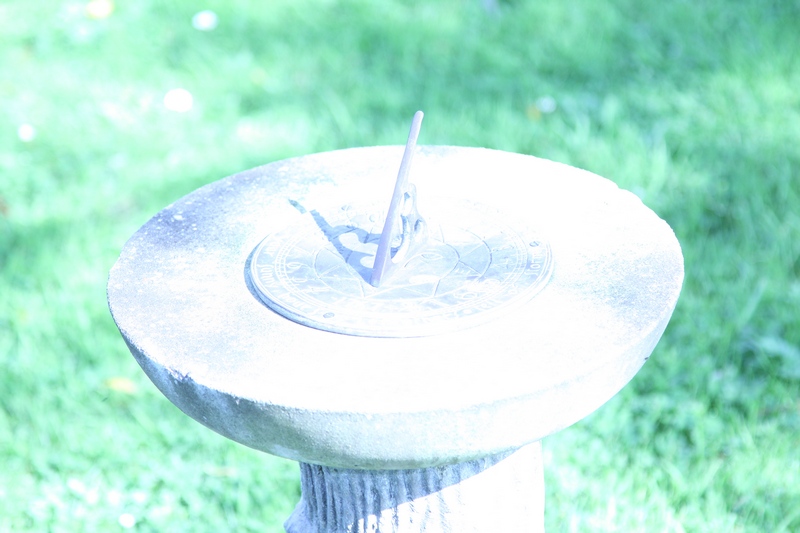
For this experiment I emulated two problems - getting the exposure wrong and using the wrong white balance. I shot raw and jpeg. Here's the jpeg...

Grass.jpg


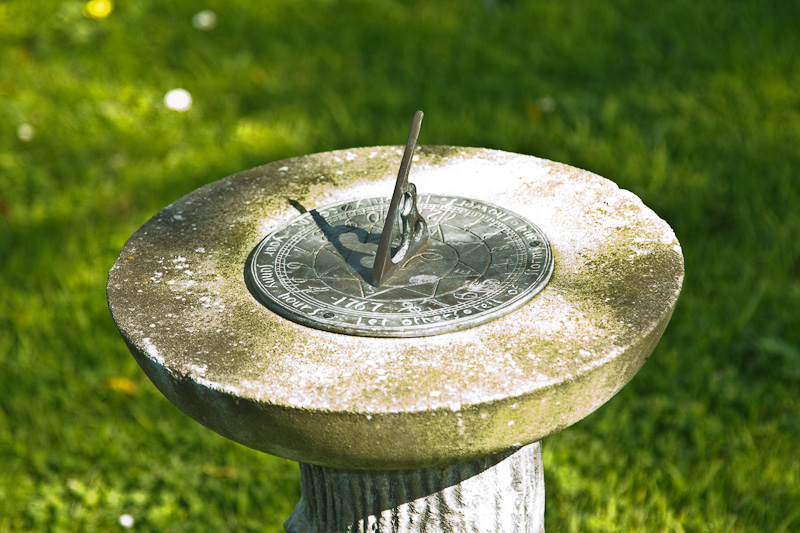
And here's what I got after processing the raw image...

Grass%20Proc%20Raw.jpg


As you can see, the difference is quite amazing. There's no way you could get anything like that from the jpeg.
 
I agree with Hollis. If yo get the exposure and colour balance spot on for all your pictures, you probably won't see a great deal of difference between an out of camera JPG and a processed RAW.

Where you will see a difference is when things aren't quite spot on. The RAW file will give you much greater latitude in what you can do to get the image right.
 
chacun a son gout

no comparison is possible..both will be different as they are different in their original state and must be different in their pp state as well...

what you must decide is DO YOU NEED TO HAVE RAW PROCESSING FOR ANY PARTICULAR REASON
i am using raw and at time find it just another set of software to muck about with..although i can see the raw when greatly enlarged seems to have a different structure
my extra fine jpeg is ok for my general use and i get more on a card than raw
i didnt know this but you can only see raw in suitably supported software...do something to it...then save it...but not to a raw...tiff usually
but at the end of the day...the image...is more than data collection and pp...
when my raw image is finally saved as jpeg it seems to be finer in texture and structure

strangely this is nearly the question i wanted to post...is raw necessary in all cases other than purist or professional use
 
Absolutely identical with the same flaws, except I can correct the RAW file a lot easier.

In your example the JPEG actually has more highlight data than the RAW conversion (unless they are the wrong way round!). In-camera processing has some advantages over software manipulation. But you may be able to process the RAW file again for better results.

jr1.jpg


Frank, it's too easy to fall into the trap of showing extreme examples of the 'benefits' of RAW data processing when in actual practice good technique (well, even half decent technique!) typically delivers results that JPEG processing can usually cope with.

But as I've said here elsewhere recently, shooting RAW & JPEG at the same time is good insurance against those occasions when we can't have the control we would prefer or, rarely, we make ridiculous mistakes.

:)

Sam
 
In your example the JPEG actually has more highlight data than the RAW conversion (unless they are the wrong way round!).

The first image, with zero detail in the highlights and blue grass, is the jpeg.

But as I've said here elsewhere recently, shooting RAW & JPEG at the same time is good insurance against those occasions when we can't have the control we would prefer or, rarely, we make ridiculous mistakes

Can't see any point in shooting both. If I want jpegs using the in-camera settings then I'll just use DPP to batch-process.

And, yes, anti-idiocy insurance is one of my favourite things about shooting raw. Recently, in Kenya, a leopard walked in front of our vehicle. I grabbed my camera and started shooting - only to find I'd moved the mode dial into manual when grabbing for it. Luckily the resulting images were recoverable.
 
I am starting to think raw might be overrated.

Sure if you screw up there is more room for manoeuvre, but how many of us screw it up as much as in hollis example?

I think for the most part the small tweaks I do to my own raw files I could easily achieve from a jpeg. So I am considering going back to shooting jpegs for that reason.
 
Absolutely identical with the same flaws, except I can correct the RAW file a lot easier.

Can you expand? In the example posted what needs correcting and how would it be easier to do those corrections in raw over jpeg?
 
I shoot RAW for 99% of my work, not because of insurance against exposure cock-ups - happily I haven't done that for a few decades now - but because I think it's better to start off with the highest amount of information available to you - why throw almost a third of the recorded information away before you even start processing?

Why spend £XXXX's on a multi megapixel camera when one with half the resolutiuon will do if you're just going to shoot JPEG...?
If you just intend your images to be viewed on computer screens, then fine, JPEG will do.
But what of the future? I don't know what I might want today's images for ten years from now, so I shoot the highest resolution available to me.

RAW is just a digital negative - I can come back time and time again and maybe try something different to what was originally envisaged when I took the shot.
When I go back to my stuff from eight years ago shot at JPEG-fine, my options are severely restricted compared to images shot as RAW files a year later on the same equipment.
 
Last edited by a moderator:
I am starting to think raw might be overrated.

Sure if you screw up there is more room for manoeuvre, but how many of us screw it up as much as in hollis example?

I think for the most part the small tweaks I do to my own raw files I could easily achieve from a jpeg. So I am considering going back to shooting jpegs for that reason.

i as a complete beginner using raw have yet to establish if its what i need as well
my fine large jpegs seem to please me... but i am going to keep ascertaining any advantages with raw

one drawback is card space use...about 1/2 of the jpeg...approximately
and i dont take a raw+jpeg...why would this be necessary anyway?
 
I shoot RAW for 99% of my work, not because of insurance against exposure cock-ups - happily I haven't done that for a few decades now - but because I think it's better to start off with the highest amount of information available to you - why throw almost a third of the recorded information away before you even start processing?

Why spend £XXXX's on a multi megapixel camera when one with half the resolutiuon will do if you're just going to shoot JPEG...?
If you just intend your images to be viewed on computer screens, then fine, JPEG will do.
But what of the future? I don't know what I might want today's images for ten years from now, so I shoot the highest resolution available to me.

RAW is just a digital negative - I can come back time and time again and maybe try something different to what was originally envisaged when I took the shot.
When I go back to my stuff from eight years ago shot at JPEG-fine, my options are severely restricted compared to images shot as RAW files a year later on the same equipment.

very elucidating...now i am beginning to get a handle on the raw idea...a storage negative rather than a jpeg storage file for future
thanks rob
 
Agree with Rob 100%. I can shoot 1,000 frames in camera shooting RAW - how many do you need?! So many more options - safety - future proof - hopefully. Just as quick to edit with LR. Absolutely no other way for me.
 
Agree with Rob 100%. I can shoot 1,000 frames in camera shooting RAW - how many do you need?! So many more options - safety - future proof - hopefully. Just as quick to edit with LR. Absolutely no other way for me.
:gag:

sorry..i only use 2x 2Gb cards...giving me 362 shots:bonk:
 
2 x 16Gb in a D3 x 2 - 2,000 shots+ :)
 
Jpeg is a "final" format and not really designed to be edited further. With data storage now so cheap it makes sense to shoot raw if it's there. I can fit over 600 raws on a single 8gb card so not much risk of me ever running out of room and I'd just get some spare cards if I was ever going to be away from a PC for an extended period of time.
 
i've started shooting RAW but find my laptop is sooo slow in loading them up on windows photo viewer, takes an age and usually ends up freezing, is there a better way to view them?

laptop could do with updating too I think.. only 2GB rubbish dell one
 
Last edited:
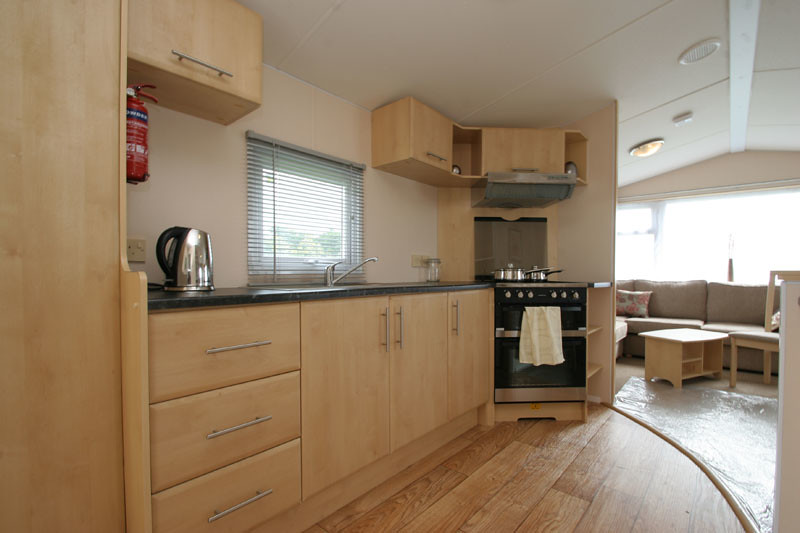
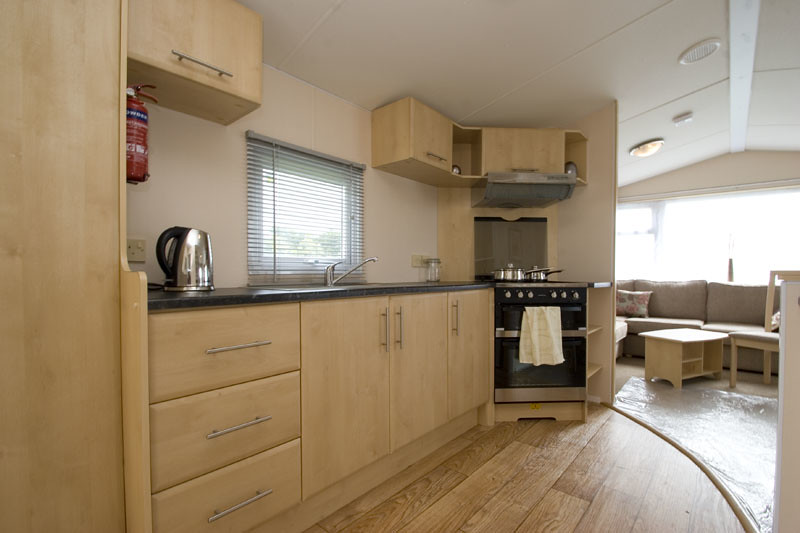
Can you expand? In the example posted what needs correcting and how would it be easier to do those corrections in raw over jpeg?

The main flaws are the windows are blown, the colours are off in the lounge as I'd exposed for the kitchen and the WB is way out. As it was a UWA lens there is a bit of barreling and distorion.

2 minutes, playing with the sliders until the lounge was right using fill light, recovery and exposure and setting a colour temp that was where it needed to be, adjust for lens and save a copy. Then another minute ensuring the kitchen was right with the correct wb, exposure was shot correctly so nothing more there and use lens setting from before. Merge the images, run noise reduction and sharpen and its done.

I carry 3x 4gb sandisk ultra cards with a spare 2gb in the car for those "I wonder if that card is still at home in the PC" moments. Shooting RAW that gives me about 1,200 shots + an emergency 200. The only time I've ever shot more in a day was my first airshow attempt using burst, then I shoot jpeg so I don't clog the buffer. It's a lot quicker to view photos when pulled off the card then saved onto laptop or desktop.
 
i've started shooting RAW but find my laptop is sooo slow in loading them up on windows photo viewer, takes an age and usually ends up freezing, is there a better way to view them?

Oh yes! Try Irfanview and Faststone. Both are free, both are a billion times better than the MS viewer.
 
i've started shooting RAW but find my laptop is sooo slow in loading them up on windows photo viewer, takes an age and usually ends up freezing, is there a better way to view them?

laptop could do with updating too I think.. only 2GB rubbish dell one

I'd definitely use View NX2 for browsing raw files - it's free to download off Nikon's website.
 
The main flaws are the windows are blown, the colours are off in the lounge as I'd exposed for the kitchen and the WB is way out. As it was a UWA lens there is a bit of barreling and distorion.

2 minutes, playing with the sliders until the lounge was right using fill light, recovery and exposure and setting a colour temp that was where it needed to be, adjust for lens and save a copy. Then another minute ensuring the kitchen was right with the correct wb, exposure was shot correctly so nothing more there and use lens setting from before. Merge the images, run noise reduction and sharpen and its done

But why was it easier to do all this to the raw file over the jpeg?
 
i've started shooting RAW but find my laptop is sooo slow in loading them up on windows photo viewer, takes an age and usually ends up freezing, is there a better way to view them?

laptop could do with updating too I think.. only 2GB rubbish dell one

I use a 2Gb Dell Inspiron laptop PC for all my editing last year and it was fine, though I upgraded back in March.

Don't view them with any Windows software. I used to have the NEF thumbnail viewer installed on my old PC, but when I bought my new one I didn't bother.
I use Adobe Bridge or Nikon View NX2 to select images and then work on them in Photoshop before saving them as two seperate JPEG files: large/uncropped and web-transmission size/cropped. RAW files stay in a seperate folder.
 
As Rob stated earlier, if you have JPG, you've already lost about 30% of the information in the file. Now, do any PP of any sort, even resizing, and save that as a JPG and you've lost even more of the information/quality.

A RAW file gives you the base from which you can do any PP from and as long as you keep the original file you can come back to it time & time again. Every time you edit a JPG & then save it as a JPG, you lose quality.

So, if you only need a 800 pixel image for the web, JPG should be fine, if you want a 24 x 20 print, then personally, I wouldn't be using a JPG, I'd edit the RAW file, and save as a TIFF.

I have one portrait that I took 2 years ago, probably one of the best I've ever taken. I have edited that image probably 20 times as I use it as a "base" to learn new techniques. Each time I start from the original RAW file, that way I get consistency.

Steve

 
Jpeg is a "final" format and not really designed to be edited further.

This is absolutely untrue and misleading -- in fact, as a typical enthusiast I've been editing JPEGs in layers for almost 10 years. They are most often saved in my software's native format (or TIFFs) to protect the JPEG's compression properties before printing.

When shooting it helps if we properly optimise JPEG exposure and keep the sharpening setting quite low. Too much saturation can mask finer detail. My raw (!) JPEGs (as I’ve called all unedited files since the early 90s), are the basis for my editing techniques.

Shooting my JPEGs isn’t much different to shooting slide film although the principles of exposure aren’t quite the same thanks to editing techniques. The same goes for RAW.

Anyway, at this stage we should be looking over our shoulders in case a red-faced mod locks or disembowels the topic...

:suspect:

Happy shooting, whatever your preference.

Sam
 
Sam, are you saying that, if you edit a JPG, then save it as another file you don't degrade the image quality further ?

Steve
 
hat is what he is saying I think - BUT if you save it in another format - say Tiff or PSD - the file size will be larger than if you'd just shot raw in the first place. Crazy to me! Why not just shoot raw ? Using LR you don't even need to 'save' the raw after editing - and you can output as often as you like in any format you like - but only when you need to!
 
It's quite simple really, If you don't understand the difference between RAW and JPEG's then continue shooting JPEG's as it won't matter to you.
For Pro shooters who have to get stuff back to the office quickly (these guys and gals have good operating technique) JPEG's are way to go - It's not quality that matters here but getting the RIGHT shot.
As has been said, If you only view on a PC screen JPEG's are fine - don't fret over it, those who DO understand the difference, will continue to shoot RAW.
 
Back
Top