Using RAW & What Software

Kev_mk3

Suspended / Banned
Messages
415
Name
Kevin Greaves
Edit My Images
Yes
Ok I have been shooting in jpeg :nuts: ( I know your all cringing now! ) but im moving to RAW now :D what software can I use to edit the photos? Will the standard canon software be ok to use to start with? ( I do have Photoshop but am not very good with it yet if that helps )

Many thanks


Kev
 
Adobe lightroom was developed from a program called Rawshooter. There was a free version called Rawshooter Essentials. It is out of date now and does not recognise the newer cameras but it should work with files from a 350D. You should be able to find somewhere to download it via a google search. It is quite easy to use and you can copy the tweaks from one picture to any others that are similar to save a lot of time.

Moving thread to editing.

Edit - Far more comprehensive answer above :)

Not noticed that before. Well done Slapo.
 
i use the canon one, im not too impressed with it, but it works.
 
DPP has an excellent reputation, at least on a par with any other converter, and it's free. I find it an awful lot easier to use too.
 
cheers guys ill play tonight :)
 
Not noticed that before. Well done Slapo.

Thanks :)

Would it be possible to make them stickies stand out more, somehow?
By making them bold and underlined or something else, perhaps.

It seems people hardly notice them unless they look for them :p

cheers guys ill play tonight :)

You're welcome :)
 
learn with photoshop, that software is the best with RAW and everything! :)

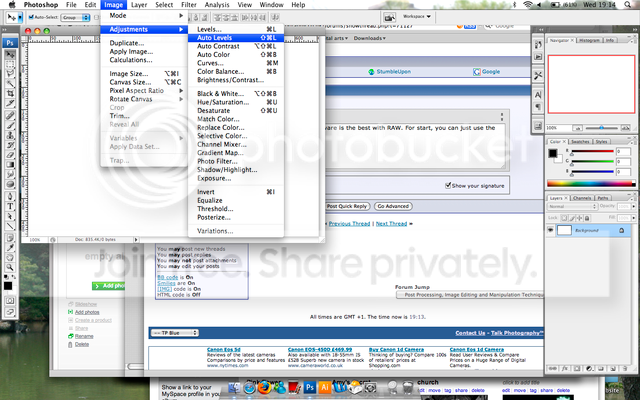
Open image on Photoshop and go to Images, Adjustment and there are many options you can use to edit the RAW. The JPEG uses all those options on Adjustment.

Picture1.png


I'd recommend to use Auto Level, Auto Contrast, Auto Colour and Curves for the start. :) Then you can experiment with the Photoshop to see what you like to choose!
 
If you have Photoshop when you upload your images and open them from Bridge it automatically opens the RAW file in CS3.
 
learn with photoshop, that software is the best with RAW and everything! :)

Now I wonder where 42 is buried in there ;)

You have to have money to buy it in the first place.
If you're not a student, the price tag is kind of scary.
So if you're going to get it (I mean the OP), you should try the rest first and see whether you're happy with the cheaper ones first.
 
Now I wonder where 42 is buried in there ;)

You have to have money to buy it in the first place.
If you're not a student, the price tag is kind of scary.
So if you're going to get it (I mean the OP), you should try the rest first and see whether you're happy with the cheaper ones first.

very true! :)
 
learn with photoshop, that software is the best with RAW and everything! :)

Open image on Photoshop and go to Images, Adjustment and there are many options you can use to edit the RAW. The JPEG uses all those options on Adjustment.

Picture1.png


I'd recommend to use Auto Level, Auto Contrast, Auto Colour and Curves for the start. :) Then you can experiment with the Photoshop to see what you like to choose!
ill have a go tomorrow :thumbs:

If you have Photoshop when you upload your images and open them from Bridge it automatically opens the RAW file in CS3.
thank you :)
Now I wonder where 42 is buried in there ;)

You have to have money to buy it in the first place.
If you're not a student, the price tag is kind of scary.
So if you're going to get it (I mean the OP), you should try the rest first and see whether you're happy with the cheaper ones first.
i have a naughty copy so im ok :naughty:
 
DPP has an excellent reputation, at least on a par with any other converter, and it's free. I find it an awful lot easier to use too.

:agree:

DPP does a better job at converting Canon RAW than any other program. People should learn that Adobe is not the be all and end all of image converters.
 
I have DPP, Lightroom and CS3. My preferred weapon of choice for raw conversions is DPP. Lightroom is great for organising and culling in the first instance, but then it's back to DPP for the edits and conversions. I'll only resort to Lightroom, or, God forbid, CS3, for editing, if I need to fix up my photo beyond the capabilities of DPP. The better I become as a photographer the less I need to use anything other than DPP.
 
im confused now. so i need a raw converter then i can edit them in something else?

as for DPP i have looked in the links above but cant find it :(


sorry to be a pain
 
Thread HiJack!

Sorry but I thought this better than creating a new one.

I have Adobe Photoshop CS, but it doesn't seem to have an option for opening RAW and if I try to open the RAW file (.NEF) it says it is not a valid file format.

So how can I edit the photo's in PS ?? Is it possible? do I need some sort of plugin?
 
You'll need the appropriate Adobe Camera Raw (ACR) plugin, available free from the Adobe website. I don't know how you'll fare with plain old CS and your camera though. For a Canon 40D, for example, you need CS3 to be able to use a sufficiently up to date ACR plugin. Maybe things are different in Nikon land.

If you can not get an ACR plugin for CS to suit your camera you will need to use the free raw to DNG converter and process your files as DNG files instead. I'm assuming CS handles DNG OK.
 
I use the Canon software Kevin, personally I think it's awesome. It's simple to use, straight forward and nicely layed out, and most of all it works fine.
 
:agree:

DPP does a better job at converting Canon RAW than any other program. People should learn that Adobe is not the be all and end all of image converters.

Would have to agree, adobe RAW convertor not that good. DPP for a free bit of software is very good, also used capture one which is also better than adobe's offerings

Peter
 
Back
Top