Using a light meter

Dman

Suspended / Banned
Messages
3,656
Name
Dave
Edit My Images
No
I've just received my light meter and having never used one before, just wanted the basics. From what I understand, the background should be two stops more than the subject to get a nice bright background? When I take the reading from the subject, should I match that reading with the aperture on the camera, for example if the subject is reading f/8, put the camera to f/8?
 
I'm assuming you're talking about white background stuff not in general terms. In which case that is pretty much it. One other thing I do Is meaure the light hitting the back of the subject as it bounces off the background, I normally go for 1 stop bigher than the light hitting the front of the subject/1 stop less than you're metering on the background. You control this by moving the subject close/further away from the background as necessary.
 
From REading some feedback on here(in Talk Lighting) reference the front to back lighting ratio (how many stops difference to have)..... it seems that as little as 1/2 stop can be sufficient......but would think you'd need to have a play to match the environment
 
1. Put meter in incident mode, place it immediately in front of your subject and facing towards the camera.
2. Take a reading
3. Set the camera to the aperture indicated on the reading.

The background is a separate subject, so you need to meter that separately. If you want the background white then it needs to have more exposure (smaller aperture indicated) than the subject. If you've got 6 metres of space between subject and background then by all means overexpose the background by 2 stops. If you haven't, overexpose by far less
 
1. Put meter in incident mode, place it immediately in front of your subject and facing towards the camera.
2. Take a reading
3. Set the camera to the aperture indicated on the reading.

The background is a separate subject, so you need to meter that separately. If you want the background white then it needs to have more exposure (smaller aperture indicated) than the subject. If you've got 6 metres of space between subject and background then by all means overexpose the background by 2 stops. If you haven't, overexpose by far less

Yes, my understanding is that if the subject is f/8, the background should be f/16, or maybe f/11 depending on the distance?
 
Yes, my understanding is that if the subject is f/8, the background should be f/16, or maybe f/11 depending on the distance?

Isn't that the wrong way round?
 
Yes, my understanding is that if the subject is f/8, the background should be f/16, or maybe f/11 depending on the distance?

Yes, more or less.

The background needs to be overexposed (have more light) in relation to the subject to make it white. But too much overexposure will cause problems because light bounced from the background will cause lens flare and will also damage fine detail on the edges of the subject (especially the hair). The trick is to get just enough background overexposure to make the background white but without causing problems.
The more distance there is between subject and background the easier it becomes to get a pure white background without image degradation (destruction of fine detail and lens flare) simply because light loses power over distance, so the greater the distance the less light there is to hit the back of the subject.
See this video on the Lencarta website
 
1. Put meter in incident mode, place it immediately in front of your subject and facing towards the camera.
2. Take a reading
3. Set the camera to the aperture indicated on the reading.

Not quite right. The aperture setting of the camera should match that of the Key/main light. Once you have metered your white High key background at 1.5 to 2 stops more than the key light, you would then give consideration to your Fill light. This is where you have to start thinking about lighting ratios in order to ensure that your high key images don't simply look flat. An ideal starter set up would be background metered bewteen f/11 and f/16, making sure that the light on the background is very even - no more than a tenth of a stop difference across it's width. Set the Key/main light at f/8, which will also be your camera aperture setting. Then set the Fill light to f/5.6 - thus creating a lighting ratio of 3:1 which is very nice. Meter your key and Fill light independantly - If you simply set them up and point your light meter from the position of the model towards your camera as suggested to get the aperture setting, you're lighting ratios will be out and the images may look very flat. With High Key, using lighting ratios is important in order to give a flattering perspective and depth to features. When you set up your key and Fill lights you also need to ensure that they are at a height and angle which ensures that the models feet and the floor give the same meter reading as your key light and aperture setting. If you don't do this, you will find that your background is pure white, you models face is correctly exposed but that the exposure falls off as the light travels down her body, leaving you with a horrible 'muddy' coloured floor and lots of work in photoshop. If need be, you could add a 5th 'kicker' light to the set up just to throw some more light on the floor.
 
Not quite right. The aperture setting of the camera should match that of the Key/main light. Once you have metered your white High key background at 1.5 to 2 stops more than the key light, you would then give consideration to your Fill light. This is where you have to start thinking about lighting ratios in order to ensure that your high key images don't simply look flat. An ideal starter set up would be background metered bewteen f/11 and f/16, making sure that the light on the background is very even - no more than a tenth of a stop difference across it's width. Set the Key/main light at f/8, which will also be your camera aperture setting. Then set the Fill light to f/5.6 - thus creating a lighting ratio of 3:1 which is very nice. Meter your key and Fill light independantly - If you simply set them up and point your light meter from the position of the model towards your camera as suggested to get the aperture setting, you're lighting ratios will be out and the images may look very flat. With High Key, using lighting ratios is important in order to give a flattering perspective and depth to features. When you set up your key and Fill lights you also need to ensure that they are at a height and angle which ensures that the models feet and the floor give the same meter reading as your key light and aperture setting. If you don't do this, you will find that your background is pure white, you models face is correctly exposed but that the exposure falls off as the light travels down her body, leaving you with a horrible 'muddy' coloured floor and lots of work in photoshop. If need be, you could add a 5th 'kicker' light to the set up just to throw some more light on the floor.

Not quite right indeed ;) Okay, mostly I agree :)

You missed the point that the meter should face your Key not your camera - but why use a Fill when you generally don't need one?

I manage quite nicely with one Key light and have never used a Fill - thus avoiding the ratio being off when the subject moves around and worse still that horrid double-catchlight that I (and Gary for certain) dislike so much

Anyway, while at least 3 studio Pros here may disagree on the detail I sure the OP has enough info now to test and create their own style/technique - which is what it's all about eh

DD
 
Not quite right. The aperture setting of the camera should match that of the Key/main light. Once you have metered your white High key background at 1.5 to 2 stops more than the key light, you would then give consideration to your Fill light. This is where you have to start thinking about lighting ratios in order to ensure that your high key images don't simply look flat. An ideal starter set up would be background metered bewteen f/11 and f/16, making sure that the light on the background is very even - no more than a tenth of a stop difference across it's width. Set the Key/main light at f/8, which will also be your camera aperture setting. Then set the Fill light to f/5.6 - thus creating a lighting ratio of 3:1 which is very nice. Meter your key and Fill light independantly - If you simply set them up and point your light meter from the position of the model towards your camera as suggested to get the aperture setting, you're lighting ratios will be out and the images may look very flat. With High Key, using lighting ratios is important in order to give a flattering perspective and depth to features. When you set up your key and Fill lights you also need to ensure that they are at a height and angle which ensures that the models feet and the floor give the same meter reading as your key light and aperture setting. If you don't do this, you will find that your background is pure white, you models face is correctly exposed but that the exposure falls off as the light travels down her body, leaving you with a horrible 'muddy' coloured floor and lots of work in photoshop. If need be, you could add a 5th 'kicker' light to the set up just to throw some more light on the floor.

I'm not sure that I agree with much of this, especially the reference to creating a 3:1 ratio between the white background and the main light. This is far too bright - to aim for just half a stop is good, and no more than one stop max. Or you will get the unwanted side effects described by Garry Edwards - there is absolutely no upside to blitzing it, and plenty of downsides.

The advice Garry had given is dead right (as usual).

And anyone that really needs five lights in order to do a full length figure with white background, is not working very efficiently.

When it comes to exposure, the Digital Gods have given us an LCD on the back of the camera and a wonderful thing called a histogram within it - an exact pictorial representation of what you're getting, and also a very accurate technical graphic. The histogram is far more accurate than you'll get with a separate meter. Together they will tell you everything you need to know and are not hard to understand :)
 
The histogram is far more accurate than you'll get with a separate meter. Together they will tell you everything you need to know and are not hard to understand :)

And in the spirit of disagreeing - here's my take on this comment - daft :D

When 20-50% of your image is white, i.e. blown, the histogram is useless at telling you what's going on with the subject, and that's perhaps why studio training togs (at least the ones I've been to see) use a meter

Much more useful in fact is the flashing blinkies and a good old zoom into the image

And I still refer to it being wrong to point the meter at the camera, at least when using one frontal light which is actually off to one side & the further off axis it gets the less accurate pointing at the camera would be

Anything else we can disagree on chaps? To really confuse the OP? :lol::lol::lol:

DD
 
well i can disagree a bit too :)
Athough i agree with diddydave the histogram is not at all helpfull in the studio for a white background but neither is blinkies either unless its just for something white on the subject .
If you set your camera up so what you see on the lcd is just about what you see on the computer a little trial and erro can make the exposure just about spot on.
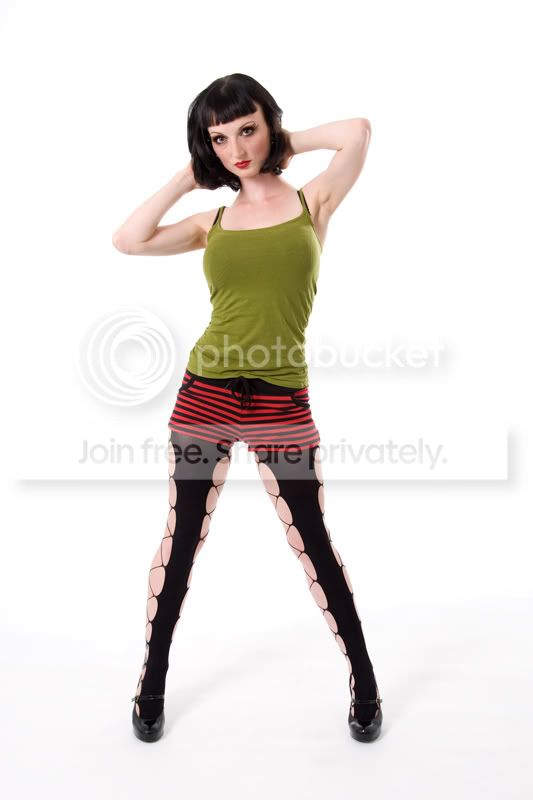
I use 6 strobes in the studio 3 for the BG, 1 as a hair light and 2 softboxes for the subject as in this shot with no PP .
Let me just say this looks almost spot on -on my computer set up with a color munki so if it doesnt on yours well ............. :)
Rob
eddit half to a stop is plenty on the bg too as Hoppy UK says
eddit again, i can see some fall off at the bottom of the shot but its not as bad in photoshop when i eddit.
6-lights.jpg
 
And in the spirit of disagreeing - here's my take on this comment - daft :D

When 20-50% of your image is white, i.e. blown, the histogram is useless at telling you what's going on with the subject, and that's perhaps why studio training togs (at least the ones I've been to see) use a meter

DD

:thumbs:
And I still refer to it being wrong to point the meter at the camera, at least when using one frontal light which is actually off to one side & the further off axis it gets the less accurate pointing at the camera would be
:thumbsdown:
Well, technically right but in practice it doesn't matter when the photographer is using a meter fitted with a dome receptor. Flat receptors are a diffferent matter but they are very rare in amateur studios
 
How about... that Kev M is :cuckoo::cuckoo::cuckoo:

:razz:

Although... I'm not sure anyone would disagree with that one :thinking:

:lol:

DD

Well if I'd said Knoica-Minolta or Bronica is better than Nikon you'd have just laughed at me:'(
 
In the spirit of disagreement, I'm having trouble with all of the last few posts.

I can't find anything to disagree with, in any of them. Even to the point of nit-picking it's a bit of a struggle :shrug: :lol:
 
I'm not sure that I agree with much of this, especially the reference to creating a 3:1 ratio between the white background and the main light.

You haven't read the post correctly - the 3:1 ratio is between the main light and the Fill light, not the main and the background. The basic set up that I described is the one taught succesfully by many professional photographers at their lighting workshops. I use it for virtually all my standard High key commissions and the images come out of the camera with no need for any exposure alterations in photoshop.

As for double highlights in each eye from using a main and and a fill light, it is possible to positon the fill so that you don't get 2 in each eye.
 
Right, used it tonight, f16 on the background, f8 on the subject (about 6 feet from the background).

Results = Better than anything I've seen yet, and a much more simple lighting setup than I've been experimenting with. I've now got the clear white background without the need to PS it after. I've spent weeks trying to get this and within five minutes of using a meter, nailed it.

The meter I got was a Sekonic L-408, got it 2nd hand from ebay.
 
You haven't read the post correctly - the 3:1 ratio is between the main light and the Fill light, not the main and the background. The basic set up that I described is the one taught succesfully by many professional photographers at their lighting workshops. I use it for virtually all my standard High key commissions and the images come out of the camera with no need for any exposure alterations in photoshop.

As for double highlights in each eye from using a main and and a fill light, it is possible to positon the fill so that you don't get 2 in each eye.

I think I read it correctly - you talk about the background being 1.5 to 2 stops brighter than the main light, which is a 3:1 to 4:1 ratio :shrug:

Which is just too high. It bleaches the edges of fine detail, creates flare, and reduces contrast, for no gain.

Once the background is blown, it is blown. What is the benefit of blitzing it in this way? Sure, white paper etc backgrounds are never absolutely pure white so you need to set a little over exposure, but if the background lighting is even (you're suggesting to within 1/10th of stop which is incredibly good) then half a stop over is ample. Make it one whole stop if you absolutely need some margin for error (maybe it's not within 1/10th of a stop after all) but anything more than that and you are throwing away a lot of quality.

If you do comparison shots with the background at half a stop and then at two stops over, the difference is very noticeable. Another thing that also lifts the image significantly is to mask all white background immediately outside the image area with black paper. This kills every unnecessary source of flare, much more effectively than a lens hood, and usually promotes a slightly darker keyline around the subject which lifts it still further (although this may or may not be desirable - not so desirable if you want to fully mimic the Venture look ;) ).

Having said all that, if it works for you as you describe, then that's what matters. But I don't think it is a good idea to promote that practise without any justification. I have said why half a stop over is better than 1.5 to 2 stops, but you have not explained why you think that's wrong.

 
I think I read it correctly - you talk about the background being 1.5 to 2 stops brighter than the main light, which is a 3:1 to 4:1 ratio :shrug:

Which is just too high. It bleaches the edges of fine detail, creates flare, and reduces contrast, for no gain.

Once the background is blown, it is blown. What is the benefit of blitzing it in this way? Sure, white paper etc backgrounds are never absolutely pure white so you need to set a little over exposure, but if the background lighting is even (you're suggesting to within 1/10th of stop which is incredibly good) then half a stop over is ample. Make it one whole stop if you absolutely need some margin for error (maybe it's not within 1/10th of a stop after all) but anything more than that and you are throwing away a lot of quality.

If you do comparison shots with the background at half a stop and then at two stops over, the difference is very noticeable. Another thing that also lifts the image significantly is to mask all white background immediately outside the image area with black paper. This kills every unnecessary source of flare, much more effectively than a lens hood, and usually promotes a slightly darker keyline around the subject which lifts it still further (although this may or may not be desirable - not so desirable if you want to fully mimic the Venture look ;) ).

Having said all that, if it works for you as you describe, then that's what matters. But I don't think it is a good idea to promote that practise without any justification. I have said why half a stop over is better than 1.5 to 2 stops, but you have not explained why you think that's wrong.


A bit more on this, because I think BigDog has a point, in practise, and it may be a good idea to over expose the background by more than just half a stop, to get the picture looking 'right'.

This is a good link tutorial on getting a white background (which was posted on another thread) with good examples of what it should look like and also what happens when you nuke it too much http://www.talkphotography.co.uk/forums/showthread.php?t=164994&page=3

Basically, over exposing by more than half a stop is probably necessary because if you have a big background it's actually quite hard to get it perfectly even, so to ensure that every corner is blown to pure white, it is going to be quite a lot more than that in some places. Check out the fourth picture down, where he has reduced the background light to the same level as the front, showing exactly what is really happening to the background. It's almost pure white on the left, but at least a stop darker than that on the right, possibly more than two stops in the top right corner.

What I'm saying is that this is probably quite typical, and that it's actually very hard to get perfectly even light over a large area. So you need a safety margin. You can do it with a small background for a solo portrait, basically use a soft reflector and move the light back to even it out, but with groups and two lights there are bound to be hot spots, and dark bits that need extra lifting. That will give you a range of exposures from half a stop over to around two stops. That's probably the reality in practise, a lot of the time.

Other factors which perhaps influence this way of working is lens vignetting, which naturally darkens the corners of the image. It can be quite severe with a lot of zooms though you don't notice it in normal pictorial photography. And I'm also thinking that a lot of the people discussing this come from a film background where you have to play safe and any hint of greyness is unacceptable. You can sail much closer to the wind with digital, with the aid of LCD, histogram, blinkies etc.

And then there is another factor which the link talks about, and that is 'pop' and 'wrap' (I would call it the Venture look) which adds sheen to faces with a small amount of deliberate bleaching. Basically a high key effect, which is helped by the background being brighter than it technically needs to be just to get it white.
 
Back
Top