Urban Photography at Night - Help With Lighting

rpsmith79

Suspended / Banned
Messages
1,796
Name
Rich
Edit My Images
Yes
Apologies if this is in the wrong place (not sure if best here or in Lighting)

I am having problems taking Urban photos at night, everything i do seem to turn out orange (damn streetlights)

Is there anything i can do to reduce this while taking the photos, or is it all going to be down to the PP

This is an example of how my shots were coming out straight from the camera

P7142634.jpg


And after several hours PP combined with several exposures and some HDR work (i'm still learning)

Here is what i ended up with

P7142633_4_5_6_7_tonemapped%25203.jpg


Is it something i am doing wrong with my camera, or are these just the pitfalls of dealing with streetlights
 
it will be white balance setting

what white balance WB - settings do you have available

see here
http://www.kenrockwell.com/tech/whitebalance.htm
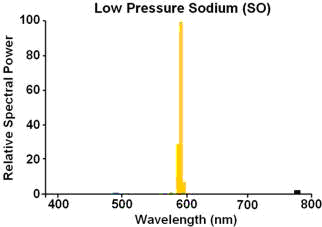
Low pressure sodium (deep orange) street lights are always going to look orange because they are orange. They are monochromatic with only one wavelength at 589 nm. They have no red, green or blue light to balance.
 
Last edited:
I shot in RAW with an AUTO WB setting, I will have a play with the WB in my RAW conversion software

Is there anything i can do during taking the photos to improve things, all is it all down to the PP
 
Try the tungsten white balance setting in camera or better still set up a custom white balance setting to deal with it.
Love the shot though.
 
Yeah, i've just had a quick play with my Olympus Master software, and a Tungsten white balance of 2850 seems to have done the trick

Thanks for all the help guys
 
I shot in RAW with an AUTO WB setting, I will have a play with the WB in my RAW conversion software

Is there anything i can do during taking the photos to improve things, all is it all down to the PP

Yes there is, but it may be more trouble than it's worth, especially if you want a largely monochrome result.

Put a blue filter over the lens. It's common practise with film, as there's very little alternative, but there is an advantage with digital in that it can reduce noise.

What you're doing with white balance, either in-camera or PC, is putting a lot more gain in the blue channel to balance the colour, which can make it very noisy if you're already pushing the ISO.

With a filter, it balances the colours more evenly, and you increase the exposure at the taking stage to compensate. That's assuming the light emits a full spectrum in the first plave though - some street lighting like yellow sodium only puts out mainly yellow light, so there's nothing you can do to put back or rebalance what isn't there to start with.
 
Hmm, interesting, i might have a look into blue filters then
 
Thanks Carl :thumbs:

Well i have got a blue filter on order, so i will have another go when it arrives to see if i can get any better results
 
was thinking the same, especially as using Raw (that is one of the most oft quoted benefits)
 
Altering WB can create more noise, could always turn the blue down a little in pp.
 
See post #6.

whoops, oh yes - didn't read properly!

Although saying that, the shot is clearly going to go through PP so a quick tweak of the WB slider is only adding a second to process...
 
Thanks for all you input folks, i did play with the white balance but the images still seemed quite orange, but i managed to pick up a blue filter for a fiver off ebay and had another go

These are the results, i know it's a different building, but shot at the same time of night and with a similar amount of street lights about

P7212977_78_79_80_81_tonemapped.jpg


P7213014_5_6_7_8_tonemapped.jpg
 
Last edited:
So without the filter, they look like the first pic you posted? Looks like you're getting a lot closer, should be able to do anything with that now.

What filter is it BTW, and what's the exposure factor?
 
That's very good!
What have you done, there? Anything more than the addition of the blue filter?
These shots are much sharper than your original shot of "The Ball".

Cheers,
Mike.
 
It was a Jessops Blue 80A filter (if that means anything to you as it doesn't to me, lol)

I did have to remove the filter to actually get my focus though, even with a powerful torch aimed at my focal point, so that was a bit of a pain

After that, i took several exposures on BULB setting starting at about 12-15 seconds and gradually worked my way down by 2 seconds at a time, then it was a bit of HDR to get the final result, but i was being a bit more subtle with the HDR than on the shot of "The Ball"
 
It was a Jessops Blue 80A filter (if that means anything to you as it doesn't to me, lol)

I did have to remove the filter to actually get my focus though, even with a powerful torch aimed at my focal point, so that was a bit of a pain

After that, i took several exposures on BULB setting starting at about 12-15 seconds and gradually worked my way down by 2 seconds at a time, then it was a bit of HDR to get the final result, but i was being a bit more subtle with the HDR than on the shot of "The Ball"

80A is a standard blue colour correction filter, commonly used when shooting daylight balanced film in tungsten light. Prolly as good as you'll get without going technical/expensive :thumbs:
 
The 80A refers to a (Wratten) number used for filters going back to film days.
The 80 means it is blue, and the letter afterwards describes how blue. A being the weakest, up to D for strong blue.
Basically the 80a filter is a blue correction filter which causes a tungsten lit scene (Colour temp of 3200K) to appear correct when used with daylight film. (Corrects to approx.5500K)
 
Ahh cheers guys, you learn something new everyday ;)
 
Great thread this.
Problem,
suggestions,
experimentation,
resolution.

:thumbs:
 
I did some more experimentation last night, same shot with and without the blue filter

It was late so i didn't get chance to upload them, but i will put them up this evening to give everyone a direct comparison of with/without filter
 
This was going to be part of my experimentation, to see if i could get the same results with and without the filter by adjusting WB etc

How exactly would you apply a blue filter PP (sorry, i'm still quite new to photography and PP)

But for the fiver it cost for the filter it's hardly going to break the bank
 
Presumably using a blue filter under these very yellow street lights the exposure time becomes very long since you're effectively shooting with what ever natural light is about?
 
Yes you need to expose for longer, but with my camera in Manual mode and using the Metering Bar (sorry if i'm not using the correct terminology) i shot 3 exposures of each shot at -1.0, 0.0 & +1.0, this worked out at something like 6, 8, 10 seconds respectively without the filter (sorry, i'm going off memory here)

With the filter it worked out at 8, 10, 12 respectively, so only one step up on the exposure time when using the blue filter

I hope that makes sense ;)
 
Yes you need to expose for longer, but with my camera in Manual mode and using the Metering Bar (sorry if i'm not using the correct terminology) i shot 3 exposures of each shot at -1.0, 0.0 & +1.0, this worked out at something like 6, 8, 10 seconds respectively without the filter (sorry, i'm going off memory here)

With the filter it worked out at 8, 10, 12 respectively, so only one step up on the exposure time when using the blue filter

I hope that makes sense ;)

Thats a bit wierd actually, unless your aperture varied for each shot(I suspect not in manual mode), I would have expected shutter speeds of 4, 8 and 16 seconds for the -1.0, 0 and +1.0 without filter and 5 seconds 10s and 20s with the filter. :thinking: It's entirely possible Ive lost the plot though, it is hot here!
 
Sorry, i meant +0.5, not 1.0 (as you say, it has been hot today) :bonk:

Anyway, here is what i was going to post last night

F3.9, ISO 400, 8.0s with NO filter

P7253419.jpg


F3.9, ISO 400, 15.0s with filter

P7253422.jpg


Now, anyone is welcome to have a go at some PP on the first photo to see if you replicate the second, but i'm happy with the reduction in orange for the price of a £5 filter :)
 
Last edited:
An 80A blue correction filter has a recommended filter factor of x4, ie two stops extra exposure. Looking at the shots of the tyres, it looks like the second one could do with a bit more but these things tend to be somewhat suck it and see.

Easy way to apply a blue filter in post processing is just to change the colour temperature, but you can only go so far. The problem with this method as explained earlier is that with big colour shifts you put a lot more gain in the blue channel, and therefore noise. Doing it with a filter over the lens, and adding extra exposure at the time of shooting, reduces that and gives you much more room for manoeuvre .
 
Thanks for that Richard, i will try to remember to go 2 stops next time i'm out, cheers :thumbs:
 
Oh, and this is how the shoot turned out after a bit of PP

P7253406_7_8_tonemapped%25202.jpg
 
Which pic is it?!
 
It's not one of the above 2 comparison photos, it was a different shot and was done with the blue filter and some light HDR work
 
That's assuming the light emits a full spectrum in the first plave though - some street lighting like yellow sodium only puts out mainly yellow light, so there's nothing you can do to put back or rebalance what isn't there to start with.

Exactly. Though it's more traditional low-pressure sodium lighting that emits in a very narrow band of yellow light.

SOX.png


High-pressure sodium lights have a broader spectrum of emission, and their light tends to look more 'peachy' than yellow. There are still some significant colours missing, though it's much better than LPS.

800px-High_Pressure_Sodium_Lamp_Spectrum.jpg


[spectrum images sourced from Wikipedia]

With LPS, I usually resort to b/w conversions unless I have another source of light handy. I did a few pops with a flash to get some natural colour onto the front of this car and provide some fill, then let the background fall to pure yellow light (shooting RAW).


200611_2770 by cybertect, on Flickr
 
Back
Top