Upgrade or not

ndwgolf

Suspended / Banned
Messages
4,692
Name
Neil Williams
Edit My Images
No
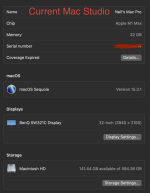
I am currently using a Mac Studio, with a M1 chip and 32GB Ram. My current set up is very slow when processing 100 megapixel Hasselblad X2D images in Photoshop.
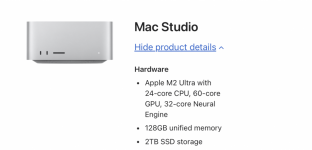
Am I going to see a significant speed increase if I go ahead and buy this new Mac Studio, or is the speed issue more to do with the software i.e. Photoshop ?
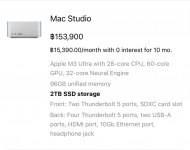
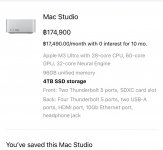
Screenshot 2025-02-27 at 01.20.49.pngScreenshot 2025-02-27 at 01.30.55.png
 
whats the wallet impact
 
I am currently using a Mac Studio, with a M1 chip and 32GB Ram. My current set up is very slow when processing 100 megapixel Hasselblad X2D images in Photoshop.
Am I going to see a significant speed increase if I go ahead and buy this new Mac Studio, or is the speed issue more to do with the software i.e. Photoshop ?

Think of how computers work in a real world experience...

You're at your desk (either at home or at office), and you have too many paperwork all over your desk. You found that the work you're doing sometimes feels like a long day? That would be because you're wasting your time lifting up a lot of papers, looking for this one paperwork that could be somewhere under the pile of paperwork.

Or doing DIY? You can't find that screwdriver because you keep leaving it laying around on the floor, with all the other tools out of the tool kit, along with all the stuff you're working on.

For computers, it's a similar experience.

Even with a very high amount of RAM, some people could still open far too many application software, open far too many files, play music on their computer, or even surf the Internet while they're working, all on their computer.

That could get the computers system, the CPU and the RAM kind of blogged down. They may be fast, but the computer need some space in the RAM to do some work. I don't know about MacOS, but in the case of Windows, some people haven't bothered to use diagnostic software to sort out their hard drive, often result in a slow computer.

You can upgrade your computer if you want to, but I would advise you to consider thinking about how do you use your software. You could close everything, restart your computer, then only open Photoshop and only open the photo you want to edit on. Rethink your workflow, use only what apps you want to use, work on one open file at a time.

That would be similar to clearing your desk of all those paperwork you're not using, and have plenty of space for the actual papers you're working on.

You could see a significant increase in performance if you upgrade, but the new computer could still get blogged down if you open too many application software, surf the Internet, watch movies, etc.,

Remember that the computer is only as good as how the person use it, for example, the fastest computer is only as fast as the person doing the typing.

Feel free to upgrade if you wish, but please also think about your workflow, which could be the reason for the slow processing.

It is too easy for people to overuse their computers, push it to the limits with too much workload, and mistakenly think the problem is that their computer is outdated.

My mother once had a Windows XP computer that complaints that it was working slow, until I clean out the dust from inside the computer, then used diagnostic tools to sort out the software, including deleting junk files, afterwards, my mother remarked that her computer works faster and smoother than before.

Hope the advice and tips help?

 
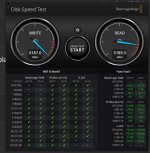
I'd say the main issue with your current setup is the speed of your hard disk. The 512GB SSD in the M1 series was noticeably slower than 1TB or 2TB.

Here's an excerpt from a Mac Rumours article a year or so ago.

Here is a summary with rounded numbers, below is Write and Read speed from BlackMagic with 5GB tests. There is some variation, up and down depending on exact spec of CPU/GPU across Max and Ultra, but not massive differences.

Write and Read Speed in MB/s (I think they have these the wrong way round as write is always slightly slower than read).

512GB – 3400 / 3000
1TB – 5700 / 5200
2TB – 6200 / 5300
4TB – 7100 / 5600
8TB – 8100/ 5900

So as you can see, you should expect to see at least an 82% increase in read speed and a 76% increase in write speed.
I have an M2 max Apple Studio with 32GB RAM and a 1TB hard drive and I never have an issue with performance, okay I'm only using RAW files from my Canon R1, R3 and R5 but I frequently work in Lightroom or Photoshop while Premiere Pro is chugging away in the background and I don't have any problems.

So in my opinion you should expect to see an increase in performance, a substantial one, 24 core CPU and 60 core GPU will fly, you've quadrupled your memory and you've got a much faster hard drive.

Apple kit holds value well so sell your current setup and offset that against the cost of your new Mac Studio. :)
 
Last edited:
Personally though, I think you would suffice with the lower 12-CPU and 30-core GPU model.
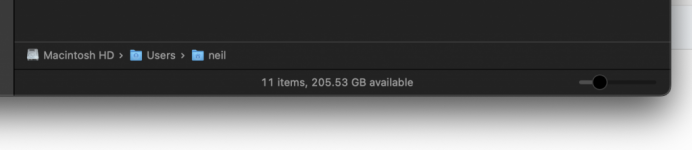
With 64GB RAM and a 1TB SSD (looking at your screenshot you're not desperate for 2TB, and it's much cheaper to add an external NvME drive for more storage) you can get it for half the price - £2,699.

Add in the money you'll get from your existing Studio and your outlay is significantly less.
 
I'd say the main issue with your current setup is the speed of your hard disk. The 512GB SSD in the M1 series was noticeably slower than 1TB or 2TB.

512GB – 3400 / 3000
1TB – 5700 / 5200
2TB – 6200 / 5300
4TB – 7100 / 5600
8TB – 8100/ 5900
I consider myself pretty tech savvy but would never have thought to consider the different drive capacity options would vary so massively in performance. It goes someway to explaining the crazy price increases as you change capacity on the apple website, but I'd expect Apple to be more transparent on this (and probably give variety of drive speed options so users can choose).
 
I consider myself pretty tech savvy but would never have thought to consider the different drive capacity options would vary so massively in performance. It goes someway to explaining the crazy price increases as you change capacity on the apple website, but I'd expect Apple to be more transparent on this (and probably give variety of drive speed options so users can choose).
Based on the increases it's more cost effective to get the 1TB and then use cheaper NvME external storage if needed.
 
100Mp is heavy, but not impossible. Just give us some idea what you do with them, how many layers, etc.

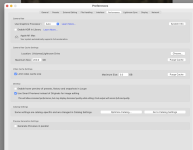
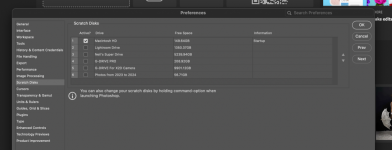
And before you spend the money, look into any potential issues like low drive space, incorrectly set cache parameters which is what may be causing the slowdown. You may still opt to spend but at least you have it under control.

I have put my rig though some tough work, including 50MP files at many layers deep, the same thing after gigapixel giving 100MP, large posters, etc. 32GB RAM is barely there; 64 is notably smoother but not absolutely necessary. The big difference is that I have a real GPU, which may be quite modest nvidia 3060 ti by today's standards, but it walks circles all over anything that apple has released to date. That may be the variable you could be missing even on the expensive new studio
 
100Mp is heavy, but not impossible. Just give us some idea what you do with them, how many layers, etc.

And before you spend the money, look into any potential issues like low drive space, incorrectly set cache parameters which is what may be causing the slowdown. You may still opt to spend but at least you have it under control.

I have put my rig though some tough work, including 50MP files at many layers deep, the same thing after gigapixel giving 100MP, large posters, etc. 32GB RAM is barely there; 64 is notably smoother but not absolutely necessary. The big difference is that I have a real GPU, which may be quite modest nvidia 3060 ti by today's standards, but it walks circles all over anything that apple has released to date. That may be the variable you could be missing even on the expensive new studio
What I ended up doing is this
I have moved my Lightroom catalog to a super fast NVMe drive. I am also saving my images to another NVMe drive. This in turn has freed up a bunch of space on the internal HD.
When editing my images (portraits) I run an action in Photoshop that increases the 124 MB .fff image to about 3GB. I then flatted that layer stack and make any final tweaks and end up with an image around 5 to 600 MB.
 
What I ended up doing is this
I have moved my Lightroom catalog to a super fast NVMe drive. I am also saving my images to another NVMe drive. This in turn has freed up a bunch of space on the internal HD.
When editing my images (portraits) I run an action in Photoshop that increases the 124 MB .fff image to about 3GB. I then flatted that layer stack and make any final tweaks and end up with an image around 5 to 600 MB.
Do your images really need to be that big?
 
As stated by @Hanley the internal SSD speeds vary with model
Mine is an M1 Pro with 1Tb drive and my speeds are pretty decent.
I also have an external enclosure with a Nvme drive in and that gives around 3000 MB/s

Five grand is a lot of money for a speed bump of around 20% if it even gives you that.
Also PS is a bit of a dog when it comes to working with large files, Adobe tend to try and throw everything in bar the kitchen sink and that will become worse over time.


Screenshot 2025-03-02 at 09.37.14.jpg
 
Last edited:
@ndwgolf hmm sounds odd to me. I had no problems with GFX100 100MP files on my Mac mini 2018. Have you checked photoshop settings to make sure they are optimized for you Mac Studio? I’ve recently upgraded to Mac Studio M2 Max but that was for video work photos were fine so I’d be surprised if you need to.
 
That’s how big they are out of camera
I meant this:

When editing my images (portraits) I run an action in Photoshop that increases the 124 MB .fff image to about 3GB. I then flatted that layer stack and make any final tweaks and end up with an image around 5 to 600 MB

That's what I was referring to, they're not that big out of camera.
 
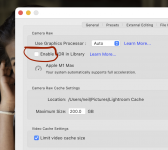
Try switching your cache to the Mac Studio”s internal SSD and enabling full GPU acceleration - both should help significantly.
 
Personally though, I think you would suffice with the lower 12-CPU and 30-core GPU model.
With 64GB RAM and a 1TB SSD (looking at your screenshot you're not desperate for 2TB, and it's much cheaper to add an external NvME drive for more storage) you can get it for half the price - £2,699.

Add in the money you'll get from your existing Studio and your outlay is significantly less.
I have this setup (except with a 38-core GPU) and an 8TB NVMe SSD (40Gbps over Thunderbolt), but that upgrade was for complex video work, not photos. My 2018 Intel Mac Mini with 64GB RAM handles 100MP Fuji GFX images without any issues.
 
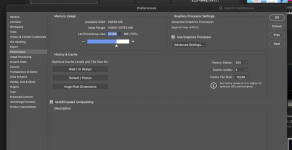
Cache levels could go to 8. or more. Could also go to advanced settings under use graphics processor and just double check all is ticked.

I really can't see anything major wrong here. Could be some 3rd party app interfering with setup. Something like antivirus or tweaking malware. Next step is really talk to adobe.
 
Since moving my Lightroom catalogue to my 2TB NVMe drive and now saving my edited photos to another 6TB NVMe in the same housing things are starting to look a lot snappier. I’ve also adjusted my cash settings as per your recommendations so fingers crossed no more issues. Thanks for everyone’s help
 
Since moving my Lightroom catalogue to my 2TB NVMe drive and now saving my edited photos to another 6TB NVMe in the same housing things are starting to look a lot snappier. I’ve also adjusted my cash settings as per your recommendations so fingers crossed no more issues. Thanks for everyone’s help
Great to hear, so as we thought initially your bottleneck was your internal 512GB SSD, which are renowned for being sluggish, Apple's kind way of forcing you down the expensive upgrade path :)
 
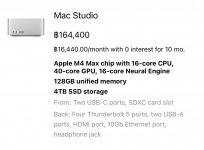
So Apple announced a new Mac Studio. There not available here in Thailand right now but hopefully they will be soon. This is what I’m thinking of getting but in too minds of getting either 2 or 4 TB SSD
The difference is about £500 £3500 verses £4000
IMG_7526.jpegIMG_7525.jpeg
 
I guess it depends what volume of images you have whether that's worth it vs NVME SSD over TB. On my Mac Studio M2 Max the onboard memory is about 4700 MB/s read and write and the NVME SDD over TB is about 2700 MB/s read and write so plenty fast enough. The NVME 8TB SSD was about $700 all in so much better VFM per TB.

....looks like I was one of the last M2 Max purchasers.... last return date for the box was a couple of days before the Apple announcement and already discounted by $500. That said it's still an incredible machine so maybe worth looking at one of those too?
 
I would save yourself a lot of money and go for an external Thunderbolt 5 SSD enclosure (TB501Pro) . With something like a WD SN850, you will get 5000-6000 Mb/s transfer speed which is on par or slightly better than the internal SSD, and gives you the flexibility to use it on the move or with other devices if required.
 
I would save yourself a lot of money and go for an external Thunderbolt 5 SSD enclosure (TB501Pro) . With something like a WD SN850, you will get 5000-6000 Mb/s transfer speed which is on par or slightly better than the internal SSD, and gives you the flexibility to use it on the move or with other devices if required.
I will just get the 2TB SSD. That should take care of my Lightroom catalog and initial imports of up to 1000 x 100mp images. Process them then store them on external NVMe drives.
 
Thanks for all the feedback guys. This is what I eventually got. Hopefully it will arrive today View attachment 449268
that looks amazing! You're going to love it :) .... not only for photos pretty decent machine for LLM work too!

edit P.S. I have the M2 Max Studio 12 CPU, 38 GPU cores and 64GB and that's already a monster with very quick preview generation and exporting. From what I read the M4 Max version is about 20-30% faster.
 
Last edited:
That is going to fly! I've just got an M4 Pro with 24GB and that is plenty rapid.
 
Back
Top