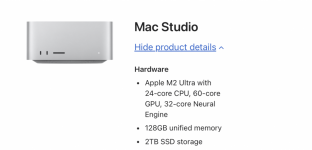
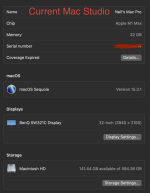
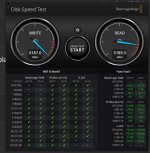
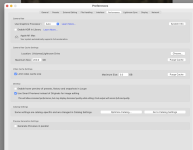
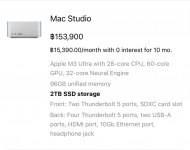
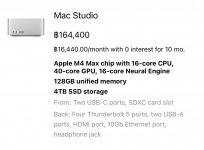
I am currently using a Mac Studio, with a M1 chip and 32GB Ram. My current set up is very slow when processing 100 megapixel Hasselblad X2D images in Photoshop.
Am I going to see a significant speed increase if I go ahead and buy this new Mac Studio, or is the speed issue more to do with the software i.e. Photoshop ?
Think of how computers work in a real world experience...
You're at your desk (either at home or at office), and you have too many paperwork all over your desk. You found that the work you're doing sometimes feels like a long day? That would be because you're wasting your time lifting up a lot of papers, looking for this one paperwork that could be somewhere under the pile of paperwork.
Or doing DIY? You can't find that screwdriver because you keep leaving it laying around on the floor, with all the other tools out of the tool kit, along with all the stuff you're working on.
For computers, it's a similar experience.
Even with a very high amount of RAM, some people could still open far too many application software, open far too many files, play music on their computer, or even surf the Internet while they're working, all on their computer.
That could get the computers system, the CPU and the RAM kind of blogged down. They may be fast, but the computer need some space in the RAM to do some work. I don't know about MacOS, but in the case of Windows, some people haven't bothered to use diagnostic software to sort out their hard drive, often result in a slow computer.
You can upgrade your computer if you want to, but I would advise you to consider thinking about how do you use your software. You could close everything, restart your computer, then only open Photoshop and only open the photo you want to edit on. Rethink your workflow, use only what apps you want to use, work on one open file at a time.
That would be similar to clearing your desk of all those paperwork you're not using, and have plenty of space for the actual papers you're working on.
You could see a significant increase in performance if you upgrade, but the new computer could still get blogged down if you open too many application software, surf the Internet, watch movies, etc.,
Remember that the computer is only as good as how the person use it, for example, the fastest computer is only as fast as the person doing the typing.
Feel free to upgrade if you wish, but please also think about your workflow, which could be the reason for the slow processing.
It is too easy for people to overuse their computers, push it to the limits with too much workload, and mistakenly think the problem is that their computer is outdated.
My mother once had a Windows XP computer that complaints that it was working slow, until I clean out the dust from inside the computer, then used diagnostic tools to sort out the software, including deleting junk files, afterwards, my mother remarked that her computer works faster and smoother than before.
Hope the advice and tips help?