Trouble with lighting

max.morch

Suspended / Banned
Messages
18
Edit My Images
No
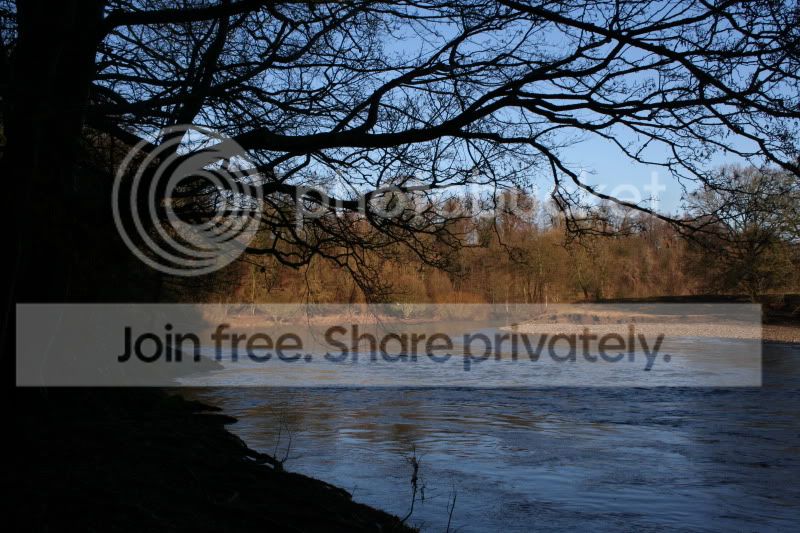
I went out first time with my new dslr, and had trouble with light. Alot of the foreground was simply black on the picture, yet to my naked eye looked well lit and it ruined most of my photos.
What can I do to resolve this? The inbuilt flash made the shots look terrible when I tried using that? There were times when the light from the sun would overlighten parts while having other bits realy dull?
Also I want to slow down the shutter speed when using P to make the wavy effect when shooting rivers, how can I do that? I tried adjusting the main dial but that just adjusted the auto white balance?
Cheers, il upload some photos to show what I mean in a minute.
Cheers and sorry for the stupid questions, I do try reading the manual but it wasnt much help!
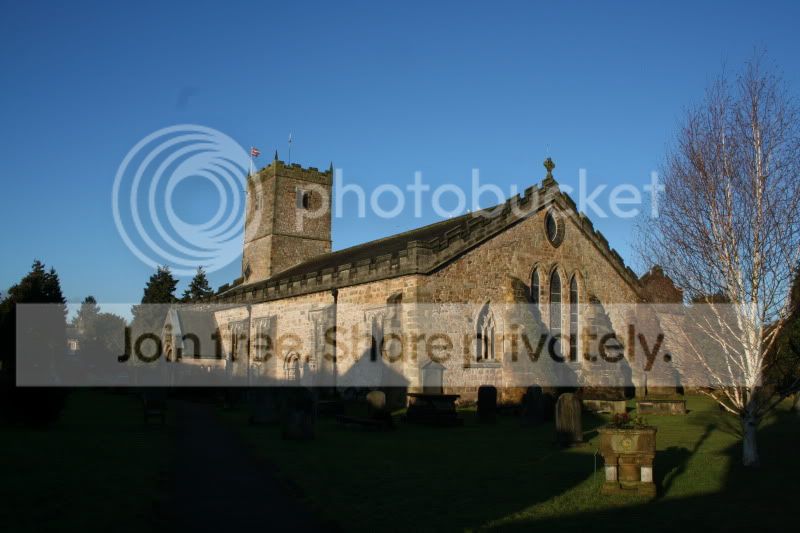
IMG_4426.jpg
 
Last edited:
The first problem with the church is one of dynamic range. The camera is nowhere near as good as your eyes when it comes to scenes with a very big difference between the brightest and darkest tones.

It's a very common problem and there are no easy ways around it. If you shoot Raw and set the exposure carefully (that shot looks a bit under anyway) then you will ensure the sensor records the absolute maximum amount of image data. With careful post processing you can extract more from the file than the in-camera JPEG delivers, and that image could certainly be improved - but maybe not enough to be really satisfactory.

For that particular shot above, the best option would be HDR technique - High Dynamic Range. Basically you take two or more exposures, one exposing for the bright areas and another for the darker tones, and then merge them in post processing.

For the long exposure to blur water, set the lowest ISO and on the P mode use programme-shift to get the longest shutter speed possible. Depending on the light, this probably won't be long enough to get you a very long speed and if that's what it takes (depends on the speed of the water) then you'll need a neutral density filter to darken the whole scene still further.
 
Last edited:
IMG_4525.jpg

I had a similar problem with that one aswell.
So with the church im best shooting raw with a few different exposures and making a HDR? is that the only real way to get around it bar spending loads on external flashes?
Il try that with the lower iso tommorow, is there not a way to manually select the shutter speed?
Cheers thats been realy helpful!
 
The exif for both of your shots shows -2/3 exposure compensation, this will cause them to be darker overall.
I have not got a Canon, it looks as though you have a 350D, but you need to study the manual and find out how to set Av, Tv, P, M and how to adjust shutter speed & exposure in each of these.
Once you can do that you can learn about exposure compensation, ISO etc

There is some detail which can be recovered from your pictures, I do not know what software you have but if you open your church photo in a basic program like Picasa3, a free download, you can use the fill light slider to lighten the shadows a bit although it also lightens the rest of the shot a little.
 
IMG_4525.jpg

I had a similar problem with that one aswell.
So with the church im best shooting raw with a few different exposures and making a HDR? is that the only real way to get around it bar spending loads on external flashes?
Il try that with the lower iso tommorow, is there not a way to manually select the shutter speed?
Cheers thats been realy helpful!

The fundamental problem is that the sensor can only handle a range of brightness from light to dark of, say, 200:1. A typical sunlit landscape will be more like 1000:1 or in an extreme case ten times that.

Fortunately, most of the time, the important tones are only a small part of that range somewhere in the middle. The job of exposure metering is to measure the important tones and make sure they fall within the dynamic range of the sensor.

In extremes of dynamic range, the task is to ensure that the range is reduced to manageable proportions. With the church, the easiest way to do that would be to recompose the picture so that you either have just the brighter sunny area, or perhaps just the shaded area if there's something more important to be seen there.

If you need to record the whole scene, then the options are:
- use flash or some other means to lighten the dark areas (impractical)
- use a graduated ND filter to darken the bright areas (only works if there's a straight line between light and dark, such as the horizon/sky)
- use HDR technique as described above (would work well here, as there is nothing that will move between the two or more separate exposures)

You need to get up to speed with some basic terminology, and your camera controls. Check out the tutorials section on here, there's some good stuff, especially the one headed Understanding Photography which was written specifically with folks like you in mind :) http://www.talkphotography.co.uk/forums/showthread.php?t=99841
 
So with the church im best shooting raw with a few different exposures and making a HDR? is that the only real way to get around it bar spending loads on external flashes?

Often the best solution is just to be there at a different time of day. In some cases you can process all you want but an unprocessed picture taken at a different time of day or in different weather conditions will still turn out better. (not necessarily true for the images in question)
 
Back
Top