
total beginner - how to improve these pics

campergirl

Suspended / Banned
Messages
82
Name
Liz
Edit My Images
Yes
How can I get these to look better? I'm a total beginner and am still practising with my camera, I have photohop but as yet dont really get how to use it :shrug: is there any way to remove rubbish back grounds? the pics are of my nephew and I'd like to get some done for my bro & his wife for xmas (I know that they are not that great!).
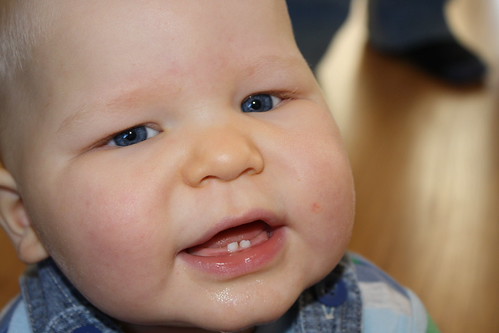
IMG_6517 by campergirl2008, on Flickr
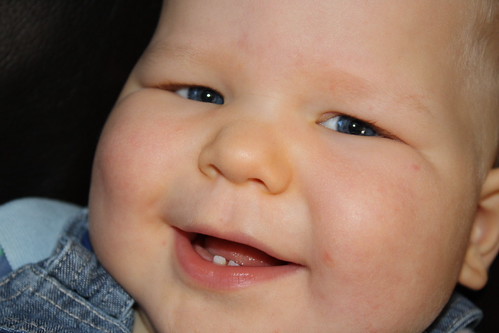
IMG_6534 by campergirl2008, on Flickr
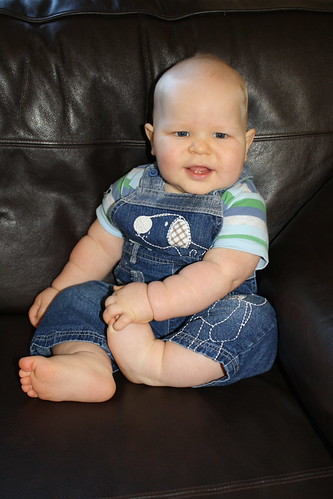
IMG_6530 by campergirl2008, on Flickr
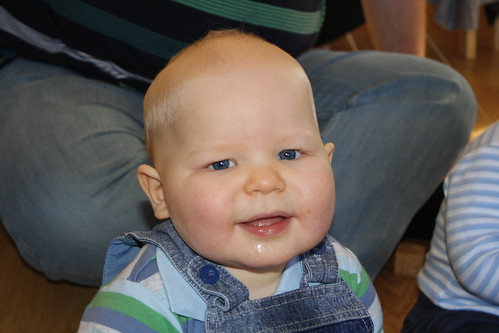
IMG_6511 by campergirl2008, on Flickr
 
Could be worth posting in the Photo Critique and Sharing section.
Im pretty much in the same boat as you being completely new to PP so i posted up a portrait i`d taken and had a lot of helpful critique.
 
The first two are a little too close for me, the second two the opposite :)
I've cropped closer and in IMG 6530, cloned out some minor but (in my opinion) distracting highlights on the leather couch.
BabyCrop1a.jpg

BabyCrop1.jpg

Indecently, it looks to me as though the ears are a little sharper than the eyes in this one? But congrats on avoiding red-eye, which can sometimes be more of a problem with blue eyes.
With IMG 6511, again cropped in closer; airbrushed a lot of the upper background, selecting from the uniform dark colour and removing both the stripes and the area of flooring.

BabyCrop2a.jpg

BabyCrop2.jpg

Pretty quick and dirty, could be better with more time spent, but you get the general idea :)
Personally, I try to compose in-camera where ever possible, using the flexibility of a zoom lens to get the crop I want, remembering that even though my human eye/mind might filter out the background, the camera's sensor won't :D While a wide aperture can help isolate the main subject and throw the background out of focus, an out-of-focus highlight is still bright and often distracting, just not sharp ;) I know it's not always that easy, especially with less formal settings, especially with babies!
HTH.
 
Last edited:
Rather than trying to get rid of the intrusive background in the photos, why not set up photos with simpler backgrounds? For example, your third shot, which I think is one which any parent would be happy with.

Children of this age can, unlike when they get older, be organised/put into the right palce.

Processing after the photo has been taken can do a huge amount, but it is far better to get the image right to begin with.

You said you are practising with your camera. That is great - just take lots and lots of photos in all sorts of different situations and you will learn a lot.

Dave
 
these were taken on the spur of the moment so not really planned at all. I am going to have to invest in some sort of background material I think to get some shots which are more worthy of hanging on the wall! Thanks for the comments
LIZ
 
Nice shots - But rather than messing about buying background material try practising with a narrower depth of field. noticed you shoot at f.5 at iso 400. Take it down to the f2 mark and iso 100/200 and blur the background.

Try and find a background with some colour in (wood and leaves) that would blur to a nice colour.

You can pick up a cheap 1.8 50mm prime lens that would be ideal for these sort of shots

Here's a good article on it. Check out the street shot, no expensive background just any old street. He's shooting with an expensive lens, but a 50mm prime will give you some really good shots with the same principle
http://neilvn.com/tangents/2010/10/27/using-narrow-depth-of-field-and-great-bokeh/
 
Untitled-1.jpg
 
How can I get these to look better? I'm a total beginner and am still practising with my camera, I have photohop but as yet dont really get how to use it :shrug: is there any way to remove rubbish back grounds? the pics are of my nephew and I'd like to get some done for my bro & his wife for xmas (I know that they are not that great!).

Hey you have to start somewhere.

Have a search on google for photoshop tutorials on layers and masks.

Main idea is
- that you duplicate your picture layer.
- blur the bottom layer
- add a mask to the upper layer - pok holes through to see the blurred layer.

By holes I mean black and white on the mask.
Takes a little while to get the hang of but you can use masks in all sorts of pictures.

I use GIMP - free package... have a browse and a play and post back if you need advice on aspects. People on here use photoshop and can assist :)
 
The OP asked how he can improve the photos. Photoshop does not help improve your photography skills.

To the OP the use of on-camera flash to be seems to be the main issue. Try using flash off camera.

Move the subject away from the background a bit. What you're doing with the subject so close is getting both background and subject in focus. the further you move the subject from the background the more out of focus the background will become and the more isolated the subect will be.

the main issue is the lighting. With teh flash, try using a diffuser. Is it a flash gun or just the small camera flash?

You could try sitting him in front of a window and use soft natural light. Open up the aperture and you should get some nice images.
 
Actually, the OP asked how to improve the pics that had already been taken, or did I read it wrong?
 
Actually, the OP asked how to improve the pics that had already been taken, or did I read it wrong?

You're right! My apologies :)

I skimmed over it too much :) sorry :bonk:
 
That notwithstanding, all the advice given for future pics is all good :)
Get that finger clicking!
 
Back
Top