Topaz Adjust 5

theraven

Suspended / Banned
Messages
918
Name
Jenna
Edit My Images
Yes

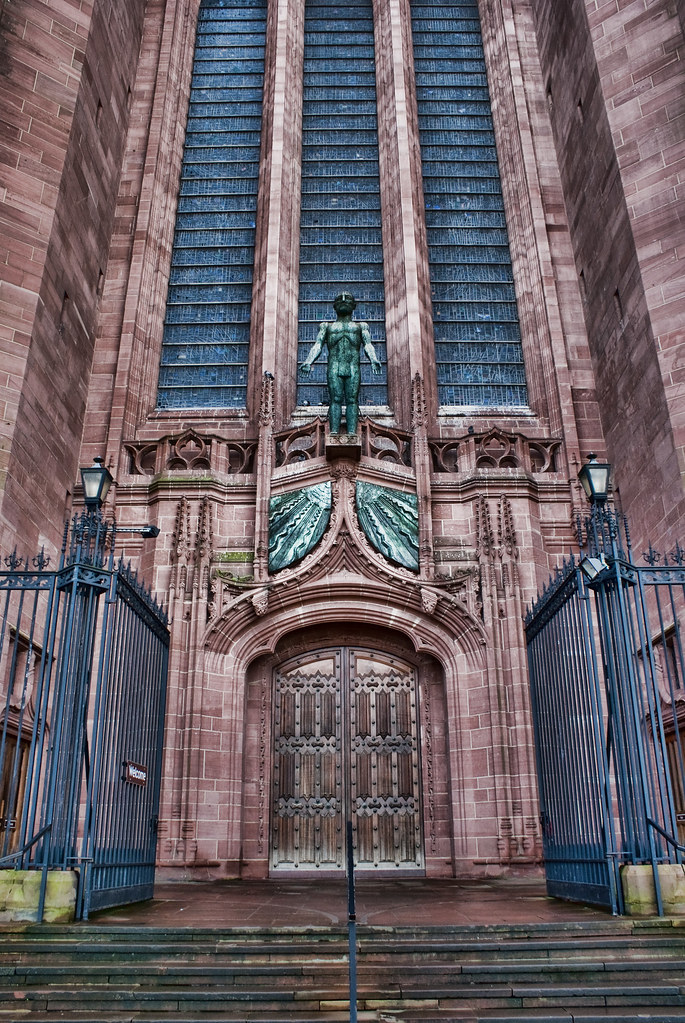
Liverpool Cathedral by ravenphotography2012, on Flickr

I have seen so many things about Topaz recently that I had to try it for myself, I have to say I am impressed.

I haven’t had much chance to play with it completely yet but the picture above was very boring and flat and didn’t have much going for it, but I applied the Dynamic Pop preset and it’s like a different photograph!

Click on the image and view it on a black background, it looks a lot better.

I put it through Photoshop as a RAW file, did the generic RAW adjustments, then opened the Topaz Adjust plug-in, fiddled about with it a bit until it looked how I wanted it and that was it. I didn’t even feel the need to touch it up afterwards.

I have to say I can see myself using this a lot. I like the depth it gives and the contrast, it also pulls a lot of details out of a RAW file without much effort.

This will be great for those shots that need a little more dynamic range but without the effort of HDR.

It will never replace HDR, but it will be a time saver and I can’t wait to edit my actual HDR’s with it.
 
I'm another fan of Topaz plugins, especially Adjust. I tried version 4 and liked it so much that I ended up buying all of the plugins. Remask is great for extracting fiddly detail like hair or bridal veils, Simplify is great for producing artistic and 'painterly' images, and Lens Effects is great for changing the depth of field after you've taken the photo or creating 'miniature city' photos or adding mist, fog, filters, grain, etc.

I don't know if you know but whenever Topaz put on a webinar, they offer all participants 30% off of either the product they're highlighting in the webinar, or off of any plugin. There's one on tonight from 10pm-11pm titled, "Crafting Your Images with Topaz Plug-ins" presented by John Barclay. Plus there are 4 other upcoming webinars that are worth attending.

If you go to the URL below and click on the title of the webinar you're interested in, you'll see a lot more details including a link to let you register.

http://www.topazlabs.com/webinars/
 
Used lightly they can be good, just don't want to over cook it, which I would say your image is just about doing IMO, pull it back a little and would look great!
 
For me personally that looks heavily processed. I mean if that's the style you like then great. :)
 
Back
Top