to remove a telephone line...?

Yardbent

Suspended / Banned
Messages
7,761
Name
John
Edit My Images
Yes
new at pp and only have Paint.Net

doing a project on this tree
but before I continue...whats the best method of removing the power line

OOC - only resized - need to work on a decent sky [and colour saturation?] but the very first prob is that power line.. need a step-by-step "how-to"

thanks
.
showphoto.php
[/url][/IMG]
 
Do you have photoshop ?

EDIT: Err no you answered that....

Photoshop trial..

It would be quite a simple clone job but would take just as long to do on the above as the original

If you post a link to the original image (full sized) I am sure someone will have a go for you. I would later but not got time right now.
 
If you don't have Photoshop, then go download Gimp. It's free and has many fairly decent PP features.
 
Photoshop trial..

It would be quite a simple clone job but would take just as long to do on the above as the original

If you post a link to the original image (full sized) I am sure someone will have a go for you. I would later but not got time right now.

thanks but didn't want anybody to spend time doing it....:)

more of a "what do i do on subsequent images..? .thanks
 
If you don't have Photoshop, then go download Gimp. It's free and has many fairly decent PP features.

cheers - tried Gimp some time ago .....really struggled to use
[very time-consuming to learn ....maybe time to try again though..?]

so I picked a simple DIY Paint.Net
 
Any decent post production software is going to take some time to learn. I've been using Photoshop since version 3 (yes, version 3, not CS3) and I'm still learning new things about it.

Give Gimp another go, start off simple and just keep trying new things. :)
 
Any decent post production software is going to take some time to learn. I've been using Photoshop since version 3 (yes, version 3, not CS3) and I'm still learning new things about it.

Give Gimp another go, start off simple and just keep trying new things. :)

ok - I'm guessing cloning out a line right across the frame is going to take some time ?

unfortunately unable to change the viewpoint........:thumbsdown:
 
I've been using Photoshop since version 3 (yes, version 3, not CS3) and I'm still learning new things about it.

Likewise, but my first exposure was v1.1 circa 1991/2 and I've had my own licence since v2.5 in 1993.

I've always said that Photoshop was the reason I never got into computer gaming :D
 
Yardy I started this at 12.30 and just finished using photoplus x3 cloning

Yardbent.jpg
 
Julian

well that's excellent
I shall devote a few evenings looking at various pp packages........thanks
 
well I did not see some one else had done it should have looked down but took about 5min with clone tool
If you look close you will there are no patters that you some times get as you will see in wheels cloning
If you wish to see what is different put one on top of each other in layers and turn on and off you will start to see what I mean
4714321641_d5339f2a41_o.jpg
 
Chaz ... thanks....which package did you use...?

what are "patters".......

I did see the bungalow roof in yours is sharp
 
I got CS4 but what I did you can do with any you just need to one use a very small brush and to keep re sampling so as not to make patterns If you look along the lin that was there you will see what I mean look at the far right on the grass you will see them. it repeating on lines or tones which can be seen easy when you know what your looking for.
It hard to show you easy with the screen res image
 
CS5 should make this kind of job a bit easier. I'll find out on Monday when my copy arrives.
 
Now why didnt we think of it :lol:

If you haven't got an all-terrain chair (hope I didn't give Darren another idea there), I can see why it wasn't your first thought. ;)
 
If you haven't got an all-terrain chair (hope I didn't give Darren another idea there), I can see why it wasn't your first thought. ;)


Bloody hell John best delete that before folk start talking :lol::lol:
 
:lol: Ooooo we could make an offroader!
 
:lol: Would need one hell of a mounting system for the camera too.....

And cobbled paving stones are nearly as bad!
 
:lol: Would need one hell of a mounting system for the camera too.....

And cobbled paving stones are nearly as bad!


With this chariot having 6 wheels I wouldnt even attempt cobbles, they are a no go area, I avoid them as I would avoid landmines :nono:
 
Fair enough - they usually are in rustic cities and lead women to expensive shops to buy inappropriate shoes...
 
Fair enough - they usually are in rustic cities and lead women to expensive shops to buy inappropriate shoes...


Suprisingly our local town has a hell of a lot of cobbled areas, you just have to make detours around those areas.
 
Fair enough.

Sorry for diversion OP. :)
 
I got CS4 but what I did you can do with any you just need to one use a very small brush and to keep re sampling so as not to make patterns If you look along the lin that was there you will see what I mean look at the far right on the grass you will see them. it repeating on lines or tones which can be seen easy when you know what your looking for.
It hard to show you easy with the screen res image

thanks - I've seen that when i tried to clone out some crease faults in old photo scans - the area cloned out just doesn't blend with the background
 
John I used Photoplus (CLONING ONLY)

This is how I started to get into photography by joining in the Stroke Groups Digital Photography PP course.

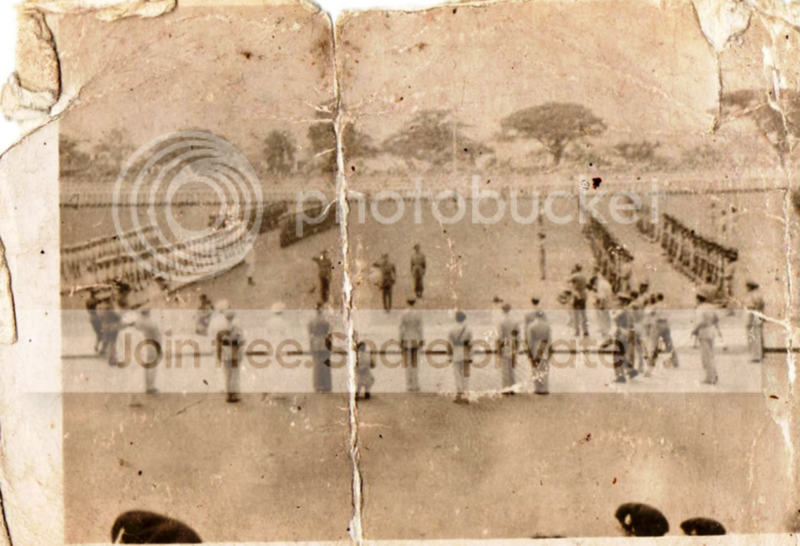
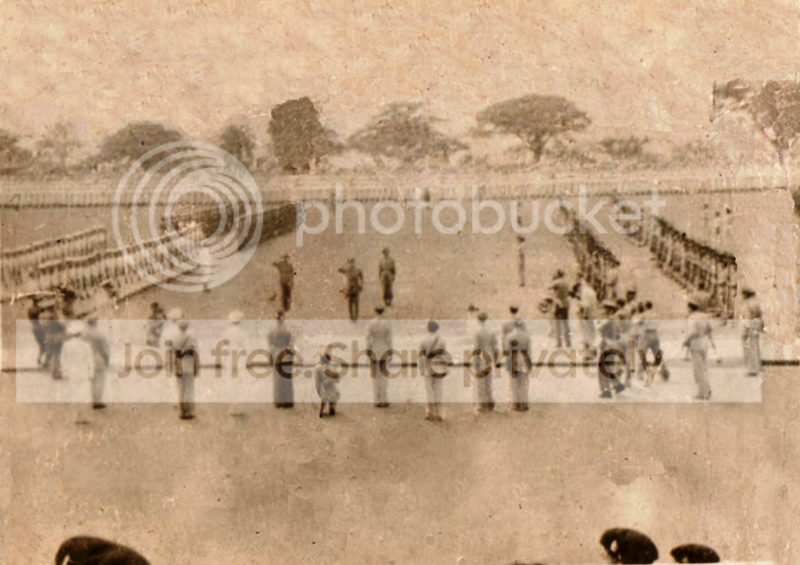
This is a photo my 84 year old neighbour has in his wallet its at the Japanese surrender from WW2 he was there. This is the original copy he has in his wallet.

largewar111.png


This is what I did after a couple of hours on photoplus, I know there are a few obvious errors but you get the gist of it.

japanesesurrenderrestored.png
 
superb.....:thumbs:

my Mother carried a photo of Dad with her throughout WWII
him getting into a Hurricane cockpit at Biggin Hill

it was folded over at each edge to fit a perspex window in her purse....:bang:

I did do one ok that only had a few imperfections - did a sepia of it
I'll leave the cockpit one till I get some editing software...
may try "gimp" again - a bujjer to learn

but I see PC World has PhotoPlus X3 for £29
then I can bother you with all my "how does this work" questions.....:lol:
 
I probably do it the wrong which must take longer but i clone the colour next to what want to remove, then use the airbrush over it. I do this every 15 millimetres until it's removed, it's worked on a printed photograph and unnoticeable.
 
ok - I'm guessing cloning out a line right across the frame is going to take some time ?

I find the clone tool isn't very intuitive in GIMP, so takes longer to use successfully than Photoshop/PSE.

This took about half an hour in Elements 7, which is dirt cheap now, I believe. It's not absolutely perfect, but a good example of what's achievable. (Sorry, I know it's not your photo. It's just an example).

4720291707_18b651820f.jpg

4720292051_1279742e16.jpg
 
Back
Top