

Tips for scanning colour shifted film...?

Harlequin565

Suspended / Banned
Messages
8,684
Name
Ian
Edit My Images
No
So I always fancied the idea of shooting colour shifted film, mainly because it can give me a look I want with no PP. The only 2 I've tried have been Lomochrome Metropolis and Lomochrome Purple.

Metro didn't seem to be a problem, and a straight colour scan got me the same results I was seeing on the web. However Lomochrome Purple has been a nightmare.

I just sent off 2 rolls to AG Photographic. This is the contact sheet I got back...
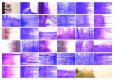
2020-11-30-lomopurple-1-eos30.jpg

Frankly, content aside, this looks horrible to me. So when I got the negs back, I scanned them myself. Plustek 8100 + Silverfast
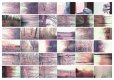
2020-11-30-lomopurple-2-myscan-eos30.jpg

This is much less bad, but I was kinda expecting something in between the two. As you can see, the colours vary wildly within the frame.

Does anyone know the best method for just scanning the image without any "interpretation". I don't know if my scanner is trying to correct the purple colour cast, or if the AG scan was viewed by an expert and that's how Lomo purple is supposed to look (I've mailed them about it).

Alternatively has anyone had experience of scanning colour shifted films and has any tips?
Thanks in advance!
 
Last edited:
Metro didn't seem to be a problem
When I scanned the Metro on my V550 I did have to apply a bit of correction but Silverfast "copy settings to all frames" sorted that out after I had corrected one frame. Googling Lomo Purple shows photos that are quite different to what you got from AG. I think both have had some sort of automatic correction applied and I guess you are going to have to do some manual setting. This gives details of what to expect the colours to be
 
No doubt someone here will tell you how to tame your scanner, but I'd be photographing them in RAW (to eliminate white balance) with a dSLR and inverting them with Photoshop/ GIMP or similar.

I just started to go down that road only to discover Neg Lab Pro was removed in the altest LR update (thanks Adobe) so I redownloaded the plugin and started to read through the installation instructions only to discover that Adobe have changed their file structure (thanks Adobe). All in all, the whole process is making me grumpy so I think I'll write the film off and sell what's left on eBay.

A quick internet search found this though

This was very interesting and I suspect I'll get a similar response from AG.

#shootnormalcolourbehappy
 
This gives details of what to expect the colours to be

The Emulsive article I found explains the purple - red colour shift depending on available light. It's my own stupidity I think for seeing the images on the Lomo website and other places on the web and thinking I could replicate them when I have neither the light (UK/November isn't sunny California which is where most of the showcase images look like they were taken), photographic skill, or desire to fiddle with pp (scan, photoshop or equivalent) to get it looking Instagram worthy.
 
I just started to go down that road only to discover Neg Lab Pro was removed in the altest LR update (thanks Adobe) so I redownloaded the plugin and started to read through the installation instructions only to discover that Adobe have changed their file structure (thanks Adobe). All in all, the whole process is making me grumpy so I think I'll write the film off and sell what's left on eBay.

Do you have Photoshop Ian? If you do, try Grain2Pixel (although the install for that is a bit of a faff too - there are instructions on the website though). I've never shot Lomochrome Purple, but theres an example shot converted with Grain2Pixel here: View: https://www.reddit.com/r/analog/comments/iuki0b/purple_puddle_contax_t_lomochrome_purple200/
 
when I have neither the light (UK/November isn't sunny California which is where most of the showcase images look like they were taken)
TBH I often think that about Portra for anything other than portraits. Portra seems to be very trendy but with UK grey skies and greenery it doesn't really add anything IMHO.
 
So AG wrote back and said that they offer no guarantees with colour shifted film. I get the sentiment (see the link in Mr Badger's post #3) but it's annoying to pay for a scan that's crap.

They have a discalimer on their site which I completely missed so it's entirely my fault. But as an FYI to anyone reading this thread. Don't order scans from AG on colour shifted film without being prepared to potentially waste your money.

Where's my grumpy emoticon...

:mad:

Edit to add: On the plus side, Lightrooms "Colour Grade" function has rescued the images to the point where I actually like some of them.
 
Last edited:
TBH I often think that about Portra for anything other than portraits. Portra seems to be very trendy but with UK grey skies and greenery it doesn't really add anything IMHO.

The GW690 I recently bought contained a part-exposed roll of Velvia 50. In my excitement to use the camera I shot it in less than favourable conditions, using my incident meter. Cue most shots having featureless (and in some cases, completely blown out) skies, and washed out colours. I should have known better really.

Note to self - only shoot slide film on bright, sunny days unless you have the ghost of Ansel Adams providing advice (which would probably be "Wait for a bright sunny day"...).
 
Back
Top