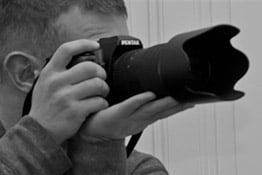
Beginner Tips for keeping the camera steady

PeachDragon

Suspended / Banned
Messages
55
Edit My Images
No
Hi.

I’ve looked at several videos and articles on holding the camera steady, but none have helped. I hold the camera correctly, but I think when pressing down the shutter button I tilt the camera or move it down slightly.

I do have a tripod and obviously sometimes I can rest the camera on something, but this isn’t always possible.

I’ve seen tips about using the camera strap or string to be more steady, but they don’t stop me pushing the camera down/to the side slightly when pressing the button.

I try to keep my arms close to me, but I need the camera far enough away from me to see the screen so I know what I’m taking a photo of. The screen doesn’t move (Nikon D3300) and I can’t use the viewfinder as it makes me dizzy.

Does anyone have any tips or are there any accessories/gadgets to help?

Thanks.
 
Don't think about 'pressing' the button - think about 'squeezing' it. ;)

Also, try to get used to the viewfinder. Holding the camera out at arm's length will make it more difficult to hold steady - that's down to the laws of physics.
 
Last edited:
I still have my reverse monopod :p
A length of string, one end attached to the tripod socket the other with a large washer tied to it, at the right length so that with the washer under my foot I can just raise the camera to the correct height. Keeping the tension on the string whilst pushing the shutter keeps the camera steady.
I don't know whether it will stop you tilting the camera but it may help.
Rolling your finger over the shutter button rather than pushing it may also help.
I assume that you are supporting the lens from below.
 
Nobody can keep a camera perfectly steady when taking pictures.
Use the image stabilisation system and a higher shutter speed by virtue of high ISO ;)
 
Don't think about 'pressing' the button - think about 'squeezing' it. ;)

Also, try to get used to the viewfinder. Holding the camera out at arm's length will make it more difficult to hold steady - that's down to the laws of physics.

I'll have to try that. Hard to break the habit of how I press it - years of gaming and tilting controllers when pressing buttons lol.

Sadly I can't do anything about the viewfinder issue. I have the same issue with binoculars, telescopes, magnifying glasses and prescription glasses.
 
  • Like
Reactions: Sky
I still have my reverse monopod :p
A length of string, one end attached to the tripod socket the other with a large washer tied to it, at the right length so that with the washer under my foot I can just raise the camera to the correct height. Keeping the tension on the string whilst pushing the shutter keeps the camera steady.
I don't know whether it will stop you tilting the camera but it may help.
Rolling your finger over the shutter button rather than pushing it may also help.
I assume that you are supporting the lens from below.

Thanks. Yes, I am supporting the lens from below. Problem is, that arm is quite happy to lower itself when I push the shutter button :rolleyes::ROFLMAO:

Nobody can keep a camera perfectly steady when taking pictures.
Use the image stabilisation system and a higher shutter speed by virtue of high ISO ;)

Thanks. True, but I know it can be a lot steadier than it currently is. I do use the image stabilisation - some photos do turn out better than expected so it appears to be working hard lol.
 
Try putting your thumb under the camera body with one of your middle fingers on the shutter button. Then squeeze your thumb and finger towards each other.
 
Try putting your thumb under the camera body with one of your middle fingers on the shutter button. Then squeeze your thumb and finger towards each other.

First time of trying that was a blurry mess, second went alright. I'll have to keep trying it that way and see if there's any improvement. Thanks.
 
Take a look at this. Forget the camera brand, it's the technique that's important.


Thanks for the link.

I only mentioned the brand for the screen position. I haven't read all that article, but in every photo he's looking through the viewfinder with arms close to his body to have it steady and I can't do that.

He also has the lens cap on...I know he's not actually taking photos, but when advising how to take better photos it's a pretty important thing to not have the lens cap on.

I was just watching a video that suggested a timer as well. I see one bit says "Another technique to gain more stability is using a handheld 2sec timer delay (just be cautioned that this automatically disables the Shake Reduction we all know and love." Does that apply to all cameras/lenses?
 
SLR and dSLR's were always intended for the user to use the viewfinder to compose the image. Its only relatively recently that LiveView has become a thing, but its not intended to replace the eyepiece, more for video and awkward positioning, and to be able to magnify the image for checking focus/depth of field.

However, if it makes you dizzy you'll have to adapt, and either practice so you can condition yourself to the process or thinking of other answers.

Holding a heavy camera out extended will always cause a problem - a geometrical and physics issue.. A neck strap adjusted so it can be used as a brace may be worth trying - and either an actual monopod or a length of string thats slightly too short as a foot support are other options.

Stabbing the buttons - big no no. Gently squeeze the shutter.
 
  • Like
Reactions: Sky
Easy way-cheap and cheerful-use the self timer and shoot in burst mode or get a monopod
Expensive Way ( gets you noticed) get a shoulder stock (Looks like a rifle -Google Bush Hawk shoulder mount )
 
SLR and dSLR's were always intended for the user to use the viewfinder to compose the image. Its only relatively recently that LiveView has become a thing, but its not intended to replace the eyepiece, more for video and awkward positioning, and to be able to magnify the image for checking focus/depth of field.

However, if it makes you dizzy you'll have to adapt, and either practice so you can condition yourself to the process or thinking of other answers.

Holding a heavy camera out extended will always cause a problem - a geometrical and physics issue.. A neck strap adjusted so it can be used as a brace may be worth trying - and either an actual monopod or a length of string thats slightly too short as a foot support are other options.

Stabbing the buttons - big no no. Gently squeeze the shutter.

Sadly I can't adapt or condition myself, it doesn't work that way. Thinking of other answers is why I'm here. Just glad cameras do have liveview now. It may not be intended to replace the viewfinder or be the ideal option, but I wouldn't be able to take photos otherwise.

I'll have to consider a monopod, that might be useful, thanks.

I don't stab the button. Sometimes I do need to press a little harder (not hard, just not as gentle) to get it to autofocus properly. Mostly it's fine, it just has a moment sometimes. I'm just used to tapping buttons and tilting controllers so, along with the camera weighing more, means I'm struggling to not tilt or lower it while pressing the button.
 
Maybe experiment with different shutter speeds to find out at what shutter speed the problem starts? If there is plenty light, easiest is to keep the shutter speed fast. When there is low light and you do need a slow shutter speed then I'd start with using the self timer with whatever support you can find, ideally tripod or similar.
 
what Shutter speed you use? usually 1/60 is the minimum for me. anything slower makes the image blurry for me
 
posted at the same time haha
 
I my old age, I find one hand steadier that two. Electronic shutter better than Manual shutter. And yes shutter speed, 1/200 or faster is a good number for casual snaps.
 
Last edited:
Sometimes the camera is on auto so shutter speed is whatever it decides. Rest of the time, I experiment with different speeds. Recently it has been lighter out so shutter speed has been faster, but otherwise it has generally been low light and slower shutter speeds.
 
Hi.

I’ve looked at several videos and articles on holding the camera steady, but none have helped. I hold the camera correctly, but I think when pressing down the shutter button I tilt the camera or move it down slightly.

I do have a tripod and obviously sometimes I can rest the camera on something, but this isn’t always possible.

I’ve seen tips about using the camera strap or string to be more steady, but they don’t stop me pushing the camera down/to the side slightly when pressing the button.

I try to keep my arms close to me, but I need the camera far enough away from me to see the screen so I know what I’m taking a photo of. The screen doesn’t move (Nikon D3300) and I can’t use the viewfinder as it makes me dizzy.

Does anyone have any tips or are there any accessories/gadgets to help?

Thanks.
Could you please clarify what happens when you twist the camera.
Does it result in the horizon not being level, or does it result in blurred pictures.
 
I use to always use the viewfinder, then when I started to shoot jazz gigs in pubs I swapped to only using the back screen. Whatever I shoot now I NEVER hold the camera at arms reach as even with IS on it would blur, today I was out and about and did the same just using the back screen but bend my arms in a bit. Keep doing it like that and practice till it just clicks.
 
Could you please clarify what happens when you twist the camera.
Does it result in the horizon not being level, or does it result in blurred pictures.

I have had a one or two photos that were tilted badly, but mostly it's that they're blurry. With most they do look ok looking at the thumbnails or when you open them up on a desktop, but as soon as you start to zoom in at all you can see how blurry they are.

When I say zoom in, I will just add that I am not expecting perfect detail and sharpness at 100%. They look blurry well before you get close to 100%.
 
I use to always use the viewfinder, then when I started to shoot jazz gigs in pubs I swapped to only using the back screen. Whatever I shoot now I NEVER hold the camera at arms reach as even with IS on it would blur, today I was out and about and did the same just using the back screen but bend my arms in a bit. Keep doing it like that and practice till it just clicks.

I'm tempted to try a photo with the camera at arms reach, just to see how bad it is compared to ones where I've accidentally tilted/lowered by arm lol.

I do keep my arms bent and as close as possible. Really wish I could tilt my screen as that would be a massive help, but sadly it's not possible. If I get a new camera at some point that is on the list of features I want!
 
Not exactly a normal reply but I recently had an accident and as I could only use a camera upside down with one hand, I found that using the 2 second delay allowed me to press the shutter button and then stabilize my hand before it shot the photo, This of course is not ideal. The best way is not to use auto and instead use a semi auto setting in this case shutter priority ( marked as S on most camera dials) Set this to 125th or 200/250 of a second and that way the camera will be forced to use a faster shutter and alter the other settings to compensate, This way it should stop you getting blurred images due to movement when you press the button also you may need to put the ISO setting on auto if you haven't already to help the camera do this.
 
Last edited:
I'm tempted to try a photo with the camera at arms reach, just to see how bad it is compared to ones where I've accidentally tilted/lowered by arm lol.

I do keep my arms bent and as close as possible. Really wish I could tilt my screen as that would be a massive help, but sadly it's not possible. If I get a new camera at some point that is on the list of features I want!

Even with IS for me I would not be able to keep my camera steady at arms reach, hence why I slightly bend them and that works for me but I have shot like this for years to get the knack of it.
 
Not exactly a normal reply but I recently had an accident and as I could only use a camera upside down with one hand, I found that using the 2 second delay allowed me to press the shutter button and then stabilize my hand before it shot the photo, This of course is not ideal. The best way is not to use auto and instead use a semi auto setting in this case shutter priority ( marked as S on most camera dials) Set this to 125th or 200/250 of a second and that way the camera will be forced to use a faster shutter and alter the other settings to compensate, This way it should stop you getting blurred images due to movement when you press the button also you may need to put the ISO setting on auto if you haven't already to help the camera do this.

I'm glad you found a way to keep up the photography. I will have to try using shutter priority more. Thanks.
 
I have had a one or two photos that were tilted badly, but mostly it's that they're blurry. With most they do look ok looking at the thumbnails or when you open them up on a desktop, but as soon as you start to zoom in at all you can see how blurry they are.

When I say zoom in, I will just add that I am not expecting perfect detail and sharpness at 100%. They look blurry well before you get close to 100%.
Well as long as you brace your elbows against the front of your ribs, and you use a shutter speed that is equal to or greater than the reciprocal of the focal length of the lens, you should get sharp images. It is not the most comfortable way to take photographs, but at least the rear screen will be at eye level.

But as others have said you need to gently squeeze the shutter button.
 
I feel people have got the wrong idea about how I press the button. Gently is no longer looking like a word lol. Because my finger is going down my hand/arm automatically lowers too and so the camera tilts.

I am not bashing the shutter button, stabbing it, forcing it down or whatever and pushing down the camera in doing so.

I perhaps need to do more of a squeezing motion, but I am pressing the button gently.
 
The Manfrotto 361 is a shoulder brace that fits on top of a monopod. See here. https://www.wexphotovideo.com/manfrotto-361-shoulder-brace-mn361-11046/

Could be a solution for you? With the camera mounted on top of the brace/monopod, if you hold the camera with both hands and pull the brace into your shoulder as you press the shutter release that would stop the camera moving about.

Thanks. Possibly. I'm not sure if something against my shoulder would work for me, but it's something to consider. I think I'll try just the monopod first and see how that goes.
 
Take a steady stance with legs spread, Rest on something to get a tripod effect if poss. Brace your elbows with gentle pressure (to your body if nothing else available). Breathe slowly. Squeeze the button.
 
Perhaps a basic question, when looking through the viewfinder are you keeping both eyes open ?
I have a severe astigmatism in my right eye and had a similar issue, with glasses I could see virtually nothing, without the image was blurry and it gave me headaches and dizziness.
I swapped to my less dominate left eye (right eye closed) and after a lot of practice things improved considerably, I also switched to Back Button Focus which helped immensely.
Just a pity all camera's are right hand and right eye !
 
Perhaps a basic question, when looking through the viewfinder are you keeping both eyes open ?
I have a severe astigmatism in my right eye and had a similar issue, with glasses I could see virtually nothing, without the image was blurry and it gave me headaches and dizziness.
I swapped to my less dominate left eye (right eye closed) and after a lot of practice things improved considerably, I also switched to Back Button Focus which helped immensely.
Just a pity all camera's are right hand and right eye !

Interesting. No, I close one eye. I close my left, but just tried it the other way around and things looked worse. Pretty clear, but kind of wavy. I think that's due to what I was looking at though. When looking at other things it looked pretty similar no matter which eye I looked through. It's worse looking through without glasses on, but, again, pretty similar with both eyes.

I do have astigmatism, but my glasses don't correct it because the correction makes me dizzy and it makes everything look far worse. I can't stand anything close to my eyes that magnifies too much.

Yes, it is a pity. I'd like to see how I would get on with it left handed. Who knows, my right hand could be better at supporting the camera/lens.
 
what are you taking photos off and what is your gear you are using ?

Nikon D3300 and 2 Nikon lenses (18-55mm and 70-300mm). Landscapes, some wildlife and anything else I see that I think may be a nice photo (and random things to just practice/test settings etc.). So, bit of everything and anything lol.
 
I am not bashing the shutter button, stabbing it, forcing it down or whatever and pushing down the camera in doing so.

I perhaps need to do more of a squeezing motion, but I am pressing the button gently.
It's been mentioned already, but 'rolling' your finger over the button reduces vibration and motion of the camera.

Don't press the button with the tip of your finger vertically downwards. Rest your finger, horizontally and 'roll' it over the button.

A quick search found this:

View: https://www.youtube.com/watch?v=iv7eYH_JNPs&ab_channel=RunNGun
 
If you are holding your breath while you shoot, don’t!
 
Assuning your problem is one of needing distance between your eye(s) and the screen to focus your image viewing.

Can you borrow a camera to try a folding rear screen?

Holding it against your body at waist height, bracing your stance, whilst holding your breath, might work with the 18-55 lens and when you're used to that you could try with long lens on a monopod.
 
Nikon D3300 and 2 Nikon lenses (18-55mm and 70-300mm). Landscapes, some wildlife and anything else I see that I think may be a nice photo (and random things to just practice/test settings etc.). So, bit of everything and anything lol.

Well landscapes you should tripod most of the time and wildlife, well,...even if you have top expensive gear does mean you get good images ! ! ! lol
 
Some one told me years ago to use the middle finger not the pointing finger for the shutter to help prevent the problem.
This also has the benefit os being able to use the wheel and buttons behind the shutter button without changing finger position (of course it doesn't help for cameras with the wheel in front of the shutter button)
 
my digital photography started with a canon 400D, which really is a revamped 300D ( the first digital DSLR to be under £1,000 I believe ) which had only 1 cross typed AF point in a grid of 9, ISO limit of 1600, 10mp sensor, pretty basic really, however still a capable camera.

There was not that many youtube videos around on beginners using DSLR's I think it was vemo videos at the time ! ! !
So I had to learn how to stand with elbows tucked in, focus recomposed, lean against posts, walls, chairs as I did not want to push the camera beyond ISO 300/400. I even purchased a gorillapod to attach the camera to chairs, litter bin, lampposts, etc using 2 second timer + cable release.
All these techniques really helped when I got my EOS 7D as I was fully aware of how to get steady / non blurred images. However sometimes a venue / location is just difficult i.e a music gig in a poorly light hall !

I envied Full Frame owners as they had some much more dynamic range, higher ISO, better low light capability, better DSLR's, however I believe starting with a entry level camera has made me appreciate what I have and how to work with the limitation of my kit and myself !

This is a wonderful discovery of our determination, resolve, dedication to achieve the highest standard possible !
One thing I have realized is I can not compete with rich hobbyists, so I work myself and my kit harder to prove I do not need that expensive kit to be better tog, however I would like the kit as Xmas presents ! ! ! ! lol
 
Back
Top