Time lapse photography

chrisc

Suspended / Banned
Messages
298
Edit My Images
Yes
Time lapse photography

I am thinking of giving this a go over the next few days, has anyone on here ever giving it a go and if so what was your results like???
I am using a D70 so any tips on software to use or any online tutorials would be a big help.
 
You will need some sort of triggering device as the d70 afaik doesn't have the facility to do timelapse on it's own. I think one of the more fancy remote releases has this option.

I know the d200 can be set to do timelapse as I was thinking about this a while ago but never got round to doing it.

Having just had a quick google, nikon's camera control pro may be able to help you.

other links....

http://www.cs.berkeley.edu/~ddgarcia/tl/

http://photo.net/bboard/q-and-a-fetch-msg?msg_id=00DfGX


looks like whatever method you choose it will be a bit of a hack. Sorry.
 
Hey Chrisc - I have done some timelapse with my Canon 350D and beware it uses A LOT of shots :( I messed about with timelapse for about a week and took about 10,000 shots :( I stuck some of my stuff on Youtube:
[YOUTUBE]y018OmUJG0Y[/YOUTUBE]
[YOUTUBE]xetKL1pqI_I[/YOUTUBE]
[YOUTUBE]QZnqQtzn0d8[/YOUTUBE]
[YOUTUBE]mYKpwZzSL0E[/YOUTUBE]

The gave up in the end and decided it was easier to use a video camera for relatively short stuff. I will try again with some longer timelapse sometime, something covering 12 hours or something.

Timelapse from video camera:
[YOUTUBE]ELu4z17k8TI[/YOUTUBE]
 
Jimmy,

That stuff is really great. (I'm no pro but I like it!!) I have a 350D, can I ask how you set these up? Are there settings in-camera or was it using software?

Eddie
 
That's very cool. The thread is a bit old but I've sent him a pm in the hope he'll make me one!! Just out of interest, how long roughly was the camera in position for the clouds over the hillside shot?

Thanks Jimmy.
 
I was sat on the top of that hill (in my car) for about three quarters of an hour (it was a very fast moving rain cloud!). Was a bit windy hence the camera wobbles a bit :( I think I had it dialed into 4 seconds between shots for that one.
 
Jimmy that is the exact thing I am trying to do pity they can make a box for the d70 looks like I have to link the laptop to the camera for this one
 
forgot to answer the end bit of you post sorry Chris,

Software wise I used Windows Movie Maker (comes with XP) to make those for youtube, would probably use something else if I wanted some better quality, as Movie Maker can be a bit jumpy, but just about manages timelapse :)
 
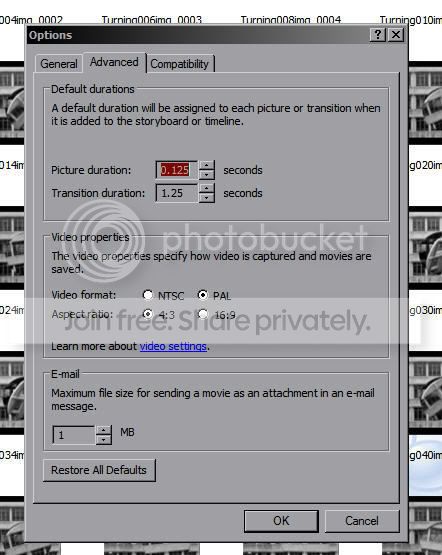
Sorry for dragging this to the top but I'm having a try using Movie Maker and I can't find a way of shortening the clips from five seconds.

Any tips?
 
In options - before you drag anything into the timeline, you can change the default duration. I've never found away of altering it once the photo is in the timeline

wmm.jpg
 
Cheers guys, I can see where I was going wrong now. I tried it after I'd added the pictures...

BTW I love your clouds going over the house, I must have a go at that :thumbs:
 
wow, no wonder theres so many accidents on the road when people never seem to hold the wheel properly :/
 
Being Jesus Chirst I would have though you could have done something about it. The driving looked fine to me but then I'm only a rational human.

Nice clips btw...
 
Hey Chrisc - I have done some timelapse with my Canon 350D and beware it uses A LOT of shots :( I messed about with timelapse for about a week and took about 10,000 shots :( I stuck some of my stuff on Youtube:
[YOUTUBE]y018OmUJG0Y[/YOUTUBE]
[YOUTUBE]xetKL1pqI_I[/YOUTUBE]
[YOUTUBE]QZnqQtzn0d8[/YOUTUBE]
[YOUTUBE]mYKpwZzSL0E[/YOUTUBE]

The gave up in the end and decided it was easier to use a video camera for relatively short stuff. I will try again with some longer timelapse sometime, something covering 12 hours or something.

Timelapse from video camera:
[YOUTUBE]ELu4z17k8TI[/YOUTUBE]

Great results! May I ask what you used to support the camera in the in-car shots?

Thanks.
 
Just a cheap tripod wedged between seats or in footwells etc EOS_Kam - it isnt perfect, but it just about holds up.
 
To drag this back up....................

I'm looking at doing a timelapse with my 40D, and my laptop (with DLSRpro). The biggest problem I have is it will be over four days (when do I sleep?)

At one photo per minute, that's over 5,750 photos!

How would I stitch them together at the end to make a moive?
 
Most movie making software allow you to add pictures. I used to use Ulead when on a PC and i just added picture after picture and just reduced the display time.
 
Most movie making software allow you to add pictures. I used to use Ulead when on a PC and i just added picture after picture and just reduced the display time.

Thanks, but would that work with best part of 6,000 photos?
 
Thanks, but would that work with best part of 6,000 photos?

Yeah shouldn't be a problem, most video editing software will have a setting somewhere to set the duration of what it will either call "Still Images" or "Stills" or maybe "Graphics" or something along those lines. Then you can just drag all your shots onto the timeline and it should run them all together when you play it. It is a bit hard trying to find the right length for each frame though...just depends on how fast you want the timelapse to go and how smooth you want it really. It is a bit of trial and error.
 
The problem is I always shoot in RAW and large JPEG. 6,000 shots at 12Mb + 8 Mb each means 120Gb :eek:

Any free movie software out there?
 
I gave this a go a few months ago. I used the software that comes with the 40D and just connected it up to my mac. If you wana watch it its here.

OoOoOoOoh interesting :thumbs:

So you didn't change the exposure?

Am I mad to think about doing it over four days though?
 
The problem is I always shoot in RAW and large JPEG. 6,000 shots at 12Mb + 8 Mb each means 120Gb :eek:

drop down to medium image quality and reduced image resolution for the duration of the time lapse. if each capture is only on screen for a 10th of a second, you won't notice the difference between "superfine" and "medium".

also no point shooting at full resolution - just match the native resolution of the display you'll be using to view it.

that should bring the file sizes down under 1mb even for a hi-res 42" TV, whole 6000 shot shoot will be less than 5GB. :D
 
How many shots do you need to take a second and overall to make this work?
 
How many shots do you need to take a second and overall to make this work?

depends on your subject and the effect you want.

for something really slow like a sunset, clouds moving across the sky, vapour trails etc ..you can use anything between 1 shot every few seconds to 1 shot every few minutes. shorter gaps between each shot will make the timelapse flow nice and smoothly, whilst longer gaps make the changes occur faster and appear more dramatic (if a little jumpy at times).

for this one i used a delay of about 30 seconds between shots..

http://www.youtube.com/watch?v=i3nKbDOrJ6s
 
The problem is I always shoot in RAW and large JPEG. 6,000 shots at 12Mb + 8 Mb each means 120Gb :eek:

Any free movie software out there?

I just made an action for my jpegs and knocked them all down to PAL resolution for importing to the edit software (720x576) - which was fairly easy and speeded up the editing bit.

OoOoOoOoh interesting :thumbs:

So you didn't change the exposure?

Am I mad to think about doing it over four days though?

4 days sounds cool :) might be worth some trials first though, working out some good settings to cope with day and night shots etc.

How many shots do you need to take a second and overall to make this work?

as said above it depends on what you are wanting to capture, For rolling clouds etc I use around 4-6 seconds (depending on how fast the clouds are moving etc)
 
How do you set up the camera to do time lapse?
 
I use DLSR pro, and that has timelaspe (although I have never used it).

The four days thing: it is for a very large corporate company covering the construction/maintenance of a site, and would involve me being on site all that time. I *could* leave the equipment as it would all be locked down, but I wouldn't want to (what if something went wrong? I've only got one shot at this.)

How long would it take to stitch together 6,000 shots?
 
Thinking about this, wouldn't it be easier to use a Camcorder for timelaspe?
 
Back
Top