Tidying up the background advice.......

yoby

Suspended / Banned
Messages
1,254
Name
Dave
Edit My Images
Yes
Took a few like this of the kids over Christmas against the Kitchen wall (being the only really tidy background available indoors.

The flash was bounced from the ceiling, and due to the lack of space, has still caused a drop shadow behind my willing model. On another shot I spent hours selecting the subject and changed the bg to white but it just looks odd so would appreciate any ppointers on the best way to 'clean' the shadows so that they're the same colour as the rest of the wall (or would you just leave it as it is)......
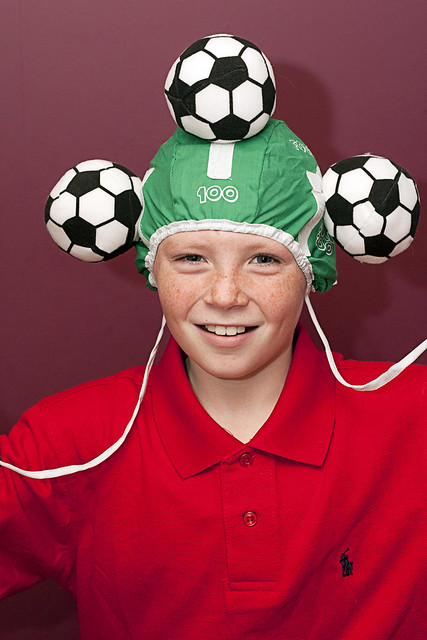

Alf by DaveFrost, on Flickr
 
I would have moved the subject away from the wall and diffused the flash, that said, you may not have had the room to do that :shrug:

Its an easy fix in Photoshop, but to be honest as a Christmas snap it looks fine to me Dave.


Les :thumbs:
 
Cheers Les,
There wasn't the room to move, as there's a sodding big 'island' in the way (lord only knows why we needed one). Flash had one of those stofen type diffusers on, and if I'd actually thought about it a bit more I would have taped a sheet of A4 over the front as well but as is often the case with me I always seem to think about these things afterwards.
Aside from sharpening and re-sizing, my PS skills are pretty shocking (on the list of things to improve this year) and the problem is I have absolutely no idea on the best way to tidy it in PS.

Had a quick hack with the clone tool but it was a bit of a disaster - There's got to be an easier way.....
 
I would have thought the Clone Stamp \tool was the easiest way too :shrug:

I have a similar diffuser on my Sony Flash- and sometime find a tissue or two helps diffuse even more, just a thought

Les :thumbs:
 
I've just had a very quick go with the patch tool, (patch tool on source) draw a selection around the shadow area and non shadow area then drag it to a clear section of the background 2 or 3 goes should blend the shadows to the lighter areas.

fnk4m.jpg
 
Last edited:
I would have the 'lighter bits' in ps. maybe better then trying to cut around the subject?
 
Back
Top