
You are using an out of date browser. It may not display this or other websites correctly.
You should upgrade or use an alternative browser.
You should upgrade or use an alternative browser.
The TP'ers 52 challenge for 2020 The discussion thread Week 52 Decor(ate)
- Thread starter Cobra
- Start date

- Messages
- 21,611
- Name
- Dave
- Edit My Images
- No
Probably best to carry on learning and practicing on your own spreadsheet in private, Dave, and let Tim and Minx carry on with the main fully-featured spreadsheet with all the links etc. I think it's great that you've set yours up and are learning Excel but there's a risk of confusion (especially for the new 52'ers) if you mention your spreadsheet when there is a main official spreadsheet already up and running and included in all the links.
@Manxmaid Thank you again for the above post, as I have been watching a lot of videos on YouTube about Doc`s and it`s now going very well

- Messages
- 21,611
- Name
- Dave
- Edit My Images
- No
For all new comers to the 52, it is a good idea to read this before you jump straight in. @Jim_Tod it might help.
https://www.talkphotography.co.uk/t...enge-for-2020-how-to-guides-and-links.703930/
You need to have your own thread and link the image from the main thread back to yours so we can comment
https://www.talkphotography.co.uk/t...enge-for-2020-how-to-guides-and-links.703930/
You need to have your own thread and link the image from the main thread back to yours so we can comment
Last edited:

BobBCN
Suspended / Banned
- Messages
- 3,518
- Name
- Bob
- Edit My Images
- Yes
No links to threads of @Jim_Tod and @Yvette Smith. Maybe they haven't created a personal thread yet? Can't find them anyway.
- Messages
- 21,611
- Name
- Dave
- Edit My Images
- No
No links to threads of @Jim_Tod and @Yvette Smith. Maybe they haven't created a personal thread yet? Can't find them anyway.
I had a look last night, did not find a thread for them either

- Messages
- 11,169
- Name
- Tim
- Edit My Images
- Yes
What new Fuji stuff have you bought this time Dave?As of now, I`m one very Happy Bunny
- Messages
- 21,611
- Name
- Dave
- Edit My Images
- No
What new Fuji stuff have you bought this time Dave?
None at all, last night I watched a lot of YouTube on doing a Google Docs spreadsheet and this morning I totally nailed it. Using the Freeze and sorting out every Link, so I`m well chuffed as like I said I`ve never done anything like this before plus the colours go together well.
- Messages
- 11,169
- Name
- Tim
- Edit My Images
- Yes
Ah, okay.
Now have a look at using the =COUNTA() function to count the cells that have something in them - That way you can mark along the top if you've completed a theme or technique automagically
Then maybe look at conditional formatting to automatically colour cells based on the contents
Now have a look at using the =COUNTA() function to count the cells that have something in them - That way you can mark along the top if you've completed a theme or technique automagically
Then maybe look at conditional formatting to automatically colour cells based on the contents
- Messages
- 21,611
- Name
- Dave
- Edit My Images
- No
Ah, okay.
Now have a look at using the =COUNTA() function to count the cells that have something in them - That way you can mark along the top if you've completed a theme or technique automagically
Then maybe look at conditional formatting to automatically colour cells based on the contents
I will put it up in the Testing thread and see what you think.
- Messages
- 21,611
- Name
- Dave
- Edit My Images
- No
Is it not the one linked in your sig ?
No, that`s my own one just for me but I want to learn this so the videos are really helping.
Yvette Smith
Suspended / Banned
- Messages
- 214
- Edit My Images
- No
You beat me to it @Dave70D, I was just about to post something too
@gardenbirder @Yvette Smith the reason for having your own "personal" thread is so that we can converse with you / comment on the images as that cannot go in the main posting thread without everything becoming un-manageable.
The link @Dave70D posted will walk you through it all
[emoji28]
Yvette Smith
Suspended / Banned
- Messages
- 214
- Edit My Images
- No
@gardenbirder @Yvette Smith
If you have any questions or are having problem just ask and we'll try to help.
Yes! Lots of questions... firstly, when I click on the link it says ‘no valid forum id’?
OP

- Messages
- 114,434
- Name
- The real Chris
- Edit My Images
- No
You have posted on the home page, goodYes! Lots of questions... firstly, when I click on the link it says ‘no valid forum id’?
Have you started your own thread? I can't find it if you have.
You need to do this next, in this forum HERE
Last edited:
OP
- Messages
- 114,434
- Name
- The real Chris
- Edit My Images
- No
I'm gonna need to go shopping at this rate!
As quite a few of you are new, I'll let it slide for a bit however please take note
As quite a few of you are new, I'll let it slide for a bit however please take note
Post your image HERE
and link it back to your own thread.
No comments in this thread please, comments on the personal threads only.
Transgressors will get the “order of the donut”
Yvette Smith
Suspended / Banned
- Messages
- 214
- Edit My Images
- No
You have posted on the home page, good
Have you started your own thread? I can't find it if you have.
You need to do this next, in this forum HERE
Thanks in anticipation! When I click on that link, if tells me I need a valid forum ID. [emoji849]

Nostromo
Suspended / Banned
- Messages
- 6,236
- Name
- Dominic
- Edit My Images
- Yes
That's weird, I've just clicked on it and it took me straight to where it was meant to.Thanks in anticipation! When I click on that link, if tells me I need a valid forum ID. [emoji849]
Yvette Smith
Suspended / Banned
- Messages
- 214
- Edit My Images
- No
Do I need any sort of ID then? I thought it would just work... its just a blank page with that msg on it.

- Messages
- 17,791
- Name
- Ingrid
- Edit My Images
- No
Do I need any sort of ID then? I thought it would just work... its just a blank page with that msg on it.
If you go to the top of the page and click on the bold writing that says 365 & 52s
That takes you to the page on the link
Click the blue button on the right that says "post thread" then you can start you own thread for the forum
to add your pictures to Hope that helps
- Messages
- 21,611
- Name
- Dave
- Edit My Images
- No
Do I need any sort of ID then? I thought it would just work... its just a blank page with that msg on it.
On the top of the page it says Do not comment in the thread with only photos in, as that is where we all post our photos. If you want folk to comment on your photo you have to have your own thread so have a read HERE and HERE
Last edited:
- Messages
- 11,169
- Name
- Tim
- Edit My Images
- Yes
Hi @Yvette SmithYes! Lots of questions... firstly, when I click on the link it says ‘no valid forum id’?
I've not seen an error stating ‘no valid forum id’ before, so I'm tagging @Cobra in this to see if he knows.
Can you explain exactly what you're doing when you get this error?
You say "when I click on the link", which link, Cobra's "Here" link? If so, in which browser because it works for me (could be a browser issue)
The instructions are at
https://www.talkphotography.co.uk/t...enge-for-2020-how-to-guides-and-links.703930/
and about 1/2 way down the first post there are a bunch of how-tos which will explain the technical bits.
In essence what you need to do is:
1. Create a personal thread in the 3652 & 52 sub forum (https://www.talkphotography.co.uk/forums/365s-52s.153/), call it something like "Yvette's 52 for 2020". This is the thread you'll use all year to post your pictures and put any info you want about the photo - it's where people will respond with comments / critique
2. Post your photo and any blurb about it
3. Once you've posted, at the top right of the post there will be a number something like #1. Right click on this and select the option "Copy Link Location" / "Copy Link" / "Copy Address" (this depends on the browser you're using). This will copy the unique address of the post into your clipboard. I tend to paste it (Ctrl-V) into notepad so I don't lose it.
4. Go to the main thread and post your picture there too (I know you've already done that). Whilst posting the picture also add some text that says LINK (or something similar). Highlight the LINK text and press "CTRL-K". A dialog box will appear with the LINK text in the bottom. In the top field paste in the Unique Address we saved in Step 3. Press OK and then Save/complete the post. This will then create a link from the main thread to your personal thread post so people can get to you photo easily to comment.
For any post you've made, there is also an 'edit' option. so you could go back to your post in the main thread and edit it to add the link back.
Hope that helps a bit.
Last edited:
Yvette Smith
Suspended / Banned
- Messages
- 214
- Edit My Images
- No
Hi @Yvette Smith
I've not seen an error stating ‘no valid forum id’ before, so I'm tagging @Cobra in this to see if he knows.
Can you explain exactly what you're doing when you get this error?
You say "when I click on the link", which link, Cobra's "Here" link? If so, in which browser because it works for me (could be a browser issue)
The instructions are at
https://www.talkphotography.co.uk/t...enge-for-2020-how-to-guides-and-links.703930/
and about 1/2 way down the first post there are a bunch of how-tos which will explain the technical bits.
In essence what you need to do is:
1. Create a personal thread in the 3652 & 52 sub forum (https://www.talkphotography.co.uk/forums/365s-52s.153/), call it something like "Yvette's 52 for 2020". This is the thread you'll use all year to post your pictures and put any info you want about the photo - it's where people will respond with comments / critique
2. Post your photo and any blurb about it
3. Once you've posted, at the top right of the post there will be a number something like #1. Right click on this and select the option "Copy Link Location" / "Copy Link" / "Copy Address" (this depends on the browser you're using). This will copy the unique address of the post into your clipboard. I tend to paste it (Ctrl-V) into notepad so I don't lose it.
4. Go to the main thread and post your picture there too (I know you've already done that). Whilst posting the picture also add some test that says LINK (or something similar). Highlight the LINK text and press "CTRL-K". A dialog box will appear with the LINK text in the bottom. In the top field paste in the Unique Address we saved in Step 3. Press OK and then Save/complete the post. This will then create a link from the main thread to your personal thread post so people can get to you photo easily to comment.
For any post you've made, there is also an 'edit' option. so you could go back to your post in the main thread and edit it to add the link back.
Hope that helps a bit.
- Messages
- 21,611
- Name
- Dave
- Edit My Images
- No
@Yvette Smith hope this helps, as soon as you click Quote then hit the Enter button on your PC/Laptop as it will give you a space between the quote and you can then reply.

Nikon f1.8
Suspended / Banned
- Messages
- 1,724
- Name
- Paul
- Edit My Images
- Yes
Had a one already but seems Cobra has eaten it, not that I mindA box of donuts needed this week! But I'm sure everyone will get the hang of it!
- Messages
- 11,169
- Name
- Tim
- Edit My Images
- Yes
Yes you did, didn't you...Had a one already but seems Cobra has eaten it, not that I mind
I have to admit, quoting "And please no comments, save those for the personal threads." and then adding a bunch of comments in the main picture thread was asking for it really

'Ol snakey is far too nice.

OP
- Messages
- 114,434
- Name
- The real Chris
- Edit My Images
- No
My "Old" classic car sailed through the MOT, I was in a good mood'Ol snakey is far too nice.
I have just run through your profile, and everything is in order,Thanks in anticipation! When I click on that link, if tells me I need a valid forum ID.
However Sometimes Hotmail gets the arse with TP. and vice versa.
What internet provider are you using?
IE? FF? Chrome? Opera?
BT does get the arse with hotmail too, do you have problems on any other forums?
Ah hang on, you are using the app aren't you?
That also goes pear shaped from time to time.
Can you either log in using the internet rather than the app
or Use another email address.
I bet either of those will sort it ...
Last edited:
Nostromo
Suspended / Banned
- Messages
- 6,236
- Name
- Dominic
- Edit My Images
- Yes
OP
- Messages
- 114,434
- Name
- The real Chris
- Edit My Images
- No
Tim, @LC2 another name for the spread sheet under Hotel California rulesIf you go to the top of the page and click on the bold writing that says 365 & 52s
- Messages
- 11,169
- Name
- Tim
- Edit My Images
- Yes
If you go to the top of the page and click on the bold writing that says 365 & 52s
I have to agree Chris, that looked to me like a sign up, and as you say... Hotel California rules...Tim, @LC2 another name for the spread sheet under Hotel California rules
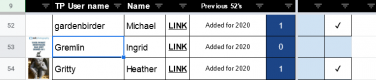
Ingrid (@Gremlin) Sign Up accepted, you're now on the official spreadsheet for 2020. Welcome aboard
Yvette Smith
Suspended / Banned
- Messages
- 214
- Edit My Images
- No
Hi LC2,
Thanks for taking the time to try and explain it. I have a bit of a ‘lurgy’ going on at the moment, so my brain isn’t switched on fully! Yes, it was the HERE link. I still get the need valid ID message.
When I click on the link to the 366 & 52 sub forum, I also get the same message.
I am working between my ipad and my mobile at the moment so tomorrow I shall try on the main frame computer and see if that makes any difference.
At least the Fantasy Football is easier than this! [emoji460]️
- Messages
- 21,611
- Name
- Dave
- Edit My Images
- No
Hi LC2,
Thanks for taking the time to try and explain it. I have a bit of a ‘lurgy’ going on at the moment, so my brain isn’t switched on fully! Yes, it was the HERE link. I still get the need valid ID message.
When I click on the link to the 366 & 52 sub forum, I also get the same message.
I am working between my ipad and my mobile at the moment so tomorrow I shall try on the main frame computer and see if that makes any difference.
At least the Fantasy Football is easier than this! [emoji460]️
Can you take a screen shot photo and upload here so Cobra can have a look ?
OP
- Messages
- 114,434
- Name
- The real Chris
- Edit My Images
- No
That is definitely coming from your / email client / internet browser appI still get the need valid ID message.
as above what are you using as a browser, FF, Opera / IE / Chrome and system? windows? Mac?
- Messages
- 11,169
- Name
- Tim
- Edit My Images
- Yes
Ah, tablet / app. I'm afraid I've never used those for anything other than reading / commenting. I shall defer to the scaly one and his knowledge of common issues. I suspect once on a Desktop/Laptop it'll all fall into place.I am working between my ipad and my mobile at the moment so tomorrow I shall try on the main frame computer and see if that makes any difference.
OP
- Messages
- 114,434
- Name
- The real Chris
- Edit My Images
- No
Yep that's where I'm going with this, the app was always a PITA, and even more so now we have swapped servers.Ah, tablet / app.
- Messages
- 17,791
- Name
- Ingrid
- Edit My Images
- No
Tim, @LC2 another name for the spread sheet under Hotel California rules
I have to agree Chris, that looked to me like a sign up, and as you say... Hotel California rules...
Ingrid (@Gremlin) Sign Up accepted, you're now on the official spreadsheet for 2020. Welcome aboard
Welcome @Gremlin to the 52
Pah that's the last time I try and help you lot, put me in the hall of shame, not going to happen