
and help to keep the site free for all
You are using an out of date browser. It may not display this or other websites correctly.
You should upgrade or use an alternative browser.
You should upgrade or use an alternative browser.
THE PP GAME!
- Thread starter Phil Young
- Start date


PaulButler
Suspended / Banned
- Messages
- 3,194
- Name
- Paul
- Edit My Images
- No
It's nice to have a few more to judge between, and four quite different efforts too.
@Pookeyhead - I like the central crop and the muted tones David. I like the way you have brought the detail out in the clouds too. I like the subtly but feels just a little on the cool side for me (but only a little). You've managed to maintain a lovely balance I think.
@Rhodese - Didn't expect a mono conversion (not sure why not though), and think you have done a very nice job here. I like the contrasts particularly like the way you have handled the sky, wonder if it is to everyone's taste. Not so sure about the crop though. And sorry can't help with the halo.
@Dr_O - This looks so much better on Flickr than in the forum (no idea why either). I have a bit of a soft spot for rich vibrant colours, it was what caused me to press the shutter here. I feel as though the saturation is just a little too much for me although it does convey the feel of the light from what I can remember as the sun was quite low and the light was lovely and warm.
@kev2010 - Thanks for joining in, I've only just joined in and am finding it fun! Not so sure about the crop here. I'd have loved to have been able to see a bigger version but it's private and won't let me. I love the treatment of the brickwork. I'm not quite sure on the overall colour though.
I've enjoyed looking at these so thank you guys for having a go. After a bit of umm-ing and what have you I like David's edit the best, I think the overall balance of it swayed me in the end. Nice job, so over to you David
Anyway's here's may take on it
All in LR, lens profile and CA removal. Crop 5x4 and slight straighten.
Add grad to bring out the sky a bit, colour temp -14, sat +55
Global clarity +15, vibrance +15, sat -15
Clone out part of bench lower right.
adj brush over the dome tint -21, sat +29
export sRGB, 75%

Royal_Victoria_Park-2055-1 by PabloRosso, on Flickr
@Pookeyhead - I like the central crop and the muted tones David. I like the way you have brought the detail out in the clouds too. I like the subtly but feels just a little on the cool side for me (but only a little). You've managed to maintain a lovely balance I think.
@Rhodese - Didn't expect a mono conversion (not sure why not though), and think you have done a very nice job here. I like the contrasts particularly like the way you have handled the sky, wonder if it is to everyone's taste. Not so sure about the crop though. And sorry can't help with the halo.
@Dr_O - This looks so much better on Flickr than in the forum (no idea why either). I have a bit of a soft spot for rich vibrant colours, it was what caused me to press the shutter here. I feel as though the saturation is just a little too much for me although it does convey the feel of the light from what I can remember as the sun was quite low and the light was lovely and warm.
@kev2010 - Thanks for joining in, I've only just joined in and am finding it fun! Not so sure about the crop here. I'd have loved to have been able to see a bigger version but it's private and won't let me. I love the treatment of the brickwork. I'm not quite sure on the overall colour though.
I've enjoyed looking at these so thank you guys for having a go. After a bit of umm-ing and what have you I like David's edit the best, I think the overall balance of it swayed me in the end. Nice job, so over to you David
Anyway's here's may take on it
All in LR, lens profile and CA removal. Crop 5x4 and slight straighten.
Add grad to bring out the sky a bit, colour temp -14, sat +55
Global clarity +15, vibrance +15, sat -15
Clone out part of bench lower right.
adj brush over the dome tint -21, sat +29
export sRGB, 75%
Royal_Victoria_Park-2055-1 by PabloRosso, on Flickr

Pookeyhead
Suspended / Banned
- Messages
- 11,746
- Name
- David
- Edit My Images
- No
Thanks Paul
I'll be back to edit this post in a min when I've got a pic. As usual... random number will generated, and the first RAW to match the 4digit number wins. Back in a bit.... just watching TV.
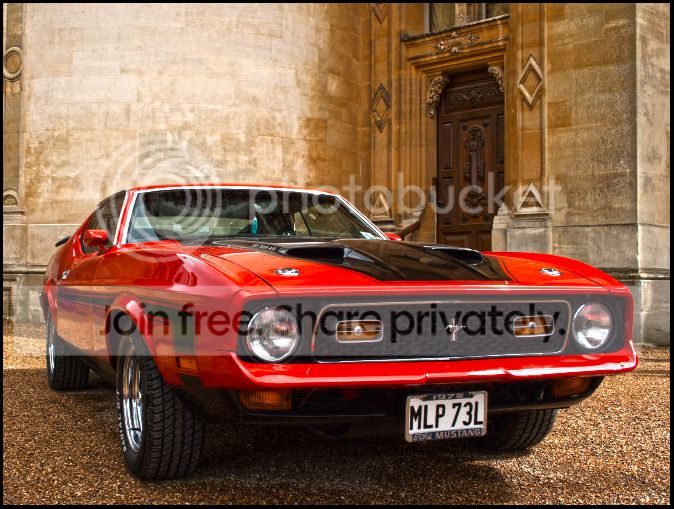
OK... It turned up an oldie, but an interesting one.

Raw file here....
https://dl.dropboxusercontent.com/u/23953768/_MG_3386.CR2
I'll call it Thursday evening.
Have fun
I'll be back to edit this post in a min when I've got a pic. As usual... random number will generated, and the first RAW to match the 4digit number wins. Back in a bit.... just watching TV.
OK... It turned up an oldie, but an interesting one.
Raw file here....
https://dl.dropboxusercontent.com/u/23953768/_MG_3386.CR2
I'll call it Thursday evening.
Have fun
Last edited:
Pookeyhead
Suspended / Banned
- Messages
- 11,746
- Name
- David
- Edit My Images
- No
Thanks Paul- I did turn it up to '11'
Well done David. Random generator working well
I'm waiting for the day it turns up a RAW that was accidentally taken with the lens cap on that I forgot to delete... that will make for interesting processing

overbez
Suspended / Banned
- Messages
- 4,088
- Name
- Graham
- Edit My Images
- Yes
Hi chaps - been more than busy of late, but this one called out to me.......
Opened in lightzone
wamed WB the tiniest amount
increased exposure 0.25 EV
With relight tool - Lifted shadows, increase detail tiny amount
noise reduction in shadows only
local contrast, amount 100, rad 1
Increased luminance of red / orange car colour
Export as TIFF and srgb
Into PS
Tiny adjustment to rotate and vertical perspective
Crop
clone back gravel and walls into corners left blank through adjustments
clone over blue tarp in left BG
clone over round thing at base of building to rear of car
clone (50% opacity) over couple of reflections in rear window
Saturation adjustment layer. SAT -50%, lightness -10
mask BG, leaving car at original colour level.
mask indicators at 50% to reduce orangeness.
Slight vignette

Hmmm - why does google chrome not resize large images like it used to??
Becasue I had the browser zoom set to 110% for some reason, at 100% all is well.
Opened in lightzone
wamed WB the tiniest amount
increased exposure 0.25 EV
With relight tool - Lifted shadows, increase detail tiny amount
noise reduction in shadows only
local contrast, amount 100, rad 1
Increased luminance of red / orange car colour
Export as TIFF and srgb
Into PS
Tiny adjustment to rotate and vertical perspective
Crop
clone back gravel and walls into corners left blank through adjustments
clone over blue tarp in left BG
clone over round thing at base of building to rear of car
clone (50% opacity) over couple of reflections in rear window
Saturation adjustment layer. SAT -50%, lightness -10
mask BG, leaving car at original colour level.
mask indicators at 50% to reduce orangeness.
Slight vignette

Hmmm - why does google chrome not resize large images like it used to??
Becasue I had the browser zoom set to 110% for some reason, at 100% all is well.
Last edited:

Rhodese
Suspended / Banned
- Messages
- 1,154
- Edit My Images
- Yes
Thanks Paul, you picked the right one. Well done David.
Well I’ll go to the foot of our stairs, another Mustang ay David, no swirls to get rid of this time, so hopefully not as much work. .
.
Laugh, I thought I would never start, all that work and I was on the wrong swirls.
Here we go,
Open in ACR, auto, open in PS.
Crop and add space to the bottom. Adjust the verticals on the left side of the image with the distort tool in transform.
Select and fill the space on the bottom using content aware.
Remove the airbrick from under the window with a patch.
SAVE.
Copy layer.
Select the car including underneath with the polygonal lasso tool, contract by two pixels and feather by two pixels, copy and paste into a new layer.
Call the layer CAR.
SAVE.
On the copy layer, drop the brightness/contrast and vibrancy to help make the car stand out.
Still on the copy layer make a rectangular selection of the top two thirds then using refine edge feather by 150 pixels. Blur the selection.
Drop a 45% gray grad from the top to the bottom of the rear wheel.
SAVE.
On the CAR layer open transform and select warp, tease out the front of the car nearest the camera, to give a slight fisheye look hit OK.
Increase the saturation and vibrancy in the reds.
Clone out the distractions in the windows.
SAVE.
Fill a new layer with 50% grey and change the blend mode to soft light.
Then painting in the new layer with black to burn and white to dodge darken the windows, tyres, grill and stripes and then highlight the chrome bits and the lighter reflections.
With the blur tool set low, paint over the rear wheel and quarter to give the impression of being out of focus, matching background.
Flatten.
SAVE.
Save for the web.

CLICK THE IMAGE FOR BIG AND ZOOM.
Rhodese.
Well I’ll go to the foot of our stairs, another Mustang ay David, no swirls to get rid of this time, so hopefully not as much work.
.Laugh, I thought I would never start,
all that work and I was on the wrong swirls. Here we go,
Open in ACR, auto, open in PS.
Crop and add space to the bottom. Adjust the verticals on the left side of the image with the distort tool in transform.
Select and fill the space on the bottom using content aware.
Remove the airbrick from under the window with a patch.
SAVE.
Copy layer.
Select the car including underneath with the polygonal lasso tool, contract by two pixels and feather by two pixels, copy and paste into a new layer.
Call the layer CAR.
SAVE.
On the copy layer, drop the brightness/contrast and vibrancy to help make the car stand out.
Still on the copy layer make a rectangular selection of the top two thirds then using refine edge feather by 150 pixels. Blur the selection.
Drop a 45% gray grad from the top to the bottom of the rear wheel.
SAVE.
On the CAR layer open transform and select warp, tease out the front of the car nearest the camera, to give a slight fisheye look hit OK.
Increase the saturation and vibrancy in the reds.
Clone out the distractions in the windows.
SAVE.
Fill a new layer with 50% grey and change the blend mode to soft light.
Then painting in the new layer with black to burn and white to dodge darken the windows, tyres, grill and stripes and then highlight the chrome bits and the lighter reflections.
With the blur tool set low, paint over the rear wheel and quarter to give the impression of being out of focus, matching background.
Flatten.
SAVE.
Save for the web.

CLICK THE IMAGE FOR BIG AND ZOOM.
Rhodese.
Pookeyhead
Suspended / Banned
- Messages
- 11,746
- Name
- David
- Edit My Images
- No
Well I’ll go to the foot of our stairs, another Mustang ay David,
I've just filtered lightroom to images tagged with mustang... 73GB!! I went through a period of shooting a great many people's Mustangs for them by being known in the MOCGB (Mustang Owners Club of Great Britain). Don't be surprised if you ever see another Mustang in this thread from me.
[edit]
I seem to recall it was a Corvette I posted last time wasn't it?
Last edited:
PaulButler
Suspended / Banned
- Messages
- 3,194
- Name
- Paul
- Edit My Images
- No
Well this was fun I don't take pics of cars so have very little experience of how the"should" be pp'd - but had a play, hopefully I've done it justice!
Import into LR.
Crop and minor rotation
Minor adjustment to WB
Global highlights -14, shadows +95, whites -40, blacks -15, clarity & vibrance +10.
On the wall behind the car (the rounded bit) warmed it slightly, -2/3 exp, -33 sharpness +19 saturation
On the car itself inc exp 1 stop +10 contrast, +12 saturation
On the grille, headlight surround and from air dam/thingy -3/4 stop exp
Export @ 75% sRGB

not_mine-3386 by PabloRosso, on Flickr
I don't take pics of cars so have very little experience of how the"should" be pp'd - but had a play, hopefully I've done it justice!Import into LR.
Crop and minor rotation
Minor adjustment to WB
Global highlights -14, shadows +95, whites -40, blacks -15, clarity & vibrance +10.
On the wall behind the car (the rounded bit) warmed it slightly, -2/3 exp, -33 sharpness +19 saturation
On the car itself inc exp 1 stop +10 contrast, +12 saturation
On the grille, headlight surround and from air dam/thingy -3/4 stop exp
Export @ 75% sRGB
not_mine-3386 by PabloRosso, on Flickr
Rhodese
Suspended / Banned
- Messages
- 1,154
- Edit My Images
- Yes
[edit]
I seem to recall it was a Corvette I posted last time wasn't it?
My mistake, I blame this “Old timer’s disease”. That was last May, no wonder I miss remembered, blimey I can’t remember what I had for tea yesterday.
.Rhodese.

Dr_O
Suspended / Banned
- Messages
- 1,517
- Name
- Dr Ozone
- Edit My Images
- Yes
So much for having time tonight...
Did experiment last night with removing the reflection in the glass- that went well- not . I decided it might be possible for me but the internet would be superseded by then
Went for some punched colour instead (although I was trying both):
Upped vibrancy
Increased clarity
Sharpened
Added new layer for plate
Cropped slightly

Edit86 by Dr_Ozone, on Flickr
but wasn't sure so tried a tight crop tonight- tried a few angles;

Edit85 by Dr_Ozone, on Flickr
Decided classic car needed old school look:
Removed and tweaked colour until I was happy
Added grain
Sharpened
Cropped

Edit87 by Dr_Ozone, on Flickr
Did experiment last night with removing the reflection in the glass- that went well- not
. I decided it might be possible for me but the internet would be superseded by then Went for some punched colour instead (although I was trying both):
Upped vibrancy
Increased clarity
Sharpened
Added new layer for plate
Cropped slightly
Edit86 by Dr_Ozone, on Flickr
but wasn't sure so tried a tight crop tonight- tried a few angles;
Edit85 by Dr_Ozone, on Flickr
Decided classic car needed old school look:
Removed and tweaked colour until I was happy
Added grain
Sharpened
Cropped
Edit87 by Dr_Ozone, on Flickr
Pookeyhead
Suspended / Banned
- Messages
- 11,746
- Name
- David
- Edit My Images
- No
Which one's your official entry Dr_O? You can only enter one
D
Deleted member 34016
Guest
Here's my effort opened in RAW, sharpened sightly and played around with contrast and the HDR function is CS 5, with a slight crop and a small black border
Les

Les

Farmerjim
Suspended / Banned
- Messages
- 1,756
- Name
- Jim
- Edit My Images
- Yes
Here's my effort, and what a pleasure to play with a Mustang, Yankee muscle cars have been a love of mine for a long, long time.
Started off with ACR here's the screen shot, managed to dig out the shadows under the car.
View attachment 8004
Then in PS, selected car and FG, selected inverse and applied 4% Gaussian blur to BG, desaturated a bit and removed the blue thingy.
On the car layer I painted out the reflections on the screen and sharpened 76% radius 6 thresh-hold 2.
A final fling with the shadows/highlights to try and make it "pop" and as they say "Robert's your father's brother.
Toyed with an inlay of Paul Newman but that looked tacky, also no Homer in this one!
I'm away to the SVR for the Weekend Spring Gala so won't be around for the judging so maybe I shouldn't enter? Not sure of the netiquette.
Good luck anyway every-one ...........................

Mustang by Farmejim, on Flickr
Started off with ACR here's the screen shot, managed to dig out the shadows under the car.
View attachment 8004
Then in PS, selected car and FG, selected inverse and applied 4% Gaussian blur to BG, desaturated a bit and removed the blue thingy.
On the car layer I painted out the reflections on the screen and sharpened 76% radius 6 thresh-hold 2.
A final fling with the shadows/highlights to try and make it "pop" and as they say "Robert's your father's brother.
Toyed with an inlay of Paul Newman but that looked tacky, also no Homer in this one!
I'm away to the SVR for the Weekend Spring Gala so won't be around for the judging so maybe I shouldn't enter? Not sure of the netiquette.
Good luck anyway every-one ...........................
Mustang by Farmejim, on Flickr

Stu Blackpool
Suspended / Banned
- Messages
- 470
- Name
- Stewart
- Edit My Images
- Yes
Hi Guys,
Not had much time to play on here but thought I would have a crack with this one. (All done in LR 5.3)
View attachment 8007
P.S:
Much as id like to win, I don't have enough time round here of late to do justice to the topic and would end up leaving you guys hanging like last time, so this entry is just for fun.
Not had much time to play on here but thought I would have a crack with this one. (All done in LR 5.3)
- Import
- Tweak white balance
- Boost contrast 25
- Drop highlights 50
- Added 36 to shadows
- dropped whites 50 and added the same to blacks
- +30 clarity
- +15 vibrance
- +5 saturation
- add ed a medium contrast curve
- Added a radial filter around the car and dropped exposure 1.25stops and highlights -35 to all but the car then dropped sharpness -35.
- added a medium contrast curve
- dropped orange sat by 10
- added 5 to red
- sharpen +50
View attachment 8007
P.S:
Much as id like to win, I don't have enough time round here of late to do justice to the topic and would end up leaving you guys hanging like last time, so this entry is just for fun.
Dr_O
Suspended / Banned
- Messages
- 1,517
- Name
- Dr Ozone
- Edit My Images
- Yes
Ah-ha-yes, haven't made it totally obvious here- it's always the last one- so the B&W hereWhich one's your official entry Dr_O? You can only enter one
Pookeyhead
Suspended / Banned
- Messages
- 11,746
- Name
- David
- Edit My Images
- No
Having serious broadband issues here.... I may have to call this tomorrow... keep losing connection and images aren't downloading, sorry.

Phil-D
Suspended / Banned
- Messages
- 7,553
- Edit My Images
- Yes
Haven't had a go miself for a while, here's my effort
Screen shot of ACR adjustments

mustang ACR screen shot by Phil D 245, on Flickr
Open in E11, crop and clone out the bit of blue sheet still showing down the left

pp game mustang not my image by Phil D 245, on Flickr
Screen shot of ACR adjustments
mustang ACR screen shot by Phil D 245, on Flickr
Open in E11, crop and clone out the bit of blue sheet still showing down the left
pp game mustang not my image by Phil D 245, on Flickr
Pookeyhead
Suspended / Banned
- Messages
- 11,746
- Name
- David
- Edit My Images
- No
Ok... right then.. let's see what's what. As usual... I'll call it as I see it.
Overbez:
Good work in trying to remove the object from the extreme bottom left, but not sure the crop works now for some reason.. seems to be a lot of space there now. The shadow recovery options have been pushed too far I think too, which have made it look unnatural and brought out a great deal of noise. The colour has been altered too much IMO too, and become orange. That was an odd step to take, as the red/orange luminance was increased, then towards the end of the work flow, action was taken to actually reduce orangeness. Good work with straightening things up. All looks neat, tidy, and clean.
Rhodese:
I'm undecided about the fake depth of field. The very neutral background allows the car to pop out as it is, and I'm wondering if it's too much or not. It's well done though. The colour has been saturated a bit too much for my liking, but at least it's remained the correct colour within reason. The thing I'm having the most difficulty with is the distortion of the car. A fisheye lens would have have distorted perspective in so many other ways too. If the front of the car was as close as this with a fish-eye lens, we'd see the whole building and sky, and the back of the car would look as if it was a very long way away. To me, this looks like that poor '72 has had an accident and not been very well repaired. Nice retouching work. Perhaps a bit too much depth to shadows.
Paulbutler:
Clean, simple edit. +95 shadows and -40 whites has made it look a little over processed. Not much else wrong tough. Simple, clean edit.
Dr_O:
Incredibly dark edit. Can't see the tyres, front valance, and even the indicators are barely visible. The tone of the car looks very dark too. Although it's black and white, I wouldn't imagine it was red if I hadn't seen the original. I'd assume it was dark green or brown or something. Although not your official entry, the first edit is a cracker!
Lez325:
Punchy! Colours remain faithful. Nice crop. Can't decide if the building is too bight and dominating now though. Blacks are heavy. Nice to see an HDR effect not lifting shadows unrealistically though. They've remained deep and lush, but still enough detail left to show detail... but blacks are very heavy.
Farmer Jim:
Good job you couldn't get Paul Newman to work, as a Mustang should have really had Steve McQueen in it Too much shadow lift for me.. shadows are unrealistically bright, but it's interesting. What lets this down for me is the way the ground remains sharp all the way to the building, and then suddenly becomes blurred. It stands out heavily and would be optically impossible. Rhodese's method of doing the same thing was a successful attempt at this, as he has even included the effect on the car itself, and the there's a smooth drop off in focus as you move back.
Phil-D:
Very rich, warm image. Not much done that I can tell apart from the crop and colour/tone treatment, but somehow it's better for it. It may be a little unrealistically warm, but it's attractive, and has rich deep blacks that retain detail. The only thing that bugs me about it, is the colour treatment has made the air freshener stand out more, and that would have been so easy to remove. It's slightly dark here on my monitor too.
Stu Blackpool:
I know it's not been entered, but I'll give feedback. The soft radial exposure filter works really well.. lifting the car out without making it obvious. Almost perfect lift in shadow detail for me. You can clearly see the side and front valance, tyre treads, and even detail inside the front lower grille (can still just see the air horns peeping out), rich detail still in bonnet scoops etc... but all still a rich black. Nicely done.
IMO, the two best edits are not entered, which is a shame. Dr_O's first edit, and Stu's are really good, and can't decide between them.. and fortunately, I don't have to... as it would be a nightmare - they both have a great deal to recommend them. So that leaves me with an equally awkward choice, but after some good staring and thinking, I'm giving this one to Phil-D. It's a tad warm for me, but it's not unpleasantly so, and it's a simple edit that works well. I think this was a less-is-more image, and Phil-D's treatment works well. It's a very clean edit.
So.. over to you Phil. Post up a RAW!
[edit]
Forgot to post what I did, sorry....

I know I never removed the air freshener before anyone says... and it bugs me. If I ever had reason to revisit or print this shot for the owner I'd have to re-edit.
Overbez:
Good work in trying to remove the object from the extreme bottom left, but not sure the crop works now for some reason.. seems to be a lot of space there now. The shadow recovery options have been pushed too far I think too, which have made it look unnatural and brought out a great deal of noise. The colour has been altered too much IMO too, and become orange. That was an odd step to take, as the red/orange luminance was increased, then towards the end of the work flow, action was taken to actually reduce orangeness. Good work with straightening things up. All looks neat, tidy, and clean.
Rhodese:
I'm undecided about the fake depth of field. The very neutral background allows the car to pop out as it is, and I'm wondering if it's too much or not. It's well done though. The colour has been saturated a bit too much for my liking, but at least it's remained the correct colour within reason. The thing I'm having the most difficulty with is the distortion of the car. A fisheye lens would have have distorted perspective in so many other ways too. If the front of the car was as close as this with a fish-eye lens, we'd see the whole building and sky, and the back of the car would look as if it was a very long way away. To me, this looks like that poor '72 has had an accident and not been very well repaired. Nice retouching work. Perhaps a bit too much depth to shadows.
Paulbutler:
Clean, simple edit. +95 shadows and -40 whites has made it look a little over processed. Not much else wrong tough. Simple, clean edit.
Dr_O:
Incredibly dark edit. Can't see the tyres, front valance, and even the indicators are barely visible. The tone of the car looks very dark too. Although it's black and white, I wouldn't imagine it was red if I hadn't seen the original. I'd assume it was dark green or brown or something. Although not your official entry, the first edit is a cracker!
Lez325:
Punchy! Colours remain faithful. Nice crop. Can't decide if the building is too bight and dominating now though. Blacks are heavy. Nice to see an HDR effect not lifting shadows unrealistically though. They've remained deep and lush, but still enough detail left to show detail... but blacks are very heavy.
Farmer Jim:
Good job you couldn't get Paul Newman to work, as a Mustang should have really had Steve McQueen in it
Too much shadow lift for me.. shadows are unrealistically bright, but it's interesting. What lets this down for me is the way the ground remains sharp all the way to the building, and then suddenly becomes blurred. It stands out heavily and would be optically impossible. Rhodese's method of doing the same thing was a successful attempt at this, as he has even included the effect on the car itself, and the there's a smooth drop off in focus as you move back.Phil-D:
Very rich, warm image. Not much done that I can tell apart from the crop and colour/tone treatment, but somehow it's better for it. It may be a little unrealistically warm, but it's attractive, and has rich deep blacks that retain detail. The only thing that bugs me about it, is the colour treatment has made the air freshener stand out more, and that would have been so easy to remove. It's slightly dark here on my monitor too.
Stu Blackpool:
I know it's not been entered, but I'll give feedback. The soft radial exposure filter works really well.. lifting the car out without making it obvious. Almost perfect lift in shadow detail for me. You can clearly see the side and front valance, tyre treads, and even detail inside the front lower grille (can still just see the air horns peeping out), rich detail still in bonnet scoops etc... but all still a rich black. Nicely done.
IMO, the two best edits are not entered, which is a shame. Dr_O's first edit, and Stu's are really good, and can't decide between them.. and fortunately, I don't have to... as it would be a nightmare - they both have a great deal to recommend them. So that leaves me with an equally awkward choice, but after some good staring and thinking, I'm giving this one to Phil-D. It's a tad warm for me, but it's not unpleasantly so, and it's a simple edit that works well. I think this was a less-is-more image, and Phil-D's treatment works well. It's a very clean edit.
So.. over to you Phil. Post up a RAW!
[edit]
Forgot to post what I did, sorry....
I know I never removed the air freshener before anyone says
... and it bugs me. If I ever had reason to revisit or print this shot for the owner I'd have to re-edit.
Last edited:
D
Deleted member 34016
Guest
Thanks for such an in depth critique David, shame I didn't win though 
Les
Les
Pookeyhead
Suspended / Banned
- Messages
- 11,746
- Name
- David
- Edit My Images
- No
Some stiff competition. It was a nice edit... just perhaps too contrasty.
D
Deleted member 34016
Guest
Some stiff competition. It was a nice edit... just perhaps too contrasty.
I actually ( for once) agree with that comment David
Les
Phil-D
Suspended / Banned
- Messages
- 7,553
- Edit My Images
- Yes

PaulButler
Suspended / Banned
- Messages
- 3,194
- Name
- Paul
- Edit My Images
- No
Thanks for the feedback David, much appreciated. Well done Phil.
Stu Blackpool
Suspended / Banned
- Messages
- 470
- Name
- Stewart
- Edit My Images
- Yes
Thanks for the feedback Dave, much appreciated.
I didn't notice that air freshener until you mentioned it and now its all I can see. LOL
I didn't notice that air freshener until you mentioned it and now its all I can see. LOL
Dr_O
Suspended / Banned
- Messages
- 1,517
- Name
- Dr Ozone
- Edit My Images
- Yes
Thanks David- I did the colour edit but then thought I'd made it a bit plain so transitioned through to black and white after trying various crops. I can see what you mean about the colour and too much black- was going for a sort of menacing, grunge look- that's what I was aiming for lol.
I do need to watch when I am upping blacks that I preserve the detail- it is easy to go for that high contrast look but obliterate definition.
Phil- Well done, liked the colour from the stone
. I do need to watch when I am upping blacks that I preserve the detail- it is easy to go for that high contrast look but obliterate definition.
Phil- Well done, liked the colour from the stone
Phil-D
Suspended / Banned
- Messages
- 7,553
- Edit My Images
- Yes
Here's my missus Lynn. Certainly more of a snap shot more than anything else. She hates having her photo took. Its a shame because I don't have many of her.
I asked if I could use this image..........she said no.......but what the hell (I've told her its going up and she's still making mi tea.......can't decide if that's good or bad  )
)
I haven't done any pp on it yet myself, but I have an idea to try make a better image from it, thought it might be interesting to see what can be de achieved.
It was taken on a very warm late evening, last summer. The sun had just set, out of shot, over to her left so don't think I'll get away with any warming on this one David
Comedy hats and wigs welcome
I'll call it late Monday evening
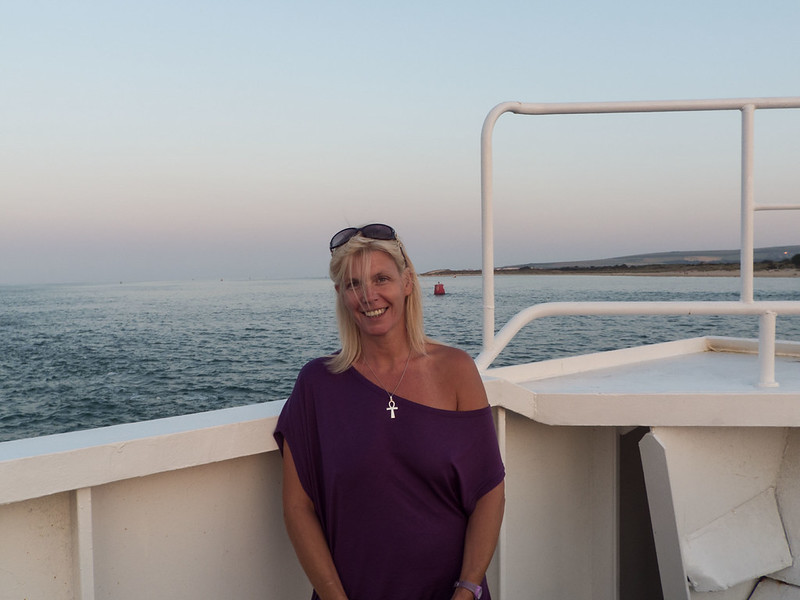
Lynn, Poole Chain Ferry by Phil D 245, on Flickr
link to raw
https://www.dropbox.com/s/i0pyyi2cm1x8iu0/Lynn Poole Ferry.dng
I asked if I could use this image..........she said no.......but what the hell
(I've told her its going up and she's still making mi tea.......can't decide if that's good or bad )I haven't done any pp on it yet myself, but I have an idea to try make a better image from it, thought it might be interesting to see what can be de achieved.
It was taken on a very warm late evening, last summer. The sun had just set, out of shot, over to her left so don't think I'll get away with any warming on this one David
Comedy hats and wigs welcome
I'll call it late Monday evening
Lynn, Poole Chain Ferry by Phil D 245, on Flickr
link to raw
https://www.dropbox.com/s/i0pyyi2cm1x8iu0/Lynn Poole Ferry.dng
Rhodese
Suspended / Banned
- Messages
- 1,154
- Edit My Images
- Yes
Not a lot done.
Open in ACR, auto, open in PS.
Crop.
Copy layer.
Remove the rubbish from around the subject.
Apply levels to sky.
Apply a warm filter to the lady, (I know, that’s no lady that’s my wife).
New grey soft light layer, paint white on to teeth and eyes to lighten them.
Paint a bit more colour into the sky and then reduce the highlights on the water.
Flatten.
Add border with the stroke command.
Save.
Save for web

CLICK IMAGE FOR BIGANDZOOM
Rhodese.
Open in ACR, auto, open in PS.
Crop.
Copy layer.
Remove the rubbish from around the subject.
Apply levels to sky.
Apply a warm filter to the lady, (I know, that’s no lady that’s my wife)
.New grey soft light layer, paint white on to teeth and eyes to lighten them.
Paint a bit more colour into the sky and then reduce the highlights on the water.
Flatten.
Add border with the stroke command.
Save.
Save for web

CLICK IMAGE FOR BIGANDZOOM
Rhodese.
overbez
Suspended / Banned
- Messages
- 4,088
- Name
- Graham
- Edit My Images
- Yes
Hmmm - not sure what I managed to do but I only have a 1MB full res file??
Anyway, couple of things I'm not happy with, but I'm not starting over!
Lightzone
Crop to put land sea line on a third, and face on third and straighton to perceived horizon
very little, upped exposure, sharpened a bit, up saturation a bit
PS
copied railings and sea from LHS to RHS after making selection of her left side.
upped reds and yellow in sky (what there was anyway).

Anyway, couple of things I'm not happy with, but I'm not starting over!
Lightzone
Crop to put land sea line on a third, and face on third and straighton to perceived horizon
very little, upped exposure, sharpened a bit, up saturation a bit
PS
copied railings and sea from LHS to RHS after making selection of her left side.
upped reds and yellow in sky (what there was anyway).

Pookeyhead
Suspended / Banned
- Messages
- 11,746
- Name
- David
- Edit My Images
- No
LR5:
PS CC:
Here's my PS layer stack

Click for big

- Crop
- straighten
- Lens profile and CA removal
- -15 highlight, -10 white
- export as 16bit TIFF
PS CC:
- remove buoys, and railing
- Add layer as a retouch layer, and light retouching using heal and clone tools
- toned down the tan line
- Pick up best skin tone with dropper tool to set as foreground colour, then create solid colour fill tool to create a layer of that colour
- Change blend mode of skin tone layer to colour, and create a later mask to brush back everything but skin tones
- reduce fill colour layer to 50% opacity
- Create 50% grey layer set to soft light and dodge and burn
- Curves adjustment layer
- 85a warm up filter layer
- selective filter colour layer set to remove any remaining magenta from red channel.
- convert to sRGB
- Save as JPEG quality 12.
Here's my PS layer stack
Click for big

Last edited:
Dr_O
Suspended / Banned
- Messages
- 1,517
- Name
- Dr Ozone
- Edit My Images
- Yes
Ok,
open in LR and increased purple saturation and decreased purple hue
In PS, cloned out buoy and rail (cropped half way through rail as decided pointless cloning out area that was going to get cropped)
Added layer and brushed out tan line a bit- had a few goes but just couldn't get it to look right
Added another layer and filled with sampled skin colour then added layer mask and brushed out everything apart from skin.Tried a variety of settings but left on normal and 41% opacity.
Decided this was better and removed the other layer.
Still wasn't totally happy so added another layer and layer mask and blended a bit more.
Added Adjustment layer filter- LBA at 52% and then brushed out all except sky.
Straightened as well as I could with ruler
Done

Edit89 by Dr_Ozone, on Flickr
open in LR and increased purple saturation and decreased purple hue
In PS, cloned out buoy and rail (cropped half way through rail as decided pointless cloning out area that was going to get cropped)
Added layer and brushed out tan line a bit- had a few goes but just couldn't get it to look right
Added another layer and filled with sampled skin colour then added layer mask and brushed out everything apart from skin.Tried a variety of settings but left on normal and 41% opacity.
Decided this was better and removed the other layer.
Still wasn't totally happy so added another layer and layer mask and blended a bit more.
Added Adjustment layer filter- LBA at 52% and then brushed out all except sky.
Straightened as well as I could with ruler
Done
Edit89 by Dr_Ozone, on Flickr
 . Well done Phil.
 Looking forward to having a go on this one.
PaulButler
Suspended / Banned
- Messages
- 3,194
- Name
- Paul
- Edit My Images
- No
Here is my attempt (apologies as I don't feel I have done this lovely lady justice, it is a very quick edit whilst having a cup of tea) ...
Imported into LR
Cropped & straightened.
Railings cloned out as best I could
Buoys/boats cloned out.
White balance adjusted
Darkened the sky but left the very high clouds at top of image
Minor lightening to the eyes and teeth.
Global: exposure + 2/3rds stop, contrast -25, whites +25, blacks -30, vibrance +10, clarity +10
Export sRGB, qual 75%

not_mine--1 by PabloRosso, on Flickr
Imported into LR
Cropped & straightened.
Railings cloned out as best I could
Buoys/boats cloned out.
White balance adjusted
Darkened the sky but left the very high clouds at top of image
Minor lightening to the eyes and teeth.
Global: exposure + 2/3rds stop, contrast -25, whites +25, blacks -30, vibrance +10, clarity +10
Export sRGB, qual 75%
not_mine--1 by PabloRosso, on Flickr
Farmerjim
Suspended / Banned
- Messages
- 1,756
- Name
- Jim
- Edit My Images
- Yes
Here's mine.
Converted to DNG and started with ACR. Forgot the screen grab but didn't do much apart from fine tuning the exposure and adding a bit on the clarity slider.
Removed the buoys and removed the railings.
Selected the lovely subject and adjusted skin tones a bit.
Sharpened 60% radius 4 threshold 2
Ran noise reduction.
Cropped.
There was too much empty space with the crop so added some sea-gulls, I love sea-gulls.
Resized for Flickr.

Lynn Poole Ferry by Farmejim, on Flickr
Converted to DNG and started with ACR. Forgot the screen grab but didn't do much apart from fine tuning the exposure and adding a bit on the clarity slider.
Removed the buoys and removed the railings.
Selected the lovely subject and adjusted skin tones a bit.
Sharpened 60% radius 4 threshold 2
Ran noise reduction.
Cropped.
There was too much empty space with the crop so added some sea-gulls, I love sea-gulls.
Resized for Flickr.
Lynn Poole Ferry by Farmejim, on Flickr
Rhodese
Suspended / Banned
- Messages
- 1,154
- Edit My Images
- Yes
I love sea-gulls.
I think Bobby Ball's phrase will do nicely here.
"You little liar!"
.Rhodese.
Farmerjim
Suspended / Banned
- Messages
- 1,756
- Name
- Jim
- Edit My Images
- Yes
Couldn't find the irony smilieI think Bobby Ball's phrase will do nicely here.
"You little liar!"
Rhodese.