THE PP GAME!

Had a play and tried to get the colour of ths ky how I'd like to imagine it, but couldn't so decided to see what a mono version looked like (I'm not convinced but ...).

Imported into LR
Grad from top with temp -75, -half stop exp, -50 contrast, -100 highs, +100 sat
Grad from bottom halfway up -85exp,-17 contrast-33 highs
adj brush over mountains upped contrast and exposure (about half a stop)
adj brush over bright clouds, slight -ve contrast, -ve exp and -ve highs to try and tame them
overall exposure +.6, contrast +21, highs -10, shadows +10 blacks -20
B&W
slight s tone curve
slight vignette


not_mine-
by PabloRosso, on Flickr
 
Enjoy new kit Nick whatever it is- shiny new stuff is always good:).

:D

Off topic.

I'm loving it. I've never used a dSLR before - it's quite an eye-opener. Canon 70D, Canon 18-55, 55-250 EF-S STM and 100L Macro, Sigma 10-20. Returned for refund MPE-65 1x-5x macro and MT-24EX flash unit. Bought Metz 58-AF2 to use in place of MT-24EX. I'm currently comparing IQ and ergonomics with Panasonic G3 and Panasonic FZ200, including the use of achromats (Canon 500D, Raynox 150, 250 and MSN-202) to work out what combination of kit to use for several types of subject matter. Ongoing. Not as straightforward as I thought it would be, as in, "It's simple, and obvious. Just use the new kit and drop the rest". Not so simple it turns out. And not, to me at least, obvious. Yet.
 
Slight delay chaps as knacked my back.

A few entries since last time I looked so all good.

Ok, lack of raw not going to help, neither was the big yellow thing straight ahead but I think everyone did a grand job.

Rhodese- I like the colour in the sky and the outline of the mountain is well defined. Not much else to be said really:D

Neil- That Topaz effect is certainly quite striking. It does give it an interesting look and I like the sky although I have to say I am torn as to whether the look of the ben blends with with the foreground.

Darren- Good job on the sky as well and the muted colours are a nice take. Not overly sold on the particular choice of border but good to experiment and remind us of the functionality.

Paul- I like the B&W conversion. The hardest thing I found with punching the colour up is that there was a tendency for the snow to go blue as well- neatly avoided in B&W.
Highlights under control as well. If I was being picky I'd lose the vignette but may just be my taste

Ok, despite all being good, it seemed slightly easier to get to final two than last time. Bit stuck now tho:p

So, torn between Rhodese and Paul's. The good news is you have each won it many times over- the bad news is I keep changing my mind and award the other one the win again:D.

Right no more faffing, a close run thing but for his b&w rendition which I think suits the old character of Ben Nevis I award Paul the win- well done Paul:clap:

Mine- brushed some clarity into the sky then added some blue with the adjustment brush. Upped the exposure by .83 and overall clarity.
Sharpened a bit. Probably should have done more but hey ho.
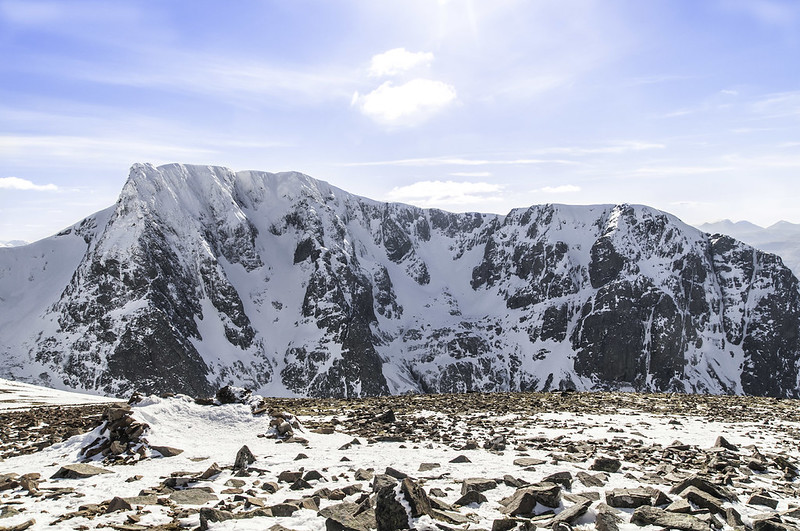

The Ben-Edit
by Dr_Ozone, on Flickr

 
:D

Off topic.

I'm loving it. I've never used a dSLR before - it's quite an eye-opener. Canon 70D, Canon 18-55, 55-250 EF-S STM and 100L Macro, Sigma 10-20. Returned for refund MPE-65 1x-5x macro and MT-24EX flash unit. Bought Metz 58-AF2 to use in place of MT-24EX. I'm currently comparing IQ and ergonomics with Panasonic G3 and Panasonic FZ200, including the use of achromats (Canon 500D, Raynox 150, 250 and MSN-202) to work out what combination of kit to use for several types of subject matter. Ongoing. Not as straightforward as I thought it would be, as in, "It's simple, and obvious. Just use the new kit and drop the rest". Not so simple it turns out. And not, to me at least, obvious. Yet.

Wow, that's a lot of shiny things to play with- excellent:D

I'm sure it will come together- there are so many variables it just takes practice. Still easier than golf:p
 
Thanks Dr_O and appreciate the feedback. :) Hope the back gets better soon, not much worse than a bad back :(

Hopefully this will work, it is a raw file on dropbox

Call this Saturday evening if that's ok. :)

and here's a straight jpeg conversion (no processing).

Eastney_Beach_Huts_D600-0062
by PabloRosso, on Flickr
 
Thanks Doc, (y)

Well done Paul. :clap:

This has to be a knock you over, put your shades on blast.

Open in ACR, auto, open in PS.
Copy layer.
Crop.
Clone out lamps and sign.
SAVE.
Select the sheds and feather by 10 pixels then zap em with levels, vibrance, saturation, brightness and contrast, the works.
Still on the copy layer, Invert selection and apply little levels adjustment followed by a touch of saturation.
New layer, drop a blue grad from top to half way down the image.
On the copy layer, deselect.
Dodge and burn.
Flatten
Add the border with the stroke command, and Roberts your mother’s brother.
SAVE.
Save for the web.


CLICK4BIGANDZOOM.

Hows zat for a lemon popsicle. ;)

Rhodese.

PS I couldn’t save the gull on the lamppost but I did save the others.
 
Wowzer- now that's bright Rhodese- none of your usual moody darkness here:D:p

Back a lot better thanks Paul. good choice of pick- I really wanted to punch those colours up although I think I have maybe washed them out a bit in the end by upping the brightness again.

Anyway- upped the green and pink in lightroom
In PS, added some sand- felt compelled as beach huts:D
Cloned out lamposts and ariel. Had left post on the right in but subsequently cropped and got rid of.
However before cropping had played about with perspective after not being able to get anything much straighter using the ruler. Quite a tricky one to get all aspects lined up and didn't really manage to.
I had saved etc and was ready to upload then remembered I hadn't sharpened. This then led to me adding a little extra;)- oh and sharpened too.


Edit79
by Dr_Ozone, on Flickr

I thought there was no way that white panel would be untouched:D

However, sensible entry below:


Edit80
by Dr_Ozone, on Flickr

It still doesn't quite have the look I was after- the huts look a bit perched on the sand. Have flicked layer off but the grass/mud doesn't quite sit with the punched colour... Just had a quick play with B&W and some film grain and that perhaps suits the ground a bit more although the sand lookd ok too lol. Anyway, time up, need to stick with number 2.
 
Oh forgot, I also repaired the first hut and increased the vibrancy as well as adding a levels layer and upping midtones.
 
I decided that the shot needed humanoids.
First used Adobe converter to get a dng file that my PS could handle then opened with ACR, here's the screen shot..........
View attachment 7250
Upped clarity and both shadows and whites.

Then opened up PS. Added some canvas top and right and pasted in a stock sky.
Found a pic of a beach and used some of that for human interest. Also put some donkeys on the right.
Didn't need to sharpen or do any noise reduction so that was about it.
Reduced image size for Flickr.

Eastney_Beach_Huts_© PaulButler
by Farmejim, on Flickr
 
Going off piste a little. After seeing the Doc's "wall scrawl" it reminded me of this classic bit of graffiti.
"But from what film." I here you ask?
Click the image to find out.


Rhodese.
 
Jim it took me ages to find him, but find him I did. :banana:(y).

Rhodese.
 
Jim it took me ages to find him, but find him I did. :banana:(y).

Rhodese.
It was like that when I got it, honest guv, it's my browser, it does strange things.
Graffiti must be Shawshank related I'd guess.
 
No :p


haha- nice tie in Rhodese, classic film.

Jim- well done, your huts have a more loved and purposeful appeal
 
Apologies for the slight delay in calling this one.

@Rhodese - Definitely a "Knock you over and put your shades on" moment! :D My recollection of that morning was whilst cold, the light had a lovely soft warmth about it. Your colours reflect the warmth, but in a rather nuclear way :) Interesting crop too. I rather like this.

@Dr_O - You've managed to bring out the depth of the pastel colours of these huts but I agree with you, they do look perched on the sand a bit. Nice crop and like the cloning.

@Farmerjim - Nice touch with the sky, not entirely sure about the humanoids, though I do think Homer was very brave getting ready for a dip - it was November I believe! :D Love the donkeys though.

I thought it would be quite easy to decide this as there are three very different takes on the image. But it hasn't been easy at all as there are things I like in all of them. So I'll give this to Rhodese, it was the one I kept going back to.

And Shawshank Redemption is one of the best movies ever made imho :)

Here's my take on this image, crop, slight exposure boost, added vibrance & a little saturation, cloned out the lamp posts.

Eastney_Beach_Huts_D600-0062-2
by PabloRosso, on Flickr

Over to Rhodese now :)
 
Thanks Paul, I’m not sure it was deserved, with only two other entries in contention and both of them very likable.
COME ON you PPers. Where are you all, the challenge on this thread is to pull the best you can from the image presented. You don’t have to add abstracts to the picture; all that’s needed is a bit of pp and a bit of you, so COME ON HAVE A GO.

This is another old one as I don’t have many new RAWs, I mainly use a little Fuji X these days and the jpegs are so good it hardly seems worth the extra effort of taking RAWs.

3329-1394367301-2853c60697b71d8115e25612a52af46a.jpg


Link to RAW. https://www.dropbox.com/s/jkbu11bztowlhw8/OLD ROPE.NEF

I will call it on Wednesday afternoon.

Rhodese.
 
Last edited:
Thanks for the feedback Paul- I like your edit, the tight crop works well.

Well done Rhodese- yours had a Warhol-esk look which did grow on me, perfectly well deserved win:).

I'm liking the variety of shots we have had to play with recently(y)
 
OK, had bit of time today.

In Lightroom:
Increased clarity
Converted to B&W
Increased exposure
Set to strong contrast
Increased highlights and shadows
Increased blacks a bit

In PS:
Sharpened
Cloned out object near bottom right corner.
Tried a version with added noise and leaving the window in. Decided against leaving the window in
Cloned out window.
Added omni light filter and had centre near top of rope


Edit83
by Dr_Ozone, on Flickr
 
Liking that B&W edit Dr_O :)

OK, here's my attempt. I've tried to bring out the texture and colour of the wood and rope (as well as the wall) - it involved playing about a lot and various copies,until I got something I'm reasonably happy with ...

Import into LR.
Crop and minor rotation
clone out the corner of the wall (bottom left)
Bump exposure 1.25
bump whites +50
drop blacks -25
clarity +10
vibrance +25
saturation +45
moderate bottom heavy s curve
used adjustment brush on wall -100 on contrast and highlights
used adjustment brush on wood & rope tint -5, exp +.33, contrast +10, sat +20

Export as jpeg, quality 75 and sharpen for screen as standard.


not_mine--5
by PabloRosso, on Flickr
 
Thanks Paul- you've done well with bringing out the detail and retaining wall texture- I just blitzed the wall:D
 
It luks like bein a two oss rerce, do it. ;).

Rhodese.
 
Its time, well what can I say, I‘m stumped :(, what a poor turn out, am I disappointed or what.

Still we had two very deferent interpretations, both having merit.
I have to pick one although I do like both, the “grunge” look of the Doc’s (if that’s the right word?), and the warmth of Paul’s.
The winner...... Paul, because it’s the nearest to my edit.

Well done Paul over and out.

My edit,
It was done many moons ago. I think all I did was to hide the detritus with stretched patches, levels and probabaly a bit of D&B.


Clickfubig.
 
Oh, I nearly forgot, Doc your image reminded me of my darkroom escapades into Solarisation and pseudo-solarisation (Sabatier) effects. What jolly japes and gay times we, my friends and I had messing about with stuff we thought was so cleaver and when I look back, god it was rubbish, but such fun to do rubbish.

Rhodese.
 
I'm late on parade, been busy.

Opened with ACR, here's the capture..............
View attachment 7602

Messed about with the wall but couldn't make it interesting apart from some graffiti but ditched that and went back to drawing board.

Selected the rope and foreground and sharpened 75%,radius 4 threshhold 2.

Cut the BG (wall) and inserted Whitby harbour which was desaturated and had 3.8 Gaussian blur applied.


OLD ROPE © Rhodese on TP
by Farmejim, on Flickr
 
Hi Jim, Jim I like that, it’s really well executed. Is that the second coming of Dracula, the little fella floating in the harbour?

Rhodese.
 
Hi Jim, Jim I like that, it’s really well executed. Is that the second coming of Dracula, the little fella floating in the harbour?

Rhodese.
Could be Rhodese! Sorry I missed the cut :(
 
Been away on a trip- well done Paul:clap:

Thanks for the feedback Rhodese- I always like trying different things:)

Jim, that looks really cool- but you were too slow:p:D
 
LR5:

Crop, straighten
apply lens profile and remove CA
darken blue slightly
export as 16bit TIFF

PS CC:

Add black and white layer and darken blue and aqua to give cloud separation
fade back black and white layer to 50%
add saturation layer and increase saturation to get nearer to original, but keeping colour subtle
Add 50% grey soft light layer and burned clouds in a little.

sRGB and JPEG

Clicky biggy
 
Last edited:
accidental double post
 
Open in ACR, no adjustments, open in PS.
Crop, copy layer.
Apply a B&W adjustment layer, knock the blues and cyan’s back to darken the sky, a little of the same with red to aid the brickwork.
New layer, fill with 50% grey and change blend to soft light. Painting with black to burn and white to dodge shape the sky.
Flatten.
Add a FP4 film grain.
Select all and add the border with the stroke command.
Save.
Save for web.

Question, when I knocked the blues and cyan back I got a massive halo on the top branches of the trees, any ideas? :(


CLICK IMAGE 4 BIG

Rhodese.
 
In LR:
Increased contrast
Increased saturation in sky

In PS:
Straightened
Increased saturation on green at top of church


Edit84
by Dr_Ozone, on Flickr

Rhodese- not sure on your halo, although looking at mine now I see I have some issues in that area too, oh well
 
Hope you don't mind me joining in.

Here is my take.
Lens correction.
Straightened and cropped.
I adjusted the levels globally.
I then adjusted the colours and levels for individual parts of the image selectively e.g. brick work, roof, sky.
I then gave a final levels adjustment to the whole image.
Applied grad filter to the sky.
Reduced noise selectively on sky.
Sharpened with unsharp mask.
Reduced to 72di and saved as jpeg.
(saved on flickr as private image)


Royal_Victoria_Park-2055
by 2010kev, on Flickr
 
Last edited:
Back
Top