
THE PP GAME!

“Oh I do like to be by the seaside.” :banana:

Open in ACR, auto, open in PS.
Copy layer.
Crop 16x9 and level.
SAVE.
Make a selection of the main subject using the polygonal lasso, contract by 1 pixel-feather by 1 pixel, copy and paste into new layer. Name it GULL.
SAVE
On the copy layer select the sky left of the birds, copy and past into new layer. Call it SKY.
In free transform, stretch the selected sky across the rest of the image covering the birds and the skyline.
Add a mask to the SKY layer and with the fore and background set black and white respectively with a soft round brush mask the skyline by painting with black, correcting any mistakes with white.
SAVE.
Switch off the gull layer.
On the copy layer. Using content aware fill, remove unwanted gulls including the main one, also remove the pylons.
Add one small gull bottom right.
SAVE.
Switch the gull layer back on, select transform-scale and increase the size of the bird then move into position.
Flatten, select all and make the “BORDER” ”Thanks John” :thumbs: using stroke.
SAVE.
Save for web.


Cick for a bigun, again to zoom.

Rhodese.
 
Phil could you give an idea of time on Friday evening in case I find myself a bit last minute as I sometimes do? Ta :)

John, I'll be in no rush, how does 10pm sound :)
“Oh I do like to be by the seaside.” :banana:

So do I.........but this was Hollingworth Lake, Littleborough :p

Sorry.....couldn't resist :D
 
Heres my attempt

opened in Paintshop Pro X5
Cloned out all but 1 seagulls
Brightened +28
Highlights +10
Saturation +22
Focus +62
Ran 1 step noise removal to remove any noise I had created
Tried adding a new layer (my first attempt at this) to remove the cloud however I can now see the bottom line of the layer.
Sharpened
Saved as Jpeg
Uploaded to FlickR


The PP Game Edit 5
by DazJamesPhotography, on Flickr
 
John, I'll be in no rush, how does 10pm sound :)


So do I.........but this was Hollingworth Lake, Littleborough :p

Sorry.....couldn't resist :D

I should have looked closer at the reflection in the gull’s eye; it looks like it’s taken from the lay-by, near to Heald Lane, Lake Bank……As if. :lol: :exit:
 
Last edited:
I should have looked closer at the reflection in the gull’s eye; it looks like it’s taken from the lay-by, near to Heald Lane, Lake Bank……As if. :lol: :exit:

Spooky :eek:....................... you knew that from the reflection in a gulls eye :suspect: ..............well ya as near as dammit anyway!


I'm guessing you know the area? :thinking: :lol:
 
Last edited:
Nah, I’ve been told there be dragons north of Wolverhampton :runaway:, so it was a quick look on Google. :thumbs:

Rhodese.
 
auto settings, increase clarity reduce hilights and shadows
sharpen, straighten
crop clone out bird at the top and dust bunny
done
 
Nah, I’ve been told there be dragons north of Wolverhampton :runaway:, so it was a quick look on Google. :thumbs:

Rhodese.

Google earth
doh.gif
................didn't think of that :oops:


crop clone out bird at the top and dust bunny

Dust bunny! :eek: the camera and lens was less than a month old..........they were very small clouds ;)......we get them like that on the Pennines :lol:
 
Not really much needed here IMO

LR5
Straighten
crop
-35highlight
+15 exposure
Slight sharpen
remove CA
lens profile

PS CC
Added black and white layer, filtered red to darken legs and beak of gull, filtered green to increase tonal seperation in hills, and filtered blue to bring out cloud detail.
faded above layer back to 50%
flattened
added saturation later and increased saturation back to normal
Removed part of gull top centre
For some reason the pylon annoyed me, so that went too.

Flatten
8bit
sRGB
Save as JPEG.

Click for big
 
Wow, some awesome PP skills in here. I can't use PS but am not too bad in LR so I'm going to play this game today if works slack. :)
 
Tried adding a new layer (my first attempt at this) to remove the cloud however I can now see the bottom line of the layer.

Looks like you can use layer masks with PSP X5, presume you can use a brush to paint on a layer mask to hide what's on it, hopefully you can get a nice large one with "soft" edges??

If so, create a layer mask on your new layer, and then paint (on the mask) round the edges, this will give a smoother transition between the original and the new. TBH your new bit is only really obvious once you mentioned it - just needs softening.

If you go back and read some of Rhodese's explanations, they're pretty detailed and clear for how he did this type of thing. :thumbs: (Or shout out if you're having a particular trouble with something - this threads not just for showing off, people are happy to share!).
 
Wow, some awesome PP skills in here. I can't use PS but am not too bad in LR so I'm going to play this game today if works slack. :)

Hi Stu

Welcome to the thread & new ones are always welcome :welcome:

Bear in mind new joiners have a good track record of doing well like Phil on this round in two attempts he's ben second & then the winner :)
 
Looks like you can use layer masks with PSP X5, presume you can use a brush to paint on a layer mask to hide what's on it, hopefully you can get a nice large one with "soft" edges??

If so, create a layer mask on your new layer, and then paint (on the mask) round the edges, this will give a smoother transition between the original and the new. TBH your new bit is only really obvious once you mentioned it - just needs softening.

If you go back and read some of Rhodese's explanations, they're pretty detailed and clear for how he did this type of thing. :thumbs: (Or shout out if you're having a particular trouble with something - this threads not just for showing off, people are happy to share!).

Thanks graham will have a look and see if I can do this when I get a chance and will deffo ask for help when needed.
 
Ok, here is my effort - all in light room 5.3.


Cropped in tighter& straightened
cloned out everything I found annoying.
Added my usual raw import process that adds a little saturation, contrast and drops highlights a little.
Made an ass of removing large bird in sky, probably should have left it in?
Added a grad to the sky to darken slightly
Masked off the landscape and added a little sharpness, contrast and shadow enhancement
Adjusted the luminance value of the sea slightly to take the edge off it.
Masked off the bird in upper right and added a little shadow and exposure to him to make him a little more prominent after the grad filter darkened him too much.

Got told I had to get on with Dynoing a car the customers waiting for... LOL
Exported to JPG with my usual preset, 65% quality, 1024L side and watermark.
 
Last edited:
Hey all, I'm nick. I'm new here but though I'd give this a go.

I've cropped,
cloned out little bit of land in top left,
cloned out a few birds that I didn't like (it was nothing personal, they were just in the way),
boosted contract,
converted to B&W.

All and any feedback welcome :)

View attachment 2220
 
More flying rats !!! This was a good chance to cull a few :)
Started with ACR .................

View attachment 2221

Opened PS
Straightened
Then it was open season on the menace from the skies..........Blam! Splat! Crunch! "Holy cow Batman are you sure they're gulls and not Robins?"
Then it was over, just a few feathers to clone away.
Next it was time to use the shadows/highlights sliders. I meant to get a screen grab but forgot (must have been all the excitement of the cull :))
I brought the highlights slider down as I thought the gulls were too bright and I don't think they are that clever.
I selected the nearest gulls and sharpened them up.
Put a frame round the pic and saved for Flockr @ 1MB.


Flying Rats
by Farmejim, on Flickr
 
Hey all, I'm nick. I'm new here but though I'd give this a go.

Hi Nick, glad you could join us, always room for more, just makes the judging harder for the PP King!:lol:
I'm a big fan of B&W, I like your edit.
Actually I like all the edits on this one, they're all different.
 
Sorry......double post:rolleyes:.......see below
 
Last edited:
Wow, some awesome PP skills in here. I can't use PS but am not too bad in LR so I'm going to play this game today if works slack. :)

Hey all, I'm nick. I'm new here but though I'd give this a go.
From one newcomer to the game to 2 more..........:welcome: Nick and Stu


................... just makes the judging harder for the PP King!:lol:.

Ya not joking!..............there's over 24 hours to go and its already making mi head hurt :nuts:

Wished I'd called it last when there wasn't as much choice :D

And as for them gulls Jim, ya missed loads.....ya need to get ya self some manly 32g 6's.......not them girlie 21g 9's ya must have been using :lol:

Joke btw......just in case we have any twitchers in :whistling:
 
LR5
Exposure +2, Contrast -19, H'Lights -100, Shadows +55, Whites & Blacks each -30, Clarity +30
Converted to B&W Red, Orange & Aqua all -13, Yellow & Green -26, Blue +31, Purple +18, Magenta +4
Then deliberated for long time with crop to arrive at one I liked.

PE10
Cloned some tweet tweets out, blurred top part including green area

Picasa
Applied boarder (Rhodese are you reading my typo :p).

30 minutes.


Last edited:
Hi Nick & a welcome from me - it's really good fun in here & any trouble our thread cop (Phil :boxer:) soon enters & sorts them out - don't you Phil :p
 
Hi Nick & a welcome from me - it's really good fun in here & any trouble our thread cop (Phil :boxer:) soon enters & sorts them out - don't you Phil :p

That's not me either btw ;)

Wow John......if I didn't know any better I'd think you'd had a sneaky look at the version I did, stupidly left it public on flickr, untill I realised today and put it in private :bat:........and if ya didn't I'll :coat:.........'cos that's even spookier than Rhodese knowing where I'd stood to take the picture :lol:
 
Does any one mind if I call this 24hours early.......say tonight at 10 pm?

It does appear that entries are in from folks that were playing, plus a couple of new faces :)
 
That's not me either btw ;)

Wow John......if I didn't know any better I'd think you'd had a sneaky look at the version I did, stupidly left it public on flickr, untill I realised today and put it in private :bat:........and if ya didn't I'll :coat:.........'cos that's even spookier than Rhodese knowing where I'd stood to take the picture :lol:
No that's Phil Young :boxer:

I swear I'd not looked at your Flickr. I'm not usually a big fan of B&W but by the time I'd got round to an edit the colour has been done by a lot so I thought I should try for a B&W. Me & Rhodese are the older & wiser member with psychic powers ;)
 
Does any one mind if I call this 24hours early.......say tonight at 10 pm?

It does appear that entries are in from folks that were playing, plus a couple of new faces :)

Your decision as you're in charge Boss
animated-smileys-christmas-005.gif
 
Your decision as you're in charge Boss
animated-smileys-christmas-005.gif

Boss, I like that!......do you think you can convince mi missus :D

John, after I've decided the winner I'll post my version up, you'll see what I mean...............must be just great minds and all that :thumbs: :lol:
 
Apologies to anyone who was still going to have a go at this image, but I'm calling it 24 hours early :D

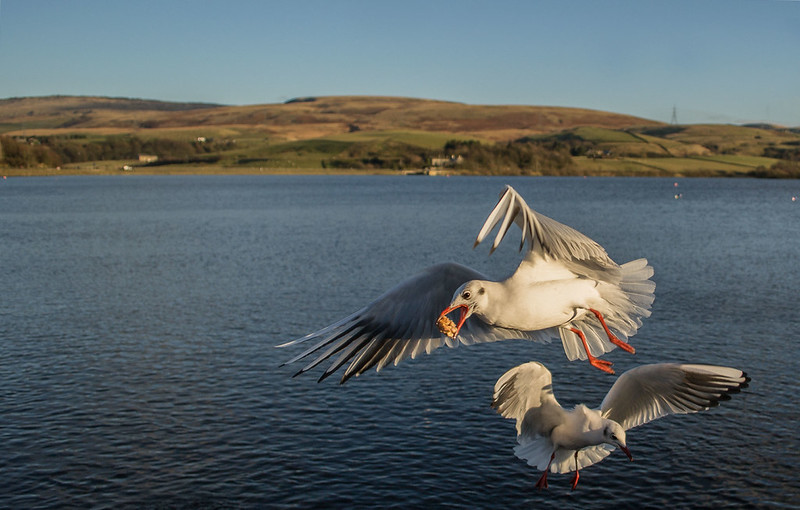
Firstly, I can't believe no one was curious to know what the main gull has in its beak :lol:

I'm not going to go through each image as I'm not the best at giving critique, but I'm hoping that playing along here will, in time, improve that too .

I looked at this image the other day for the first time in a while and the first thing I thought was less was best. Have I mentioned that cloning stuff out is still a novelty to me :rolleyes::D so with that in mind I was looking for an improved image that got rid of the distracting birds but kept the main ones. To me, the half a bird in the top right had to go. If a few more had cloned that one out, it would have been more difficult to decide. So thanks to those that didn't, it made the job a little easier ;) :lol:

It's took some deciding and it was a close decision but I'm going to go with Graham's image :thumbs: . The main two reasons are, he left plenty of space to the left of the main gull, which appealed to me when I did my pp and the cloning and reconstruction of the gulls wing to the top right :clap: something that is certainly on my 'learn to do' list, well done Graham, over to you. I'm looking forward to the next image :thumbs:

Anyway this is what I did, if John and I didn't think so much alike, he would have come close but picking Johns to win would have been too much like picking a b&w version of my own :shrug: :lol:


Gulls pp
by Phil D 245, on Flickr
 
Well done Graham :clap:, many good edits on this one:thumbs:

Firstly, I can't believe no one was curious to know what the main gull has in its beak :lol:

I had agood look at that Phil, at first I thought it was chip batter but I'm not so sure..................
View attachment 2248
 
Blimey. cheers phil.... Didnt want to take away too many as it would detract from the frenzy when gulls and food combine. Also I tend not to like half things, or overlapping things......

try this one, three files, +/-2 EV, or just use the "mid" one...... bit of cloning too if you like!

i231.jpg


DARK RAW (-2 EV) http://speedy.sh/3RVnu/DSC-2433-dark.NEF

MID RAW (0 EV) http://speedy.sh/rGKvz/DSC-2432-mid.NEF

BRIGHT RAW (+2 EV) http://speedy.sh/DSdNQ/DSC-2434-bright.NEF

Monday morning first thing, gives you 3 full days. :thumbs:

_____
Cheers Jim, thankyou Lee. :)
 
Last edited:
I had agood look at that Phil, at first I thought it was chip batter but I'm not so sure..................

No Jim....... not even close with that guess :nono:...................sound familiar to ya :D

Tbh, it was just one of those rice crackers (the ones that look like they've been made from rice crispies ) feeding the gulls was about all they were fit for. :gag:

I just thought it looked a little odd in its beak :shrug:
 
No Jim....... not even close with that guess :nono:...................sound familiar to ya :D

Tbh, it was just one of those rice crackers (the ones that look like they've been made from rice crispies ) feeding the gulls was about all they were fit for. :gag:

I just thought it looked a little odd in its beak :shrug:

Right glad I know now as it was keeping me awake all night trying to figure it out --- what a bloody liar I am
animated-smileys-cheeky-017.gif
 
How may more time will I have to type 'well done Graham' :lol:

Seriously though you've done well :notworthy:

So coffees & mince pies on you today - for all members of TP, or is it just this thread
animated-smileys-taunting-12.gif
 
Blimey. cheers phil.... Didnt want to take away too many as it would detract from the frenzy when gulls and food combine. Also I tend not to like half things, or overlapping things......

Actually Graham, I should have added, that after looking at the other edits I did think that I'd gone a bit overboard with the cloning. So leaving a few more birds in also appealed :thumbs:

It all goes towards learning for me :)
 
Just this thread please John.. and maybe some of the 52'ers.. they're the only two places I tend to go on TP.

And phil - yep, it is tempting to remove everything when you can, but sometimes the things you remove are what makes the shot in the first place, so like anything, used with care is the best way!
 
Actually Graham, I should have added, that after looking at the other edits I did think that I'd gone a bit overboard with the cloning. So leaving a few more birds in also appealed :thumbs:

It all goes towards learning for me :)

What you must remember there is more than one way of 'skinning a cat' as it were & as such you must always keep your own sense of what you like & not what others may, or may not like. I find my mind is all over the place, from edit to edit, so I tend to be a bit like a mad professor & just hit different things in different programmes. But sometimes get like 'writers cramp' & just don't know what to do next.

So just ensure you enjoy it.
 
Back
Top
