THE PP GAME!

Gowd moanin all.

Hi John, Jim will probably have a gull BBQ on the front lawn.

The worst STUKA attack by gulls that I ever saw was at an ice cream van by the Corbiere lighthouse, Jersey. A bloke with three or four cornets turned from the van only to be bombarded by several of the screaming banshees, sending the rest of us waiting to be served into panic. It was horrendous, terrifying. There are warning signs, but FM…..
Talking to the ice cream vendor after the event, he told me that he had put nets up to stop them only to make thing worse, as they swooped underneath causing greater confusion.

My previous comments on gulls were my limp attempts at humour, at which I obviously missed the mark, sorry.

Rhodese.
 
Surprised no B&W edits on this one :shrug:
 
Gowd moanin all.

Hi John, Jim will probably have a gull BBQ on the front lawn.

My previous comments on gulls were my limp attempts at humour, at which I obviously missed the mark, sorry.

Rhodese.

How very dare you! I wouldn't dream of harming one of the charming little sky-rats :)
 
Around our neck o the woods we call them and pigeons “Flyin rots” and those delightful little squirrels “Tree rots” :).

Rhodese.
 
Around our neck o the woods we call them and pigeons “Flyin rots” and those delightful little squirrels “Tree rots” :).

Rhodese.

Learnt my lesson a while back, I was ploughing and shed-loads of gulls were following, as they do, anyway a clod of earth hadn't turned fully over and fell back into the furrow trapping a gull. Being a kind-hearted bloke I got off and went to extricate it and the bloody thing went for me and drew blood!
 
Here's my go.........

Opened in ARC
View attachment 1891

Then in PS I cropped and straightened a bit
Then used Highlights and shadows for more contrast and detail in the sky.
View attachment 1892

Wanted bit more sky detail so selected the sky and upped saturation.
Reduced the noise.
Cloned out the new looking building on the right and notice on the tree.
Saved as very small file as the wind seems to have blown my broad-band away and upload speed is about 50bps:thumbsdown:

No Herring Gull BBQ :)


TP Torquay The Pavillions
by Farmejim, on Flickr
 
A bit early :)

With this shot I was looking for the right crop then how the sky would be treated.

I must admit I’m not too bothered about people in the shot but would have cloned out the sign if I had remembered.

I also feel the whole building left & right should be included but which can be a problem when correcting perpendiculars & straightening shots.

So in no particular order:

Graham - I feel for me this time your edit is too intense with the saturation for me even though I often like more than not with the saturation slider. But you have kept the whole building & cloned out one person & the sign.

Rhodese - a fair bit of skill with the cloning, not just of people & the sign but also the building to the right side. & you have kept the whole building. I like the crop but I would have liked to have the building a bit lighter.

David - as always a good clean simple edit again with good cloning skills but I was looking for a bit more ‘pop’.

Neil - I must admit I thought I had loaded my own colour edit as it looks so similar. I like the crop & the details but may have liked the building a little less in shadow.

Lee the crop & mirror image isn’t working for me – sorry. You’ve also cut some of the building off but if it is not mirrored there is good restraint shown especially with the sky.

Phil – an excellent first entry good crop, good cloning skills so very well done. I feel the crop to the left was too tight but I hope you stick around.

Jim – I’ve studied your entry & can’t find your usual trademark ‘odd & ends’ anywhere unless I’ve missed them? You’ve chopped part of the building off which I don’t feel is right & I also feel the foreground could have been tidied up.


So my WINNER IS NEIL but with newcomer Phil as a good number two but thanks to each of yoy for putting an edit in :thumbs:


My edit was done some time ago but I don’t do that many B&W. It would have been done in LR & by individually pushing & pulling the individual colour & luminance sliders. (Tips I took note of in one of David’s posts).

 
Well done Neil, good edit :clap:. Thanks for the critique John, you didn't see Homer Simpson :) I was going to tidy up the fore-ground but got side-tracked.
 
Well done Neil, good edit :clap:. Thanks for the critique John, you didn't see Homer Simpson :) I was going to tidy up the fore-ground but got side-tracked.

I've been searching you edit for the past hour looking for additions/dilations/amendments but find nothing that resembles a Jim do dah :shrug:
 
I've been searching you edit for the past hour looking for additions/dilations/amendments but find nothing that resembles a Jim do dah :shrug:
Just under the flying penguins, quite small and insignificant:):)
 
Congrats Neil, :banana::clap:

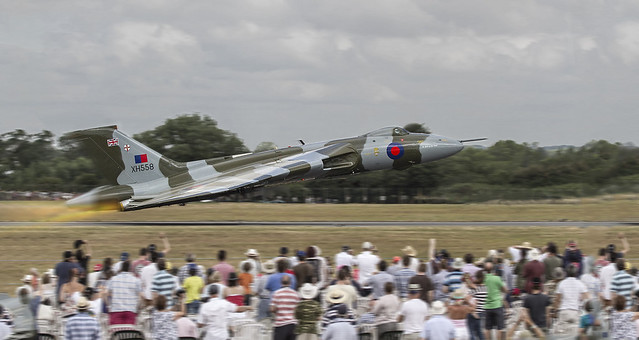
What to do with this, there’s not a lot going on, in fact its quite plane, :whistling: so to give it a bit of a lift.I…
Opened in ACR, hit auto, opened in PS.
Crop to 16x9, and straighten.
Copy layer.
Selected the sky and feathered by 150 pixels, in levels moved the L/H slider in until the sky looked OK. Moved the R/H slider in very slightly to lift the whites.
Inverse the selection and apply auto curves.
SAVE.
Clone out the letters on the tail and replace using the Type Tool, move and transform.
Clone out the white sign and the flare under the plane.
SAVE.
Create new layer Fill with 50% grey, set fore and background colours to black and white respectively. Then using a soft low value brush, use black to burn in and white to dodge, work on the form of the aircraft.
Burn the shadow and the runway.
Quiet down (Burn) the spectators on the far side.
SAVE
Flatten.
Select all and add a border using stroke.
SAVE.
Save for web.


CLICK 4 BIG.

Rhodese.
 
Last edited:
What to do with this, there’s not a lot going on, in fact its quite plane, :whistling:
Rhodese.

Just to prove someone reads your words :p
 
LR5:
Highlight reduce
CA removal
+10 clarity
crop and straighten

PS CC:

Create layer mask from XH558 (a little rushed unfortunately... not got much time)
Motion blur background
[edit] forgot to mention radial blur on wheels
Levels
Slight red layer curve adjustment to add slight warmth and give a slightly aged RA4 print feel
35mm film grain layer added.

Flatten
convert to 8bit
convert to sRGB
JPEG
Done.

20 mins

Click for big etc.
 
Last edited:
Quick one in Lightzone

Straighten
crop
Zonemapper to reduce highlights
relight to lift shadows and add detail
Increase Saturation
decrease vibrance
NR
slight local contrast (small rad, small amount)
B&W layer - select plane - invert selection - reduce opacity
to reduce the sat of the BG

 
Last edited:
Just to prove someone reads your words :p

Good for you, that’s nice to know. :thumbs:

You didn’t tell me that I had misspelt straighten though. The missus read it and …DOH. :gag: :'( :lol:

Rhodese.
 
Good for you, that’s nice to know. :thumbs:

You didn’t tell me that I had misspelt straighten though. The missus read it and …DOH. :gag: :'( :lol:

Rhodese.

Didn't like to be so rude.

But have you spelt boarder right - shouldn't it be border :thinking:
 
I could use the excuse that I’m dile… dess … Diss … dixle, but I can’t spell it. :lol:

Oh no, now I have to go back hundreds of pages correcting my posts.

Drat and double drat.

Rhodese.

 
Phil – an excellent first entry good crop, good cloning skills so very well done. I feel the crop to the left was too tight but I hope you stick around.

Apologies for the late reply, I've been off for the weekend with no internet

John, thank you , I enjoyed doing it, I've only been using E11 a couple of weeks from View NX2 so cloning is a bit of a novelty :D

Neil, well done, I'll submit an entry shortly :) I like what David (Pookeyhead) has done with the motion blur, but that's just a tad advanced for me yet :lol:
 
Here's my attempt, sorry I must remember to make a note of what I adjust in ACR :oops:

Slight crop then cloned out the trees to try make the plane stand out more, then cloned out the crowd ........as I said, being able to clone stuff out is still a novelty :D


vulcan pp game_edited-1
by Phil D 245, on Flickr
 
then cloned out the crowd ........

Good cloning Phil - considering how little grass there was to start with compared to how much crowd! :thumbs:
 
Thanks Graham :)
 
Phil, your flashing Santa reminds me of the time ...................ah well, that's another story :nuts:

Tried to simulate the Vulcan doing a fast low-level pass with gear up.
Started with ACR, as per screenshot....

View attachment 2106

In PS straightened and added a bit to left and right sides.
Selected Vulcan and sharpened a tadge, upped vibrance and saturation a bit.
Selected the rest and decreased vibrance and saturation then used the motion blur for speed.
Cloned out landing gear and put flaps down.
Tried to add another layer with after-burners aflame but not entirely happy with result.
Edit. I shouldn't have bothered... I'm informed that XH588 wasn't fitted with after-burners, D'oh!:bang: and even if it was they couldn't afford the fuel to light them up :)
Selected sky and gave it more detail using shadows/highlights.
Gave a bit of motion blur to rear end of Vulcan.
Flattened and reduced image size then saved for Flickr.


vulcan
by Farmejim, on Flickr
 
Last edited:
LOL@ 1 metre off the deck with no gear down and reheat! :) At least you retracted the aibrake :)
 
some cracking edits again all round, all seeing something slightly different in the photo, and for this each one could well be the winner, what i had in mind myself was to clone out the crowd, and bring the vulcan out a bit, so for this reason, with some fantastic cloning im going to give the winners badge to phil-d, well done and over to you
 
Phil - As new un to this thread you're doing well - 2nd last time & first this time so a particularly good effort
animated-smileys-jumping-027.gif
 
Last edited:
Thanks for all the encouraging comments :) and thank you Neil for picking my attempt as the winner :)

As I said, I've only been using E11 a few weeks and its capabilities are way beyond my skills and knowledge :oops: but after looking back at a few of mi photos on flickr that I pp'ed with NX2, it makes me want to take them off and redo them with E11 :lol:

Right.....I'm afraid I need help again :rolleyes:.......I have a photo that I took 12 months ago, when I first got my camera, that I never got round to doing any pp on but.......... I don't know how to link to the raw file :oops:
As well as a flickr account I have a photobucket account, will either of these do? Thanks
 
Last edited:
Phil, your flashing Santa reminds me of the time ...................ah well, that's another story :nuts:

.....you got arrested Jim? :shrug: :D
 
Phill... open a dropbox account (free) and upload the RAW into your public folder, then post the link to it. Once you install drop box, there's a instruction file in yrou public folder.

Dropbox rocks for a million reasons.... you should use it anyway. :)

Well done BTW :)
 
Phill... open a dropbox account (free) and upload the RAW into your public folder, then post the link to it. Once you install drop box, there's a instruction file in yrou public folder.

Dropbox rocks for a million reasons.... you should use it anyway. :)

Well done BTW :)

David, thank you, I'll give that ago and return.......I would like to say shortly........but sometimes the easiest things can take me awhile :rolleyes:
 
Link now added to raw file.........I think :thinking:

Thanks again David :thumbs:
 
Yep.. that works :)
 
Well done Phil (both on the win and getting your image posted up). :lol: Really like this shot btw. :thumbs:


Click for big


Pretty straightforward to start with

ViewNX2
Expo +0.5
WB Sunny (5200 I think)
Sharpen 3
Contrast +5
Highlight Prot 25
Shadow Prot 50
Colour boost 5 (Nature)
Straighten

CS2
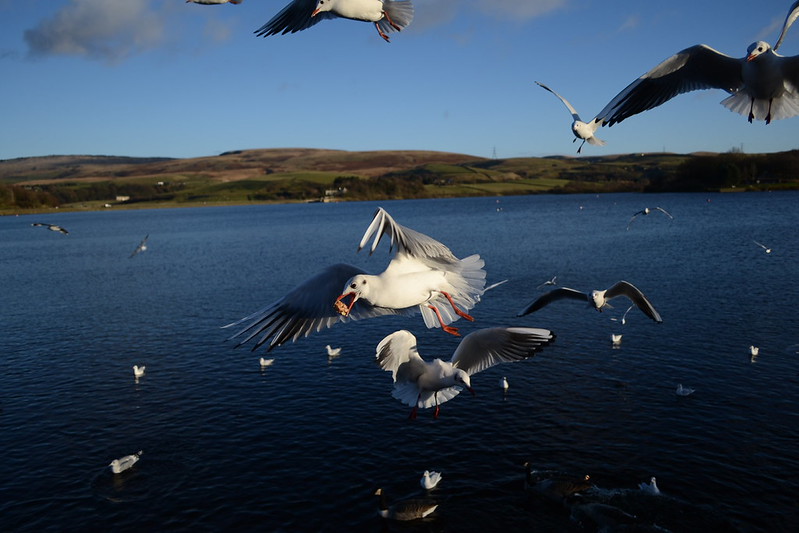
Clone over half gull at very top
clone a couple of little ones out too
(I loves cloning gulls out I do!!) ;)
Didn;t like the big one top right, so he went too
but I did like the one behind him, so I reconstructed a wing for him.
(Copy the other one, flip horizontal, distort, layer, mask, clone).
Selected land in the BG, increase saturation
High Pass filter (small radius, 1.5 pix) to sharpen just the main gull.
Crop
 
Last edited:
Phil could you give an idea of time on Friday evening in case I find myself a bit last minute as I sometimes do? Ta :)
 
Well done Phil, I hope this is the start of things to come. Wow, What am I saying. :bonk:

To cull a gull, or not to cull a gull, that is the question. :eek:
Oh, sorry I meant clone. :whistling:

Rhodese.
 
Back
Top