THE PP GAME!

expo +0.70
contr +68
hi lights -100
shads -8
whites +3
blacks +42
clarity +73
vibe +5
sat -29
sat sliders
reds +23
orange +26
yellow +100
all others reduced to -100
sharpen
add vignette
done

IMG_5395 by flying giraffe, on Flickr
 
Edit in LR5 (finally purchased it as my trial ended back on page 100)

IMG_5395.jpg


More blue with temp at 3531, tint +37
Exp +0.10
Contrast +16
H -16 S +100 W +33 B +22
Clarity 100
Vibrance -30

Tone curves - s shape for rgb. Slight s shapes for R and G and the inverse shape for B to give a subtle cross process.

Bit of sharpening and vignetting.

Then just some localised brushing to enhance lettering in places.
 
9472613536_b685a67d5e_b.jpg

gone a dif rout to others for a bit of fun ;)
hi lights +25
shads +100
whites +3
clarity +100
vibe +82
Colour selector
magenta -100
yellow +100
Sharpen
reduced noise
cropped a little
 
Last edited:
B*gger I think having my computer go wrong & having to restock it with my programmes sent my brain haywire :gag: I really have been trying to do an edit on this one but not helped by me not having saved some of my 'own made' presets for LR4 & just getting the end time wrong. My head was this evening - anyway here's some of the ways I was going bit none felt quite right :lol::lol::lol:

 
Alix a hearty well done as this one really was a 'wotsit' to do & so hats off to anyone who tried it :clap:

Ben owes you all a beer :)
 
Well done Alix :clap: - you do know you're in the chair now... :thumbs:

Post up an image and a link to a RAW file if possible, if you're unsure about anything - just shout.....
 
wow Thanks didn't expect to win be warned im a motorsport mad person so here one that was not my best work when i took it due to bad light set up flash after this shot but it can be clean up and worked quite well. will pick a winner on Thursday

And thank you again for the great feedback :)
good luck

9478104077_5b5256dc80_b.jpg


Link to Raw file IMG_0094.CR2
 
Last edited:
Nice one Alix - can't remember a motorsport one here before... plenty of static cars but no moving ones... :thumbs:


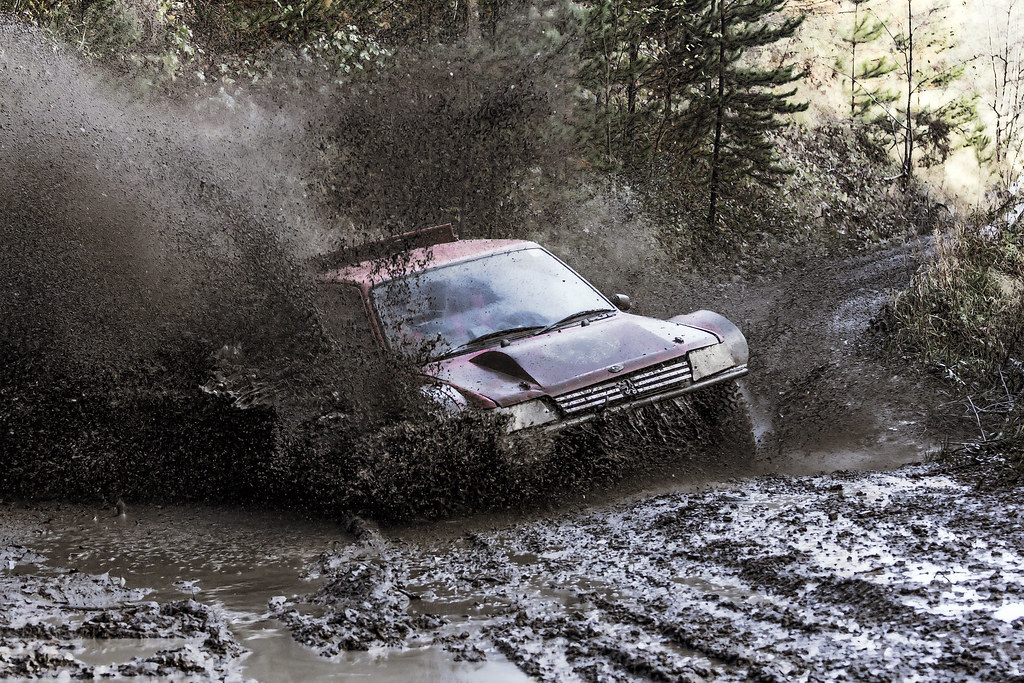
exposure blend from 3 exposures
saturation upped on 0EV version
midtone / microcontrast upped to get detail in the splash
blur added to FG and top right corners
high pass filter added to car
noise reduction added over splash area and car.

took 15-20 minutes,
feel free to rip it to pieces.. (or not - I don't mind) :nuts:
 
Last edited:
Nice one Alix - can't remember a motorsport one here before... plenty of static cars but no moving ones... :thumbs:
ill have to start doing more of these comps and try to win i got tons of them to play with :)
 
Here's my entry:

969627_10153151515565305_747423311_n.jpg


In ACR:

Increased WB to around 6000
Lowered contrast
Reduced highlights
Increased blacks
Increased clarity
Increased vibrancy
Increased saturation in the red, green and yellow channels
Adjusted hue in the yellow channel to make more green

In PS:
Put through color efex and applied 'super cross pop' preset

Time; 10mins

Feedback fine
 
Last edited:
In LR4 to increase WB to just over 6,000, small increases to exposure, clarity, vibrancy & sats with small decrease to contrast.

Then into PE10 with general fiddling to shadows, highlights & levels.

Then a lot of brushwork to give more colour here & there. This included selecting various areas to give even more pop such as car & its parts, areas of the mud, & areas of the trees/shrubs.

Then high pass sharpen with soft overlay.

Done.

Half an hour & feel free to critique :)

 
I haven’t played for a while so as a bit of a quickie to get back into things…….
Open in ACR no edits open in PS.
Copy layer, then new layer, make a selection for NS lamp light, another new layer, make a selection for OS lamp light, feather selections by 80 pixels, and fill using grad at 30%.
SAVE
On another new layer make a selection of the light lenses and feather by 10 pixels then fill with lights colour at 45%. Paint the intense bits in.
SAVE
On copy layer, apply light overspill by building up colour using the brush tool at 10% with same colour as headlights.
SAVE
On the copy layer, make a selection of the bright area on the top right, feather and darken using levels.
Use the burn tool to darken other parts.
Using the dodge tool lighten the splashing mud and the highlights within, with the brush tool and the lights colour at 2% add highlight to the main splash.
SAVE
Select the windscreen and feather, lighten with levels.
Flatten.
Select all, apply stroke for border.
SAVE
Save for web.


TP-CAR1-WEB.jpg


Rhodese.
 
Last edited:

IMG 9002378 edit1 by btyreman, on Flickr

opened in PSE10

sharpened, added clarity, warmed WB, reduced colour noise all in ACR.

1.duplicated background layer,
2. created high pass filter on duplicate layer set to 14% opacity hard light,
3. duplicated hpf layer but set to 25% soft light,
4. Invert layer set to Hue,
5. vibrance +21 on new layer,
6. black and white layer set to lighter colour for just the mud to desaturate it, I painted in where I wanted it,
7. burn and dodging applied to the car and parts of the splashes,
8. saved to jpeg set to highest quality.

took around 30 minutes.

feel free to critique,

Ben.
 
Last edited:


1) corrected exposure
2) darkened foreground
3) sharpened spray
4) soften background tree's
5) add blue tine to shadows
output sharpened

15 mins
 
Good turn out guys :clap:

Welcome back Rhodese (and Shaun), I've missed your unique take on the edits the past few rounds Rhodese. :thumbs:

Alix gonna have a tough call on this one. :lol:
 
Good turn out guys :clap:

Welcome back Rhodese (and Shaun), I've missed your unique take on the edits the past few rounds Rhodese. :thumbs:

Alix gonna have a tough call on this one. :lol:

Great to see quite a few dif edits, def gonna be tough call :bonk:
 
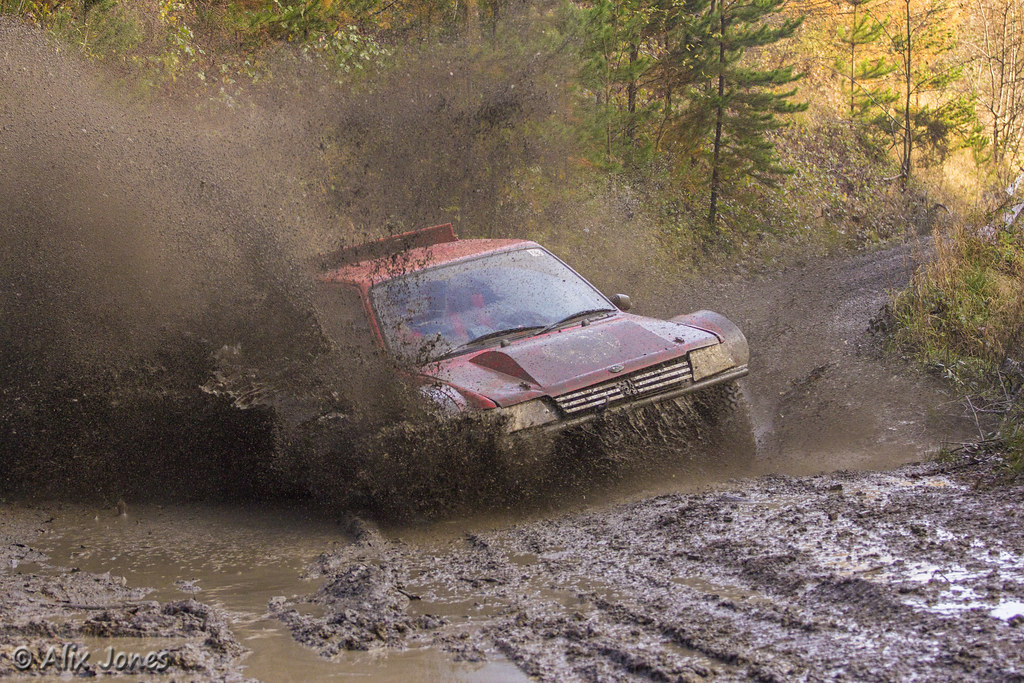
Edit in LR5

IMG_0094.jpg


Temp 6184, tint +3

Then a lot of playing with the sliders below.

More exposure and contrast
Highlights lowered, shadows +100, whites +43, blacks altered to just clip.

Clarity +100, vibrance +29.

Tweaked the hue/sat of the car bodywork.

Small split toning amount with hues 57 and 230.

Bit of brushwork to increase exposure and sharpen the mud spray around the car and to brighten the windscreen highlight.

Sharpening and noise reduction.

Small amount of vignette.
 
Last edited:
nice to see so meany entrys here was my edit
8182106473_f1b9c3642f_b.jpg


was a hard choice but the top 3 with the winner in first place is

#1 Graham
A cracking edit the blur in the right corner makes the car jump out at you even more only way that could be improved anymore was to play with color sliders on the mud to give it more its orange/brown color

#2 John
Lovely detail in the mud and color resembles what it look like to the eye i know as i was same color after a few cars here as i was covered head to toe in it :lol:

#3 Shaun
mud stands out that come from the car after you sharpen it up colours in general look great all around

so its back over to you Graham :thumbs: one thing im surprised no one went for a B&W conversion
 
Last edited:
Well done Graham - this is getting a real habit - you winning - so you are the one we have to beat :lol: But seriously very well done :thumbs:

And thanks Alix for the feedback :thumbs:
 
cripes... :eek: Sorry.......

Thanks Alix, and thanks John, Ben, Phil and Shaun. Considering what we had to work with, (no offence Alix.... :lol:), everyone turned in a more than worthy effort :thumbs:

OK - 2 to play with if you don't mind, from the South Downs way, loved the group of three windblown trees, but as you can see the sky behind wasn't playing, but further on and 180º round there were some nice clouds.

Edit one, or combine the two into one image. No extra marks for submitting two entries, I'll ignore the second if you do that. ;)

mz5i.jpg

http://www.speedyshare.com/WGs56/DSC-6084.NEF

gpc1.jpg

http://www.speedyshare.com/WGsZ6/DSC-6108.NEF

Tuesday morning good for everyone?? :thumbs:
 
9520548485_6797548a58_c.jpg

Highlights -100
Shadows +100
Clarity +29
Vibrance +100
Saturation +62
Removed the city in the background to give it more a country look
Removed the lens flair in top middle
Run though my Colour contrast filter
Added border
Time took around 20min
 
Last edited:
edit: sky swapped in ps
platinum filter topaz
denoise and sharpen
crop and add border
5 mins

tree.jpg


feedback ok
 
Last edited:
This could be interesting...

Hopefully...... :)

didn't have time to replace the sky ;)

Can be done in a few steps in PS..... The way I have done it is.......

Take clouds image, select along the hilltop line, delete the grass.
Place the remaining clouds on a new layer - above the tree image
set clouds layer blend mode to "darken"
Move tree layer up a bit to suit
This pretty much does it, although there are a few patches on the composite sky that are easily dealt with by adding a layer mask to the trees layer, and painting black over any odd looking bits, (or over all the top half, roughly round the trees and horizon).

This gives something like this.

of73.jpg
 
oh go on then you shamed me into it. Image replaced ;)
 

DSC_6084 by btyreman, on Flickr

PSE10

sharpened raw image and added clarity before importing,

blended the two layers together,
duplicated sky layer and added high pass filter with hard light set to 20%,
removed the barbed wire using the clone tool,
added 2 gradient filters one in the sky and one on the grass,
decreased shadows with curves slightly,
desaturated colours,
blue filter set to low opacity,
exported as jpg.

critique is welcomed
 
Last edited:
Took 30/40 minutes going backwards & forwards in PE10 & LR4 with an odd touch in Picasa.

Put better sky in & cropped to my preferred ratio

Fiddled a lot with luminance sliders, a bit with sats sliders, noise reduction in LR, brushed in areas of grass to give it more of a 3D feel & that's it.

Fire away with critique :lol:

 
Back
Top