THE PP GAME!

I'll start us off...

In ACR:

-Clarity all the way to the right.
-slight WB shift to the left.
-decreased vibrancy.
-decreased highlights
-increased blacks.
-increased whites slightly.
-used the adjustment brush to slectively darken a gap in between the two people in the center & two lamp posts, one on either side.

In PS CS6
-Used Colour efex to increase local contrast to give even more detail.
-cropped and rotated slightly.
-Added some star brush effects to the highlights.

Around 10mins.

1003479_10153069383800305_66753962_n.jpg


Feedback appreciated.
 
Last edited:
had a quick play using cs6 took around 10min
exposure taken up a little
clarity up 50%
blacks up 35%
highlights increased
vibrance up a little
cropped image
cooling filter applied 50%
brightness reduced around 3%
contrast turned up a little
noise reduced very slightly
hard light filter used 36% opacity


Last edited:
LR 4
+0.71 exposure
-25 contrast
-81 shadows
+7 whites
+29 clarity
Some sharpening with mask
cropped to make the show larger in the frame keeping heads for context.

Topaz medium pop smooth filter and adjusted adaptive exposure and saturation
denoised some.

10 mins

glasto-42.jpg


feedback good
 
Opened in ACR, adjustments as shown. Open in PS.
Copy layer.
Made darker in levels by moving middle slider slightly to the right.
Corrected perspective by using transform.
Darken the sky with a 25% gradient, pulled down to just above the crowd.
Flatten.
Select all, make border using stroke.
SAVE.
Save for web.

ACR-001.jpg


TP-GLAST-WEB.jpg


Rhodese.
FEEDBACK
 
Last edited:
Well done Neil - a long overdue win.. :thumbs:

Ineteresting shot to edit this one....

found that upping the brightness in the shadows brought in a lot of noise, so decided to leave them dark
also that the flame bursts were irretrievably blown...

So, usual routine for me,
upped contrast, reduced shadows
increase in saturation on purples

in PS,
copied the small flame bursts onto the middle of the large ones
resized, duplicated, rotated, flipped to suit
layer blend mode hard light, reduced opacity to 30% ish
did this to all to try to give some definition and depth to these flames
wanted to crop tight, like the girl lower left in shot, but didnt want to go that wide, so shoved her to the right a few places.

Which gave me this...


(Image does click through to bigger version) - thoughts / feedback most welcome.. :thumbs:
 
Haven't used photoshop in a while but decided I'd have a go, I decided to split into 2 layers and bring the focus to the people rather than to the big metal machine... whatever it was lol.

1. Loaded raw file into Photoshop Elements 11

Edited following values to bring out the visibility of the people in the photo the best I could.

Exposure +1.20
Shadows +70
Clarity +75

2. Duplicated background layer so I had two copies of image on seperate layers.

3. Polygon tooled away the background from the top layer to that just the people were left on layer 2.

4. Gaussian Blurred layer 2, radius 5.0

5. Adjust brightness/contrast of layer 2 (-12,70)

6. Adjust color curves of layer 1, Use Darken highlights preset, but increse highlights/brightness, decrease contrast/shadows.

7. Gaussian Blurred 15.0 radius on layer 1.

IMG_1067a_zpsf09787f3.png
 
great edits guys, keep them coming

Yes I do agree with you & my feeling is that the PP skills being shown on this thread have improved dramatically since I started 'playing'.

I seem to have 'PP cramp' (like writers cramp) on the last few rounds as my brain is well confuddled as to where I am going. So if someone can send me a 'magic preset' that is a 'one button click' for each round's pics that will produce the winning shots, time after time, I will buy them a coffee + two hobnobs :lol:
 
Mornign John.. :wave:

I generally look at the shot - try to see what is "wrong" with it, and address that, at the same time as seeing what feature(s) need(s) bringing out, through texture, contrast, colour, crop, brightening, darkening etc, and doing my best to do that...

Sometimes it can help to steer yourself according to likes or dislikes of the 'judge' for that round, as in will they like HDR, selective colour, B&W, or reward or resent pixel level editing / flipping, adding to the edges or moving things within the shot etc..

But there's always the random factor, and the fact a completely left-field edit can win that makes it interesting....

And like any game... it's the taking part that counts. :nuts:
 
Mornign John.. :wave:


And like any game... it's the taking part that counts. :nuts:

:wave: And good morning to you Graham.

Your last bit is very true & I must give myself a good talking to :bonk:
 
Started in LR3
Contrast and tones adjusted with more cooling added.
Clarity also boosted to 70%.
Local Brush adjusted for -100 Clarity and Sharpening for the crowd and and outer elements, also worked some additional black to lose the horrible central high vis jacket.
Strong crop to allow for tighter space.
Exported to photoshop for cloning of smoke and added 3 individual fires to make right the completely overexposed fire balls. Time taken 20 minutes.

Feedback welcome :thumbs:


PP Game Fire Festival by dTEA Photography, on Flickr
 
Sorry. As you can tell I'm a bit new at this. I presumed that as they were clearly titled ad PP Game and also shared by the OP. I'll amend. No rights or presumptions made that these are my shots. Merely my interpretation of the post processing. Is the full breakdown of the rules clear enough in the first post for all us newbies?:(
 
Out of interest where are some of the others being hosted that don't show as being in Flickr? As it'd obviously be easier if it any PP game images weren't publicly viewable apart from on here.
 
i've started using dropbox as it was a bit confusing in flickr
 
Last edited:
I use talkphotography's gallery.

Rhodese.
 
ok time to pick a winner
i can only give my opinion of the edit for feedback, im really not experienced enough to go any deeper as there are most of you have forgotten more than ill know about editing. I will also only give feedback to those that requested as well
so here goes

phil
good edit, but a touch desaturated for me, also maybe a tighter crop too for the spider

sponner
great edit, good crop, and some lovely colours from the spider and smoke too, theres not much you can do with the fire as i blew that lol.

rhodese
another cracker, you have the spider just right, great colours, i would perhaps like a crop to the heads of the people at the front

overbez
Good edit, colours are right, and good work with the flames, i would have liked to see the spider sharpened though, i do love my sharpening lol

dTEA

really good edit, the flames are fantastic, i again would hqave liked to see a tighter crop to the heads of the observers at the front

smithey1981 and u1bd2005 thanks for taking the time to enter, i really appreciate it, which goes for everyone else too, i cant give feedback as is the rule now, abut will say some really good ideas from you two, everyone seems to have there own take on it, but to pick a winner i will pick the edit which most resembled mine, so the lucky winner is


Sponner! well done great edit, over to you sir

heres mine
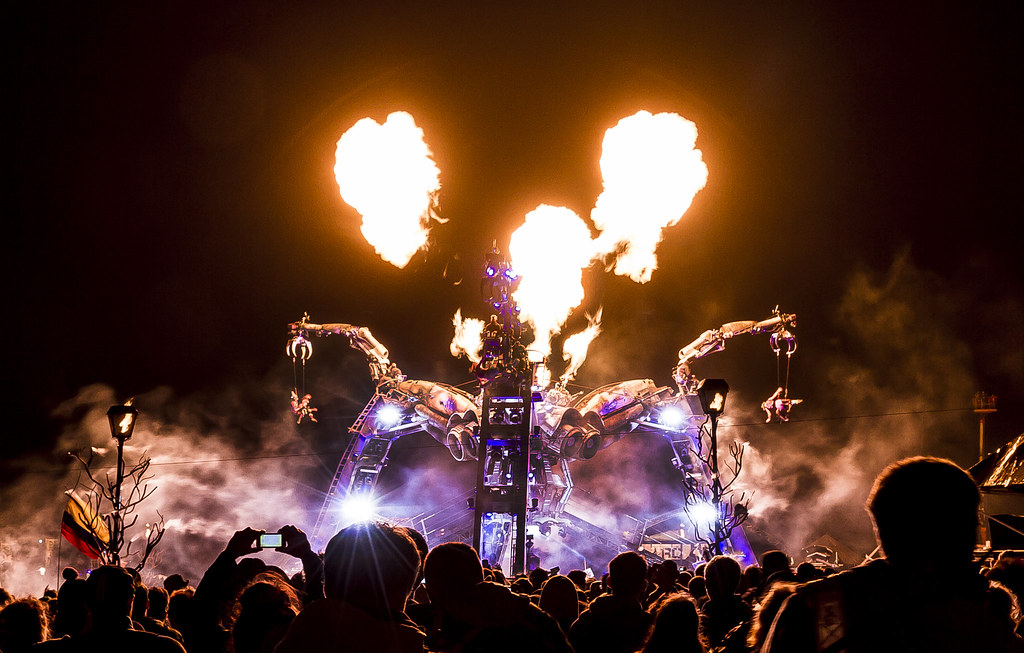
IMG_1067 by flying giraffe, on Flickr
 
Last edited:
Well done sponner. Had that pegged for the win from the moment I saw it.

Now you have the tricky job of finding another image for us.... and then judging it.. :lol: :naughty:
 
Last edited:
cheers, even if it is a double edged sword :)


I like this game and feel it is improving my pp skills, very interesting to see what others do. I admit I was pleased with this one, just wish I could be more consistently pleased with my results.

snapshot from the other day, not a great photo but hey.........

jpg file

tea.jpg


and the dng

https://www.hightail.com/download/bWJyc0x6Y1NqY3BwdmNUQw
 
Last edited:
Early bird again!

The first thing that came to mind was to expose the image properly and give it the summer feel it deserves...so here goes...

1045223_10153080394260305_745528958_n.jpg


In ACR:

-exposed slightly more
-decreased contrast
-decreased highlights
-increased shadows
-increased whites

Then, opened 2 images with the same as above, but one was heavily WB'ed shifted to the right, the other to the left (in essence, one gave me a warm feel for the foreground and the other, a blue sky).

Opened both in PS, put the blue sky with the warm foreground and bob's your uncle :)

Sharpened. Exported :)

10mins.

Feedback welcome.
 
Last edited:

PP Game Tea (Original supplied by Sponner) by dTEA Photography, on Flickr

Exposure corrected in LR3. Colour temp altered to warm things up.
Brush work to lighten both the model and the bench.
Boosted Cyan and Blue saturation. Cross processed to yellow highlights adding warmth, but also blue shadows slightly added to key in the blue sky.
Clarity increased due to possible lack of sharpness as sharpening tool was adding too much noise with a touch of additional sharpening to just give a little extra without noise.

Exported to GIMP to clone out the bench at the right hand side as seemed to clutter things up.

Time taken 10 mins
Feedback welcome:thumbs:
 

tea-3 by btyreman, on Flickr

opened as DNG file in LR5:

cropped out a bit of the right side,
made WB colder overall,
decreased highlights,
increased shadows,
decreased blacks.
increased clarity overall.

Tone Curve:

Increased lights and highlights

used radial brush on the centre with warmer WB and clarity,
then a brush on her dress and shoes with red-ish tint and increased exposure + clarity,
second brush on her sunglasses with increased exp, clarity and purple ish tint.

gradient filter in the sky with slight purple tint and increased saturation.
second gradient filter in the bottom left to make the shadows slightly bluer.

lens correction, sharpened and a very mild post crop vignette added.

saved with sharpening as jpeg.

it's still a bit weird how soft the image looks compared to how it looks in Lightroom though...

NO FEEDBACK WANTED THANKS

Ben.
 
Last edited:
GTG6hQE.jpg

made three exposures,
1 exposed for the shadows
1 for the midtones
and one for the bright areas
merged together
increased contrast and brightness
slight sharpen on lady and table area with high pass filter (soft light overlay)
slight crop.

Would have cloned out the vinegar and the black camera(?) bag under the table if I had more time.......

edit - found 10 minutes so the vinegar and bag have been disappeared......

Edit .... feedback. / comments appreciated.
 
Last edited:
Hi all, really wasn't the best pic probably trying to make a silk purse out of a sow's ear (the quality of the picture not the model in case swmbo reads this?!)

Phil, I like the summer feel but it looks a bit soft to me I think form noise around the face etc.

Flying giraffe I like the b and w treatment and played with that myself, afraid the colour pop kills it for me. The orange is just too much and there are strange colour fringes on the crocks .

Dtea, like the cloning and the blues, like the lightening, shadows a bit harsh maybe?

Ben - No feedback

Overbez - like the sunny feel, like the cloning, sky a bit washed out?

blimey tough choice.

The lack of bag and vinegar bottle swung it, I'll have to give to to Overbez.
 
Here is my effort btw.

Lots of fiddling trying to balance shadows, noise, sharpness and saturation in lightroom and topaz adjust.

cropped and cloned out pen, bags and table.

teafinal%20%281%20of%201%29.jpg
 
Thanks sponner (I think!!) TBH I would have cropped out the sky completely, but it then wouldn't fit compositionally with any crop I tried, so left it muted so as not to distract. :thumbs:

After a bit of a trawl through my images, I almost put this one up a few months back, but decided on something else. Plenty of opportunities here, handheld at 1/13 sec, trying to get a moment with no people walking in front of me.

Lets see how we go, I'll try and get in Saturday afternoon / early evening to put you all out your misery.

t4ox.jpg


RAW FILE
http://www.speedyshare.com/da4H4/DSC-1877.NEF


Only nice, positive comments will be given unless requested otherwise.... ;)
 
Last edited:
much better image

carpp.jpg


adjusted black point white point and boosted clarity in lightroom.
topaz bw increased detail boosted blacks some adaptive exposure
adjusted transparency so a hint of colour remained (to be different)
cloned out sign and man

honest feedback appreciated
 

1937 Ford Model Y (Tyreman edit) by btyreman, on Flickr

opened in PSE10
and isolated the car as a new layer,
desaturated the car apart from the red stripe,
put the background layer through colour fx pro 'modern film' effect,
lots of burning and dodging applied.

imported PSD file into LR5:
increased clarity and used radial brush on the car set to de-saturate the background and decrease the contrast and exposure,
gradient filter on the roof,
cloned out the bottle on the bottom left of the image,
saved as jpeg with output sharpening
 
Last edited:
Here's mine:

1011530_10153097044470305_1667989610_n.jpg


Went with 3 exposures from RAW then merged in photomatix.

Over to PS:
Cloned the highlight spot in the car and did some burning to make it less prominent.
New layer>used colour efex to bring out the detail by boosting microcontrast.
Used the eraser tool on the floor and pump to make it less "in your face".

Great image to work with.

Feedback welcome.

Time taken - 15mins.
 
Back
Top