THE PP GAME!


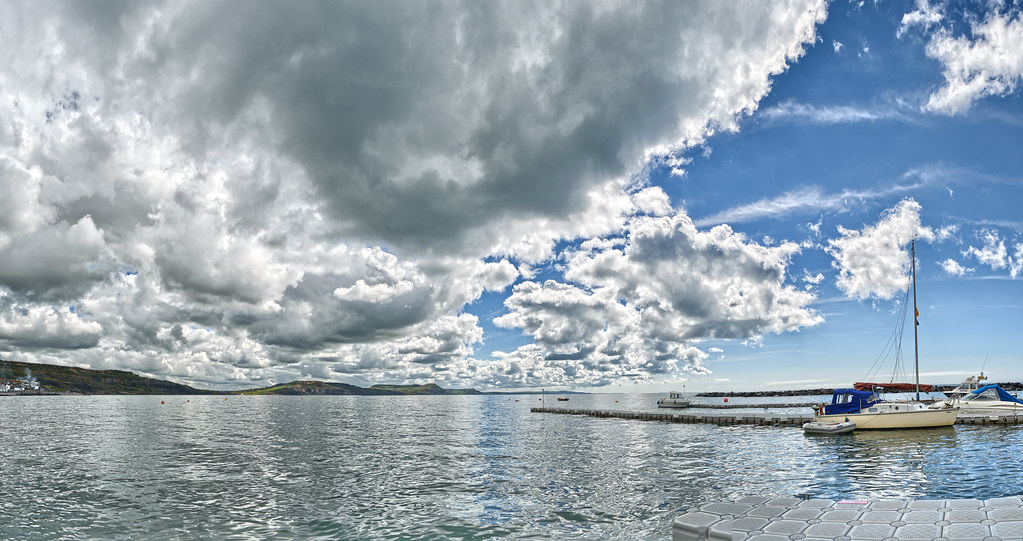
DSC_4444-1 by btyreman, on Flickr

LR5 RAW:

crop,
warmed up white balance,
Highlights: -56
Shadows +100
Clarity +32
Vibrance +36

Tone Curve

Highs + 36
Lights + 26

heal brush used to remove some of the boats, and clean up the sea.
radial brush used to subtly improve the boat.

played with each colour the saturation, luminance, and hue.

slip tone

sharpened, lens correction and chromatic aberration removed, post crop vignette used in 'colour priority' mode.

exported as jpeg for screen.
 
Last edited:
Edit in LR5 trial.

DSC_4444.jpg


Bit of manual vertical straightening
Basic adjustments - highlights -100 shadows +100 whites +49 blacks -24
Contrast +35, clarity +12 vibrance -10

Temp 7700, +22

Tone curves:
Reds: bit of a lift in the middle
Greens: very shallow S curve
Blues: Inverted S curve
RGB: Lifted at the dark end to give a vintage look - compresses (or clips?) the histogram.

Gradient from below to add a bit of blue temp to the water and increase clarity.

Radial brush around the near boat to increase exposure and boost shadows/clarity/sharpness

Little vignette.
 
Last edited:
added punch pre-set in lightroom, set black and white point lifted shadows.
pre-set dynamic pop filter in topaz adjust
bit of dodging on the boat.
made it a bit bluer in photoshop
found the heavy cloud top left a bit distracting so a new crop selected which pleased me.

boat.jpg


feedback is great :)
 
Last edited:
So this is my first go at the PP game! Thought it would be useful at developing my skills! :)


Changed to a Warmer WB
Contrast boosted
-100 highlights
+100 shadows
+52 whites
-8 Blacks
+33 clarity
+67 vibrance
Blues boosted by +13

Bit of sharpening and noise reduction
 
So this is my first go at the PP game! Thought it would be useful at developing my skills! :)

http://postimg.org/image/ji652d37x/full/

Changed to a Warmer WB
Contrast boosted
-100 highlights
+100 shadows
+52 whites
-8 Blacks
+33 clarity
+67 vibrance
Blues boosted by +13

Bit of sharpening and noise reduction

Welcome :)

If you want some tips on your PP then just make a bold statement saying you'd like some feedback and at the end you shall receive :)
 
Well done Graham, you is good at the monkey business, ay.
The weather today is so good I thought I would have a day sun worshiping. I stood all I could stand, but I could stand no more, so I came in to get out of the sun and lo, I’m back in the sunshine with this lovely image.
The edit,
Open in ACR, and yes again, I clicked on auto, it always seems to do a better job than I do. Fiddling and pharting about with sliders, not knowing what I’m at. Open in PS. Copy layer.
I didn’t like the boat and things to the right of the main subject, so I painstakingly removed them using the clone, healing and patch tools. Saving at regular intervals.
SAVE.
I then created more space on the right-hand side and the foreground, using the crop tool. This moved the boat towards the bottom right third. I then selected the new space on the right with the rectangular marquee tool and filled it using the content aware fill option. This was OK but needed some patching.
The foreground was created by making a selection of the water in front of the boat using the same tool, feathering it by 15 pixels and then copy and pasting it into a new layer. Using the move tool the selection was moved down, then with transform engaged a very slight increase in scale was applied to give the impression of being nearer to the camera.
SAVE.
I flattened the image, did a bit of dodging and burning. I sharpened the name on the boat.
Cropped to size.
Made a new layer and applied a 25% warm filter.
Another new layer, select all and make a border using stroke.
Flatten.
Save.
Save for web.

TP-BOAT2-WEB.jpg


Rhodese.
 
Last edited:
Spent a long time in Snapseed & came to a conclusion even though I only spent £16 it was a bit of a waste of money. So back to LR4 & all in all about an hour going down a lot of dead ends. Here is my main workflow but there was (as usual with me) lots of brushing in bits & pieces.

Phew :gag:


Last edited:
Good turn out guys.... :thumbs: going to call this a bit earlier as I have to go out this afternoon and evening....

Decision at lunchtime today.
 
quick comments... ;)

Neil, now I do like a bit of dark under the clouds, nice and bright on the boat hull

BEN (symmetricalOCD as we have 2 Bens this time), rather liking this, love the dark under the near clouds but the further ones becoming lighter

Andrewp, don't really feel the low contrast vintage feel works for me, but :thumbs: for going down a different road. We do need this to see different takes.

Phil, best of the B&W edits ;), rather like the high contrast and the bright white in the clouds

sponner - liking it - similar to what I would do I think, good work on the clouds, good colour and crop

benc, good first post in here, many thought's are going to be purely personal and subject to individuals screens etc, I'm feeling a bit too much on the blue's, but it does give a more mediterranean feel, rather than Lyme Regis!!!

Rhodese, I did feel that the boat in front of the main one could go. little bit of repetition but that really comes down to how much time you want to spend on it. Good work as always.

John, another one I really like, nice, natural looking edit, nice and bright on the hull again....

hmmmmmm, I hate this part......

My final 4 have come out as the "old hands" in this game, Neil, Ben (OCD), Phil & John.

But my winner is, (you can tell when it's a tough call as i tend to ramble, purely to put off the inevitable and work through my thoughts. :lol:)

Phil Young, never considered this as a candidate for B&W, but it works really well, I might like the sea and boat pulled up a bit brighter, but the dark does provide a good contrast to the great highlights in the sky....

Over to you Phil. :clap:

mine looked like this


(Ok I had another 5 frames in mine too but you get the idea!!. HDR from 3 exposures from the six RAW files (shot in portrait orientation), merged with Microsoft ICE).

 
Well done Phil - look forward to seeing your pic :clap:
 
Phil I still feel that the originally posted rules are not that clear & that's why I was seeking clarification/to be written more clearly more for new members that decide to read the rules before entering.

After all I've posted hundreds of times on the thread (possibly the most prolific on your thread - much rubbish though :lol:) & have felt the point unclear.

So what exactly do you mean by "adding to improve the image" adding exactly what?

Ok, will clarify when I get a minute.

Phil have you that minute to spare yet :shrug:
 
Phil have you that minute to spare yet :shrug:

Done. This will have to suffice because I can't pre-empt every scenario.

*For example* extracting some clouds from one image and planting them in another is fine. Cloning a person from one part to another is also fine. Blending two images posted where one bird is extracted and planted into another is ok. Removing something from the scene altogether, is fine.

What's not fine is adding fire breathing dragons and cartoon characters.
 
Done. This will have to suffice because I can't pre-empt every scenario.

*For example* extracting some clouds from one image and planting them in another is fine. Cloning a person from one part to another is also fine. Blending two images posted where one bird is extracted and planted into another is ok. Removing something from the scene altogether, is fine.

What's not fine is adding fire breathing dragons and cartoon characters.

Thanks Phil. Could be good to have on your first post for new ones joining?
 
Ok so I thought I'd give the choice between two shots, as always - only one is put forward for competition although the other may be posted for fun :)

Options are...

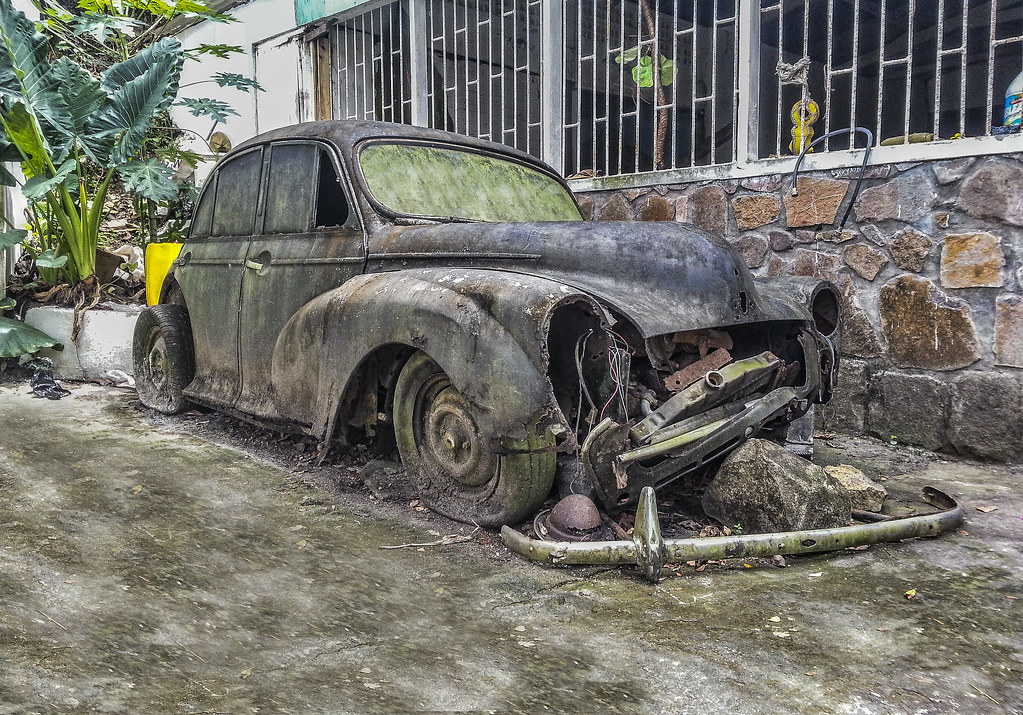
The old banger (phone shot - would be nice to see what could come out of this)
1069282_10153057184545305_1654586186_n.jpg


DROPBOX

And one from St. Vincent's salt pond...
992815_10153057188700305_1481545134_n.jpg


DROPBOX

Will call this one on Thursday afternoon.
 
Edit in LR5 trial.

DSC_4871.jpg


Lens correction.

Temp/Tint 5571/18

HSWB -100, 57, 27, -12
CVS 22, 27, 18

Slight crop.
Bit of sharpening and CA removal.
Vignette.

Radial brush in lower right to emphasis the water.
I think there's a grad brush in the clouds.
Then used the adjustment brush to paint in some sunlight on the distant hills - the most fun part but it's like working in porridge :shrug:
 
forgot to ask, do you like hdr? :lol:
opened jpeg as a raw and adjusted to get as much detail back as i could
increased clarity and sharpened
in ps cloned in some ground and the widow that was blown
then i couldnt help myself with the hdr, i personally think it suit old vehicles
saved and had doubts but in the end im going for it, if i get time ill do the other for fun


ppgame a by flying giraffe, on Flickr

Feedback please
 
Last edited:
I went for a film look here with light leaks on both sides. *coughs* (stolen from a gavtrain video on youtube I saw today) :D


DSC_4871-Edit-1 by btyreman, on Flickr

Opened the DNG in LR5.

where do I start?...

highlights -100
vibrance + 50

Tone Curve:
+ Highlights
- Shadows

Lens Correction + all Chromatic Aberration removed,
Lots of Grain added,

here's the filter part:

one filter on the bottom with decreased exposure and + clarity,
sky filter on the upper clouds with clarity and saturation increase,

then for the film leaks:

2 x gradient filters on the left side,
2 x extra large radial filters on only the right side,

they have gradually increased exposure and warmer white balance and decreased contrast, 2 layers of each...

it almost looked good enough but then I decided to use the brush tool on the middle of the photo with increased clarity and saturation, this greatly improved the colour of the water and made the pine trees more defined.

final stage was to sharpen using nik viveza RAW sharpener, then export with lightroom output sharpening.
 
Last edited:
Neil - you're spot on - rusty old car = huge smack with HDR hammer. Very surprised how much can be changed from "just" a phone jpeg.

Haven't copied you Neil - just the exact same idea :thumbs: (I really don't want to win for a third time in a row, so pushed some sliders really far.. :naughty:).

(There is a bigger version, or use this one as you wish).


In PS, used image > adjustment > exposure to save 4 disfferent exposures, (-2, 0, +2, +3 :eek:)
Into HDR software
Went for it with the sliders..... :nuts:
saturation on the greens down
saturation on the reds up
back to PS to clone the floor back in.
crop to make the car more prominent in the frame.

Feedback welcome but not required :thumbs:
 
had a quick play with the car, topaz hdr filter then b and w effects

car.jpg


feedback is good
 
Last edited:
I was going to do a HDR, on the car, but beaten to it several times - so what do I do now :thinking:
 
Thought I'd give this a go and I tried to avoid HDR...gotta be just as described in the Flickr description. (edit was due to misnaming the link! Apologies)
Critique welcome.

All the PP processing is done solely in LR 3.1

Exposure -2.0
Contrast Levels + Boost
Localised brushes to avoid the need for HDR
Clarity levels
Slight crop


PP Game Rusty Old Car-Camera Pic3-2 by dTEA Photography, on Flickr
 
Last edited:
And now for the car (in LR5 trial)

2013-02-23%2012.47.17.jpg


B/W.
Shadows +100, highlights -100
whites +22 blacks -22
clarity 100
exp -0.7, contrast +100

That sort of fills the histogram.

Crop.

Tone curves - pushed the middle up in r and g channels to add tint.
Then lifted up the dark ones in the rgb channel - moves histogram away from the left.

Bit of sharpening.

Vignette - highlight priority, -88, 27, -100, 93.
Bit of grain added but probably not noticeable at this size.

Export!
 
A bit of a last minute attempt to get some edit in as it has been too hot for me to function effectively. This is my one to be entered & car hopefully to follow.

In LR4 this was all about slight straighten, cropping & then loads of brushing to get more colour variation in trees & water.


Tried in Snapseed but can't remember the workflow - sorry :shake:


Ok,

Thanks for all participants - always good to see what can be done with one of your images to get some fresh ideas.

Just to state again, out of respect and as per new rules - only giving feedback to those who asked. Happy to give any to those that missed this new ruling.

Neil - Bloody fantastic. LOVE the idea of cloning. I would not be able to tell this was taken on a phone - superb work. 100% agree about the detail, old bangers lend themselves to it.

If I had seen this on the feedback and crit section I would have said: "Absolutely fantastic".

Graham - unfortunately the original idea has been taken by Neil :(

It is another good effort - for me though, slightly too much saturation in certain areas gives it a bit of an unnatural look. Looks great and the detail is fab however, I feel the overall feel, color and cloning of the windscreen in particular was better executed in Neil's version.

If I had seen this on the feedback and crit section I would have said: "fantastic image but for me the saturation is a little too much - in the brickwork most of all".

dTEA - Alternative method in the colouring. I quite like it but prefer the more normal, faded look it has. After seeing what can be done with cloning on this one, I just can't stop looking at the highlights which really need work on...

If I had seen this on the feedback and crit section I would have said: "Nice image, shame about the highlights".

Sponner - I went with a mono conversion myself but yours is a little too bright and "pastel like" for my liking. Again, another good crack at the detail extraction.

If I had seen this on the feedback and crit section I would have said: "I would like to see darker blacks and less highlights"

I think it's pretty clear who my winner is. Neil (flying giraffe), fantastic idea, well executed and another of my images that I am shocked with the outcome! Over to you.

MY VERSION:

1013499_10153069074860305_1082682094_n.jpg


Bit rubbish compared to the winner but there we are!.

On this, went for clarity increase, desat & border. I think I will definitely be having a re-go though ;)
 
Last edited:
thanks for the kind words Phil, i love old banger pics so just had to get it right, ill have a look at my Glastonbury pics for a suitable one for you all, cheers again.
 
Sorry. I missed that ruling and tried to add an edit saying critique welcome. Feedback appreciated. And well done to flying giraffe
 
Well done Neil. Once you'd submitted your entry I thought b*gger as it was the 'way to go' and you beat me to it. But as I said a very well done.
 
Back
Top